How to Build Your First AI-Powered Business Tool (A Beginner's Guide to "Vibe Coding")
Learn how to vibe code your first business tool with AI — plan, prompt, test, refine — with a client tracker example, pricing notes, and mistakes to avoid.
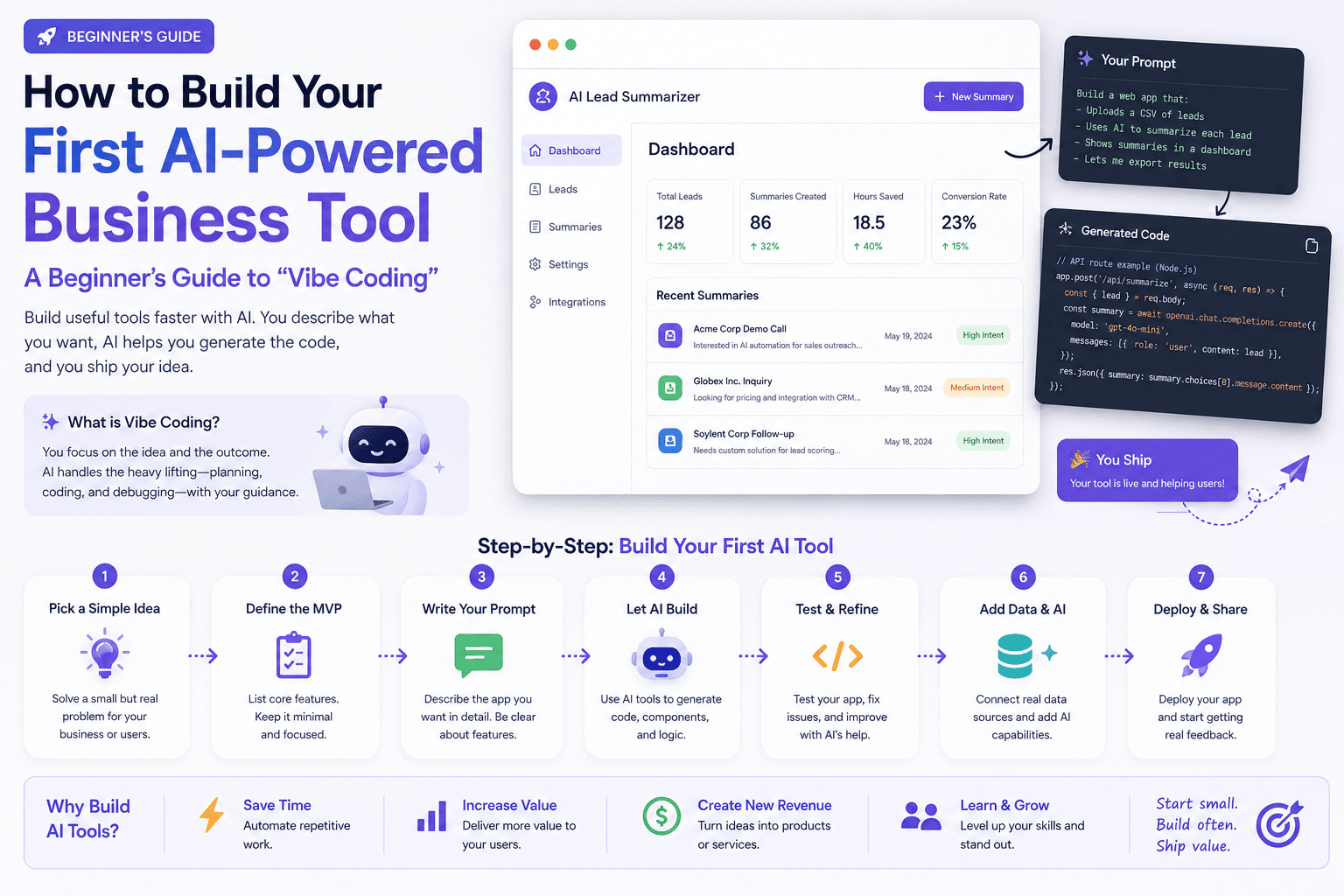
You do not need to be a developer to build small software anymore. If you can describe a problem in plain English, you can often ship a working tool — a simple CRM slice, an invoice tracker, a client intake form, a scheduling helper.
That approach is nicknamed vibe coding: describing what you want to an AI model in everyday language and letting it write the code, instead of writing the code yourself.
This tutorial walks you through building your first real business tool from scratch. By the end you will understand the plan → prompt → test → refine loop well enough to build the next tool on your own. For platform shopping later, see How to Choose an AI Coding Platform and Emergent vs Replit.
Table of contents
- Quick summary
- What vibe coding is
- Who should use it
- Who should NOT use it
- Quick recommendation
- Things to consider before choosing
- Key features of a solid first tool
- Best-for table
- Pricing in 2026
- Pros and cons
- Best use cases
- Limitations
- Step-by-step build
- Comparison tables
- Decision matrix
- Setup checklist
- Common mistakes
- Alternatives and competitor comparison
- FAQ
- Final recommendation
Quick summary
| Step | Do this | Done when… |
|---|---|---|
| Plan | Answer problem, users, data, flow on paper | You can explain it in four short paragraphs |
| Prompt | Describe fields, actions, and who uses it | First version runs |
| Test | Add, edit, sort, blank fields, messy names | Basics work |
| Refine | Plain-language change requests | Matches your plan |
| Stress-test | Edge cases + 50-row feel | No obvious data loss |
| Host habit | Decide where it lives + monthly check | You can reopen it without hunting chats |
What vibe coding is
Vibe coding means describing the outcome you want — “a form that lets customers book a 30-minute call and emails me the details” — and having an AI model write the code behind it. You review what it builds, ask for changes in plain language, and repeat until it works.
You still need clear thinking about what the tool should do, who will use it, and what could go wrong. What disappears is the need to personally know a programming language.
It is different from:
| Approach | Output | Guide |
|---|---|---|
| Chat advice | Answers and drafts | ChatGPT Work, Claude for SMB |
| No-code templates | Pre-set structures you fill in | Useful when the template fits |
| AI agents | Multi-step goals across connected systems | AI agents |
| Vibe coding | A runnable page, app, or script you shape | This guide |
Who should use it
This guide fits:
- Small business owners, freelancers, and office managers
- People who have used ChatGPT, Claude, or similar assistants
- Teams that need a narrow internal tool a spreadsheet cannot handle cleanly
- Non-technical founders prototyping before hiring a developer
No coding background required.
Who should NOT use it
Do not vibe-code as your primary system when you need:
- Full payroll, complex tax, or certified industry software
- Payment card processing as the core product
- Health records or other heavily regulated data stores
- Multi-tenant customer portals with serious security requirements on day one
- A vague “manage my whole business” rebuild
Buy compliant software for those jobs. Use vibe coding for the custom gaps.
Quick recommendation
Things to consider before choosing
- Problem sentence — specific enough to build
- Users — just you, team, or customers
- Data fields — the real list, not “everything”
- Happy-path story — open → act → save
- Sensitivity — can this stay internal/low-stakes?
- Where data lives — chat session vs file vs hosted DB
- Backup — keep the old spreadsheet until trusted
- Must-work vs nice-to-have — reliability beats polish
- Buy vs build — is this already solved well off the shelf?
- Next platform — chat preview first; coding platform later
Key features of a solid first tool
| Feature | Why it matters |
|---|---|
| Clear fields | AI cannot invent your workflow |
| Core actions only | Add, edit, sort, search — then stop |
| Visible status | Urgent items must stand out |
| Empty-state behavior | Blank fields should not crash it |
| Persistence you understand | Know where saves go |
| Export path | CSV or copy-out before lock-in |
| Simple UI | You will actually open it |
Best-for table
| Profile | Great first tool | Avoid first |
|---|---|---|
| Solo consultant / freelancer | Follow-up tracker, proposal checklist | Full accounting suite |
| Local contractor | Job intake + status board | Payment processing |
| Agency ops | Client status board for one workflow | Multi-client permissions portal |
| Office manager | Recurring task / vendor log | HR/payroll system |
| Non-technical founder | Prototype of one product feature | Production multi-tenant SaaS |
Pricing in 2026
| Layer | Typical cost | Notes |
|---|---|---|
| ChatGPT / Claude chat build | $0–~$20/mo | Enough for many first tools |
| Coding platforms (Replit, Emergent, etc.) | Plan-dependent | When you need persistent projects — Emergent vs Replit |
| Hosting / domain | Often low monthly | Only when you leave chat artifacts |
| Your time | 30–90 minutes first tool | Planning saves prompt thrash |
A follow-up tracker that replaces a $50/mo CRM you barely used can pay for itself quickly — if reliability is good enough for that narrow job.
Pros and cons
Pros
- Ships custom tools without learning a programming language
- Fits exact workflows off-the-shelf software overcharges for
- Fast iteration with plain-language feedback
- Low cash cost when you already pay for an AI seat
- Teaches a reusable plan-prompt-test-refine habit
Cons
- Easy to overbuild and create fragile tools
- Data storage location is easy to misunderstand
- Not appropriate as primary system for regulated data
- Long chat threads can drift; restarts are sometimes better
- Maintenance still required as the business changes
Best use cases
- Client follow-up tracker sorted by last contact
- Simple intake form that emails you details
- Internal checklist for onboarding a client
- Lightweight inventory or job-status board
- Personal dashboard of “today’s urgent clients”
- Prototype UI before hiring a developer
When the tool needs to act across CRM, email, and calendars with guardrails, you are moving toward AI agents — different category.
Limitations
- Will not make you a security engineer overnight
- Chat artifacts can be awkward for daily phone use until hosted
- AI can introduce subtle bugs (sort order, date math, save failures)
- Team/customer-facing tools need clearer permissions and error handling
- Certified domains (payroll, payments, clinical) stay buy-not-build
Step-by-step build
Before you open any AI tool: plan first
Answer on paper:
- What problem am I solving? — “Which clients I haven’t followed up with in two weeks,” not “better organization.”
- Who will use it? — Just you vs team vs customers.
- What information does it store? — Name, phone, last contact, status…
- What happens when someone uses it? — Open → list → click → note → save.
Step 1: Pick your AI tool
- Claude or ChatGPT with preview/artifacts — build and preview in chat; best first project
- Coding agents / platforms — better once files should live on your computer
- No-code + AI — when you want drag-and-drop alongside AI help
Start chat-based for the lowest friction.
Step 2: Write your first prompt
Weak: “Build me a CRM.”
Strong:
Build me a simple client follow-up tracker for my consulting business. I need a table showing client name, phone number, last contact date, and status (New, In Progress, Needs Follow-up, Closed). I should be able to add a new client, edit their status, and see clients sorted by whoever I haven’t contacted in the longest time. Keep the design clean and simple — I’ll be the only one using it.
Name the fields, actions, and user. That is the difference between first-try useful and ten rounds of guessing.
Step 3: Review what it built — don’t just accept it
Test basics before new features:
- Can you add a client?
- Does status update?
- Does “longest without contact” sorting work?
Step 4: Refine with plain-language feedback
This looks good. Two changes: highlight Needs Follow-up in orange, and add a search box at the top to find a client by name.
Cycle: test → describe → review → repeat.
Step 5: Stress-test like a real user
- Blank fields
- Names with apostrophes (O’Brien)
- ~50 clients — still usable?
Step 6: Decide where it lives
Saved chat artifact or local file may be enough for personal use. For phone access or an employee, ask how to export or host. Confirm where data is stored before relying on it.
Step 7: Light maintenance habit
Revisit monthly: does it still match how you work? Small tools should stay adjustable in minutes.
Worked example: client follow-up tracker
Illustrative path for a solo bookkeeper who tracked follow-ups in a messy spreadsheet:
Plan: forgets follow-ups after first call; solo user; fields = name, phone, email, last contact, status, notes; flow = open → sorted list → expand → note + status.
First prompt: build tracker with those fields; sort oldest contact first; expand row for notes; single user.
Refine 1: colored dots — red if more than 14 days, yellow 7–14, green under 7.
Refine 2: button to show only red-dot clients for today’s list.
Test: a few real clients, missing phone number, confirm sort after date changes.
Result pattern: in under an hour, a tool matched to one workflow — often tighter than configuring a generic CRM for a single job, without another subscription — if saves are reliable and data sensitivity is low.
Core loop: plan, prompt, test, refine.
Best practices
- Start smaller than you think
- Describe outcomes, not implementation
- Keep a running change list
- Test with messy real data
- Separate must-work from nice-to-have
- Treat sensitive data carefully
- Keep the old spreadsheet until trust is earned
Comparison tables
Table 1 — Build approach comparison
| Approach | Flexibility | Setup speed | Best when |
|---|---|---|---|
| Vibe coding (chat) | High | Fastest | First personal tool |
| Coding platform / agent | High | Medium | Ongoing product files |
| No-code template | Medium | Fast | Template already fits |
| Buy SaaS CRM | Low–medium config | Fast if it fits | Broad sales process, compliance |
| Hire developer | Highest | Slowest | Security, scale, regulated |
Table 2 — Tool vs agent vs automation
| Need | Prefer | Why |
|---|---|---|
| Custom UI for one job | Vibe-coded tool | Exact fields and flow |
| Fixed multi-app handoffs | Automation | AI automation |
| Adaptive multi-step goals | AI agent | AI agents |
| General drafting | ChatGPT / Claude | Not a runnable app |
Decision matrix
Score 1–5 × weight before you build.
| Criterion | Weight | Vibe code | Buy SaaS | No-code template | Hire / platform later |
|---|---|---|---|---|---|
| Problem is narrow and clear | 5 | ||||
| Off-the-shelf already fits 80%+ | 5 | ||||
| Data sensitivity is low | 5 | ||||
| Need this week | 4 | ||||
| Will share with team/customers soon | 3 | ||||
| Long-term product ambition | 3 | ||||
| Weighted total |
Rule: If “Buy SaaS” wins, do not vibe-code a worse version for sport.
Setup checklist
- Four planning answers written
- Must-have fields listed
- Strong first prompt saved
- Add / edit / sort tested
- Blank field + messy name tested
- Storage location confirmed in plain language
- Old spreadsheet kept as backup
- Nice-to-haves parked for later
- Monthly revisit date on calendar
- Kill criteria written (when to buy instead)
Common mistakes
- Prompt with no specifics (“manage my business”)
- Building tracker + invoicing + email automation in one giant ask
- Skipping testing before real data
- Putting client/financial data in before knowing where it is stored
- Forgetting to say who the tool is for
- Giving up after one imperfect result
- Building when certified software already solves the problem
- Deleting the spreadsheet on day one
Alternatives and competitor comparison
| If you were about to… | Often better first move |
|---|---|
| Buy another CRM seat | Vibe-code the one follow-up view you actually use |
| Hire a developer for a tiny internal tool | Prototype with vibe coding; hire when security/scale bites |
| Jump straight to Emergent/Replit | Finish one chat-based tool first; then compare platforms |
| Build an “AI agent OS” | Learn tool-building first; agents later — AI agents |
| Replace QuickBooks | Don’t — keep vibe coding for adjacent ops tools |
Suggested future article: “When to move a vibe-coded tool from ChatGPT artifacts to Replit or Emergent.”
Frequently Asked Questions
Do I need to learn to code eventually?
No. Many people vibe code useful tools without learning a language. Basic concepts can help you write clearer prompts and spot unrealistic asks.
Is a vibe-coded tool secure enough for real business use?
For internal, low-sensitivity tools — like a personal follow-up tracker — often yes if you understand where data is stored. For payments, health records, or other regulated data, use established compliant software.
What’s the difference between vibe coding and a no-code app builder?
Templates and no-code builders give pre-set structures. Vibe coding starts from your description, which means more flexibility and more responsibility to specify and test.
How much does this cost?
Many assistants offer free or low-cost tiers sufficient for small personal tools. Costs rise with hosting, higher usage, or platforms — but a first tracker often fits inside an existing AI subscription.
Can I replace software I’m paying for?
Sometimes, for narrow tasks — building the specific slice you use without paying for the rest. Evaluate case by case. Do not replace certified systems lightly.
What if the AI gets stuck or repeats the same mistake?
Start a fresh session. Restate the request more specifically, including what went wrong. Clean restarts often beat endless patches on a drifted thread.
ChatGPT or Claude for a first tool?
Either works if it can preview a runnable page. Pick the one you already use daily — ChatGPT Work or Claude for small business. Score results on your own test checklist.
When should I switch to a coding platform?
When you need persistent files, collaboration, or deployments beyond a chat artifact. Use the non-technical founder platform guide.
Final recommendation
Vibe coding does not turn you into a software engineer overnight. It lowers the barrier to solving small, specific everyday problems.
- Pick one real friction this week.
- Answer the four planning questions.
- Build the smallest tracker or form that solves it.
- Test with messy data; confirm storage.
- Keep the old system until trust is earned.
- Graduate platforms only when persistence or team access requires it.
The skill worth building is not prompt trivia — it is the habit: plan clearly, describe outcomes, test like a user, refine in small steps.
Image prompts for production
Hero (16:9), editorial photography, no logos, no readable UI:
“Wide editorial photograph of a freelancer at a kitchen-table desk with sticky notes outlining a simple app flow, laptop closed beside them, soft daylight, documentary magazine style, no text, no logos, 16:9.”
Supporting image 1 (16:9):
“Over-the-shoulder editorial photo of hands sketching form fields on paper before building a tool, warm lamp light, no readable screen UI, no brand marks, photorealistic, 16:9.”
Supporting image 2 (16:9):
“Documentary-style photo of a small-business owner testing a paper checklist of ‘add, edit, sort’ beside a tablet face-down, calm office, authentic, no logos, 16:9.”
Infographic prompt (16:9):
“Clean editorial infographic on paper-textured background showing vibe coding loop: Plan → Prompt → Test → Refine → Host habit, geometric icons, charcoal/cream/muted teal, no logos, no tiny UI text, 16:9.”
Metadata (CMS)
| Field | Value |
|---|---|
| Title | How to Build Your First AI-Powered Business Tool (A Beginner's Guide to "Vibe Coding") |
| Slug | vibe-coding-first-business-tool-guide |
| Primary keyword | vibe coding |
| Secondary keywords | vibe coding for beginners, AI business tool, build app with ChatGPT, no-code AI coding, Claude vibe coding, first AI app small business |
| Semantic keywords | prompt engineering, artifacts, client tracker, plan prompt test refine, buy vs build |
| Meta title | Vibe Coding Guide: Build Your First AI Business Tool |
| Meta description | Learn how to vibe code your first business tool with AI — plan, prompt, test, refine — with a client tracker example, pricing notes, and mistakes to avoid. |
| Excerpt | A beginner-friendly vibe coding tutorial for small businesses: build a real client follow-up tracker without coding experience, plus checklists and buy-vs-build rules. |
| Category | AI Tutorials (ai-tutorials) |
| Type | guide |
| JSON-LD | Article + FAQPage + HowTo |
Suggested external references
Key takeaway
Learn how to vibe code your first business tool with AI — plan, prompt, test, refine — with a client tracker example, pricing notes, and mistakes to avoid. For more step-by-step guides, browse our blog or explore AI Tutorials.
Frequently asked questions
Do I need to learn to code eventually?
No. Many people vibe code useful tools without learning a programming language. Basic concepts can help you write clearer prompts and spot unrealistic asks.
Is a vibe-coded tool secure enough for real business use?
For internal, low-sensitivity tools — like a personal follow-up tracker — often yes if you understand where data is stored. For payments, health records, or other regulated data, use established compliant software.
What’s the difference between vibe coding and a no-code app builder?
Templates and no-code builders give pre-set structures. Vibe coding starts from your description, which means more flexibility and more responsibility to specify and test.
How much does this cost?
Many assistants offer free or low-cost tiers sufficient for small personal tools. Costs rise with hosting, higher usage, or coding platforms — but a first tracker often fits inside an existing AI subscription.
Can I replace software I’m paying for?
Sometimes, for narrow tasks — building the specific slice you use without paying for the rest. Evaluate case by case. Do not replace certified systems lightly.
What if the AI gets stuck or repeats the same mistake?
Start a fresh session. Restate the request more specifically, including what went wrong. Clean restarts often beat endless patches on a drifted thread.
ChatGPT or Claude for a first tool?
Either works if it can preview a runnable page. Pick the one you already use daily and score results on your own test checklist.
When should I switch to a coding platform?
When you need persistent files, collaboration, or deployments beyond a chat artifact. Compare platforms with a non-technical founder evaluation guide.
Written by
Maya ChenSenior Editor, AI for Small Business
Maya has tested 120+ AI tools inside real restaurants, clinics, agencies, and brokerages. She writes the reviews and comparisons owners actually use to decide what to buy.
Comments are coming soon
We’re building a discussion space for business owners. Until then, reply to any newsletter issue — we read everything.
The AI edge, delivered every Tuesday
One 5-minute email: the tools worth your money, the plays that are working right now, and zero hype. Unsubscribe anytime.
No spam. No selling your data. Read by owners of restaurants, gyms, clinics, and agencies across the US, UK, Canada, and Australia.