AI Agents for Small Business: The Complete 2026 Guide
Learn what AI agents are, how they differ from chatbots and automation, and how small businesses can deploy them for sales, ops, and support — with costs, checklists, and tool picks.
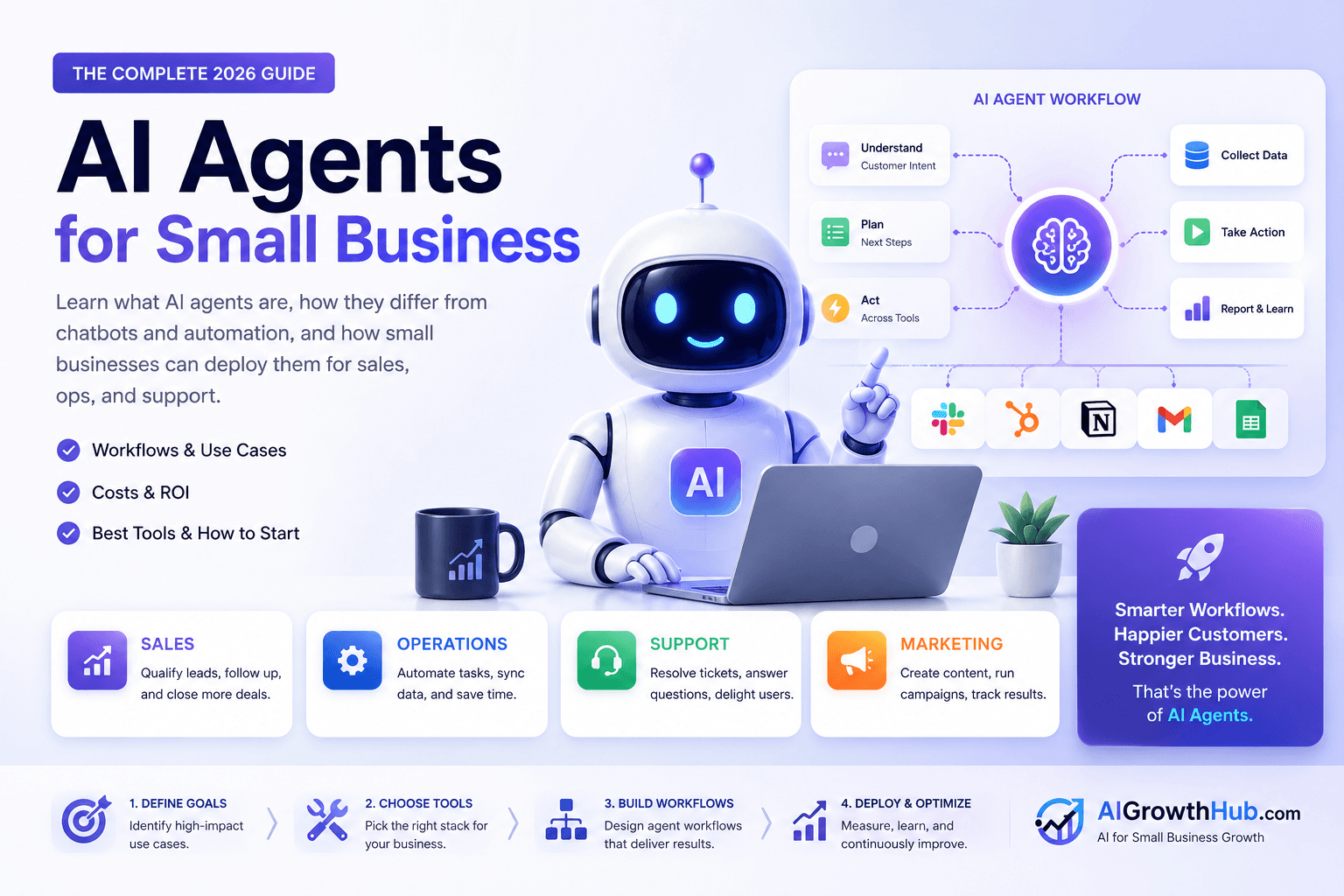
Most small businesses do not need a fleet of autonomous robots. They need reliable help with work that slips through the cracks: lead follow-up, inbox triage, meeting prep, research, and repetitive admin.
That is the practical job of AI agents for small business in 2026.
An AI agent is not “ChatGPT with a nicer window.” It is a system given a goal, tool access, clear constraints, and a way to hand work back to a human when judgment or risk is high. Done well, agents reduce delay and missed follow-through. Done poorly, they create confident mistakes at scale.
This pillar guide is for owners, operators, agencies, freelancers, and consultants who already use AI assistants and want the next step: systems that finish jobs inside real workflows. For tool picks, see Best AI Agent Tools. For the best first build, see Lead Follow-Up AI Agent.
Table of contents
- Quick summary
- What AI agents are
- Who should use them
- Who should NOT use them
- Quick recommendation
- Things to consider before choosing
- Key features
- Best-for table
- Pricing in 2026
- Pros and cons
- Best use cases
- Limitations
- Architecture options
- Comparison tables
- Decision matrix
- 7-day launch plan
- Setup checklist
- Common mistakes
- Alternatives and competitor comparison
- FAQ
- Final recommendation
Quick summary
| If you need… | Start with… | Upgrade when… |
|---|---|---|
| Adaptive first reply to messy inbound | Lead follow-up agent (draft-only) | Edit rate is low for 14–30 days |
| Identical multi-app handoffs | Zapier / Make / n8n | Path stays mostly fixed |
| Website FAQ + capture | Chatbot / receptionist | Conversation is the job, not CRM completion |
| Meeting notes feeding CRM | Meeting tool + human CRM update | Volume justifies deeper wiring |
| Custom rules / data residency | Thin custom tool or n8n | Off-the-shelf tools cannot meet policy |
Concept deep-dives: What Is Agentic AI? and What Is Computer Use in AI?.
What AI agents are
In plain terms, an AI agent is software that can:
- Accept a goal (“qualify this lead and propose next steps”)
- Decide which steps to take
- Use tools (email, CRM, calendar, docs, search, internal knowledge)
- Check intermediate results
- Stop, ask, or escalate when rules say a human must decide
That loop — plan, act, observe, continue — is what people mean by agentic work.
Agent vs chatbot vs automation vs chat assistant
| Pattern | What it optimizes | Weak when… | Guide |
|---|---|---|---|
| ChatGPT / Claude / Gemini chat | Answering and drafting | You still copy, paste, and click every step | ChatGPT Work, Claude |
| Chatbot | Conversation, FAQs, routing | Long multi-system jobs without tools | AI chatbots, Tidio review |
| Automation (Zapier / Make / n8n) | Fixed “when X, do Y” | Path must invent steps from messy context | AI automation |
| AI agent | Goal completion across tools within constraints | Identical paths (automation is cheaper/safer) | Agent vs chatbot vs Zapier |
If the process is identical every time, automation usually wins. If the process needs judgment across messy inputs, an agent — or a human — belongs in the loop.
Core parts of a working business agent
- Goal and definition of done — finished in one sentence
- Tools — systems it may read or write
- Context / memory — SOPs, ICP, product facts, past decisions
- Guardrails — never refund, never invent legal claims, never delete records
- Human handoff — when and how a person takes over
Skip any one and you get a toy demo or a liability.
Mental model for your team
Treat an agent like a junior coordinator who reads the brief, opens only unlocked apps, drafts work, asks when unsure, and never invents company policy. If you would not trust a new hire unsupervised on day one, do not grant unsupervised write access on day one either.
Who should use them
AI agents fit when you:
- Have a recurring digital job (daily or weekly)
- Can name delay cost (lost leads, slower cash, missed renewals)
- Have a CRM or inbox of record
- Can assign a human owner for review for at least 30 days
- Already use copilots for drafting and want completion, not just text
Typical buyers: service businesses, agencies, consultants, local operators, e-commerce teams with wholesale or support loops.
Who should NOT use them
Skip (or stay research-only) if:
- You cannot write the job in one sentence with a success metric
- You want the agent to negotiate high-stakes deals unsupervised
- The work is medical, legal, or financial advice without licensed review
- Sensitive HR tone reading is required
- Data is incomplete and there is no fallback owner
- The mandate is “do everything” with no metric
- You have almost no inbound volume — fix acquisition first (lead generation workflow)
Quick recommendation
Things to consider before choosing
- Job sentence — trigger, inputs, allowed actions, forbidden actions, done
- Fixed vs variable path — automation vs agent
- Two systems to connect — usually email/form + CRM
- Write permissions — draft-only for week one
- Data classes allowed — what never enters consumer tools
- Review UX — approve/edit/reject in one place
- Kill switch — disable send/update in one step
- Owner + weekly review — named human for 30 days
- Success metrics — speed, edit rate, booked outcomes, incidents
- Vendor clarity — retention, training defaults, audit logs
Key features
Score products and builds on features that change SMB risk and ROI:
| Feature | Why it matters |
|---|---|
| Draft / approval mode | Prevents unsupervised promises |
| Least-privilege tools | Limits blast radius |
| Audit log / replay | Debug bad runs |
| Escalation rules | Anger, legal, pricing exceptions |
| Knowledge packaging | Briefs, SOPs, examples beat one-line prompts |
| Clear usage metering | Seats + tasks/credits/activities stack |
| Kill switch | Stops overnight loops |
| Review UX | If approval is harder than doing it yourself, the stack failed |
Best-for table
| Profile | Best first agent | Avoid first |
|---|---|---|
| Solo founder / consultant | Lead follow-up (draft-only) | Multi-agent sales suite |
| Agency (5–15) | Inbound fit scoring + CRM notes | One agent with merged sales+support permissions |
| Local service business | After-hours form qualification + booking options | Auto-refunds or medical claims |
| E-commerce | Support triage for “where is my order” | Unsupervised wholesale pricing |
| Real estate team | Listing FAQ from approved copy | Financing/disclosure answers without a licensed agent |
| Ops-heavy technical team | n8n / thin custom tool | Consumer chat accounts for client PII |
Pricing in 2026
Expect three cost layers:
- Model / platform subscription — chat or agent seats (often ~$20/mo consumer; Business seats commonly ~$20/user/mo annual)
- Usage — tokens, runs, tasks, credits, or agent activities
- Human time — setup, review, exceptions (often the largest early cost)
| Stack stage | Typical posture | What you buy |
|---|---|---|
| Pilot | Existing ChatGPT/Claude seat + free automation tier | Brief + draft-only habit |
| Working system | One AI seat + one automation/agent seat + CRM you already pay for | Approved sends + CRM tasks |
| Scaled ops | Multiple seats, usage credits, possible custom connectors | Named owners + auditability |
ROI sketch:
Monthly value ≈ hours saved × loaded hourly cost + recovered revenue from faster follow-up − software − review time
If the only win is “it feels futuristic,” you do not have ROI yet. Tool-level anchors: best AI agent tools.
Pros and cons
Pros
- Closes delay gaps that cost deals and hours without hiring a coordinator for every job
- Encodes playbooks that used to live in one person’s head
- Works with CRM, email, and calendars many SMBs already pay for
- Pilots are cheap to test on historical examples in an afternoon
- Clear upgrade path: brief → automation → CRM AI → specialized agents
Cons
- Confident errors at scale if write access comes too early
- Usage meters can surprise budgets
- Stale briefs invent outdated prices and policies
- Tool sprawl creates unused subscriptions without owners
- Computer-use and broad connectors raise security risk
Best use cases
1. Lead qualification and follow-up
Read form/email → score ICP → draft reply → CRM note → escalate exceptions. Best first agent for most service businesses — full build: lead follow-up AI agent. Related: AI CRM automation.
2. Customer support triage
Classify tickets, answer approved FAQs, gather missing details, route refunds to humans. Keep separate from sales permissions. See AI customer service automation.
3. Research and content ops
Source notes, outlines, style checks, human-editable briefs — not unreviewed publishing. Prompts: ChatGPT prompts library.
4. Scheduling, admin, and inbox
Propose times, draft confirmations, label mail, task lists from threads. Restrict send until proven.
5. Sales meeting prep and CRM updates
Pre-call summaries; post-call notes → fields and tasks. Transcript layer: Fireflies.ai review, meeting note tools. CRM: HubSpot vs Pipedrive AI.
Examples by business type
- Local service: After-hours forms get qualification drafts; emergency language escalates immediately
- B2B agency: Inbound briefs scored for fit/budget/timeline; non-fit gets polite decline
- E-commerce: WISMO routes to SOP; wholesale inquiries get a prepared sales summary
- Real estate: Listing FAQs from approved copy; financing/disclosure escalates
- Restaurant group: Catering classified by headcount/date; incomplete requests get clarifying questions before a human quotes
Pattern every time: one job, approved facts, limited tools, human ownership.
Limitations
- Will not fix a weak offer or empty pipeline
- Chat memory is not a system of record
- “Agent” branding may mean a chatbot with a prompt
- Computer-use agents can click the wrong thing — evaluate carefully
- Free tiers are for pilots; production needs connectors, logs, and seats
Where agents create ROI vs where they fail
Pay off when: frequent task; delay has clear cost; digital inputs; review in minutes; reversible failure mode (draft email beats automatic wire transfer).
Fail first when: high-stakes negotiation; licensed advice without review; sensitive HR tone; incomplete data; “do everything” mandates.
Architecture options
| Option | Best for | Watch-outs |
|---|---|---|
| Custom GPTs / Claude Projects | Solo operators, early tests | Weak automatic CRM writes until tools added |
| No-code agent builders | Recurring jobs without engineering | Check permissions, logs, failure UX |
| Automation + one AI step | Mostly fixed paths | Overbuilt branches become fragile |
| CRM-native AI / agents | Data already in HubSpot/Pipedrive | Plan gating + credit meters |
| Code / thin custom tool | Unique rules, residency | Auth, logging, kill switches are your job — vibe coding |
Most SMBs should buy or hybrid first. Build later only when custom clearly beats subscription cost and risk.
Comparison tables
Table 1 — Stack comparison (SMB lens)
| Approach | Speed to pilot | Control | Cost posture | Best first job |
|---|---|---|---|---|
| ChatGPT / Claude Project | Fastest | Medium | Low seat | Lead draft |
| Zapier / Make + AI | Fast | Medium | Low–mid meters | Form → draft → approve → CRM |
| n8n | Medium | Higher | Mid / self-host | Custom logic |
| HubSpot / Pipedrive AI | Medium | Medium (inside CRM) | Seat + plan/credits | Pipeline hygiene |
| Computer-use agent | Slow (eval) | Variable | Often high risk | Rare — after checklist |
| Custom thin app | Slow | Highest | Dev time | Strict data rules |
Table 2 — Buy vs build vs hybrid
| Approach | Best when | Watch-outs |
|---|---|---|
| Buy (SaaS / no-code) | Speed + standard connectors | Lock-in, unclear logs, overbroad defaults |
| Build (internal) | Unique workflow or data cannot leave | Maintenance, auth, monitoring |
| Hybrid | Buy orchestration; keep core docs in-house | Integration debt without an owner |
Decision matrix
Score 1–5 × weight for this quarter’s first agent only.
| Criterion | Weight | GPT/Claude Project | Zap/Make + AI | CRM-native AI | Custom / n8n |
|---|---|---|---|---|---|
| Time to first useful draft | 5 | ||||
| Approval / kill-switch quality | 5 | ||||
| Connector fit (email + CRM) | 5 | ||||
| Predictable monthly cost | 4 | ||||
| Least-privilege controls | 4 | ||||
| Team review UX | 3 | ||||
| Weighted total |
Rule: If the path is mostly fixed, automation should outscore “agent platforms.”
Vendor evaluation criteria (cost, risk, integrations, data access, review UX, vendor clarity) also appear in the best AI agent tools shortlist.
7-day launch plan
Days 1–2: Pick one job. Write trigger, inputs, allowed/forbidden actions, definition of done, metrics (e.g. median time-to-first-response, edit rate).
Days 3–4: Connect minimum tools. Write the agent brief: role, ICP, tone, good/bad examples, escalation.
Days 5–6: Test 10–20 historical examples in draft mode. Score accuracy, tone, escalations. Fix the brief before volume.
Day 7: Soft launch to a limited segment. Require approval for outbound sends. Log failure types. Schedule a weekly 20-minute review for the first month.
Brief skeleton (practical)
- Role: sales ops assistant for [business type]
- Goal: qualify inbound leads and draft a first reply within rules
- Tools: read form/CRM; draft email; create task — do not send without approval
- Facts: scope, service area, pricing boundaries, disclaimers
- Examples: 2–3 excellent replies and 2 failures with reasons
- Escalation: budget conflict, legal, anger → stop and notify owner
Prompt patterns: ChatGPT prompts for small business.
Setup checklist
Before go-live:
- One job selected with a named owner
- Definition of done written in one sentence
- Forbidden actions listed
- Escalation channel tested
- Draft-only mode confirmed
- 10 historical examples scored
- CRM fields mapped
- Kill switch documented
- Weekly review scheduled for 30 days
- Success metrics baseline recorded
If any box is empty, you are still in design — not deployment.
Security checklist
- Remove fields the agent does not need
- Block export of full contact lists unless required
- Decide what may be sent externally
- Document who owns reviews
- Keep escalation for complaints and legal requests
- Do not paste passwords, payroll, health data, or confidential contracts into unapproved tools
Governance (one-page policy)
Allowed data classes; who can approve new tools; log retention; how customers request a human; what happens when the agent is wrong in public. Train the team like a new coordinator — examples, failures, escalation channel.
KPIs
- Speed: time-to-first-response, time-to-qualified next step
- Quality: edit rate, factual error rate, escalation accuracy
- Business: booked calls, influenced closed-won, ticket deflection with CSAT held
- Risk: incidents, complaints tied to agent actions, permission violations
Review weekly for 30 days, then monthly.
Common mistakes
- Boiling the ocean — company-wide agent before one job works
- No definition of done — endless chat instead of finished work
- Write access too early — draft before send or live CRM writes
- Missing escalation — angry customers get automated cheerfulness
- Stale knowledge — prices change; briefs do not
- Metric theater — counting messages instead of outcomes
- Tool sprawl — five overlapping agents, no owner
- Vanity demos — screenshots that never touch the real inbox
- Merged permissions — support agent inventing discounts; sales agent closing refunds
What “good” can look like after 30 days
A small consulting firm piloting draft-only lead follow-up often sees median first reply drop from many hours to under an hour in business hours once the brief stabilizes — with edit rate trending down and “we never got back to them” complaints disappearing for the pilot segment. That is delay removed, not sales replaced. (Illustrative pattern based on typical SMB baselines; measure your own numbers.)
Alternatives and competitor comparison
| If you were about to… | Often better first move |
|---|---|
| Buy a multi-agent OS | Lead follow-up brief + approval automation for 30 days |
| Add another chatbot for ops | Keep chat for conversation; agents/automation for CRM completion |
| Enable computer-use on day one | Pass the computer-use evaluation checklist first |
| Build custom immediately | Prove the job with SaaS, then vibe-code only the gap |
| Jump from zero to agent team | One stable agent, then add support or ops with separate permissions |
From one agent to a small team (later): sales follow-up, support triage, ops/research — shared CRM/knowledge where possible, not merged write permissions. Marketing systems agents can later support: AI marketing. Agency ops: AI workflow for agencies.
Suggested future article: “AI agent governance template for SMBs (permissions, logs, escalation).”
Frequently Asked Questions
What is an AI agent in simple terms?
Software given a business goal, allowed tools, and rules. It works through steps until the job is finished or a human must take over.
What is the difference between an AI agent and a chatbot?
A chatbot optimizes conversation and FAQs. An agent optimizes multi-step task completion across tools like email, CRM, and calendars, with explicit guardrails and handoff rules.
Are AI agents worth it for small businesses?
Yes when aimed at a frequent, measurable bottleneck with human review. No when installed as a vague “AI layer” over unclear processes.
How do I create my first AI agent?
Pick one recurring job, write a clear brief, connect minimum tools, test on real examples with human review, require approvals for outbound actions, then soft launch. Walkthrough: lead follow-up AI agent.
Are AI agents safe with customer data?
They can be if you use least-privilege access, approved vendors, documented retention rules, and human escalation. Safety is configuration and process — not a default. Do not grant blanket write access on day one.
How much do AI agents cost for a small business?
Many pilots run on an existing ~$20/mo AI seat plus free tiers. Working systems add automation/CRM AI seats and usage. Always include review hours in total cost.
Can AI agents replace employees?
They can absorb repetitive coordination. They do not replace accountability, relationships, or domain expertise. Redeploy saved hours into sales conversations and delivery quality.
Which model is best: ChatGPT, Claude, or Gemini?
The one that scores best on your 10 test examples for accuracy, tone, and escalation — not brand preference. See also ChatGPT vs Claude vs Gemini.
When should I use automation instead of an agent?
When the path is mostly identical every time. Use an agent when steps vary by messy context. Full fork: AI agent vs chatbot vs Zapier.
Final recommendation
AI agents are useful when they finish real work under constraints you define. Start narrow. Keep humans accountable for promises, money, and sensitive decisions. Measure outcomes.
- Read this pillar and pick one job.
- Build draft-only lead follow-up this week.
- Choose tools with the best AI agent tools shortlist.
- Prefer automation for fixed paths (AI automation).
- Add a second agent only after 30 days of stable metrics — with separate permissions.
The businesses that benefit treat agents like process design, not magic software.
Image prompts for production
Hero (16:9), editorial photography, no logos, no readable UI:
“Wide editorial photograph of a small operations table with printed workflow cards arranged in a simple sequence, owner standing beside the table reviewing one card, soft afternoon office light, documentary magazine style, no text, no logos, 16:9.”
Supporting image 1 (16:9):
“Over-the-shoulder editorial photo of a founder marking approve on a short printed checklist next to a closed laptop, warm desk lamp, calm focus, no readable UI, no brand marks, photorealistic, 16:9.”
Supporting image 2 (16:9):
“Documentary-style photo of a small agency standup with three people around a whiteboard of abstract shapes only (no readable words), natural light, authentic collaboration, no logos, 16:9.”
Infographic prompt (16:9):
“Clean editorial infographic on paper-textured background showing agent loop: Goal → Plan → Act with tools → Observe → Escalate or Done, geometric icons, charcoal/cream/muted teal, no logos, no tiny UI text, 16:9.”
Metadata (CMS)
| Field | Value |
|---|---|
| Title | AI Agents for Small Business: The Complete 2026 Guide |
| Slug | ai-agents-for-small-business |
| Primary keyword | AI agents for small business |
| Secondary keywords | AI agent, agentic AI, AI agent vs chatbot, AI automation, lead follow-up agent, no-code AI agents, AI agent ROI |
| Semantic keywords | guardrails, draft-only, kill switch, escalation, definition of done, least privilege, human handoff |
| Meta title | AI Agents for Small Business (Complete 2026 Guide) |
| Meta description | Learn what AI agents are, how they differ from chatbots and automation, and how small businesses can deploy them for sales, ops, and support — with costs, checklists, and tool picks. |
| Excerpt | The definitive 2026 pillar on AI agents for SMBs: definitions, architecture, pricing, governance, a 7-day launch plan, and when to stay with automation instead. |
| Category | Automation (ai-automation) |
| Type | guide |
| JSON-LD | Article + FAQPage + HowTo |
Suggested external references
Key takeaway
Learn what AI agents are, how they differ from chatbots and automation, and how small businesses can deploy them for sales, ops, and support — with costs, checklists, and tool picks. For more step-by-step guides, browse our blog or explore Automation.
Frequently asked questions
What is an AI agent in simple terms?
Software given a business goal, allowed tools, and rules. It works through steps until the job is finished or a human must take over.
What is the difference between an AI agent and a chatbot?
A chatbot optimizes conversation and FAQs. An agent optimizes multi-step task completion across tools like email, CRM, and calendars, with explicit guardrails and handoff rules.
Are AI agents worth it for small businesses?
Yes when aimed at a frequent, measurable bottleneck with human review. No when installed as a vague AI layer over unclear processes.
How do I create my first AI agent?
Pick one recurring job, write a clear brief, connect minimum tools, test on real examples with human review, require approvals for outbound actions, then soft launch to a limited segment.
Are AI agents safe with customer data?
They can be if you use least-privilege access, approved vendors, documented retention rules, and human escalation. Do not grant blanket write access on day one.
How much do AI agents cost for a small business?
Many pilots run on an existing ~$20/mo AI seat plus free tiers. Working systems add automation or CRM AI seats and usage. Always include review hours in total cost.
Can AI agents replace employees?
They can absorb repetitive coordination. They do not replace accountability, relationships, or domain expertise. Redeploy saved hours into sales conversations and delivery quality.
Which model is best: ChatGPT, Claude, or Gemini?
The one that scores best on your test examples for accuracy, tone, and escalation — not brand preference.
When should I use automation instead of an agent?
When the path is mostly identical every time. Use an agent when steps vary by messy context.
Written by
Maya ChenSenior Editor, AI for Small Business
Maya has tested 120+ AI tools inside real restaurants, clinics, agencies, and brokerages. She writes the reviews and comparisons owners actually use to decide what to buy.
Comments are coming soon
We’re building a discussion space for business owners. Until then, reply to any newsletter issue — we read everything.
Related posts

Google Workspace Studio for Small Business (2026): The Complete Guide
Build Google Workspace Studio flows for SMBs: Gmail invoice logging, Meet follow-ups, Sheets triggers, limits, approval rules, and when Zapier still wins.
n8n vs Zapier vs Make (2026): Best Automation Platform for SMBs?
Compare n8n vs Zapier vs Make for small business: task vs credit vs execution pricing, AI agents, setup paths, and which iPaaS to start on in 2026.

Claude for Small Business: Complete 2026 Setup Guide
Set up Claude for Small Business: Cowork plugin, QuickBooks and HubSpot connectors, 15 workflows, Pro vs Team pricing, and when ChatGPT Work or Gemini fits better.
The AI edge, delivered every Tuesday
One 5-minute email: the tools worth your money, the plays that are working right now, and zero hype. Unsubscribe anytime.
No spam. No selling your data. Read by owners of restaurants, gyms, clinics, and agencies across the US, UK, Canada, and Australia.