AI Automation for Small Business (2026): 15 Workflows, Tools & ROI Guide
15 practical AI automation workflows for small business — leads, meetings, marketing, support, and ops — plus Zapier vs Make vs n8n, safeguards, checklists, and ROI.
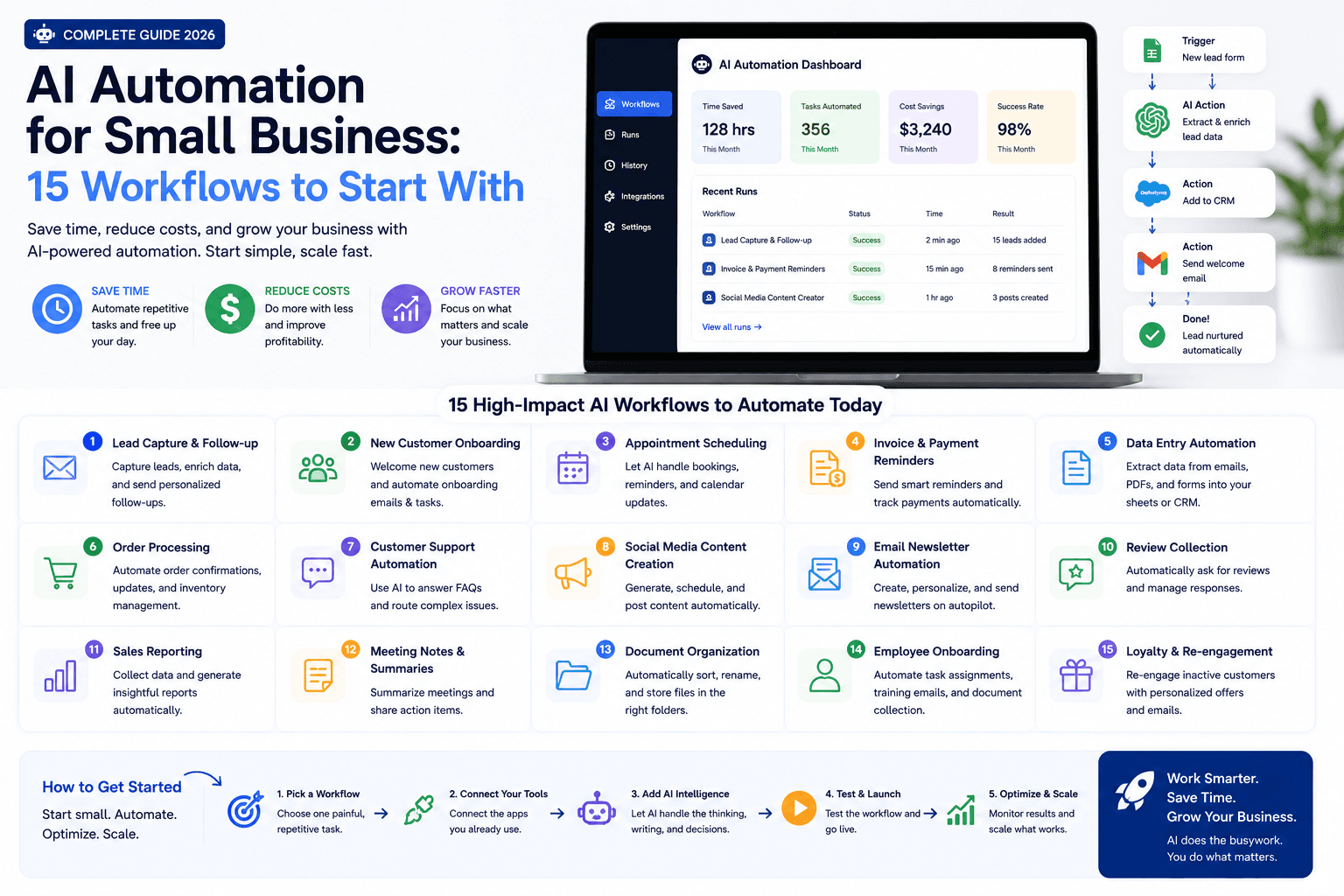
The best automation is boring: it runs reliably, handles exceptions, and saves time without surprising customers.
AI expands what no-code automation can do — classify text, summarize documents, draft responses — but it also makes errors less predictable. Start with observable internal workflows, not customer-facing autopilot.
This guide is for small business owners, freelancers, agencies, and consultants who want 15 practical AI automation workflows for leads, meetings, marketing, support, and operations — with safeguards, platform choices, and ROI criteria.
For platform comparisons, read n8n vs Zapier vs Make. For agents vs automation, see AI agent vs chatbot vs Zapier. For a marketing rollout calendar, use the 30-day AI marketing plan.
Table of contents
- Quick summary
- What is AI automation for small business?
- Who should use it
- Who should not use it
- Key features of a safe automation system
- Pricing: automation stack tiers
- Pros and cons
- Best use cases
- Limitations
- The automation readiness test
- 15 practical workflows
- Design the workflow
- Comparison tables
- Decision matrix
- Things to consider before choosing
- Common mistakes
- Automation rollout checklist
- Select an automation platform
- Automation operating checklist
- Alternatives and competing approaches
- Calculate the ROI
- Frequently asked questions
- Final recommendation
Quick summary
AI automation for small business combines triggers (forms, emails, schedules), structured data, AI steps (classify, summarize, extract, draft), and actions (tasks, alerts, records, drafts) — with a human owner and exception queue.
Start when a workflow is weekly, inputs are permitted, outcomes are clear, and errors are reversible. Measure:
Monthly net value = labor saved + incremental gross profit − software − monitoring − error cost
Include maintenance. Automations break when forms, fields, APIs, models, or policies change.
What is AI automation for small business?
AI automation means using no-code or low-code platforms — often with embedded AI steps — to move information and draft work between systems without manual copy-paste.
Typical jobs:
- route leads from forms to CRM;
- alert owners when qualification criteria match;
- draft (not auto-send) follow-up messages;
- summarize meetings into tasks;
- classify support tickets;
- extract fields from documents;
- summarize weekly metrics from exports.
It is not the same as an autonomous AI agent that plans multi-day work without supervision. See AI agents for small business for that distinction.
Who should use it
Automation fits when:
- Owners and ops leads lose hours on repetitive handoffs.
- Sales teams miss speed-to-lead because CRM tasks are manual — see lead follow-up AI agent and AI CRM automation.
- Agencies need repeatable client reporting and intake — AI workflow for agencies.
- Support-light businesses want ticket labeling and FAQ drafts — AI customer service automation.
- Google Workspace shops can start inside Gmail/Sheets — Google Workspace Studio guide.
- Someone will own logs, exceptions, and vendor changes monthly.
Who should not use it
Delay automation when:
- the manual process is undefined or changes every week;
- forms collect unstructured chaos (missing emails, vague dates);
- customer-facing messages would send with no reviewer;
- decisions involve payments, hiring, health, legal rights, or safety without qualified review;
- you cannot map which systems receive which data;
- the “fix” is strategy — automation will amplify confusion.
Fix inputs and ownership first. Then automate.
Key features of a safe automation system
| Feature | Purpose |
|---|---|
| Named trigger | Exact event starts the workflow |
| Structured input | Fields AI can rely on |
| Narrow AI task | Classify, summarize, extract, or draft — one job |
| Validation gate | Required fields before next step |
| Human queue | Low-confidence or high-impact cases |
| Idempotent actions | Retries do not duplicate records |
| Failure alerts | Silent errors are unacceptable |
| Least-privilege connections | Minimal OAuth scopes |
| Owner + monthly review | Logs, permissions, cost, still-needed? |
| Metric | Time, quality, or revenue delta |
Pricing: automation stack tiers
Verify live pricing on vendor sites. Ranges reflect commonly listed SMB tiers as of August 2026.
Native only
$0–50/month
CRM/email built-ins
- HubSpot, Pipedrive, Mailchimp, Brevo native workflows
- Form → task or tag automations
- No extra connector tax
- Best first step for most SMBs
- Add AI drafting outside automation if needed
No-code connector
$20–100/month
Cross-app handoffs
- Zapier Free/Professional-class plans
- Make Core-class plans for branching
- AI steps priced by tasks/operations (verify limits)
- Watch Zapier AI tier multipliers (Standard 1x, Advanced 3x, Premium 5x per official docs)
- Start with 1–2 Zaps/scenarios
Technical / volume
$20–800+/month
High volume or self-host
- n8n self-hosted or cloud executions
- Developer-built webhooks for sensitive flows
- Low marginal cost at volume
- Requires maintenance capacity
- See full comparison in n8n vs Zapier vs Make
Official references: Zapier AI model tier pricing, Zapier AI pricing changes June 2026.
Pros and cons
Pros
- Removes repetitive copy-paste between apps
- Speeds lead routing and internal alerts
- AI can classify and summarize at scale
- Draft-only patterns reduce customer risk
- Measurable time savings when inputs are clean
- Native CRM automation often enough at start
Cons
- Breaks silently when forms or APIs change
- AI confidence is not the same as correctness
- Per-task pricing escalates on multi-step Zaps
- Over-permissioned connections create security risk
- Auto-send without review damages trust
- Maintenance cost often underestimated
Best use cases
Automation delivers the fastest ROI when the work is repeatable, structured, and internal-facing:
- Speed-to-lead: form submission to CRM contact + owner alert within minutes, not hours.
- Pipeline hygiene: stale-deal tasks so opportunities do not die quietly.
- Meeting follow-through: transcript to action items without manual note-taking.
- Support triage: ticket labels that help agents prioritize without reading every word first.
- Reporting drafts: weekly metrics summarized from exports you already pull.
- Marketing QA: catch broken links and missing fields before a campaign sends.
Lower ROI until inputs improve: free-text-only forms, one-off processes, or customer messages that need relationship judgment on every send.
Limitations
AI automation will not:
- fix a broken sales process or undefined qualification criteria;
- replace consent, privacy, or industry compliance review;
- guarantee correct outputs when inputs are ambiguous;
- stay free forever — connector and AI step costs scale with volume;
- maintain itself when APIs, form fields, or team structure change.
Treat every workflow as a product with an owner, changelog, and retirement date. If nobody maintains it, schedule its deletion.
The automation readiness test
A workflow is a good candidate when:
- it happens at least weekly;
- inputs are available and permitted;
- the expected result is clear;
- a person can review exceptions;
- errors are detectable and reversible;
- the benefit can be measured.
If any item is “no,” improve the process before adding AI.
15 practical workflows
Leads and sales
1. Form-to-CRM routing — When a website form, Typeform, or Facebook Lead Ad submits, create or update the contact in HubSpot, Pipedrive, or your CRM. Map fields explicitly (email, phone, service type, zip code). Assign an owner by territory or round-robin. Use a unique submission ID so retries do not create duplicates. This is the foundation for every other sales automation — see AI CRM automation.
2. Qualified-lead alert — Notify the right person in Slack, Teams, or email when explicit criteria match: budget above a threshold, service area inside your radius, or intent field equals "ready to buy." Rules beat AI guessing here. If the form lacks structure, fix the form before adding intelligence.
3. Follow-up draft — Pull form answers and CRM history into a contextual reply draft inside the CRM note or Gmail draft folder. Include the lead's name, service requested, and one relevant proof point from an approved snippet library. Do not auto-send. The rep reviews, edits, and sends. Deep dive: AI email automation sequences.
4. Stale-deal reminder — When a deal or opportunity has no activity in 7, 14, or 30 days (your threshold), create a task for the owner with a link to the record. Optional: attach a one-line AI summary of the last touchpoint. Low risk, high visibility — most sales teams underuse this.
Meetings
5. Meeting summary — After an approved recording or transcript exists, run an AI summarize step to extract decisions, open questions, and action items. Route output to a shared doc or task list — not directly to clients without review. Consent and recording policy matter. Tool context: Fireflies.ai review.
6. CRM note draft — Structure the summary into CRM-friendly fields: attendees, topic, next step, follow-up date. Save as a draft note or internal comment until the account owner approves. Keeps pipeline history accurate without forcing reps to retype calls.
7. Action-item routing — Parse named owners and due dates from the summary. Create tasks in Asana, Monday, or CRM tasks with assignee and deadline. If the AI cannot identify an owner with confidence, route to a human queue instead of guessing.
Marketing
8. Content repurposing draft — Take one approved source — blog post, webinar transcript, case study — and generate channel-specific options: LinkedIn hook, email subject lines, short video script outline. Human selects and edits before publishing. Pairs with AI social media for small business and AI marketing for small business.
9. Campaign QA — Before an email or ad goes live, run an automated check: broken links, missing UTM parameters, required merge fields present, tone matches brand guidelines, and no prohibited claims (guaranteed results, unsubstantiated medical claims). Flag failures to the sender; do not block silently.
10. Lead-source report — Pull a clean weekly export from ads, analytics, or CRM. AI summarizes which sources drove qualified leads, cost per lead trends, and anomalies worth investigating. Output is a draft for the owner — not a replacement for your analytics tool.
Customer support
11. Ticket classification — When a ticket arrives, label intent (billing, technical, cancellation) and urgency (same-day vs standard). Agents see labels on review; routing rules can assign queues. Define your taxonomy first — classification without categories creates noise.
12. FAQ response draft — Match the ticket against an approved knowledge base. Draft a reply citing only approved articles. Include an escalation trigger when confidence is low or the topic touches refunds, legal, or account security. Related: train chatbot on business FAQs and AI chatbots for small business.
13. Feedback themes — Aggregate de-identified survey or review comments monthly. Group into themes (shipping delays, onboarding confusion, pricing questions) for ops and product review. Do not paste identifiable customer data into unapproved tools.
Operations
14. Document intake — When a contract, invoice, or intake PDF arrives, extract structured fields: vendor name, amount, due date, missing signatures. Flag incomplete documents to a queue. Start with internal documents only; customer PII flows need stronger controls.
15. Weekly operating summary — Combine approved metrics from Sheets, Stripe, or CRM exports into a one-page draft: revenue, leads, support volume, key wins, risks. The owner edits before sharing with the team. Agencies can adapt this for client reporting — see AI workflow for agencies.
Best for (by business type)
| Business type | Start with | Avoid first |
|---|---|---|
| Local services | Form → CRM + alert | Auto SMS replies |
| B2B sales | Stale-deal + meeting notes | AI negotiation emails |
| Ecommerce | Ticket classify + report | Refund automation |
| Agency | Weekly report draft | Client auto-send |
| Solo consultant | Follow-up draft queue | Multi-app sprawl |
| Regulated (legal/health) | Internal summaries only | Customer-facing AI send |
Design the workflow
| Layer | Question |
|---|---|
| Trigger | What exact event starts it? |
| Input | Which approved fields or documents? |
| AI task | Classify, summarize, extract, or draft? |
| Validation | What must be true before the next step? |
| Action | Task, alert, record, or draft? |
| Exception | Where do low-confidence cases go? |
| Owner | Who monitors and fixes it? |
| Metric | What time, quality, or revenue changes? |
Use confidence thresholds carefully
An AI model may sound certain when wrong. Do not treat writing style as confidence. Validate required fields; route ambiguous cases to people.
For high-impact work — payments, hiring, health, legal rights, account access, safety — use qualified review and stronger controls.
Protect data
Map every system that receives information. Minimize data, restrict permissions, review vendor retention, rotate credentials, and keep secrets out of prompts and logs.
Comparison tables
Table 1 — Workflow risk vs value
| Workflow | Value | Risk | Start month 1? |
|---|---|---|---|
| Form → CRM + alert | High | Low | Yes — best first |
| Follow-up draft (no auto-send) | High | Medium | Yes |
| Meeting summary → tasks | High | Medium — consent | Yes with approved recording |
| Ticket classification | Medium | Medium | After taxonomy defined |
| FAQ draft with KB | Medium | Medium–high | Draft-only first |
| Content repurposing draft | Medium | Low–medium | Yes |
| Stale-deal reminder | Medium | Low | Yes |
| Document field extraction | Medium | High — PII | Internal docs only first |
| Auto-send sales replies | Uncertain | High | No until routing proven |
| Ad audience AI targeting | N/A | High — compliance | Not without review |
| Recommendation | Internal alerts/tasks | Human send for external | One workflow first |
Table 2 — Platform comparison (Zapier vs Make vs n8n)
| Platform | Pricing unit | Best for SMB | AI note | Trade-off |
|---|---|---|---|---|
| Zapier | Tasks per action | 1–2 simple Zaps fast | AI by Zapier uses tier multipliers (1x–5x) per official pricing docs | Cost scales with steps |
| Make.com | Operations/credits | Branching scenarios | AI features vary by module; check credit rules | Learning curve medium |
| n8n | Executions (cloud) or infra (self-host) | Volume + technical teams | Strong for custom AI nodes | Maintenance burden |
| Native CRM/email | Included in plan | Always evaluate first | Often no connector fee | Limited cross-app reach |
| Google Workspace Studio | Workspace context | Gmail/Sheets/Drive shops | Emerging SMB flows | See dedicated guide |
| Recommendation | Native → Zapier/Make | Add n8n at volume | Review AI step cost | Process beats platform brand |
Full breakdown: n8n vs Zapier vs Make (2026).
Decision matrix
Score each platform 1–5 for your situation. Multiply by weight.
| Criterion (weight) | Native CRM | Zapier | Make | n8n |
|---|---|---|---|---|
| Solves weekly bottleneck (×3) | ||||
| Team can maintain it (×3) | ||||
| Cross-app need (×2) | ||||
| Branching complexity (×2) | ||||
| Predictable monthly cost (×2) | ||||
| Data sensitivity / self-host (×1) | ||||
| Weighted total |
Things to consider before choosing
- Is the manual process documented and stable?
- Who owns exceptions every business day?
- Are form fields structured enough for rules?
- Will external messages auto-send — or draft-only?
- Which PII crosses each connector?
- What happens when the AI step is wrong?
- Are retries idempotent (no duplicate contacts)?
- Do OAuth scopes follow least privilege?
- What metric proves ROI in 30 days?
- Can you disable the workflow in one step?
Common mistakes
- Automating a broken process — chaos at machine speed.
- No owner — logs fill; nobody fixes.
- Unstructured form inputs — AI guesses.
- Silent failures — no alert queue.
- Duplicate actions on retry — double emails/charges.
- Excessive permissions — one compromised Zap exposes everything.
- Auto-send before draft-only proof — trust damage.
- Ignoring Zapier AI task multipliers — budget surprise (official tier docs).
- Buying three platforms before one workflow works.
- Skipping monthly workflow review — zombie automations linger.
Automation rollout checklist
Four-week rollout
| Week | Action |
|---|---|
| 1 | Document manual process + baseline metrics |
| 2 | Build draft-only version with test data |
| 3 | Run parallel; review every output |
| 4 | Enable limited action; monitor; document ownership |
Pre-launch checklist
- Workflow passes readiness test
- Owner named
- Trigger and input fields defined
- AI task is single-purpose
- Validation rules written
- Exception queue configured
- Failure notifications tested
- Idempotency verified (retry test)
- Permissions minimized
- PII map documented
- Draft-only vs auto-send decided
- Success metric chosen
- Kill switch documented
- Monthly review calendar set
Align marketing automations with the 30-day AI marketing plan.
Alternatives and competing approaches
vs hiring a VA for handoffs
VAs handle judgment and exceptions well. Automation handles repeatable routing at 2 a.m. Combine: automate alerts/tasks; humans handle replies and edge cases.
vs AI agents
Agents plan multi-step work across tools with less explicit wiring. Automation is deterministic glue — better first step for most SMBs. Compare: AI agent vs chatbot vs Zapier.
vs manual-only ops
Manual is fine at low volume. Automation pays off when the same handoff happens weekly and errors have a cost.
vs all-in-one suites
HubSpot-class platforms bundle automation — see HubSpot vs Pipedrive. Avoid paying for Zapier and suite automation doing the same job.
Calculate the ROI
Monthly net value = labor hours saved × loaded cost + incremental gross profit − software − setup − monitoring − correction − maintenance
If the only measurable gain is “we ran more Zaps,” ROI is unproven.
Track: tasks completed faster, response time, error rate, hours spent fixing automations, and qualified outcomes — not step count alone.
Worked example (form → CRM + alert)
Assume a local services business receives 40 form leads per month. Manual entry takes 8 minutes each (320 minutes ≈ 5.3 hours). Loaded labor cost at $35/hour ≈ $186 saved.
| Line item | Monthly estimate |
|---|---|
| Labor saved (5.3 hrs × $35) | +$186 |
| Incremental gross profit (2 extra closes × $400 margin) | +$800 |
| Zapier Professional-class plan | −$30 |
| Monitoring (30 min/month × $35) | −$18 |
| Error correction (1 bad route/month × 20 min) | −$12 |
| Net value | ≈ $926/month |
Adjust every variable for your business. If incremental closes do not appear within 90 days, the automation may only be saving data-entry time — still worthwhile, but measure honestly.
Select an automation platform
Compare native automation inside your CRM or email platform before buying another tool. HubSpot, Pipedrive, Mailchimp, and Brevo include workflows that may already solve form routing, tagging, and sequences without a connector fee.
When multiple apps must connect:
- Zapier — largest app directory, fastest time-to-live for 1–2 Zaps. Watch task consumption on multi-step flows and AI tier multipliers (official pricing docs).
- Make.com — stronger branching and visual scenario building; credit-based pricing suits complex logic at moderate volume.
- n8n — execution-based or self-hosted pricing for technical teams and high volume. Requires someone who can debug webhooks and node failures.
- Google Workspace Studio — emerging option for Gmail, Sheets, and Drive-native flows. See Google Workspace Studio: 2026 SMB Guide.
Evaluate connectors, task/operation limits, branching, logs, retries, permissions, data location, support, and export options — not just the AI feature list. Full comparison: n8n vs Zapier vs Make.
Automation operating checklist
Review active workflows monthly. For each automation, confirm:
| Item | Question |
|---|---|
| Owner | Who is accountable this month? |
| Purpose | What business outcome does it serve? |
| Success rate | What % of runs completed without error? |
| Unresolved errors | Anything stuck in a dead letter queue? |
| Permissions | Still least-privilege? Any retired integrations? |
| Cost | Software + AI steps within budget? |
| Still needed? | Does the manual process still exist? |
Retire workflows nobody owns. Zombie automations consume tasks, create duplicate records, and erode trust when they fail silently.
Frequently asked questions
What can a small business automate with AI?
Good candidates include lead routing, meeting summaries, draft follow-ups, document classification, FAQ triage, reporting summaries, and internal task creation. High-risk decisions and sensitive customer communication need stronger controls and human review.
What is the best first AI automation?
Start with an internal alert or CRM task from a structured form when qualification criteria match. It is easy to observe, reversible, and less risky than sending external messages automatically.
How do you calculate automation ROI?
Estimate labor hours saved plus incremental gross profit, then subtract software, setup, monitoring, correction, and maintenance costs. Include the cost of errors and time spent fixing broken Zaps.
Zapier, Make, or n8n for a small business?
Use native CRM/email automation first. Choose Zapier for the fastest simple cross-app Zaps. Choose Make for branching logic at lower per-step cost than Zapier at scale. Choose n8n when you have technical capacity or high volume and want execution-based or self-hosted pricing. See n8n vs Zapier vs Make.
Should AI auto-send customer emails?
Not until draft-only runs cleanly for several weeks with low correction rates. Start with drafts in CRM or a shared queue; humans send.
How do AI steps affect Zapier pricing?
According to Zapier’s model tier documentation, AI by Zapier steps consume tasks based on tier multipliers (Standard 1x, Advanced 3x, Premium 5x) plus tool calls. Budget accordingly — a single AI step with tools can consume many tasks per run.
Can automation replace a CRM?
No. Automation connects systems and moves data. CRM remains the system of record for contacts, deals, and consent.
How often should workflows be reviewed?
Monthly minimum: owner, purpose, success rate, errors, permissions, cost, and whether the underlying process still exists.
Final recommendation
Automate boring, weekly, reversible work first.
- Pass the readiness test.
- Ship form → CRM + owner alert before anything customer-facing.
- Keep follow-ups as drafts until routing is proven.
- Use native automation before new subscriptions.
- Add Zapier or Make for cross-app gaps; consider n8n at volume with maintenance capacity.
- Review monthly — delete zombie workflows.
- Measure net value, not Zap count.
Next reads: AI CRM automation, lead follow-up AI agent, AI marketing for small business, best AI marketing tools.
The AI edge, delivered every Tuesday
One 5-minute email: the tools worth your money, the plays that are working right now, and zero hype. Unsubscribe anytime.
No spam. No selling your data. Read by owners of restaurants, gyms, clinics, and agencies across the US, UK, Canada, and Australia.
Key takeaway
15 practical AI automation workflows for small business — leads, meetings, marketing, support, and ops — plus Zapier vs Make vs n8n, safeguards, checklists, and ROI. For more step-by-step guides, browse our blog or explore Automation.
Frequently asked questions
What can a small business automate with AI?
Good candidates include lead routing, meeting summaries, draft follow-ups, document classification, FAQ triage, reporting summaries, and internal task creation. High-risk decisions and sensitive customer communication need stronger controls and human review.
What is the best first AI automation for a small business?
Start with an internal alert or CRM task generated from a structured form when qualification criteria match. It is easy to observe, reversible, and less risky than sending external messages automatically.
How do you calculate automation ROI?
Estimate labor hours saved plus incremental gross profit, then subtract software, setup, monitoring, correction, and maintenance costs. Include the cost of errors and time spent fixing broken workflows.
Should a small business use Zapier, Make, or n8n?
Evaluate native CRM or email automation first. Choose Zapier for the fastest simple cross-app automations. Choose Make for branching logic at lower per-step cost than Zapier at scale. Choose n8n when you have technical capacity or high volume and want execution-based or self-hosted pricing.
Should AI auto-send customer emails in automations?
Not until draft-only runs cleanly for several weeks with low correction rates. Start with drafts in CRM or a shared queue and require a human to send sensitive or sales-related messages.
How do AI steps affect Zapier pricing?
According to Zapier's official documentation, AI by Zapier steps consume tasks based on model tier multipliers such as Standard 1x, Advanced 3x, and Premium 5x, plus additional task usage for tool calls. Budget multi-step Zaps with AI accordingly.
Can automation replace a CRM?
No. Automation connects systems and moves data between them. The CRM remains the system of record for contacts, deals, consent, and pipeline history.
How often should small businesses review automations?
Review active workflows at least monthly: confirm the owner, business purpose, recent success rate, unresolved errors, current permissions, vendor cost, and whether the underlying manual process still exists.
Written by
AI Growthub StaffEditorial Team
The AI Growthub editorial team covers practical AI news, tools, and workflows for small business owners. Every article is fact-checked against primary sources before publication.
Comments are coming soon
We’re building a discussion space for business owners. Until then, reply to any newsletter issue — we read everything.
Related posts

Google Workspace Studio for Small Business (2026): The Complete Guide
Build Google Workspace Studio flows for SMBs: Gmail invoice logging, Meet follow-ups, Sheets triggers, limits, approval rules, and when Zapier still wins.

n8n vs Zapier vs Make (2026): Best Automation Platform for SMBs?
Compare n8n vs Zapier vs Make for small business: task vs credit vs execution pricing, AI agents, setup paths, and which iPaaS to start on in 2026.

Claude for Small Business: Complete 2026 Setup Guide
Set up Claude for Small Business: Cowork plugin, QuickBooks and HubSpot connectors, 15 workflows, Pro vs Team pricing, and when ChatGPT Work or Gemini fits better.
The AI edge, delivered every Tuesday
One 5-minute email: the tools worth your money, the plays that are working right now, and zero hype. Unsubscribe anytime.
No spam. No selling your data. Read by owners of restaurants, gyms, clinics, and agencies across the US, UK, Canada, and Australia.