Microsoft Just Gave Small Businesses the "Off" Switch for AI in Meetings — Here's Why That's a Big Deal
Microsoft Teams adds an in-meeting Meeting AI toggle for Copilot, Facilitator, and Recap. Rollout timing, transcription coupling, pricing notes, and a selective policy for SMBs.
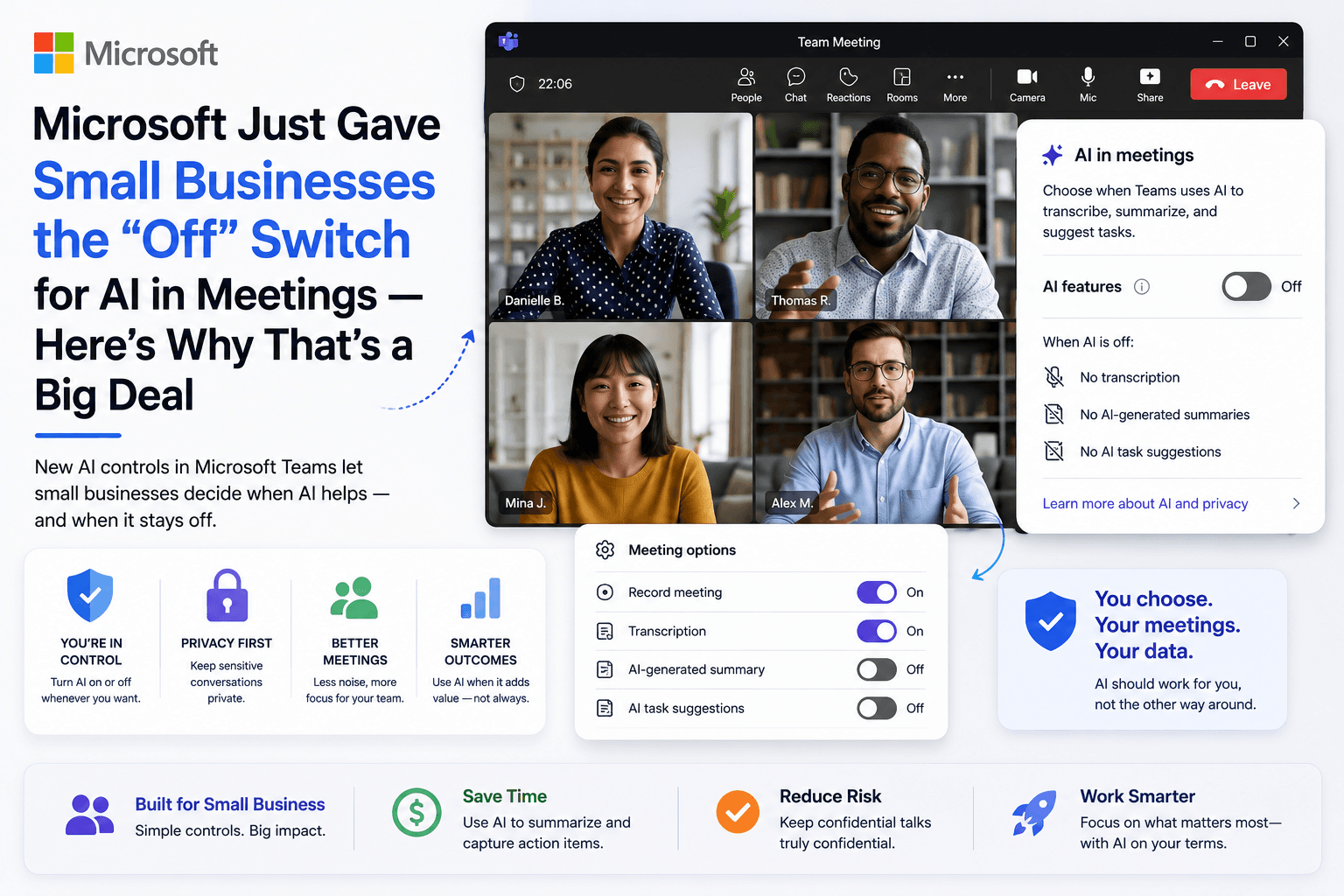
Microsoft Teams is adding a live-meeting control that lets licensed organizers and presenters turn Meeting AI — Copilot in the meeting, Facilitator, and Intelligent Recap — on or off while the call is running. It sounds like a small toolbar change. For small businesses, it is a practical permission slip: you decide when AI listens, summarizes, and stores notes — not the default setting.
This guide explains what changed (including the updated rollout window), who should care, how to use the toggle without shooting yourself in the foot on transcription, and how to build a selective AI meeting policy. For broader productivity habits, see AI productivity for small business. For Copilot stack context, see Microsoft Copilot for small business.
Table of contents
- Quick summary
- What happened
- Who should use this
- Who should NOT use it
- Quick recommendation
- Things to consider before choosing
- Key features of the Meeting AI toggle
- Best-for table
- Pricing in 2026
- Pros and cons
- Best use cases
- Limitations
- How to set a selective meeting AI policy
- Comparison tables
- Decision matrix
- Setup checklist
- Common mistakes
- Alternatives and competitor comparison
- FAQ
- Final recommendation
Quick summary
| Decision | Default posture | Why |
|---|---|---|
| Internal standup / planning | Meeting AI on | Notes and action items save real minutes |
| Client discovery (non-confidential) | On only with clear notice | Useful recap; disclose AI presence |
| Pricing negotiation / legal / HR | Meeting AI off + transcription off | Content should not auto-summarize into storage |
| Board / investor sensitive | Off unless counsel says otherwise | Retention and access risk |
| External guest heavy | Confirm policy + licenses first | Toggle only appears when policy allows |
What happened
Microsoft documented an in-meeting Meeting AI toggle for Teams (Message Center MC1319216, Microsoft 365 Roadmap 558286). Licensed organizers and presenters can turn Meeting AI — including Copilot, Facilitator, and meeting Recap — on or off during a live meeting. The control respects existing tenant policies and meeting options. Microsoft states it does not change licensing requirements, pre-meeting Meeting options, recording/transcription/sensitivity-label behavior as previously configured, or retention/compliance policies.
Rollout window (updated)
Microsoft later moved the schedule:
| Channel | Updated window (per MC1319216 update) |
|---|---|
| Targeted Release | Mid-August 2026 through late August 2026 |
| General Availability (Worldwide) | Late August 2026 through early September 2026 |
If you do not see the toolbar control yet, that may simply mean the rollout has not reached your tenant — or Meeting AI is disabled by policy, so the toggle never appears.
The critical coupling: AI + transcription
When Meeting AI is used with transcription, Microsoft treats them as linked:
- Turning on Meeting AI automatically turns on transcription and generates a recap.
- Starting transcription automatically enables Meeting AI and recap.
- To prevent Meeting AI usage, keep both transcription and Meeting AI off.
When Meeting AI is turned off mid-call: Copilot, Facilitator responses, and Notes stop generating. Previously generated artifacts remain available and stay under retention policies. If AI was running without transcription, speech-to-text stops and Recap is not generated.
Why the industry read this as a course correction
Teams users pushed back on AI features that felt always-on. Privacy concerns focused on passive monitoring, what gets stored, and who can read summaries later. A visible status indicator plus an organizer toggle is a response to that pressure: people in the room get a clearer signal and a real-time control.
This also fits a wider 2026 pattern: businesses want configurable AI — selective note-taking, dictation for drafts, and sometimes lightweight vibe-coded internal tools — not vendor defaults everywhere.
Who should use this
This update (and the selective-policy playbook below) fits:
- Small businesses already on Microsoft 365 + Teams with Meeting AI / Copilot enabled
- Owners and managers who run client calls without a dedicated IT/legal desk
- Agencies, clinics, consultancies, and professional services handling confidential conversations
- Admins who need a simple training story for organizers and presenters
- Teams that want AI notes for ops meetings but not for every conversation
You do not need to be a Microsoft admin to use the toggle once it appears — but admins still own policy and licensing.
Who should NOT use it
Do not treat the toolbar toggle as your only control if:
- You need organization-wide AI disabled — that is still a tenant policy / Meeting options job, not a per-call habit
- You lack Copilot / Meeting AI licenses — the toggle is for licensed organizers and presenters when policy allows
- You assume “AI off” while leaving transcription on — coupling can re-enable Meeting AI
- You need certified recording/consent workflows for regulated industries and have not checked counsel
- Your stack is Zoom or Google Meet as the primary meeting product — use those products’ controls instead (see alternatives)
Quick recommendation
Things to consider before choosing
- Sensitivity of the agenda — pricing, HR, legal, health, or IP?
- Who is in the room — employees only vs clients, candidates, counsel
- Consent and notice — do guests know AI may summarize?
- Where recaps live — who can open Intelligent Recap later?
- Retention — how long do notes and transcripts stick around?
- Licenses — which organizers actually have Meeting AI seats?
- Tenant policy — if Meeting AI is blocked, the toggle will not appear
- Transcription coupling — AI off means transcription off for true quiet mode
- Cross-platform guests — Zoom/Meet users may bring their own bots
- Quarterly audit — defaults drift; review like insurance statements
Key features of the Meeting AI toggle
| Capability | What it does | SMB implication |
|---|---|---|
| In-meeting Meeting AI toggle | Organizers/presenters flip AI during the live call | React when the topic turns sensitive |
| Covers Copilot, Facilitator, Recap | Stops generation of those AI outputs when off | One control for the main meeting AI surface |
| Policy-gated visibility | Toggle shows only if Meeting AI allowed | Admins still set the ceiling |
| AI status indicator | Participants can see whether Meeting AI is active | Transparency for guests and staff |
| Desktop, web, mobile | Same control story across Teams clients | Train once; works on the road |
| No license/compliance SKU change | Control ≠ downgrade or new compliance mode | You still need correct seats and policies |
Best-for table
| Situation | Meeting AI | Transcription | Notes |
|---|---|---|---|
| Weekly team planning | On | On (if you want Recap) | Highest time savings |
| Sales discovery (low sensitivity) | On with verbal notice | On | Move actions to CRM same day |
| Pricing negotiation | Off | Off | Manual notes or trusted human scribe |
| Performance / HR conversation | Off | Off | Default to privacy |
| Legal or counsel call | Off unless counsel directs | Off unless directed | Follow professional guidance |
| Training / webinar internal | On | On | Capture Q&A and actions |
| Guest workshop | Case-by-case | Case-by-case | Disclose; check guest bot policies |
Pricing in 2026
The off switch does not cost extra and does not reduce your plan. Meeting AI features behind it still sit on Microsoft’s Copilot / Meeting AI licensing.
Directional anchors from Microsoft’s public business pages (verify in your admin center before buying):
| Offer | Published list posture (USD, paid yearly) | Notes |
|---|---|---|
| Microsoft 365 Copilot Business add-on | Commonly shown around $21/user/mo; promotional $18/user/mo first-year offers may appear in windows such as July 1–September 30, 2026 | Requires eligible Microsoft 365 Business plan; up to 300 users — Copilot Business |
| Business Standard with Copilot (bundle) | Around $23.50/user/mo paid yearly on Microsoft’s business pricing pages | Bundle pricing varies by market and promo |
| Business Premium with Copilot (bundle) | Around $32/user/mo paid yearly | Security-heavy SMB bundle |
| Teams alone without Meeting AI seats | Base M365 Business plans | You may have Teams meetings without full Meeting AI |
Third-party meeting assistants (Fireflies, Otter, etc.) are separate subscriptions — useful when calls span Zoom + Meet + Teams. Compare in Fireflies.ai review and the meeting notes shortlist.
Always confirm current list price and eligibility in your Microsoft 365 admin center; promotions and regional pricing change.
Pros and cons
Pros
- Real-time control when a meeting turns confidential mid-call
- Visible AI status helps set expectations with guests
- Respects tenant policy — admins keep the ceiling
- Supports selective AI: keep notes for ops, silence for sensitive talks
- No extra SKU just to get an off control
Cons
- Rollout is gradual — not everyone sees it on day one
- Transcription coupling can surprise untrained organizers
- Off does not delete prior artifacts
- Requires qualifying licenses for organizers/presenters
- Does not block third-party bots guests may bring
Best use cases
- Ops standups — Recap captures owners and deadlines so nobody writes minutes
- Client workshops — AI on with clear disclosure; turn off for private pricing sidebars
- Agency retros — keep Facilitator/notes for internal learning; off for HR
- Owner-led discovery — on for structure; off when the prospect shares confidential numbers
- Quarterly AI settings review — treat Meeting AI like bank and insurance statements
Pair meeting capture with a same-day follow-through habit from AI productivity: summary → tasks → CRM.
Limitations
- Toggle visibility depends on policy + license + rollout
- Does not replace admin controls for organization-wide disable
- Does not change retention of content already created
- Coupled transcription means “quiet mode” is two switches, not one
- Guest-side tools (phone recorders, other AI bots) are outside Teams’ toggle
- Mobile users still need the same training — the control is only as good as the habit
How to set a selective meeting AI policy
Step 1 — Inventory what is already on
List: who has Copilot / Meeting AI seats, default Meeting options, where Recap lives, and retention length. Many SMBs discover AI notes were enabled without an active decision.
Step 2 — Write the green / red list
| Green (AI usually on) | Red (AI + transcription off) |
|---|---|
| Internal planning | Negotiations and pricing |
| Training and process reviews | HR and performance |
| Non-confidential project syncs | Legal, counsel, regulated topics |
| Public webinars (with notice) | Anything under NDA that forbids recording/AI |
Step 3 — Train organizers on the coupling
One sentence to memorize: To keep Meeting AI off, leave transcription off too. Starting transcription can turn Meeting AI back on.
Step 4 — Add a 10-second pre-call checklist
- Agenda sensitivity?
- Guests notified?
- Meeting AI on or off?
- Transcription match that choice?
- Who owns follow-up tasks after?
Step 5 — Practice the mid-call flip
When a discovery call turns into a pricing fight, the organizer turns Meeting AI off (and confirms transcription). When the call returns to logistics, they can turn it back on if appropriate.
Step 6 — Quarterly audit
Same cadence as reviewing insurance and bank statements: seats, defaults, sample recaps access, and whether red-list meetings stayed quiet.
Comparison tables
Meeting AI on vs off (same Teams call)
| Dimension | Meeting AI on | Meeting AI off |
|---|---|---|
| Copilot / Facilitator / Notes | Generating | Stops new generation |
| Recap | Typically generated when transcription path is active | Not newly generated while off |
| Prior artifacts | Still available under retention | Still available under retention |
| Best for | Ops, training, low-sensitivity discovery | Negotiations, HR, legal, confidential |
| Risk if misused | Sensitive content in searchable notes | Lost automatic minutes (manual notes needed) |
Teams Meeting AI vs common alternatives
| Approach | Best when | Watch-outs |
|---|---|---|
| Teams Meeting AI + toggle | Work already lives in M365 | License cost; coupling with transcription |
| Zoom AI Companion / meeting summary | Zoom-first company | Learn Zoom’s own privacy/admin controls |
| Google Meet / Gemini meeting features | Google Workspace-first | Different admin surface |
| Fireflies / Otter / similar | Multi-platform calendars | Bot join permissions + data residency |
| Human-only notes | Highest sensitivity | Costs time; still need storage hygiene |
Decision matrix
Score each row 1–5. Prefer the path with the highest honest total for your next 90 days.
| Factor (weight) | Lean Teams Meeting AI | Lean third-party notetaker | Lean human-only |
|---|---|---|---|
| Already on M365 + Teams (×3) | 5 | 2 | 3 |
| Need cross Zoom/Meet coverage (×3) | 2 | 5 | 3 |
| Confidential client volume (×3) | 4 (with policy) | 3 | 5 |
| Budget for Copilot seats (×2) | 3–5 | 3 | 5 |
| Want mid-call off switch (×2) | 5 | 2–4 | 5 |
| Admin time available (×1) | 3 | 2 | 4 |
Reading the score: High Teams score → adopt the selective policy and wait for/use the toggle. High third-party → you live on many platforms; pick one notetaker with clear retention. High human-only → keep AI off by default for your vertical and use AI for post-meeting drafting instead (dictation into email), not live capture.
Setup checklist
- Confirm who has Copilot / Meeting AI licenses
- Confirm tenant policy allows Meeting AI (or intentionally blocks it)
- Document green/red meeting types
- Train organizers: transcription coupling in one sentence
- Add verbal disclosure script for client calls when AI is on
- Decide retention owner (who reviews Recap access)
- Practice mid-call toggle in a safe internal meeting
- Ban “leave transcription on while wanting AI off”
- Calendar a quarterly AI settings review
- Link follow-up habit to CRM/tasks same day
Common mistakes
- Assuming the toggle deletes old notes — it only stops new generation.
- Turning AI off but starting transcription — coupling can re-enable Meeting AI.
- Leaving AI on for every client call by default — negotiations and HR are different animals.
- Ignoring guest bots — Teams off does not stop a visitor’s recorder.
- No disclosure — even when legal, surprise AI notes damage trust.
- Buying Copilot seats with no policy — spend without selective habits wastes money and increases exposure.
- Never auditing access — recaps readable by the wrong people is a process failure.
- Confusing consumer Copilot chat with Meeting AI licensing — meeting features follow business licensing rules; verify seats.
Alternatives and competitor comparison
| Need | Prefer | Guide |
|---|---|---|
| M365-native meetings + selective AI | Teams Meeting AI + this policy | This article; Copilot SMB guide |
| Best meeting notes across tools | Dedicated notetaker shortlist | Best AI meeting note tools |
| Sales-oriented transcript workflow | Fireflies-style tools | Fireflies review |
| Broader time-saving system | Productivity OS, not only meetings | AI productivity |
| Replace expensive SaaS slices | Careful build vs buy | Vibe coding first tool |
Dictation and drafting after a quiet meeting is often safer than live capture for sensitive topics: talk a voice memo, then draft the email in your usual AI assistant under business data rules.
Frequently asked questions
Do I need to do anything right now?
Not urgently for the toolbar itself — rollout is gradual into late summer / early autumn 2026. Use the wait to write your green/red policy and train organizers on transcription coupling.
Does turning off Copilot or Facilitator cost money or downgrade Teams?
No. Microsoft positions this as a control. Licensing and compliance requirements for Copilot / Meeting AI are unchanged by the toggle.
Is AI meeting software recording everything?
It depends on settings. Transcription and note features can capture and store conversation content. That is exactly why red-list meetings should keep Meeting AI and transcription off.
Who can use the toggle?
Licensed organizers and presenters, and only when Meeting AI is allowed by tenant policy. If policy disables Meeting AI, the toggles do not appear.
Should we build custom tools instead of buying big platforms?
Sometimes for narrow internal jobs — see the vibe coding guide. Do not replace certified systems (payroll, payments, health records) lightly. Meeting AI policy is independent of that decision.
What if we use Zoom or Google Meet more than Teams?
Adopt the same selective philosophy on those platforms’ admin and in-meeting controls. The Microsoft toggle only governs Teams Meeting AI.
Will participants know AI is on?
Microsoft describes an AI status indicator so participants can see whether Meeting AI is active. Still say it aloud on client calls — indicators are easy to miss.
Final recommendation
Treat Microsoft’s Meeting AI toggle as confirmation of a rule smart operators already needed: AI in meetings is a business decision, not a factory default.
Keep it on where notes create leverage — internal planning, training, low-sensitivity workshops. Keep Meeting AI and transcription off for negotiations, HR, legal, and anything you would not want searchable tomorrow. Train the transcription coupling before the toolbar shows up. Audit seats and access quarterly.
The businesses that win with AI this year will not be the ones running it in every call. They will be the ones who can explain, in one page, when it is on, when it is off, and who is responsible.
Sources
- Microsoft 365 Message Center MC1319216 — in-meeting toggle to turn Meeting AI on or off (schedule update July 9, 2026; Roadmap ID 558286) — summaries mirrored in admin trackers such as Merill Message Center archive
- Microsoft 365 Copilot Business — public SMB pricing and plan pages
- Related reading: Gene Marks / Forbes small-business tech roundups and trade coverage of the Teams AI control debate (verify quotes against primary Microsoft notices)
Image prompts for production
Hero (16:9), editorial photography, no logos, no readable UI: “Wide editorial photograph of a small conference room after a meeting, laptop closed on the table, a simple paper checklist labeled only with blank lines, soft daylight through blinds, documentary magazine style, no text, no logos, 16:9.”
Supporting image 1 (16:9): “Over-the-shoulder photo of a business owner toggling a physical light switch on a wall metaphor for an off switch, meeting room blurred behind, photorealistic, no brand marks, no screen UI, 16:9.”
Supporting image 2 (16:9): “Documentary-style photo of a sticky note on a notebook reading nothing legible, beside a headset on a wooden desk, calm office, authentic, no logos, 16:9.”
Infographic prompt (16:9): “Clean editorial infographic on paper-textured background: Meeting AI decision tree — Internal planning → AI on; Negotiation/HR/Legal → AI off + transcription off, charcoal/cream/muted teal, no logos, no tiny UI text, 16:9.”
Metadata (CMS)
| Field | Value |
|---|---|
| Title | Microsoft Just Gave Small Businesses the "Off" Switch for AI in Meetings — Here's Why That's a Big Deal |
| Slug | microsoft-teams-ai-off-switch-small-business |
| Primary keyword | Microsoft Teams AI off switch |
| Secondary keywords | Teams Meeting AI toggle, turn off Copilot in Teams meeting, Facilitator Recap off, Microsoft Teams AI privacy |
| Semantic keywords | Intelligent Recap, transcription coupling, MC1319216, Roadmap 558286, selective AI meetings |
| Meta title | Teams AI Off Switch: What SMBs Must Know (2026) |
| Meta description | Microsoft Teams adds an in-meeting Meeting AI toggle for Copilot, Facilitator, and Recap. Rollout timing, transcription coupling, pricing notes, and a selective policy for SMBs. |
| Excerpt | What Microsoft’s Teams Meeting AI off switch means for small businesses — including the updated rollout window, transcription coupling, and a practical green/red meeting policy. |
| Category | AI News (ai-news) |
| Type | guide |
| JSON-LD | Article + FAQPage + HowTo |
Suggested external references
Key takeaway
Microsoft Teams adds an in-meeting Meeting AI toggle for Copilot, Facilitator, and Recap. Rollout timing, transcription coupling, pricing notes, and a selective policy for SMBs. For more step-by-step guides, browse our blog or explore AI News.
Frequently asked questions
Do I need to do anything right now because of this Teams update?
Not urgently. Rollout is gradual into late summer / early autumn 2026. Use the wait to write a green/red meeting AI policy and train organizers that transcription can re-enable Meeting AI.
Does turning off Copilot or Facilitator cost me anything or reduce my Teams plan?
No. Microsoft positions the toggle as a control, not a downgrade. Existing Copilot / Meeting AI licensing and compliance requirements are unchanged by the toggle itself.
Is AI meeting software actually recording everything that’s said?
It depends on settings. Transcription and note features can capture and store conversation content. For truly quiet meetings, keep Meeting AI and transcription off.
Who can use the Meeting AI toggle?
Licensed organizers and presenters, and only when Meeting AI is allowed by tenant policy. If policy disables Meeting AI, the toggles do not appear.
Should a small business build its own AI-powered tools instead of buying software like Salesforce?
Sometimes for simple, well-defined internal needs. Weigh savings against security, support, and reliability. Meeting AI policy is a separate decision from build-vs-buy CRM.
Why does starting transcription turn Meeting AI back on?
Microsoft couples Meeting AI and transcription when used together. Turning on Meeting AI starts transcription and Recap; starting transcription enables Meeting AI and Recap. Keep both off to prevent Meeting AI usage.
Does turning Meeting AI off delete old notes?
No. Previously generated artifacts remain available and stay governed by retention policies.
What if we primarily use Zoom or Google Meet?
Apply the same selective AI philosophy on those platforms’ controls. The Microsoft in-meeting toggle only governs Teams Meeting AI.
Written by
AI Growthub StaffEditorial Team
The AI Growthub editorial team covers practical AI news, tools, and workflows for small business owners. Every article is fact-checked against primary sources before publication.
Comments are coming soon
We’re building a discussion space for business owners. Until then, reply to any newsletter issue — we read everything.
Related posts

NVIDIA Rubin GPU: The Complete 2026 Guide for Small Businesses Buying Cloud AI
What NVIDIA’s Rubin GPU and Vera Rubin platform mean for SMBs: agentic inference claims, why you should not buy chips, vendor QBR checklists, and how hardware efficiency may (or may not) show up in SaaS prices.

Cognition Buys Poke: Why AI Personality Matters for Small Business (2026 Guide)
Cognition’s low-nine-figure Poke deal explained for SMBs: messaging-native AI personality, Apple Messages for Business, brand risk, pricing context, and a practical voice-policy checklist.

Prentis and Computer-Use Agents: The Complete 2026 Guide for Small Business Office Automation
Prentis fundraising talks explained for SMBs: what computer-use office agents are, pricing patterns, vs Zapier and RPA, security pilots, tables, and when to wait.
The AI edge, delivered every Tuesday
One 5-minute email: the tools worth your money, the plays that are working right now, and zero hype. Unsubscribe anytime.
No spam. No selling your data. Read by owners of restaurants, gyms, clinics, and agencies across the US, UK, Canada, and Australia.