AI Workflow for Lawyers: The Complete 2026 Guide (Intake, Research Notes & Client Communication)
Build a supervised AI workflow for small law firms: intake triage, conflict search lists, document summaries, meeting notes, and client updates — with confidentiality controls and attorney review on every external send.

Small law firms do not need a lecture on whether AI will replace attorneys. They need fewer intake emails sitting unread, faster first drafts of research memos, and client updates that do not wait until Friday at 6 p.m.
An AI workflow for lawyers is a repeatable, supervised system: a trigger, approved inputs, a narrow AI task, attorney review, and a named owner. Done well, it saves hours on administrative work. Done poorly, it leaks privileged information, misstates a fact, or sends a client message that sounds nothing like your firm.
This guide is the definitive 2026 reference for solo practitioners and small firms in the US, Canada, UK, and Australia who want practical automation — not legal advice from a language model. Nothing here is legal advice. AI assists with drafting and organization; licensed attorneys remain responsible for every filing, opinion, and client communication.
It sits under AI automation for small business and links to CRM, onboarding, and regulated-profession workflows where those fit.
Table of contents
- Quick summary
- What is an AI workflow for lawyers?
- Who should use it
- Who should NOT use it
- Quick recommendation
- Things to consider before choosing
- Key features
- Best-for table
- Pricing in 2026
- Pros and cons
- Best use cases
- Limitations
- Comparison tables
- Decision matrix
- Setup checklist
- Six core workflows
- Four-week rollout plan
- Common mistakes
- Alternatives and competitor comparison
- FAQ
- Final recommendation
Quick summary
| If your main pain is… | Start here | Upgrade when… |
|---|---|---|
| Slow intake response | Intake triage + summary drafts | Conflict checklist accuracy logged on 30 inquiries |
| Conflict checks feel ad hoc | AI conflict search-term list | Attorney still runs official conflicts DB |
| Long contracts to skim | Neutral document summaries with page refs | Material correction rate stays under ~20% |
| Deposition/meeting admin | Structured notes from transcript | 10 matters reviewed for privilege redaction |
| Clients asking "any updates?" | Status email drafts from checklist | Attorney edit time ≤5 min per update |
| New matter onboarding chaos | Onboarding packet drafts from templates | Scope language stays in firm-approved templates |
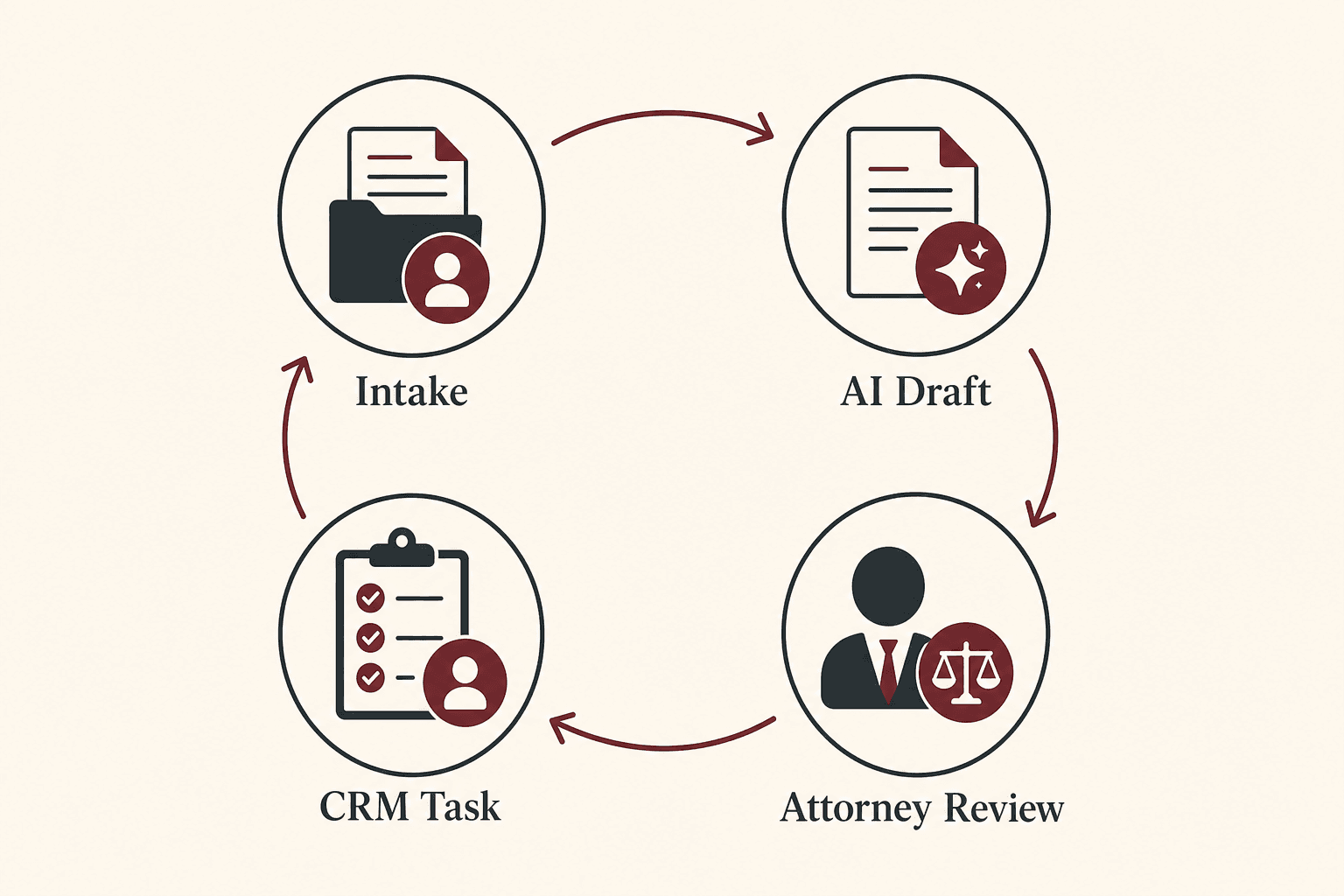
Default bias for small firms: intake → draft → attorney approve → act. AI prepares; attorneys decide.
What is an AI workflow for lawyers?
An AI workflow for lawyers is not a website chatbot giving legal advice. It is a documented path such as:
- A potential client submits an intake form or emails the firm.
- Automation classifies inquiry type and extracts parties, jurisdiction, urgency.
- AI drafts conflict-check search terms and a one-paragraph intake summary.
- An attorney reviews, runs the actual conflict search, and decides on consult.
- The system creates tasks, drafts acknowledgment, or escalates urgent items.
AI is strongest at extraction, classification, summarization, and drafting. It is weakest at legal judgment, predicting outcomes, interpreting statutes in context, or anything requiring bar-licensed advice.
For agent-style routing with guardrails, compare AI agents for small business against simpler draft-only automations — attorneys stay in the approval loop either way.
The supervised legal loop
| Step | Intake | Document summary | Client update |
|---|---|---|---|
| Trigger | Form/email | Secure upload | Status milestone |
| Context | Submission text | Single document/exhibit | Matter checklist |
| AI output | Summary + conflict terms | Neutral summary + flags | 120–180 word draft |
| Human gate | Attorney + conflicts DB | Attorney reads source doc | Attorney edit + send |
| Action | Task, ack draft | File note | Client email |

Who should use an AI workflow for lawyers
Build or upgrade when:
- Intake happens weekly or every new matter triggers conflict review
- Inputs arrive in a consistent place (form, intake inbox, matter folder)
- "Done" is obvious: conflict cleared, summary filed, client acknowledged
- Someone can catch mistakes before clients or courts see output
- You can measure baseline manual time
Strong fits:
- Solo and 2–10 attorney firms with repetitive intake (employment, family, immigration, PI intake triage)
- High document volume matters (contracts, leases, discovery packets)
- Firms already on Clio, MyCase, PracticePanther, or similar with webhook/API paths
- Practices pairing legal workflows with AI appointment scheduling for consult booking
Who should NOT use an AI workflow for lawyers
| Situation | Why wait |
|---|---|
| Intake is chaos (random emails, no owner) | AI amplifies disorder — fix routing first |
| No firm AI/confidentiality policy | Policy before tooling |
| No approved business AI accounts | Consumer free-tier risk for privileged data |
| You want auto-send client legal updates day one | Privilege and tone risk — draft-only 90 days |
| Complex multi-jurisdiction matters without templates | Start one practice area path |
| Firm prohibits cloud AI without vendor review | Compliance sign-off first |
If associates already paste full matter files into public chats, stop and fix policy before automating.
Quick recommendation
Things to consider before choosing
- Privilege and data residency — Where is data processed? Vendor training policy?
- ABA/state guidance — Disclosure when clients interact with AI; human oversight (e.g. ABA Formal Opinion 512 considerations for generative AI)
- Tool approval — Business accounts with firm agreements vs consumer chat
- Data minimization — Relevant exhibit, not entire matter file
- Conflict workflow — AI lists search terms; attorney runs official database
- Matter types — One practice area template before generalizing
- Review capacity — Partner bandwidth for daily intake queue
- Audit trail — Who approved what draft, when, in which tool
If #1 and #4 are unresolved, pause automation until compliance counsel or firm policy addresses them.
Key features of a strong legal AI workflow
| Feature | Why it matters | Intake | Documents |
|---|---|---|---|
| Approved tool list | Privilege and retention control | All paths | All paths |
| Draft-only external sends | Prevents unauthorized advice tone | Ack emails | Client updates |
| Conflict search-term drafts | Speeds human search | New inquiry | — |
| Page/section citations in summaries | Attorney verifies faster | — | Contracts, discovery |
| "Not legal advice" labels on outputs | Work product discipline | Summaries | Memos |
| Privilege review on meeting notes | Strategy stays protected | — | Depositions |
| Named workflow owner | Prevents silent failure | Intake queue | Doc pipeline |
| Sandbox vs production separation | Safe prompt testing | Testing | Testing |
For declined-consult follow-up, apply the same rules as AI CRM automation — no privileged details in marketing automations.
Best-for table
| Firm profile | Best starting workflow | Avoid first |
|---|---|---|
| Solo employment law | Intake triage + conflict term list | Auto-send consult confirmations |
| 3-attorney family firm | Intake + status email drafts | Full discovery summarization |
| Immigration high intake volume | Form → summary + task | AI eligibility opinions |
| Corporate contract review | Single-contract summaries | Enforceability conclusions by AI |
| PI intake coordinator | Triage labels + checklist | AI settlement recommendations |
| Firm on Clio Complete | Clio Duo + Grow native paths | Parallel shadow ChatGPT accounts |
| Firm without practice mgmt software | Typeform → secure folder + LLM drafts | Auto-filing court documents |
| Cross-border clients | Minimized-data summaries | Full packets in US-only tools without review |
Pricing in 2026
Directional anchors from official vendor pricing (verify before purchase — tiers and bundles change). Solo firm costs scale per user.
Practice management and intake
| Product | Published entry (USD) | Notes |
|---|---|---|
| Clio Manage EasyStart | from ~$49/user/mo | Base practice management — clio.com/pricing |
| Clio Manage higher tiers | ~$79–149/user/mo | More automation, reporting, AI on higher tiers per vendor |
| Clio Grow (add-on) | ~$49–69/user/mo typical add-on quotes | Intake/CRM; bundled on Complete tier per vendor docs |
| Clio Duo bundles | ~$119–179/user/mo published tiers | Manage + Grow + AI assistant combinations |
| MyCase | from ~$39–109/user/mo | Alternative practice management |
| Lawmatics | from ~$199+/mo firm pricing | Intake-focused CRM |
Clio states firm data is not used for external AI training on its platform — verify current terms on Clio pricing before adoption.
AI drafting layer
| Product | Published entry | Legal workflow fit |
|---|---|---|
| Claude Pro / Team | ~$20/mo+ | Long transcript summaries — Claude for small business |
| ChatGPT Business | Team pricing varies | Firm workspace with admin controls |
| Meeting transcription | Fireflies etc. | Input to note drafts — Fireflies.ai review |
Glue automation
| Product | Published entry | Use when |
|---|---|---|
| Zapier Professional | from ~$19.99/mo annual | Form → PM tool if no native path |
| Make Core | from ~$9–12/mo annual | Branching intake rules |
Realistic small firm stacks (directional)
| Size | Typical monthly stack | What you get |
|---|---|---|
| Solo | ~$70–150 | PM starter + 1 business LLM seat |
| 3–5 attorneys | ~$400–900+ | PM seats + Grow/intake + LLM |
| High intake volume | +$100–300 | Receptionist/AI intake add-ons |
Hidden cost: attorney review minutes — mandatory and non-negotiable for privilege and accuracy.
Pros and cons
Pros
- Intake summaries cut response lag without replacing attorney judgment
- Conflict search-term lists speed human clearance workflows
- Document summaries help find the right page faster
- Status email drafts reduce Friday inbox panic
- Structured meeting notes cut CRM/file admin time
- Draft-only mode limits privilege and advice-risk errors
Cons
- Consumer AI accounts create confidentiality and training-policy risk
- Summaries are not substitutes for reading source documents
- AI cannot clear conflicts or give legal opinions
- Practice management + intake tiers add per-user cost quickly
- Cross-border data rules require vendor diligence
- Bad intake data produces confident wrong party names and jurisdictions
Best use cases
Intake and conflicts
- Classify matter type; extract parties, jurisdiction, urgency
- Draft conflict search terms — attorney runs official database
- Acknowledgment email draft — attorney sends
Documents and research support
- Neutral summaries: parties, dates, obligations, deadlines, unusual clauses
- Page/section references for attorney verification
- Research note structure — not final legal analysis
Client communication
- Weekly status updates from matter checklist
- Onboarding packet drafts from firm templates — pair with AI onboarding workflow patterns for non-legal ops
Meetings
- Deposition/consult notes from transcript — attorney redacts privilege and strategy
For long transcripts, see how to use Claude Opus 5 for small business workflows — same batch-and-review pattern.
Limitations
- AI does not provide legal advice, predict outcomes, or clear conflicts
- Summaries are work product drafts — source documents remain authoritative
- Court filings, e-filing, and opposing counsel communications stay attorney-controlled
- Consumer free-tier chat with full discovery packets is a privilege risk
- State bar and ABA guidance on AI evolves — maintain firm policy and training
- Tools vary on data retention, subprocessors, and geographic processing
What not to automate (attorney-controlled)
- Legal advice and opinions to clients
- Court filings and submissions
- Communications with opposing counsel
- Settlement authority and negotiation strategy
- Any irreversible or hard-to-audit action
AI may draft memos and checklists for those areas. Drafting is not deciding.
What "done" looks like after 30 days
| Metric | Target |
|---|---|
| Intake response time (human-reviewed) | Trending down |
| Material errors in intake summaries | ≤20% after tuning |
| Open conflict checks >24h | Near zero |
| Client status emails on schedule | Improved |
| Hours saved per week (after review) | Positive and logged |
Comparison tables
Table 1 — Workflow by legal task
| Task | Best layer | AI role | Attorney gate |
|---|---|---|---|
| New inquiry | Intake form + PM | Classify + summarize | Conflict clear + reply |
| Contract review prep | Secure upload + LLM | Neutral summary | Read source + advise |
| Deposition follow-up | Transcript tool + LLM | Structured notes | Privilege redaction |
| Client update | PM checklist + LLM | Email draft | Edit + send |
| Declined lead nurture | CRM draft-only | Follow-up draft | No privileged details |
| Research memo | LLM + firm templates | Outline/structure | Full legal analysis by attorney |
Table 2 — Stack options for small law firms
| Stack | Entry posture | Best when | Trade-off |
|---|---|---|---|
| Clio Manage + manual AI drafts | ~$49/user/mo+ | Solo, light intake | More copy-paste |
| Clio Complete / Duo | ~$119–179/user/mo+ | Want native AI + intake bundle | Per-seat cost |
| Clio Grow + external LLM | PM + Grow add-on + LLM seat | Intake-heavy, flexible AI | Multiple vendors |
| Lawmatics-centric | ~$199+/mo firm | Intake-first firms | Less matter mgmt depth |
| Typeform + Zapier + LLM | Low entry | Pre-PM or testing | More glue to maintain |
| MyCase + LLM drafts | ~$39–109/user/mo | Alternative PM users | Feature depth varies |
Parallel regulated-profession pattern: AI workflow for accountants.
Decision matrix
10-minute diagnostic
- Is intake centralized? → If no, week 1 is routing.
- Does firm have approved AI policy? → If no, policy before tools.
- Will outputs go external to clients? → Draft-only 90 days minimum.
- Is bottleneck intake, documents, or updates? → Pick one workflow.
- Are you on Clio or alternative PM? → Extend native paths first.
Weighted scoring matrix
Score each approach 1–5. Multiply by weight.
| Criterion | Weight | Intake only | + Doc summaries | + Meeting notes | + Client updates |
|---|---|---|---|---|---|
| Weekly intake volume | 5 | ||||
| Firm AI policy ready | 5 | ||||
| Attorney review bandwidth | 4 | ||||
| Document volume | 4 | ||||
| Client update cadence pain | 3 | ||||
| Privilege/compliance rigor | 5 | ||||
| PM native automation available | 3 | ||||
| Weighted total |
Rule of thumb: Intake + conflict term drafts before document summarization at scale. Client external sends always gated until edit rates prove stable.
Setup checklist
- Firm AI and confidentiality policy written
- Approved tool list (business accounts, vendor terms reviewed)
- Single intake path (form or dedicated inbox)
- Conflict clearance process documented — AI does not clear
- Prompt library with no legal advice / no outcome prediction rules
- Draft-only on client emails — 90-day minimum
- Sandbox environment for prompt testing on redacted samples
- Named owner per workflow (intake, documents, updates)
- Audit log: who approved which draft
- Baseline metrics captured (intake time, correction rate)
- Kill switch documented
- 30-day partner review scheduled
Six core workflows

1. Intake triage and first-response drafts
Trigger: Form or intake@ email.
AI task: Classify matter type; extract parties, jurisdiction, urgency; draft summary.
Human step: Attorney runs conflict search; sends acknowledgment manually.
2. Conflict check checklist drafting
Trigger: New potential client flagged for conflict review.
AI task: Search terms list: parties, entities, jurisdictions, adverse parties from intake.
Human step: Attorney searches official conflicts system. AI never clears.
3. Document summarization (not legal advice)
Trigger: Secure upload of contract, lease, medical pack, or discovery PDF.
AI task: Neutral summary with page refs; flag sections needing full read.
Human step: Attorney verifies every material fact in source document.
4. Deposition and meeting notes
Trigger: Recording/transcript in matter folder.
AI task: Attendees, topics, action items, open questions; separate facts from observations.
Human step: Attorney edits for accuracy, privilege, strategy.
5. Client status update emails
Trigger: Weekly status day or milestone.
AI task: 120–180 words from checklist: progress, pending, next steps, one client action.
Human step: Attorney edits case-sensitive content; sends manually.
6. Matter onboarding packet drafting
Trigger: New client marked "Engaged."
AI task: Onboarding email, document request list, timeline from firm templates.
Human step: Attorney confirms scope, fee language, deadlines before send.
Example: solo employment-law practice
Monday intake: Form-only path. AI classifies + drafts summary + conflict terms. Attorney reviews within 4 business hours.
Daily documents: Client uploads → neutral summaries with page refs. Attorney verifies before advising.
Wednesday meetings: Post-consult notes from transcript. Attorney redacts strategy before filing.
Friday updates: Status drafts from checklist. Attorney edits and sends in ~20 minutes for active matters.
Firms running this as a system often reclaim 5–12 hours per week after review time.
Prompt patterns
Intake summary:
Summarize for attorney review only. Return JSON:
matter_type_guess, parties, jurisdiction_guess, urgency_signals,
opposing_parties, key_dates, open_questions, conflict_search_terms.
No legal advice. No outcome predictions.
Document summary:
Neutral internal summary: document type, parties, dates, obligations,
payment terms, termination, deadlines, unusual provisions.
Cite pages. Do not interpret enforceability or recommend strategy.
Four-week rollout plan
| Week | Focus | Exit criteria |
|---|---|---|
| 1 | Policy + intake SOP + baseline timing | Written policy + time study |
| 2 | Intake drafts on samples | 30 submissions accuracy log |
| 3 | Parallel production intake + doc pilots | Error types categorized |
| 4 | Status emails + meeting notes (draft-only) | Named owner + ROI note |
Do not launch six workflows in week one.
Common mistakes
- Full matter files in consumer ChatGPT — Firm policy + approved tools only.
- Auto-send client emails — Draft-only 90 days minimum.
- Summaries treated as legal analysis — Label "draft for attorney review."
- AI clears conflicts — Search terms only; attorney clears.
- No workflow owner — Automations rot without a named partner/coordinator.
- Ignoring cross-border data rules — Confirm processing location and client obligations.
- Discovery dumps into AI — Minimize data; per-exhibit summaries.
- No disclosure policy for client-facing AI — Align with bar guidance on AI use.
- Skipping source document read — Summary is a map, not the territory.
- Marketing follow-up with privileged details — Declined consult nurture stays generic — see AI CRM automation.
Alternatives and competitor comparison
Manual vs AI-assisted firm ops
| Approach | Best when | Weak when |
|---|---|---|
| Attorney does all intake admin | Very low volume | Response time slips |
| Paralegal-only summaries | Staff available | Scale and consistency break |
| PM native AI (Clio Duo) | Already on Clio Complete/Duo | Need off-platform drafting |
| External LLM + PM | Flexible prompts, firm policy ready | More copy-paste glue |
| Autonomous "AI lawyer" products | Not recommended for SMB without heavy QA | Privilege and advice risk |
Clio vs Lawmatics vs glue stack
| Need | Lean toward |
|---|---|
| Matter mgmt + billing core | Clio Manage / MyCase |
| Intake pipeline + forms | Clio Grow / Lawmatics |
| In-admin AI drafts | Clio Duo (tier-gated) |
| Custom intake without full PM change | Typeform + Zapier + approved LLM |
| Meeting transcription input | Fireflies.ai review / best AI meeting note tools |
Suggested future articles: Clio Duo vs external LLM for small firms and AI intake disclosure templates for law firms.
Frequently asked questions
What is the best first AI workflow for a small law firm?
Intake triage and conflict search-term drafting in draft-only mode. High volume, easy to review, no legal advice or conflict clearance by AI.
Can AI replace a lawyer?
No. AI summarizes, drafts notes, and prepares client update emails. Licensed attorneys review work product, clear conflicts, and own all advice and filings.
Is it safe to upload client documents to ChatGPT?
Only firm-approved tools with clear retention and training policies. Prefer business accounts, minimize data, never dump privileged packets into consumer free-tier without authorization.
How much time can an AI legal workflow save?
Many small firms reclaim several hours per week after review — especially intake and status emails — depending on intake quality and correction rates.
What should lawyers never automate with AI?
Legal advice, court filings, settlement decisions, unsupervised client communications, and conflict clearance. Humans control anything creating attorney-client obligations.
Does Clio include AI for law firms?
Higher Clio tiers include AI features (e.g. Clio Duo) per Clio pricing. Verify current tier features and data terms before adopting.
How does this differ from AI for accountants or other regulated fields?
Same draft → review → act spine, but legal workflows add privilege, conflict clearance, and stricter client communication gates — see AI workflow for accountants for a parallel pattern.
Should we disclose AI use to clients?
Firm policy should align with applicable bar guidance (including disclosure expectations for client-facing AI). This article is not legal advice — consult your jurisdiction's rules.
Final recommendation
Build a narrow, supervised, measurable AI workflow — not an autopilot practice.
- Policy first — approved tools, confidentiality, disclosure approach.
- Week 1–2: Intake summary + conflict search terms — attorney review only.
- Week 3: Single-exhibit document summaries.
- Week 4: Status emails and meeting notes — draft-only external sends.
- Stack: Intake form + practice management + firm-approved business LLM; glue only where native paths fail.
- Measure correction rates and hours saved before expanding scope.
If you build one system this month, build intake → summarize → attorney approve → respond. That loop usually pays for tooling and creates discipline for every later AI project.
Adjacent playbooks: AI onboarding workflow, AI CRM automation, Claude for small business, and AI workflow for accountants.
Key takeaway
Build a supervised AI workflow for small law firms: intake triage, conflict search lists, document summaries, meeting notes, and client updates — with confidentiality controls and attorney review on every external send. For more step-by-step guides, browse our blog or explore Automation.
Frequently asked questions
What is the best first AI workflow for a small law firm?
Start with intake triage and conflict search-term drafting in draft-only mode. It is high volume, easy to review, and does not require the AI to give legal advice or clear conflicts.
Can AI replace a lawyer?
No. AI can summarize documents, draft intake notes, and prepare client update emails, but a licensed attorney must review work product, clear conflicts, and own all legal advice and filings.
Is it safe to upload client documents to ChatGPT?
Only use tools and accounts your firm has approved, with clear data retention and training policies. Prefer business plans, minimize data, and never paste privileged packets into consumer free-tier chats without firm authorization.
How much time can an AI legal workflow save?
Many small firms reclaim several hours per week after review time is included—especially on intake summaries and status emails—but results depend on intake quality, matter complexity, and correction rates.
What should lawyers never automate with AI?
Do not automate legal advice, court filings, settlement decisions, conflict clearance, or unsupervised client communications. Keep humans in control of anything that creates attorney-client obligations or is hard to audit.
Does Clio include AI for law firms?
Higher Clio tiers include AI features such as Clio Duo per Clio's published pricing. Verify current tier features and data processing terms before adopting.
How does this differ from AI for accountants?
The draft-review-act spine is similar, but legal workflows add privilege protection, mandatory conflict clearance by attorneys, and stricter gates on client communications.
Should we disclose AI use to clients?
Firm policy should align with applicable bar guidance on AI use and client disclosure. Consult your jurisdiction's rules; this article is not legal advice.
Written by
AI Growthub StaffEditorial Team
The AI Growthub editorial team covers practical AI news, tools, and workflows for small business owners. Every article is fact-checked against primary sources before publication.
Comments are coming soon
We’re building a discussion space for business owners. Until then, reply to any newsletter issue — we read everything.
Related posts

Google Workspace Studio for Small Business (2026): The Complete Guide
Build Google Workspace Studio flows for SMBs: Gmail invoice logging, Meet follow-ups, Sheets triggers, limits, approval rules, and when Zapier still wins.
n8n vs Zapier vs Make (2026): Best Automation Platform for SMBs?
Compare n8n vs Zapier vs Make for small business: task vs credit vs execution pricing, AI agents, setup paths, and which iPaaS to start on in 2026.
Claude for Small Business: Complete 2026 Setup Guide
Set up Claude for Small Business: Cowork plugin, QuickBooks and HubSpot connectors, 15 workflows, Pro vs Team pricing, and when ChatGPT Work or Gemini fits better.
The AI edge, delivered every Tuesday
One 5-minute email: the tools worth your money, the plays that are working right now, and zero hype. Unsubscribe anytime.
No spam. No selling your data. Read by owners of restaurants, gyms, clinics, and agencies across the US, UK, Canada, and Australia.