AI Onboarding Workflow: The Complete 2026 Guide for Client & Employee Kickoffs
Build a template-driven AI onboarding workflow for new clients and employees: checklists, welcome drafts, document chasing, CRM tasks, and kickoff agendas — with human review on every external send.

Most small businesses still onboard from memory: a welcome email here, a Slack ping there, and a folder that never gets the right documents. New clients and new hires both deserve a clear first week. An AI onboarding workflow turns that first week into a repeatable system — not a chatbot on your website, but a documented path from "signed" to "productive" with drafts, tasks, and reminders a human approves before anything goes out.
This guide is the definitive 2026 reference for service businesses, agencies, freelancers, and consultants in the US, Canada, UK, and Australia. It covers client and employee paths separately, stack pricing from official vendor pages, comparison tables, a decision matrix, and a rollout checklist you can run in four weeks.
It sits under the pillar AI automation for small business and links to CRM, email, and agency workflows where those fit better.
Table of contents
- Quick summary
- What is an AI onboarding workflow?
- Who should use it
- Who should NOT use it
- Quick recommendation
- Things to consider before choosing
- Key features
- Best-for table
- Pricing in 2026
- Pros and cons
- Best use cases
- Limitations
- Comparison tables
- Decision matrix
- Setup checklist
- Six core workflows
- Four-week rollout plan
- Common mistakes
- Alternatives and competitor comparison
- FAQ
- Final recommendation
Quick summary
| If your main need is… | Start here | Upgrade when… |
|---|---|---|
| Structured first-week checklists from templates | Checklist generation workflow | You onboard 2+ clients or hires per month with repeatable paths |
| Welcome emails that match your tone | AI welcome draft + human send | Edit time drops below 10 minutes per draft |
| Chasing W-9s, brand assets, or HR forms | Document reminder workflow | Third reminder still fails — escalate to phone |
| Kickoff calls that feel prepared | Agenda draft from checklist status | Kickoff notes feed back into CRM reliably |
| Employee access and training packets | Internal-only HR workflow | IT and HR confirm compliance items in writing |
Default bias for SMBs: draft → approve → task beats auto-send on day one. Onboarding sets expectations — keep humans in the loop on anything external.
What is an AI onboarding workflow?
An AI onboarding workflow is a documented, repeatable system — not a single tool — that moves a new client or employee from "started" to "ready to work" with minimal manual chasing.
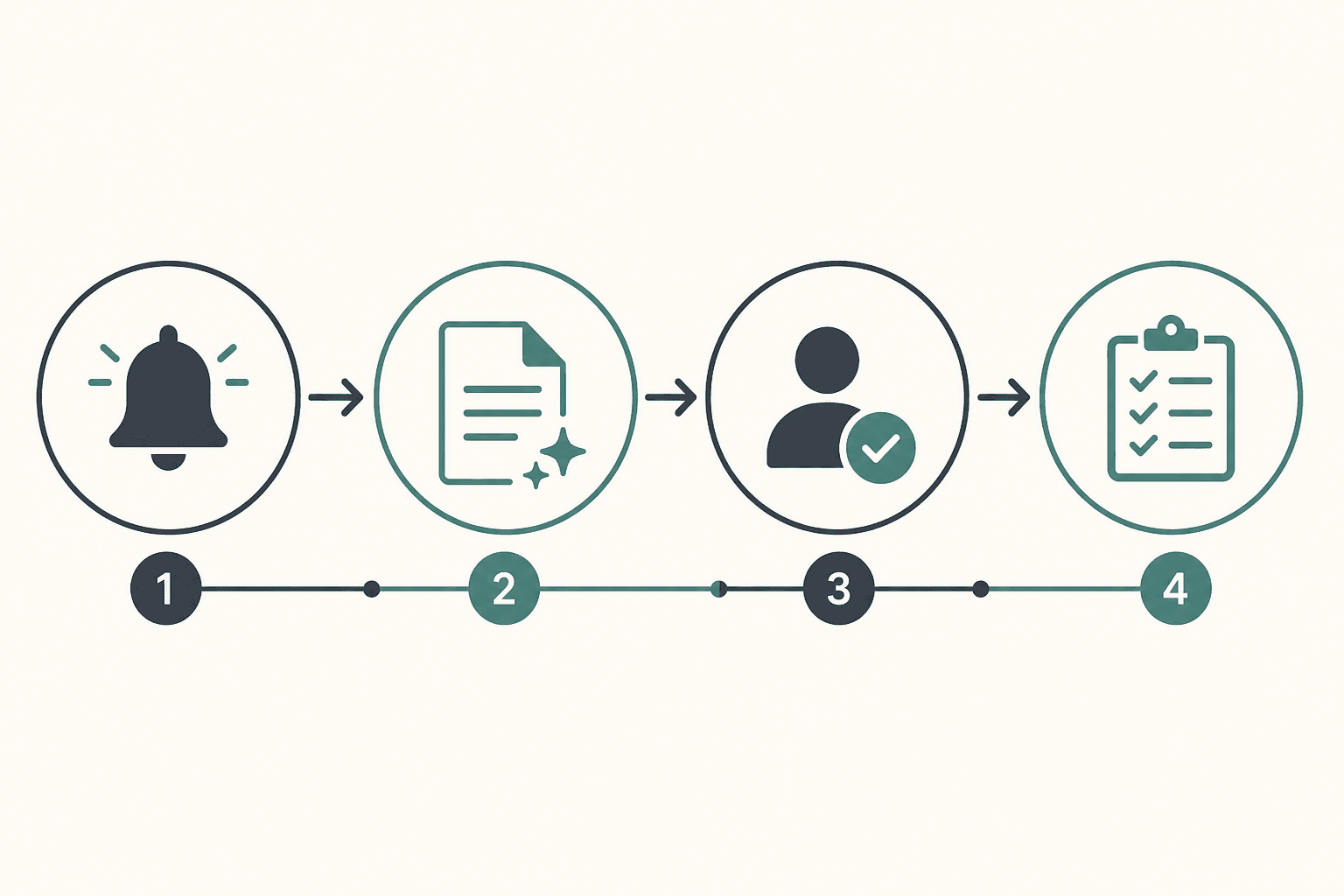
The spine looks like this:
- Trigger — A new client or hire is marked in your CRM, HRIS, or project tool (contract signed, deal stage "Won," start date set).
- Context pull — Automation reads role, service type, start date, and any intake answers already on file.
- AI drafting — A language model generates a checklist, welcome email draft, document request list, or kickoff agenda from approved templates — not from scratch every time.
- Human review — A named owner checks tone, scope, compliance language, and names before anything external sends.
- Action — Approved items become CRM tasks, calendar holds, folder structures, or scheduled emails.
AI is strongest at checklist generation, email drafting, agenda outlines, and follow-up reminders. It is weakest at employment law interpretation, contract scope decisions, pricing exceptions, or anything that changes what you owe a client. Those stay with a human owner.
For the broader automation pattern, see AI CRM automation. For agency-specific ops, see AI workflow for agencies.
Client onboarding vs employee onboarding
These look similar but should not share one automation:
| Dimension | Client onboarding | Employee onboarding |
|---|---|---|
| Owner | Account manager or ops lead | HR or hiring manager |
| Goal | Clear scope, docs, kickoff | Access, training, compliance |
| Sensitive data | Contracts, SOWs, billing | Tax forms, IDs, payroll |
| Tools | CRM, client portal, e-sign | HRIS, IT access, handbook |
| Success metric | Time-to-kickoff, doc completeness | Time-to-productivity, access done |
Client onboarding feeds revenue. Employee onboarding feeds retention and compliance. Mixing them in one prompt invites the wrong tone and the wrong document requests.

Who should use an AI onboarding workflow
Build or upgrade an AI onboarding workflow when:
- You onboard at least two clients or employees per month
- Start triggers live in one system (CRM stage, HRIS hire date, signed contract in DocuSign or PandaDoc)
- You have approved templates for welcome emails, document lists, and kickoff agendas
- A named person reviews external messages before send
- Missing items are trackable — not "we think we asked for that"
Strong fits:
- Agencies and consultancies with retainer, project, or hourly client types — see AI workflow for agencies
- Accountants and bookkeepers collecting recurring document packets — see AI workflow for accountants
- Freelancers scaling beyond solo memory-based onboarding
- Growing SMBs hiring every quarter who need consistent IT and HR checklists
If every onboarding is bespoke with no templates, write three standard paths first — retainer client, project client, and hourly contractor (or full-time, part-time, contractor for HR) — then automate.
Who should NOT use an AI onboarding workflow
| Situation | Why wait |
|---|---|
| Fewer than one new client or hire per quarter | Manual onboarding plus a shared doc may be enough |
| No system of record for triggers | Fix CRM or HRIS hygiene first — automation amplifies bad data |
| No approved templates or tone guide | AI will invent scope, deadlines, and policy language |
| Nobody can review drafts within 24 hours | Backlog creates worse delays than manual send |
| High-stakes regulated onboarding (medical, legal, financial advice) without compliance sign-off | Draft-only until legal or HR approves template library |
| You want a website chatbot to "onboard" visitors | That is lead capture, not client onboarding — see AI chatbots for small business |
Automate onboarding only when the process is documented enough to template. Automating a broken process scales chaos.
Quick recommendation
Things to consider before choosing
Work through these before buying tools or writing prompts:
- Path count — How many distinct onboarding paths exist (service types, roles)?
- Trigger clarity — Is "started" a reliable CRM stage or HRIS field?
- Template maturity — Do welcome emails, doc lists, and agendas already exist in approved form?
- Review capacity — Can an owner approve drafts in under 10 minutes each?
- Stakes — Would a wrong send affect contracts, billing, tax compliance, or brand trust?
- Document ownership — Does every checklist item have a named internal owner?
- System of record — Where do client or employee facts live after onboarding?
- Meter stacking — Zap tasks, Make credits, CRM seats, and LLM subscriptions are separate bills
If you cannot answer #2 and #6, fix operations before layering AI.
Key features of a strong AI onboarding workflow
Score any setup on capabilities that change risk and ROI — not vendor marketing labels.
| Feature | Why it matters | Client path | Employee path |
|---|---|---|---|
| Template library | Stops invented scope and policy | Service-type checklists | Role-based access lists |
| Draft-only external sends | Prevents tone and compliance errors | Welcome, reminders, agendas | Offer letters stay HR-owned |
| Named owners per item | Nothing assigned to "the team" | Account manager | Hiring manager + IT |
| CRM / HRIS task sync | Onboarding connects to pipeline or headcount | Deal and project records | IT tickets, training tasks |
| Document chase with itemized lists | Reduces "just checking in" noise | W-9, brand assets, logins | I-9, direct deposit, handbook ack |
| Kickoff agenda from status | Signals professionalism | 30-min client kickoff | Week-one manager 1:1 |
| Audit trail | Debug failures and prove sends | CRM activity log | HRIS notes |
| Kill switch | Pause without deleting work | Pause Zap or scenario | Pause HR workflow |
For email sequence patterns that pair with onboarding mail, see AI email automation sequences and AI email marketing for small business.
Best-for table
| Profile | Best starting workflow | Avoid first |
|---|---|---|
| Marketing agency (5–20 clients/year) | Client checklist + welcome draft + doc chase | One automation for clients and employees |
| Solo consultant | Welcome draft + Notion checklist | Full CRM stack before second client |
| Bookkeeping firm | Document request + reminder sequence | Auto-send without reviewing tax language |
| 3–10 person service business | CRM trigger → tasks + reminders | Agent with unsupervised send access |
| HR lead hiring monthly | Employee access packet (internal only) | Client welcome templates in HR flow |
| Google Workspace shop | Workspace Studio for folder + email drafts | Parallel Zapier for every two-app handoff |
| HubSpot-centric sales team | Deal stage trigger + task creation | HubSpot Professional solely for basic onboarding |
| Pipedrive-light agency | Make scenario + draft agent | Enterprise HRIS for three hires per year |
Pricing in 2026
Directional anchors from official vendor pricing pages (verify before purchase — plans, bundles, and promos change). Budget human review minutes as part of total cost; they often exceed software fees at low volume.
Automation layer (triggers and handoffs)
| Platform | Published entry (USD) | Meter | Onboarding fit |
|---|---|---|---|
| Zapier Free | $0 | 100 tasks/mo; 2-step Zaps | Pilot one trigger |
| Zapier Professional | from | 750+ tasks/mo | Multi-step CRM + email + Slack |
| Make Core | from ~$9–12/mo annual | 10,000 credits/mo | Branching doc-chase scenarios |
| n8n Cloud Starter | €20/mo annual | 2,500 executions | Technical teams, self-host option |
| Google Workspace Studio | Included with eligible Workspace plans | Workspace-bound | Gmail, Drive, Meet-native shops |
Deep platform comparison: n8n vs Zapier vs Make. Workspace-native flows: Google Workspace Studio.
CRM / HRIS layer
| Product | Published entry | Notes for onboarding |
|---|---|---|
| HubSpot Sales Hub Starter | from | Pipeline stages, basic automation; sequences on higher tiers |
| Pipedrive | from ~$14/seat/mo (Essential, annual) | Deal-stage triggers; lighter automation than HubSpot |
| Notion (with AI) | Notion plans + AI add-on | Checklists and wikis — see Notion AI for small business |
CRM comparison: HubSpot vs Pipedrive AI.
AI drafting layer
| Product | Published entry | Onboarding use |
|---|---|---|
| ChatGPT Plus / Business | ~$20/user/mo common list | Projects, custom GPTs with template library |
| Claude Pro / Team | ~$20/mo Pro; Team per seat | Projects for checklist and email drafts |
| ChatGPT Work | Team pricing varies | Shared workspace — see ChatGPT Work for small business |
Realistic SMB stacks (directional)
| Volume | Typical monthly stack | What you get |
|---|---|---|
| 2–4 onboardings/mo | ~$40–$80 | CRM free/starter + Make Core + one LLM seat |
| 5–15 onboardings/mo | ~$100–$250 | HubSpot/Pipedrive + Zapier Pro + 2 LLM seats |
| Agency 20+ onboardings/mo | ~$250–$600+ | CRM seats + higher task/credit tier + review time |
Hidden cost on every lane: owner review time. If correction on welcome drafts stays above 10 minutes each, tighten templates before adding workflows.
Pros and cons
Pros
- Checklists and welcome drafts cut admin time without removing human judgment
- Templated document chases reduce awkward ad-hoc follow-ups
- CRM task creation connects onboarding to revenue and delivery pipelines
- Separate client and employee paths keep tone and compliance appropriate
- Draft-only mode limits brand and legal risk in the first 60 days
- Repeatable paths make time-to-kickoff measurable month over month
Cons
- Useless without approved templates — AI will invent scope and deadlines
- Auto-send on day one creates expensive tone and compliance mistakes
- Meters stack across CRM, automation, and LLM subscriptions
- Dirty CRM or HRIS data produces wrong names, dates, and task owners
- One automation for clients and employees mixes the wrong documents and tone
- Kickoff quality still depends on humans — agendas do not replace the call
Best use cases
Client onboarding
- Checklist generation when deal stage moves to "Won" or contract is signed
- Welcome email drafts personalized by service type from intake data
- Document chase 48 hours after request — list only missing W-9s, brand guides, or ad account access
- Kickoff agenda built from checklist completion and open questions
- CRM tasks with format:
[Client] — Collect brand guide — Due [date]
Agencies should pair this with AI proposal writing for small business so scope language stays consistent from proposal to onboarding.
Employee onboarding
- Access request drafts five business days before start (IT ticket text, tool list)
- Week-one training outline from role template
- Internal-only reminders for handbook acknowledgment and equipment pickup
- Manager 1:1 agenda — never CC clients on employee automations
Combined ops (same company, separate workflows)
A consultancy might run client onboarding in HubSpot and employee onboarding in an HRIS — same LLM template library, different owners, triggers, and approval paths.
Limitations
- AI does not interpret employment law, visa status, or contract scope — HR and account managers own those calls
- Language models hallucinate deadlines and policy if templates are thin — enforce "do not invent pricing, scope, or legal terms" in every prompt
- Automation cannot fix missing CRM fields — wrong email merge tags erode trust on day one
- Auto-send is inappropriate for month one on external client and candidate messages
- Kickoff calls, relationship check-ins, and strategic problem-solving stay human — automate logistics, not trust
- Free automation tiers suit pilots; production volume usually needs paid plans and named owners
What "done" looks like after 30 days
| Metric | Target |
|---|---|
| Median days from trigger to kickoff complete | Trending down vs baseline |
| Required documents received before kickoff | ≥80% |
| Manual reminder emails per onboarding | ≤1 on average |
| Welcome draft edit time | ≤10 minutes |
| Checklist items reopened after "complete" | Tracked and declining |
Comparison tables
Table 1 — Client vs employee workflow design
| Design choice | Client onboarding | Employee onboarding |
|---|---|---|
| Primary trigger | CRM stage / signed contract | HRIS hire date / offer accepted |
| External communication | Welcome, doc requests, kickoff confirm | Offer and policy stay HR-owned; internal reminders only |
| Typical doc chase | W-9, brand assets, platform access | I-9, tax forms, direct deposit |
| Task destination | CRM + project tool | HRIS + IT ticketing |
| Approval owner | Account manager | Hiring manager + HR |
| Success KPI | Time-to-kickoff | Time-to-productivity / access complete |
| Auto-send in month one | No | No |
Table 2 — Stack options for SMB onboarding automation
| Stack pattern | Entry cost posture | Best when | Trade-off |
|---|---|---|---|
| CRM only (HubSpot/Pipedrive stages + manual AI drafts) | Low | <3 onboardings/mo | No automatic doc chase |
| CRM + Zapier | Low–mid + task growth | Clean triggers, HubSpot/Pipedrive already live | Premium apps need Pro tier |
| CRM + Make | Low–mid + credits | Branching reminders by service type | Credit math on complex scenarios |
| Workspace Studio + Drive | Workspace subscription | Google-native shop | Less breadth than Zapier catalog |
| CRM + LLM Project (no automation) | ~$20/seat LLM | Template library first, automation later | Manual copy-paste until Zap added |
| HRIS + internal Make scenario | Mid | Monthly hiring, IT access lists | Must stay internal-only |
Platform fork when automation is the bottleneck: n8n vs Zapier vs Make.
Decision matrix
Answer yes/no, then follow the path that matches.
10-minute diagnostic
- Do you onboard clients and employees? → If yes, split workflows (non-negotiable).
- Is your trigger a reliable field in CRM or HRIS? → If no, fix data first.
- Do approved templates exist for welcome mail and doc lists? → If no, write templates in week 1.
- Would a wrong external send hurt legally, financially, or reputationally? → If yes, draft-only for 60 days.
- Are you onboarding 2+ per month? → If no, stay manual with a shared checklist.
Weighted scoring matrix
Score each approach 1–5. Multiply by weight. Highest total wins for this job only.
| Criterion | Weight | Checklist + draft only | + Doc chase automation | + CRM task sync | Full stack + kickoff agenda |
|---|---|---|---|---|---|
| Onboarding volume (2+/mo) | 5 | ||||
| Template library ready | 5 | ||||
| CRM/HRIS trigger reliable | 4 | ||||
| Need doc chase at scale | 4 | ||||
| Review capacity (<10 min draft) | 3 | ||||
| Multi-service-type branching | 3 | ||||
| Low autonomy risk priority | 4 | ||||
| Weighted total |
Rule of thumb: If volume is low and templates are immature, stop at checklist + welcome draft. Add doc chase when reminders become your biggest time sink. Add CRM task sync when items fall through after kickoff.
Setup checklist
Use this as a one-afternoon readiness filter before turning anything on.
- One client path or one employee path selected (not both in v1)
- Written SOP with trigger, owners, and success metric
- Template library: checklist JSON, welcome tone guide, doc list, agenda outline
- Trigger field verified in CRM or HRIS (test with last 3 onboardings)
- Named reviewer for every external send
- Draft-only mode enforced in automation (no auto-send step)
- Document upload link or portal URL ready and tested
- Task title format agreed:
[Name] — Action — Due [date] - Kill switch documented (who pauses Zap/scenario)
- KPI baseline captured: days to kickoff, docs before kickoff, reminder count
- Prompt library stored with guardrails: no invented pricing, scope, or legal terms
- 30-day review date on calendar
Six core workflows
These six patterns deliver the highest ROI for SMB onboarding automation. Each follows trigger → draft → approve → action.

1. Checklist generation from templates
Trigger: Client marked "Won" or employee marked "Hired."
AI task: Generate role- or service-specific checklist from template library (access, documents, intro calls, billing setup).
Human step: Remove irrelevant items; assign owners and due dates.
Why it works: Checklists are structured and low-risk. They prevent the "we forgot to ask for W-9" moment.
2. Welcome email drafts
Trigger: Start date confirmed.
AI task: Draft welcome email from tone guidelines — week one plan, contacts, preparation steps.
Human step: Edit names, scope references, contractual language. Send manually or via CRM with approval.
Never auto-send welcome emails in the first 60 days.
3. Document request chasing
Trigger: Required document missing 48 hours after request.
AI task: Draft 80–100 word reminder listing only missing items with secure upload link.
Human step: Approve send; escalate to phone if third reminder fails.
4. Kickoff agenda and meeting brief
Trigger: Kickoff call scheduled.
AI task: Draft 30-minute agenda from checklist status, open questions, and service type.
Human step: Confirm attendees and sensitive topics to avoid on the call.
5. CRM task creation from approved checklists
Trigger: Checklist approved by owner.
AI task: Map items to CRM tasks with due dates and assignees.
Human step: Spot-check titles and owners before unattended runs.
Connects to AI CRM automation and HubSpot vs Pipedrive AI.
6. Employee access and training packet (internal)
Trigger: New hire start date minus five business days.
AI task: Draft IT access request, tool list, and week-one training outline from role template.
Human step: HR confirms compliance; IT confirms access scope. Internal only — do not CC clients.
Example: agency client onboarding in week one
Day 0 — contract signed: CRM stage → "Onboarding." AI generates checklist: brand assets, ad account access, billing contact, kickoff call. Account manager trims and assigns tasks.
Day 1 — welcome draft: AI drafts welcome with portal link and upload instructions. Manager edits scope reference; sends via CRM.
Day 3 — document chase: Missing brand guide triggers reminder draft. Manager approves; send logged in CRM.
Day 5 — kickoff: AI drafts agenda from checklist. Team runs call; notes return to CRM project record.
Agencies with similar paths often cut time-to-kickoff from two weeks to five business days when templates exist and review is fast.
Prompt patterns that work
Client checklist prompt:
Using only the template JSON below, generate an onboarding checklist for a new {{service_type}} client.
Return JSON: items (title, owner_role, due_offset_days, required_doc boolean), welcome_email_draft, kickoff_agenda_outline.
Do not invent pricing, scope, or legal terms.
Template JSON:
{{template}}
Document chase prompt:
Draft an 80–100 word reminder email for missing onboarding documents.
List only these missing items: {{missing_list}}.
Tone: friendly, professional. Include upload link: {{link}}.
No guilt trips. No invented deadlines.
Store prompts in a shared library so every manager uses the same guardrails.
Four-week rollout plan
| Week | Focus | Exit criteria |
|---|---|---|
| 1 | Document one client path + one employee path | Written SOP + template library |
| 2 | Checklist + welcome draft automation | 5 test runs reviewed by owner |
| 3 | Document chase + CRM tasks | Tasks created correctly in CRM |
| 4 | Kickoff agenda + limited production | Named owner, weekly exception review |
Track monthly: median days to kickoff complete, % docs before kickoff, manual reminders per onboarding, week-one clarity survey (1–5), checklist items reopened after "complete."
Common mistakes
- One automation for clients and employees — Split workflows, owners, and templates.
- Auto-send welcome emails without review — Draft-only minimum 60 days.
- No document ownership — Every item needs a named internal owner, not "the team."
- Vague CRM task titles — Enforce
[Client] — Collect brand guide — Due [date]. - Automating before templates exist — AI invents scope; humans spend more time fixing than writing.
- Treating chat memory as CRM — Pipeline facts belong in HubSpot, Pipedrive, or your system of record.
- Ignoring meters — Zap tasks, Make credits, and LLM seats stack separately.
- No kill switch — Every live workflow needs a human who can pause it without deleting history.
- Skipping the kickoff — Agendas help; they do not replace the conversation that builds trust.
- Buying an agent platform for a checklist problem — Start with templates and light automation; see AI agents for small business when judgment variance justifies it.
Alternatives and competitor comparison
Manual onboarding vs AI-assisted workflow
| Approach | Best when | Weak when |
|---|---|---|
| Shared doc + memory | <1 onboarding per quarter | Volume grows; items get missed |
| CRM tasks only, no AI | Triggers exist; copy is stable | Welcome mail needs heavy personalization |
| AI drafts + manual send | Templates exist; review capacity | No reviewer available within 24h |
| Full automation with auto-send | Proven edit rate after 60+ runs | Month one or regulated vertical |
Automation platforms for onboarding handoffs
When the question is which connector, not whether to automate:
| Need | Lean toward | Official reference |
|---|---|---|
| Largest app catalog, fastest non-technical setup | Zapier | zapier.com/pricing |
| Visual branching, credit economics at volume | Make | make.com/en/pricing |
| Execution billing, self-host, deeper control | n8n | n8n.io/pricing |
| Gmail, Drive, Meet-native | Google Workspace Studio | AI Growthub Workspace Studio guide |
Full comparison: n8n vs Zapier vs Make.
CRM-native onboarding vs CRM + automation
| Pattern | Lean toward | Caveat |
|---|---|---|
| Pipeline and tasks only | HubSpot or Pipedrive Starter | Sequences and advanced workflows on higher tiers |
| Cross-app (Slack, Drive, billing) | CRM trigger + Zapier/Make | HubSpot on Zapier may require Professional tier |
| Draft-heavy personalized mail | LLM Project + narrow CRM Zap | Draft-only until edit rate proven |
CRM fit: HubSpot vs Pipedrive AI.
Suggested future AI Growth Hub articles
- Employee onboarding automation for SMBs (HRIS + IT focus) — deep dive when HR volume justifies a dedicated guide
- Client portal vs email-only onboarding — when a portal pays off vs secure upload links
Frequently asked questions
What is the best first AI onboarding workflow for a small business?
Start with checklist generation and welcome email drafts from approved templates. They are structured, easy to review, and do not require the AI to make contractual or HR decisions.
Should client and employee onboarding use the same automation?
No. Split them. Client onboarding needs CRM tasks, scope-aware language, and document collection. Employee onboarding needs HR compliance, access requests, and internal-only messaging.
Can AI send welcome emails automatically?
Not in month one. Draft emails with AI, then have a named owner review and send manually or via CRM with approval. Auto-send only after tone and accuracy are proven on real onboardings over 60+ days.
How do I chase missing onboarding documents without annoying clients?
Use templated reminders that list only missing items, include a secure upload link, and escalate to a phone call after the third reminder. AI drafts the email; a human approves every send.
Which tools work best for AI onboarding workflows?
Most SMBs connect a CRM or HRIS trigger to Zapier, Make, or n8n, use an LLM for drafts inside a template library, and create tasks in HubSpot, Pipedrive, or their project tool. Choose based on where your start trigger already lives. Compare platforms in n8n vs Zapier vs Make.
How is this different from a website chatbot?
A chatbot answers visitor questions in a chat widget. An onboarding workflow runs after someone becomes a client or employee — checklists, welcome sequences, document collection, and kickoff prep. See AI chatbots for small business for the front-door use case.
What metrics should I track?
Median days from "Won/Hired" to kickoff complete, percentage of required documents received before kickoff, manual reminder emails per onboarding, week-one clarity score, and checklist items reopened after marked complete.
When should I add AI agents to onboarding?
When inbound context varies widely and fixed automation branches become unmaintainable — but keep draft-only and explicit forbidden actions. Start with the AI agents for small business pillar before buying a specialized agent platform.
Final recommendation
Build a narrow, template-driven, supervised onboarding workflow — not a generic "AI onboarding bot."
- Split client and employee paths with different owners and templates.
- Week 1: Document one path and build the template library.
- Week 2: Automate checklist + welcome drafts only; draft-only on external sends.
- Week 3–4: Add document chase and CRM tasks; then kickoff agendas.
- Stack: Trigger in CRM/HRIS → Zapier, Make, or Workspace Studio → LLM Project for drafts → human approval → tasks in system of record.
- Measure time-to-kickoff and edit time; tighten templates before adding complexity.
The winning pattern is boring on purpose: trigger → draft → approve → task. Everything else — kickoff agendas, training packets, portal setup — plugs into that spine.
For adjacent playbooks: AI automation for small business, AI workflow for agencies, AI CRM automation, and AI email automation sequences.
Image prompts for production
Hero (16:9), editorial photography, no logos, no readable UI: "Wide editorial photograph of a small business operations lead at a light wood desk with two organized stacks of paper — one labeled client materials and one labeled employee materials only as abstract colored dividers, no readable text — laptop closed, morning window light, shallow depth of field, documentary magazine style, no logos, 16:9."
Supporting image 1 (16:9): "Over-the-shoulder editorial photo of an account manager reviewing a printed onboarding checklist with checkboxes, red pen marking one item, warm office lamp, no readable UI or brand logos, photorealistic, 16:9."
Supporting image 2 (16:9): "Documentary-style photo of a small agency team of three standing at a whiteboard with columns of sticky notes in three colors suggesting workflow stages, no readable words, natural light, authentic small-business energy, no logos, 16:9."
Infographic prompt (16:9): "Clean editorial infographic on neutral cream background: horizontal flow diagram — Trigger → AI Draft → Human Approve → CRM Task — with simple geometric icons for each step, charcoal and muted teal palette, no logos, no tiny UI text, 16:9."
Metadata (CMS)
| Field | Value |
|---|---|
| Title | AI Onboarding Workflow: The Complete 2026 Guide for Client & Employee Kickoffs |
| Slug | ai-onboarding-workflow |
| Primary keyword | AI onboarding workflow |
| Secondary keywords | client onboarding automation, employee onboarding workflow, AI welcome email draft, onboarding checklist automation, new client kickoff workflow |
| Semantic keywords | draft-only mode, document chase, CRM task creation, time-to-kickoff, template library, human review, kickoff agenda, HRIS trigger |
| Meta title | AI Onboarding Workflow: Complete 2026 SMB Guide |
| Meta description | Definitive 2026 guide to AI onboarding workflows for clients and employees — checklists, welcome drafts, doc chasing, CRM tasks, pricing, decision matrix, and a 4-week rollout plan. |
| Excerpt | Turn new client and employee kickoffs into a template-driven AI workflow with human review on every external send — tables, checklists, pricing, and a four-week rollout. |
| Category | Automation (ai-automation) |
| Type | guide |
| Tags | Email Sequences, Small Business, Workflow Automation, No-Code Automation |
| JSON-LD | Article + FAQPage + HowTo (setup checklist) |
Key takeaway
Build a template-driven AI onboarding workflow for new clients and employees: checklists, welcome drafts, document chasing, CRM tasks, and kickoff agendas — with human review on every external send. For more step-by-step guides, browse our blog or explore Automation.
Frequently asked questions
What is the best first AI onboarding workflow for a small business?
Start with checklist generation and welcome email drafts from approved templates. They are structured, easy to review, and do not require the AI to make contractual or HR decisions.
Should client and employee onboarding use the same automation?
No. Split them. Client onboarding needs CRM tasks, scope-aware language, and document collection. Employee onboarding needs HR compliance, access requests, and internal-only messaging.
Can AI send welcome emails automatically?
Not in month one. Draft emails with AI, then have a named owner review and send manually or via CRM with approval. Auto-send only after tone and accuracy are proven on real onboardings over 60+ days.
How do I chase missing onboarding documents without annoying clients?
Use templated reminders that list only missing items, include a secure upload link, and escalate to a phone call after the third reminder. AI drafts the email; a human approves every send.
Which tools work best for AI onboarding workflows?
Most SMBs connect a CRM or HRIS trigger to Zapier, Make, or n8n, use an LLM for drafts inside a template library, and create tasks in HubSpot, Pipedrive, or their project tool. Choose based on where your start trigger already lives.
How is this different from a website chatbot?
A chatbot answers visitor questions in a chat widget. An onboarding workflow runs after someone becomes a client or employee — checklists, welcome sequences, document collection, and kickoff prep.
What metrics should I track?
Median days from Won/Hired to kickoff complete, percentage of required documents received before kickoff, manual reminder emails per onboarding, week-one clarity score, and checklist items reopened after marked complete.
When should I add AI agents to onboarding?
When inbound context varies widely and fixed automation branches become unmaintainable — but keep draft-only mode and explicit forbidden actions. Start with constrained agent patterns before buying a specialized platform.
Written by
AI Growthub StaffEditorial Team
The AI Growthub editorial team covers practical AI news, tools, and workflows for small business owners. Every article is fact-checked against primary sources before publication.
Comments are coming soon
We’re building a discussion space for business owners. Until then, reply to any newsletter issue — we read everything.
Related posts

Google Workspace Studio for Small Business (2026): The Complete Guide
Build Google Workspace Studio flows for SMBs: Gmail invoice logging, Meet follow-ups, Sheets triggers, limits, approval rules, and when Zapier still wins.
n8n vs Zapier vs Make (2026): Best Automation Platform for SMBs?
Compare n8n vs Zapier vs Make for small business: task vs credit vs execution pricing, AI agents, setup paths, and which iPaaS to start on in 2026.
Claude for Small Business: Complete 2026 Setup Guide
Set up Claude for Small Business: Cowork plugin, QuickBooks and HubSpot connectors, 15 workflows, Pro vs Team pricing, and when ChatGPT Work or Gemini fits better.
The AI edge, delivered every Tuesday
One 5-minute email: the tools worth your money, the plays that are working right now, and zero hype. Unsubscribe anytime.
No spam. No selling your data. Read by owners of restaurants, gyms, clinics, and agencies across the US, UK, Canada, and Australia.