AI CRM Automation: The Complete 2026 Guide (Lead Capture, Tagging & Follow-Up)
Build supervised AI CRM automation for small sales teams: capture leads, draft tags and follow-ups, stale deal alerts, and meeting recaps — with human approval before every external send.

Your CRM should not be a graveyard of stale deals. Most small teams capture leads fine — they fail at tagging intent, drafting timely follow-ups, and surfacing opportunities that went quiet without anyone noticing.
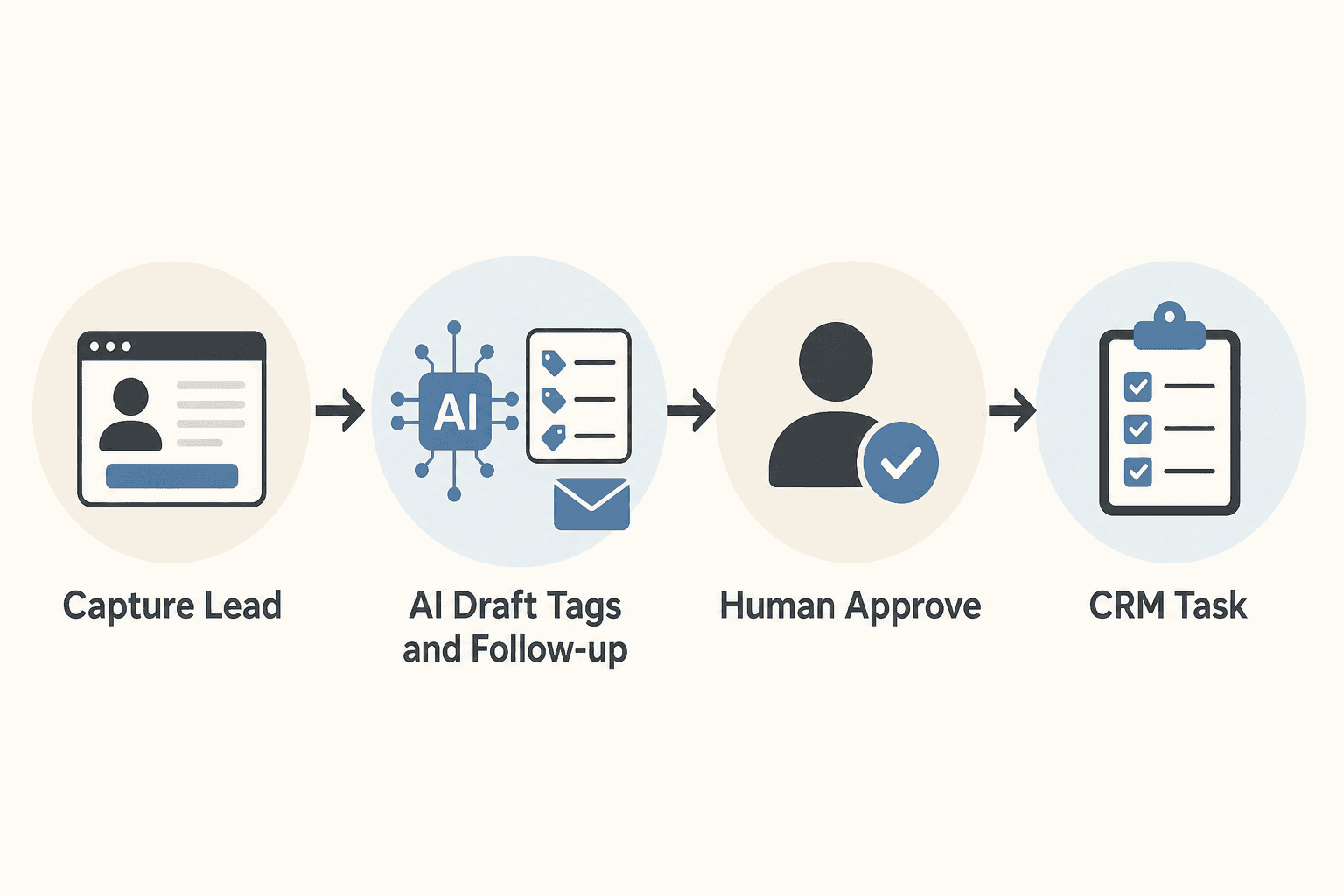
AI CRM automation is a supervised system: forms and inboxes feed your CRM, AI drafts tags and follow-ups, humans approve every external send, and stale deals trigger tasks — not spam. It is not an autopilot that blasts sequences while you sleep.
This guide is the definitive 2026 reference for sales-led SMBs, local service businesses, agencies, and lean B2B teams in the US, Canada, UK, and Australia using HubSpot, Pipedrive, or similar. It covers capture, tagging, follow-up drafts, meeting recaps, stale-deal alerts, pricing from official vendor pages, comparison tables, and a four-week rollout.
It sits under AI automation for small business and links to CRM comparisons, email sequences, and lead workflows where those fit better.
Table of contents
- Quick summary
- What is AI CRM automation?
- Who should use it
- Who should NOT use it
- Quick recommendation
- Things to consider before choosing
- Key features
- Best-for table
- Pricing in 2026
- Pros and cons
- Best use cases
- Limitations
- Comparison tables
- Decision matrix
- Setup checklist
- Six core workflows
- Four-week rollout plan
- Common mistakes
- Alternatives and competitor comparison
- FAQ
- Final recommendation
Quick summary
| If your main pain is… | Start here | Upgrade when… |
|---|---|---|
| Leads sit in inbox before CRM | Form → CRM capture with source fields | 100% of sources verified for 2 weeks |
| Reps rewrite the same follow-ups | AI follow-up drafts (draft-only) | Edit rate drops below ~30% on 30 sends |
| Bad or missing tags | AI tag suggestions from ICP doc | Human confirms every qualification tag |
| Deals go silent | Stale deal alerts by stage | Rep action rate on alerts is logged |
| CRM admin after calls | Meeting recap → CRM fields | 10 calls reviewed for field accuracy |
| Sequences feel robotic | Approval gate before each send | 30+ approved sends with logged edits |
Default bias for SMB sales teams: capture → draft → approve → send. Speed-to-lead still needs a human — AI accelerates the note, not the delay.
What is AI CRM automation?
AI CRM automation is a documented, repeatable path from lead to next action — not a chatbot pretending to be your sales director.
The spine:
- Capture — Form, email, chat, or booking creates or updates a CRM record with source and timestamp.
- Context — Deal summary, ICP criteria, playbook step, and last touch — not a full mailbox export.
- AI task — Draft tags, follow-up email, internal note, or meeting recap fields within guardrails.
- Human review — Rep edits, approves send, or overrides stage and tags.
- Action — Email sent, task created, stage updated, or stale alert queued.
AI is strongest at drafting, classification, summarization, and surfacing stale records. It is weakest at pricing exceptions, contract commitments, and moving deals to "qualified" without rep judgment.
For platform choice, see HubSpot vs Pipedrive AI. For agent-style follow-up with guardrails, see lead follow-up AI agent and AI agents for small business.
The supervised CRM loop
| Step | Form capture | Follow-up | Meeting recap |
|---|---|---|---|
| Trigger | New submission | No reply 48h | Call ends |
| Context | Form answers + source | Deal JSON + playbook step | Transcript or notes |
| AI output | Tag suggestions + note | Email draft | CRM field summary |
| Human gate | Assign owner | Edit + send | Approve CRM update |
| Action | Task + stage | Log activity | Update deal |

Who should use AI CRM automation
Build or upgrade when:
- Every lead source routes into one CRM (no shadow spreadsheets)
- Required fields exist: source, owner, created date, contact method
- You have a written follow-up playbook (day 0, day 2, day 7)
- Someone owns pipeline hygiene weekly
- You can measure reply rate and time-to-first-touch
Strong fits:
- Local B2B service firms (HVAC, agencies, consultants) with 20–200 leads/month
- Small sales teams (2–8 reps) on HubSpot Starter or Pipedrive Growth+
- Founder-led sales drowning in CRM data entry after calls
- Agencies connecting intake to pipeline — see AI workflow for agencies
Pair with AI lead generation workflow so top-of-funnel and CRM nurture share the same voice.
Who should NOT use AI CRM automation
| Situation | Why wait |
|---|---|
| Leads sit in shared inbox for days | Fix routing and capture first |
| No ICP or playbook doc | AI invents qualification language |
| Nobody reviews drafts within SLA | Backlog creates worse delays |
| You want full auto-send on day one | Brand and pricing risk — see AI agent vs chatbot vs Zapier |
| CRM data is duplicate-heavy | Automation amplifies dirty records |
| <10 leads per month | Manual follow-up may suffice |
If reps spend more time fixing bad drafts than writing from scratch, tighten playbooks before adding workflows.
Quick recommendation
Things to consider before choosing
- System of record — Is the CRM actually where deals live?
- Capture completeness — Are chat, form, and email leads all creating records?
- Playbook maturity — Written steps for day 0, 2, 7, 14?
- ICP clarity — Can you describe ideal fit in one page?
- Review capacity — Can reps batch-approve drafts daily?
- Stakes — Would a wrong discount or commitment email hurt?
- Native vs glue — Can HubSpot/Pipedrive workflows handle the trigger?
- Data minimization — Are you passing deal summaries, not full inboxes, to the model?
If #1 and #3 are weak, fix before layering AI.
Key features of strong AI CRM automation
| Feature | Why it matters | Capture | Nurture |
|---|---|---|---|
| Source field on every record | Attribution and routing | Required on create | Segmentation |
| AI tag suggestions | Faster segmentation | Form submit | First reply |
| Draft-only external sends | Prevents pricing/brand errors | — | Follow-ups |
| Stale deal alerts | Surfaces rot before QBR panic | — | By stage + days |
| Meeting recap → fields | Cuts admin time | — | Post-call |
| Approval queue | Batch review for founders | — | Sequences |
| Audit trail | Who approved what send | Compliance | Debugging |
| Block lists | Legal, partners, competitors → human | Inbound | Escalation |
For sequence design, see AI email automation sequences. For proposals after qualification, see AI proposal writing for small business.
Best-for table
| Profile | Best starting workflow | Avoid first |
|---|---|---|
| Solo founder, HubSpot free/starter | Form → CRM + follow-up drafts | Enterprise sequences |
| 3-rep Pipedrive team | Capture + stale alerts | Auto-tag "qualified" |
| Local service business | Speed-to-lead draft + task | AI sending without review |
| Agency new business | Source tagging + intake note | Full marketing hub stack |
| High inbound email volume | Triage labels + draft replies | Autonomous agent with send access |
| Post-call CRM haters | Meeting recap → fields | Freeform GPT with no schema |
| Wholesale + retail CRM | Separate pipelines and prompts | One prompt for both channels |
Pricing in 2026
Directional anchors from official vendor pricing (verify before purchase — promos and bundles change).
CRM platforms
| Product | Published entry (USD) | AI / automation notes |
|---|---|---|
| HubSpot CRM Free | $0 | Up to limited seats; basic pipeline |
| HubSpot Sales Hub Starter | from | Basic automation, email tracking |
| HubSpot Sales Hub Professional | from ~$90–100/seat/mo | Sequences, advanced workflows; onboarding fee often ~$1,500 year one |
| Pipedrive Lite/Essential | from ~$14/seat/mo annual | Pipeline; deeper automation on higher tiers — pipedrive.com/pricing |
| Pipedrive Growth | from ~$39/seat/mo annual | Email sync, automations |
| Pipedrive Premium | from ~$49/seat/mo annual | AI email tools on higher tiers per vendor docs |
Full comparison: HubSpot vs Pipedrive AI.
Drafting and glue layers
| Product | Published entry | CRM automation fit |
|---|---|---|
| ChatGPT Plus / Business | ~$20/user/mo common list | Projects with ICP + playbook |
| Claude Pro / Team | ~$20/mo Pro | Meeting recap and follow-up drafts |
| Zapier Professional | from ~$19.99/mo annual | Form tools → CRM if no native connector |
| Make Core | from ~$9–12/mo annual | Branching capture rules |
Realistic SMB stacks (directional)
| Team size | Typical monthly stack | What you get |
|---|---|---|
| 1–2 reps | ~$30–80 | CRM starter + 1 LLM seat |
| 3–5 reps | ~$150–400 | CRM seats + automation tier + LLM |
| 5+ with sequences | ~$400–900+ | Professional CRM tier or Pipedrive Growth+ |
Hidden cost: rep review minutes — often exceed software fees until edit rates stabilize.
Pros and cons
Pros
- Follow-up drafts cut blank-page time without removing rep judgment
- Tag suggestions speed segmentation when humans confirm
- Stale alerts replace vague pipeline meetings with actionable queues
- Meeting recaps reduce CRM admin after calls
- Draft-only mode limits pricing and brand mistakes
- Works on HubSpot or Pipedrive — discipline matters more than logo
Cons
- Useless if leads never reach CRM — capture must come first
- Auto-tags poison segments and sequences if wrong
- Auto-send creates embarrassing or contractual errors
- Professional CRM tiers jump cost for sequences and deep automation
- Bad context in prompts produces confident wrong drafts
- Does not fix broken sales process — only accelerates what exists
Best use cases
Capture and qualification
- Form → CRM with source, UTM, and owner assignment
- AI draft note: intent summary + suggested tags from ICP doc
- Rep confirms tags — never auto-move to "qualified"
Nurture and follow-up
- 48-hour no-reply → playbook follow-up draft
- Post-meeting bump with one value-add asset
- Breakup or re-engage draft on stale deals
Operations and hygiene
- Stale deal alert with suggested next action
- Meeting notes → CRM fields (next steps, objections, budget signal)
- Approval gate on sequence steps
Connect onboarding handoffs to AI onboarding workflow when deals close to delivery.
Limitations
- AI must not invent pricing, discounts, or contract terms
- Moving deals to qualified or closed-won stays rep-owned
- Full email history in prompts increases privacy and noise risk — use summaries
- Native CRM AI features vary by tier — verify on HubSpot and Pipedrive pages
- Auto-send sequences without review fail on edge cases (legal threats, partners, wrong persona)
- CRM automation does not replace speed-to-lead discipline — routing and ownership still matter
What "done" looks like after 30 days
| Metric | Target |
|---|---|
| % leads with source + owner within 24h | ≥95% |
| Median time-to-first-touch | Trending down |
| Edit rate on AI follow-up drafts | ≤30% |
| Stale open deals without activity | Declining |
| CRM admin minutes per closed deal | Declining |
Comparison tables
Table 1 — Workflow type by sales job
| Job | Best primary layer | AI role | Human gate |
|---|---|---|---|
| Lead capture | Native form / Calendly → CRM | Draft note + tags | Assign owner |
| Follow-up | CRM + LLM Project | Email draft | Rep send |
| Stale pipeline | CRM workflow | Alert + re-engage draft | Rep action |
| Meeting admin | Fireflies/Otter + LLM | Field extraction | Approve update |
| Sequences | CRM sequences / ESP | Step draft | Approval queue |
| Proposals | Doc tool + LLM | Scope draft | See proposal guide |
Meeting tools context: Fireflies.ai review.
Table 2 — HubSpot vs Pipedrive for AI CRM automation (editorial)
| Dimension | HubSpot Starter+ | Pipedrive Growth+ |
|---|---|---|
| Entry posture | Free tier; starter ~$15/seat/mo list | Essential ~$14/seat/mo annual |
| Email + marketing alignment | Stronger native marketing hub | Sales-first pipeline |
| Automation depth | Sequences on Professional+ | Automations tier-gated |
| AI features | Breeze across hubs (tier varies) | AI tools on Premium+ per vendor |
| Best for | Marketing + sales alignment | Visual pipeline, sales-only teams |
| Hidden cost | Hub jumps, onboarding on Pro | Email sync, add-ons on lower tiers |
Deep dive: HubSpot vs Pipedrive AI.
Decision matrix
10-minute diagnostic
- Are 100% of leads in CRM? → If no, week 1 is capture only.
- Is there a written playbook? → If no, write day 0/2/7 first.
- Do external emails need rep approval? → Yes for month one (always).
- Is the bottleneck data entry or writing? → Recaps vs follow-up drafts.
- Does your team already live in HubSpot or Pipedrive? → Extend that stack first.
Weighted scoring matrix
Score each approach 1–5. Multiply by weight.
| Criterion | Weight | Capture only | + Follow-up drafts | + Stale alerts | + Meeting recap + gated sequences |
|---|---|---|---|---|---|
| Lead volume (20+/mo) | 5 | ||||
| Playbook documented | 5 | ||||
| Rep review capacity | 4 | ||||
| CRM data quality | 4 | ||||
| Post-call admin pain | 4 | ||||
| Sequence volume | 3 | ||||
| Lowest autonomy risk | 5 | ||||
| Weighted total |
Rule of thumb: Capture and playbook before AI. Add follow-up drafts before sequences. Gate every external send until edit rate is stable.
Setup checklist
- All lead sources mapped to CRM create/update
- Required fields: source, owner, created date
- One-page ICP doc for tag suggestions
- Follow-up playbook (day 0, 2, 7, 14) in writing
- Draft-only on external sends — no auto-send step
- Named owner for pipeline hygiene weekly
- Stale thresholds defined per stage
- Block list for legal, partners, competitors
- Prompt library with no invented pricing rule
- KPI baseline: time-to-first-touch, edit rate, stale count
- Kill switch: who pauses sequences or Zaps
- 30-day review on calendar
Six core workflows
Each follows trigger → context → AI task → human review → action.

1. Form to CRM with source tagging
Trigger: New form submission.
AI task: Summarize intent, suggest tags (budget, timeline, fit), recommend owner.
Human step: Confirm tags; assign owner within SLA (under 15 minutes for hot leads).
2. Lead scoring and tagging drafts
Trigger: New lead or first reply.
AI task: Tags from ICP: industry, size band, urgency, budget signal.
Human step: Accept or override — never auto-tag "qualified."
3. Follow-up email drafts (not auto-send)
Trigger: No reply 48h or post-meeting.
AI task: Draft from playbook + deal context.
Human step: Personalize one line; send manually or approved sequence step.
4. Stale deal alerts
Trigger: No activity X days by stage.
AI task: Internal alert + optional re-engage email draft.
Human step: Call, breakup email, or stage change.
5. Meeting notes to CRM updates
Trigger: Call ends; notes in Zoom, Fireflies, or doc.
AI task: Extract next steps, objections, budget, suggested stage → JSON fields.
Human step: Rep approves before CRM posts.
6. Approval gates for sequences
Trigger: Sequence step would send email.
AI task: Prepare draft; hold until rep approves.
Human step: Daily approval queue review.
Example: local B2B service firm — week one
Lead in: Form → CRM "Website audit request." AI suggests tags: local, 10–50 employees, this quarter. Rep confirms and assigns self.
Day 0: AI drafts reply referencing form answers. Rep adds case study line; sends.
Day 3: No reply → AI drafts bump with checklist PDF. Rep approves from queue.
Day 14: Stale alert fires. Rep schedules call or moves to nurture.
Teams running this pattern often improve time-to-first-touch and reduce forgotten deals without increasing spam volume.
Prompt patterns
Follow-up draft:
Draft a 100–130 word follow-up email for this CRM context.
Tone: helpful, not pushy. One clear CTA.
Do not invent pricing, discounts, or contractual terms.
Context JSON: {{deal_context}}
Meeting recap to CRM:
From these call notes, return JSON only:
summary (max 80 words), next_steps (array), objections (array),
budget_signal (string or null), suggested_stage (string or null).
Notes: {{transcript}}
Four-week rollout plan
| Week | Focus | Exit criteria |
|---|---|---|
| 1 | Form → CRM + manual tags | 100% capture verified |
| 2 | AI tag + follow-up drafts | 20 drafts reviewed; edit patterns logged |
| 3 | Stale alerts + meeting recap | CRM notes accurate on 10 calls |
| 4 | Approved sequence steps | Owner sign-off on send gate |
Track monthly: time-to-first-touch, tag completeness, reply rate on approved drafts, stale count, CRM admin minutes per closed deal.
Common mistakes
- Auto-send sequences on day one — Draft-only until 30+ logged sends.
- Auto-tag qualified — Tags power segments; bad tags poison nurture.
- Leads not in CRM — Automating follow-up on shadow inboxes fails silently.
- Full inbox pasted into prompts — Use deal summaries; minimize PII surface.
- No playbook — AI invents cadence and tone every time.
- Ignoring speed-to-lead — AI note does not replace owner assignment SLA.
- Wrong CRM tier — Sequences need Professional on HubSpot or Growth+ on Pipedrive for many teams.
- No block list — Legal threats and partners need human-only routing.
- Buying Apollo for CRM hygiene — Fix capture in existing CRM first.
- Treating CRM chat memory as system of record — Pipeline facts live in deal fields.
Alternatives and competitor comparison
Manual CRM vs AI-assisted
| Approach | Best when | Weak when |
|---|---|---|
| Rep writes every email | <15 leads/mo | Volume and consistency break |
| CRM tasks only, no AI | Stable playbook | Personalization at scale |
| AI drafts + rep send | Playbook + review capacity | No reviewer available |
| Native CRM AI only | Simple tasks inside vendor UI | Cross-app capture |
| Full autonomous SDR agent | Mature QA and data | Month one for SMBs |
HubSpot vs Pipedrive vs glue stack
| Need | Lean toward |
|---|---|
| Marketing + sales one platform | HubSpot |
| Sales pipeline simplicity | Pipedrive |
| Typeform/Calendly → CRM | Native integration or Zapier/Make |
| Heavy meeting recap | LLM Project + Fireflies |
| Booking before follow-up | AI appointment scheduling |
Suggested future articles: HubSpot Breeze workflows for SMB sales teams and Pipedrive AI vs manual follow-up — ROI calculator.
Frequently asked questions
What is the safest first AI CRM automation for a small team?
Route all forms and inbound into CRM with source fields, then AI-draft follow-ups a rep approves before send. No auto-send until accuracy is proven on 30+ messages.
Can AI automatically tag and qualify leads?
AI can suggest tags and notes from your ICP doc. A human should confirm before qualified stages or high-intent sequences fire.
HubSpot or Pipedrive for AI CRM automation?
Both work. Choose where your team already lives, native automation depth, and tier cost. Discipline of capture and approval matters more than the logo — see HubSpot vs Pipedrive AI.
How do I prevent embarrassing sales emails?
Draft-only mode, rep approval on every external send for at least 30 messages, log edits, tie prompts to approved playbook — not freeform generation.
What metrics prove CRM automation is working?
Time-to-first-touch, reply rates on approved drafts, stale deal reduction, CRM admin minutes per closed deal. Data entry time should drop without reply rates falling.
When should I add an AI agent instead of CRM drafts?
When inbound context varies widely and fixed CRM branches break — but keep draft-only and forbidden actions. Start with lead follow-up AI agent patterns before platform shopping.
Does AI CRM automation replace a sales rep?
No. It reduces drafting and admin time. Relationship, negotiation, and qualification judgment stay human.
Can I use ChatGPT instead of native CRM AI?
Yes — many SMBs use a Claude or ChatGPT Project with ICP + playbook for drafts, then paste or sync via API/Zapier. Native CRM AI is optional, not mandatory.
Final recommendation
Build supervised AI CRM automation — capture clean, drafts reviewed, stale deals surfaced.
- Week 1: 100% capture with source fields.
- Week 2: Follow-up and tag drafts — draft-only.
- Week 3: Stale alerts + meeting recaps.
- Week 4: Gate sequence sends behind approval.
- Stack: Existing CRM first; LLM Project for drafts; Zapier/Make only for gaps.
- Measure time-to-first-touch and edit rate before expanding.
Your CRM should feel like a co-pilot, not an autopilot. Approval gates are the feature that protects brand trust.
Adjacent playbooks: AI email automation sequences, AI lead generation workflow, AI proposal writing for small business, and HubSpot vs Pipedrive AI.
Key takeaway
Build supervised AI CRM automation for small sales teams: capture leads, draft tags and follow-ups, stale deal alerts, and meeting recaps — with human approval before every external send. For more step-by-step guides, browse our blog or explore Sales.
Frequently asked questions
What is the safest first AI CRM automation for a small team?
Route all forms and inbound into your CRM with source fields, then AI-draft follow-ups a rep approves before send. Do not auto-send until accuracy is proven on 30+ messages.
Can AI automatically tag and qualify leads in my CRM?
AI can suggest tags and qualification notes from your ICP criteria, but a human should confirm before moving deals to qualified stages or triggering high-intent sequences.
HubSpot or Pipedrive — which is better for AI CRM automation?
Both work. Choose based on where your team already lives, native automation depth, and tier cost. Capture discipline and approval gates matter more than the logo.
How do I prevent AI from sending embarrassing sales emails?
Use draft-only mode, require rep approval on every external send for at least 30 messages, log edits, and keep prompts tied to an approved playbook.
What metrics prove CRM automation is working?
Track time-to-first-touch, reply rates on approved drafts, stale deal reduction, and CRM admin minutes per closed deal.
When should I add an AI agent instead of CRM drafts?
When inbound context varies widely and fixed CRM branches break — but keep draft-only mode and explicit forbidden actions. Start with constrained agent patterns before buying platforms.
Does AI CRM automation replace a sales rep?
No. It reduces drafting and admin time. Relationship, negotiation, and qualification judgment stay human.
Can I use ChatGPT instead of native CRM AI?
Yes. Many SMBs use a Claude or ChatGPT Project with ICP and playbook docs for drafts, then paste or sync via API or Zapier. Native CRM AI is optional.
Written by
AI Growthub StaffEditorial Team
The AI Growthub editorial team covers practical AI news, tools, and workflows for small business owners. Every article is fact-checked against primary sources before publication.
Comments are coming soon
We’re building a discussion space for business owners. Until then, reply to any newsletter issue — we read everything.
Related posts
AI Proposal Writing for Small Business: The Complete 2026 Guide
How agencies, consultants, and service businesses use AI proposal writing tools to cut drafting time, personalize scopes, and close deals faster — with pricing, comparisons, and a decision framework.
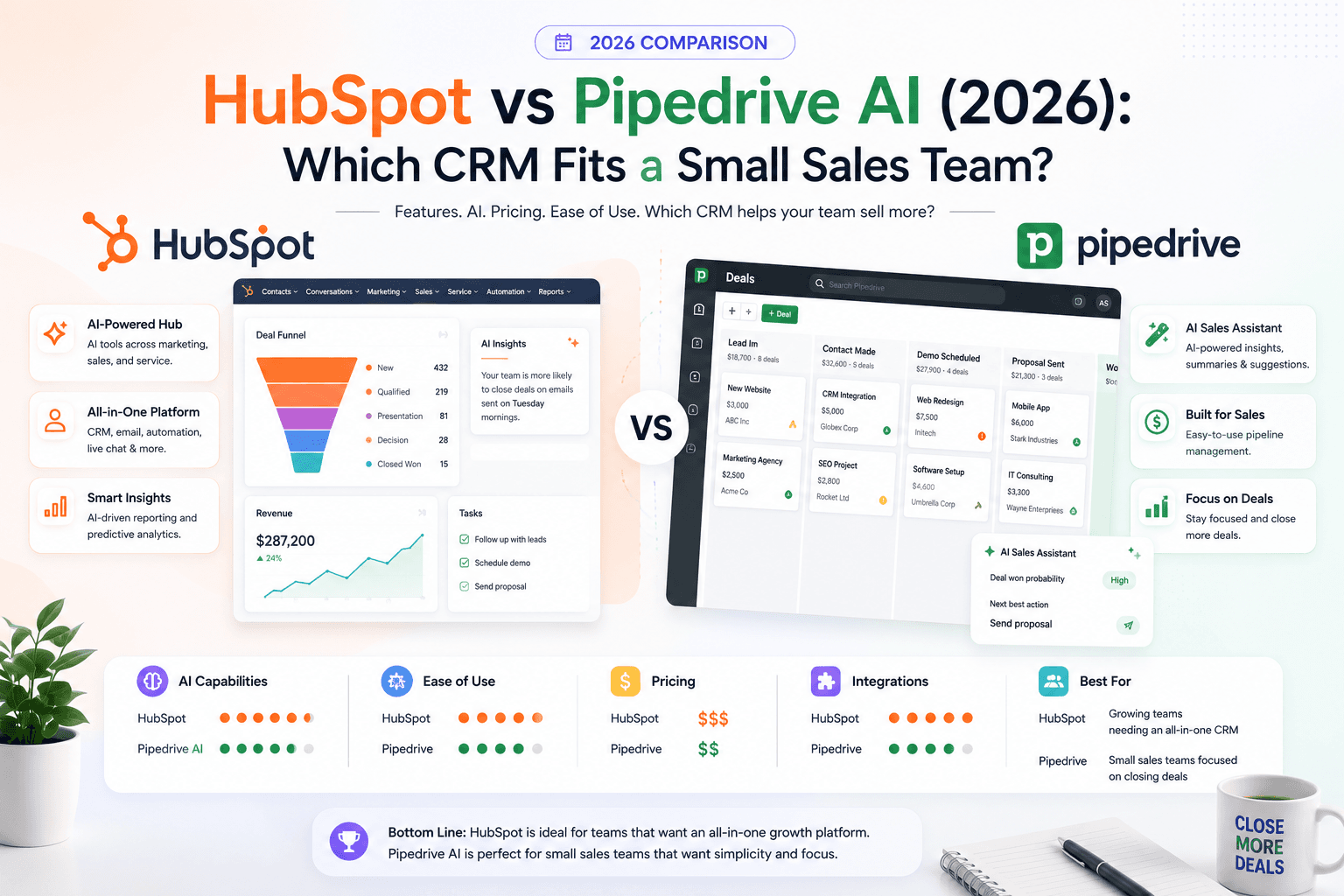
HubSpot vs Pipedrive AI (2026): Complete CRM Comparison for Small Teams
HubSpot and Pipedrive both ship AI in 2026 — but for different jobs. Compare pricing, Breeze vs Sales Assistant, automation limits, and which CRM small sales teams actually adopt.
The AI edge, delivered every Tuesday
One 5-minute email: the tools worth your money, the plays that are working right now, and zero hype. Unsubscribe anytime.
No spam. No selling your data. Read by owners of restaurants, gyms, clinics, and agencies across the US, UK, Canada, and Australia.