Canva Magic Studio Review 2026: Pricing, Features & Small Business Verdict
Canva Magic Studio review for small business: AI features, Free vs Pro vs Business pricing, Brand Kits, limitations, alternatives, and when upgrading is worth it in 2026.
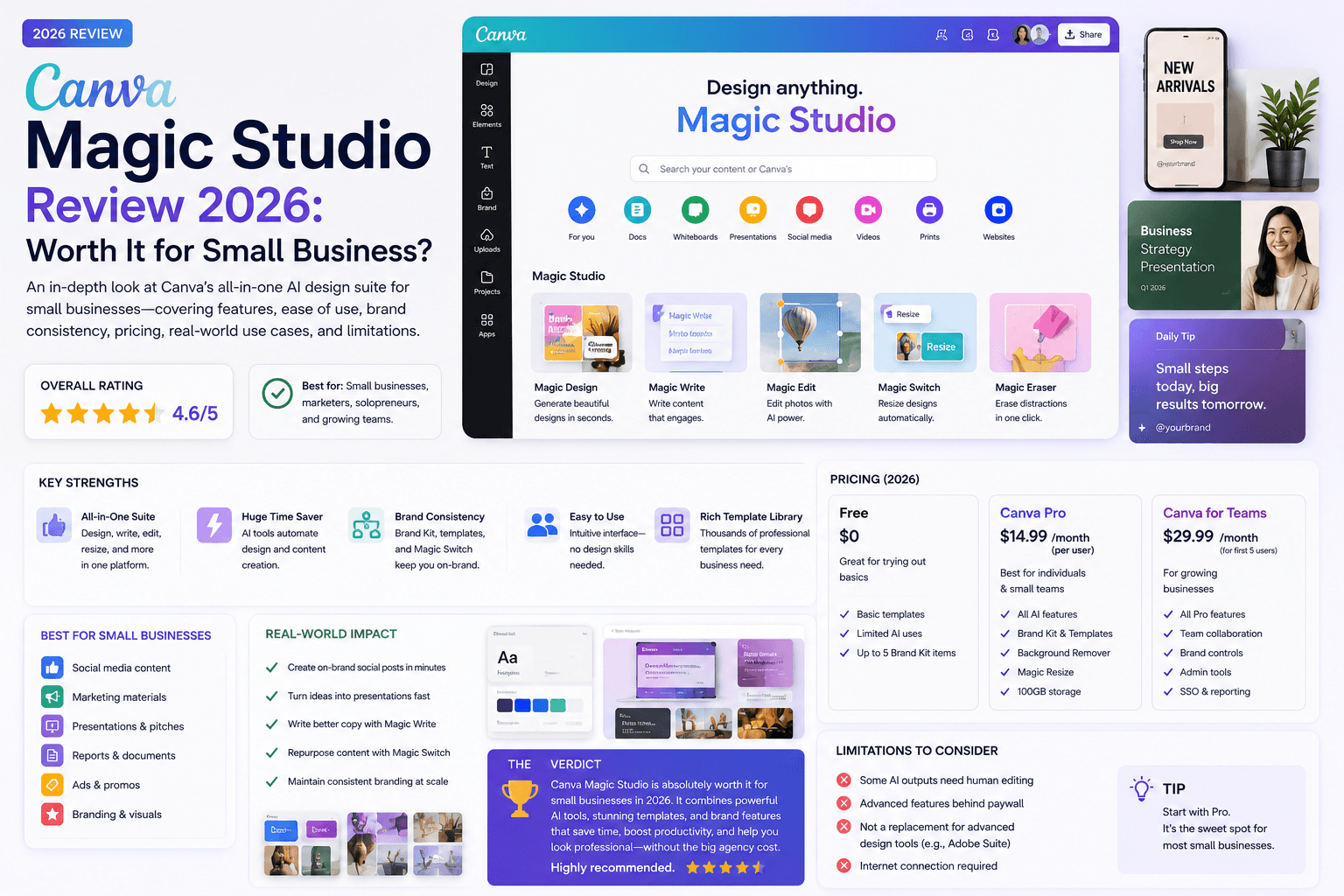
Canva Magic Studio puts AI-assisted writing, image generation, editing, resizing, presentation drafts, and short video tools inside a design platform many small businesses already understand.
That convenience is the advantage. It is also the risk: producing more assets is easy, but producing distinctive, accurate, on-brand work still requires judgment.
This review covers what Magic Studio is, who it fits, pricing from Canva’s official plans, strengths, limits, and alternatives — for small business owners, freelancers, agencies, and consultants. It is an editorial assessment based on publicly listed product and pricing information and common SMB workflows — not a controlled creative-performance benchmark.
Table of contents
- Quick summary
- What is Canva Magic Studio?
- Who should use it
- Who should not use it
- Key features
- Pricing
- Pros and cons
- Best use cases
- Limitations
- Comparison tables
- Decision matrix
- Things to consider before choosing
- Common mistakes
- Evaluation checklist
- Alternatives
- Privacy and governance
- Frequently asked questions
- Final recommendation
Quick summary
Magic Studio is the name Canva uses for its AI tools inside the Canva editor. You do not buy Magic Studio as a standalone SKU — you use Free, Pro, Business, or Enterprise, and AI access scales with the plan.
According to Canva’s pricing page, Free includes limited AI access; Pro is listed at US$144/year; Business at US$250/year per person. Paid plans share a monthly AI allowance across Standard, Premium, and Ultra tools. Some design AI (including Magic Write and Translate on eligible plans) may sit outside that shared pool under fair-use rules — verify current Help Centre details before budgeting.
Editorial rating: 4.3 / 5 for accessibility, breadth, and practical small-business production. Value comes from repeatable templates and faster adaptation — not from replacing creative direction.
What is Canva Magic Studio?
Canva Magic Studio is Canva’s AI design toolkit embedded in the Canva workspace. Based on publicly described capabilities, it commonly includes tools for:
- drafting and rewriting text (Magic Write / Canva AI text);
- generating and editing images;
- removing or changing backgrounds;
- Magic Resize / Magic Switch-style format adaptation;
- presentation drafts;
- short video assistance;
- translation and design adaptation;
- brand-aware generation on eligible plans.
The exact feature set, labels, and limits change by market and plan. Treat Canva’s product and Help Centre pages as the source of truth.
Magic Studio’s edge is workflow: generate or edit inside the same canvas where you already apply Brand Kits, templates, and team comments — instead of hopping between Midjourney-class tools and a separate editor for every social size.
Who should use it
Magic Studio fits when:
- Solo owners already create weekly promotions in Canva.
- Social and content teams need fast channel adaptations — pair with AI social media for small business.
- Local businesses (restaurants, clinics, realtors) reuse offer templates — see AI for restaurants, AI for dentists, AI for real estate agents.
- Agencies need client Brand Kits and approval comments.
- Freelancers deliver decks, lead magnets, and carousels without desktop Adobe for every job.
- The team will review facts, crops, contrast, and disclosures before publish.
It pairs well with a general AI assistant for long-form briefs (ChatGPT prompts) while Canva owns visual production.
Who should not use it
Skip or deprioritize Magic Studio when:
- design needs are rare (a few assets per year) — Free may be enough;
- you need a mature professional design system (complex packaging, custom illustration, product UI);
- nobody will check AI copy for prices, claims, or spelling;
- prompts would imitate living artists or misuse third-party trademarks;
- confidential client files or PII would be uploaded without an approved process;
- your bottleneck is strategy or offer quality — more templates will not fix that (AI marketing guide).
Canva accelerates production. It does not invent brand strategy.
Key features
Based on Canva’s publicly listed Magic Studio / AI design tools (availability varies by plan):
Text and copy assistance
- Magic Write / Canva AI for captions, headlines, and short copy drafts
- Rewrite and tone variations inside designs
- Brand Voice-style consistency on eligible plans
Image generation and editing
- Magic Media / image generation inside the editor
- Magic Edit, Magic Eraser, Magic Expand, Magic Grab (plan-dependent)
- Background remover and related photo tools
Layout and repurposing
- Magic Resize / Magic Switch to adapt formats (Instagram, LinkedIn, print, Stories, etc.)
- Magic Design-style draft layouts from prompts
- Template ecosystem for social, presentations, print, and video
Presentations and video
- Presentation draft assistance
- Short video helpers (captions, background tools, animate — plan-dependent)
Brand and team controls
- Brand Kits (colors, fonts, logos) on paid plans
- Shared folders, comments, and approvals
- Storage and premium asset libraries on Pro/Business
AI allowance model (2026)
According to Canva’s pricing FAQ:
| Plan | Shared AI allowance (estimate) |
|---|---|
| Free | Up to 200 Standard or up to 20 Premium; no Ultra |
| Pro | Up to 2,000 Standard or 200 Premium or 20 Ultra |
| Business / Enterprise | Up to 4,000 Standard or 400 Premium or 40 Ultra |
Higher-tier tools consume more of the shared pool. Some AI Design tools (e.g. Magic Write, Translate) may not count toward the shared allowance, subject to fair use. An AI Pass add-on is available for Pro/Business users who need more monthly capacity — Canva describes it as unlocking substantially more monthly AI than Pro or Business alone. Verify current add-on pricing on Canva’s site before budgeting Ultra-heavy image or video generation.
How Magic Studio fits a marketing stack
Treat Canva as the visual production layer, not the whole marketing system:
- Brief and claims live in a source pack or doc (offer, prices, banned claims).
- Long-form drafting can happen in ChatGPT/Claude when needed.
- Visual assembly and AI resize/edit happen in Canva Magic Studio.
- Scheduling and engagement happen in Buffer/native social tools — see AI social media.
- Measurement happens in platform analytics and GA4 — not in Canva alone.
That separation prevents “pretty asset, wrong price” failures.
Pricing
Prices below reflect Canva’s US pricing page as listed in August 2026. Confirm live rates for your region.
Free
$0
Occasional design + limited AI
- Core editor and free templates
- Limited AI allowance (Standard/Premium only)
- Basic collaboration
- Good for testing Magic Studio lightly
- Upgrade when Brand Kits or AI limits block weekly work
Pro
$144/year
Best solo SMB starting point
- ~10× AI vs Free (shared Standard/Premium/Ultra pool)
- Brand Kits and premium content
- Background remover, Magic Resize at scale
- 100 GB-class storage (per Canva plan details)
- 30-day trial available — verify on Canva
Business
$250/year per person
Teams and higher AI use
- ~20× AI vs Free
- Enhanced brand management and team workflows
- Ad performance insights (per Canva Business positioning)
- Higher collaboration and growth tools
- AI Pass add-on option for heavy Ultra use
Upgrade when: assets are created every week; Brand Kits prevent rework; premium features replace manual editing; collaboration shortens approvals; hours saved exceed subscription cost.
Stay Free when: use is occasional and basic templates suffice.
Regional note: Canva prices and included libraries vary by country and currency. Always confirm the live pricing page and Help Centre AI allowance article for your account before committing to annual billing.
Pros and cons
Pros
- Low learning curve for routine business design
- AI tools sit inside a familiar editor — no export hop for every resize
- Huge template and format ecosystem for social, decks, and print
- Brand Kits improve consistency on paid plans
- Free plan is usable for evaluation
- Strong fit for non-designers on marketing teams
Cons
- Generated designs can look polished but generic
- AI limits and feature gates vary by plan — easy to hit ceilings
- Not a replacement for strategic brand design
- Every factual claim still needs human review
- Rights and AI licensing require attention for commercial use
- Business per-person pricing can add up for small teams
Best use cases
Routine marketing production
Restaurants, clinics, realtors, and agencies build approved templates and reuse them for weekly offers, educational posts, events, and presentations.
Repurposing
One campaign master becomes several channel sizes. Automatic resize still needs a human crop and hierarchy check.
Team accessibility
Easier for many non-designers than professional desktop software. Comments and shared Brand Kits reduce handoff friction.
Realistic workflow
- Write one approved campaign brief.
- Build one strong master asset (human creative direction).
- Use Magic Studio to adapt dimensions and draft supporting copy.
- Human-check crops, claims, contrast, spelling, links, and disclosures.
- Save approved assets as reusable templates.
This uses AI for production efficiency while preserving creative direction — the same pattern as the 30-day AI marketing plan.
Best for (by role)
| Role | Best fit | Plan signal |
|---|---|---|
| Solo owner | Weekly social + flyers | Free → Pro |
| Social manager | Multi-size repurposing | Pro |
| Agency | Client Brand Kits + comments | Business |
| Consultant | Decks and lead magnets | Pro |
| Design-led brand team | Limited — use Canva for drafts only | Keep Figma/Adobe as system of record |
Limitations
Magic Studio does not:
- invent a distinctive brand strategy;
- guarantee print-accurate color without process control;
- replace photographers for authentic product or place imagery;
- verify prices, health claims, or statistics in generated text;
- grant unlimited commercial rights without reading Canva’s license and AI terms;
- solve weak offers or unclear CTAs.
Generic creative direction remains the main quality ceiling. Original photography, a real point of view, and a coherent brand system remain differentiators.
Rights, accuracy, and brand review
Accuracy. Generated text can be vague or false. Generated images can include visual errors (garbled text, wrong products, odd anatomy). Never publish product details, prices, health claims, or statistics without checking them against primary sources.
Rights and permissions. Review Canva’s current content license and AI terms for your commercial use case. Keep records for important commercial assets. Avoid prompts that imitate living artists or misuse third-party brands and trademarks.
Brand. AI drafts often look “finished” before they look yours. Lock colors, fonts, logo clear-space, and layout patterns in Brand Kits so production gets faster without looking interchangeable.
Comparison tables
Table 1 — Canva vs common alternatives
| Need | Canva Magic Studio | Adobe Express | Figma / Adobe Pro apps |
|---|---|---|---|
| Learning curve | Lowest for SMBs | Low if Adobe-familiar | Higher |
| AI inside design editor | Strong (Magic Studio) | Yes (Firefly-linked) | Varies by product |
| Template library | Excellent for marketing | Good | Different focus |
| Brand systems at scale | Brand Kits (paid) | Brand libraries | Strongest |
| Complex UI / packaging | Weak | Limited | Strong |
| Price for solo SMB | Free / Pro ~$144/yr | Often in Adobe plans | Higher |
| Best for | Weekly marketing assets | Adobe ecosystem teams | Designers / product |
| Recommendation | Default SMB choice | If already on Adobe | When brand complexity is high |
Table 2 — Free vs Pro vs Business (decision view)
| Dimension | Free | Pro | Business |
|---|---|---|---|
| Listed annual price (US) | $0 | $144/yr | $250/yr per person |
| AI allowance | Limited (no Ultra) | ~10× Free | ~20× Free |
| Brand Kits | Limited | Yes | Enhanced |
| Team growth tools | Basic | Solo-focused | Team + insights |
| Best when | Testing / light use | Weekly solo production | Multi-person brand control |
| Upgrade trigger | Hit AI or brand limits | Need team seats / more AI | Need enterprise controls |
| Bottom line | Start here | Most SMB sweet spot | When Pro is too small |
Decision matrix
Score 1–5. Multiply by weight.
| Criterion (weight) | Free | Pro | Business | Adobe Express | Figma |
|---|---|---|---|---|---|
| Weekly asset volume (×3) | |||||
| Non-designer usability (×3) | |||||
| Brand kit needs (×2) | |||||
| AI allowance fit (×2) | |||||
| Team collaboration (×2) | |||||
| Cost vs hours saved (×1) | |||||
| Weighted total |
Things to consider before choosing
- How many marketing assets do you approve each week?
- Who owns brand templates today?
- Will AI copy be fact-checked before publish?
- Do you need Brand Kits and premium stock?
- Is your team one person or many collaborators?
- Will Ultra/Premium generation burn the monthly allowance?
- Have you read Canva’s current AI and content license terms?
- What confidential material must never be uploaded?
- Can you cancel or downgrade after a 30-day trial without disruption?
- Which other design subscriptions would Pro replace?
Common mistakes
- Upgrading because AI is fun — not because a weekly workflow exists.
- Publishing Magicked copy with wrong prices or claims.
- One-click designs with no brand kit — generic look.
- Skipping crop checks after Magic Resize.
- Burning Ultra generations on throwaway experiments.
- Imitating living artists or competitor trademarks in prompts.
- Uploading client confidential files into shared workspaces.
- Buying Business for one solo user who only needed Pro.
- Judging ROI by designs generated instead of assets approved and published.
- Ignoring Accessibility — contrast, alt text, readable type sizes.
Evaluation checklist
Run a two-week Free or Pro trial on one repeated asset type:
- Time from brief to approval recorded
- Number of corrections logged
- Assets actually published counted
- Brand consistency scored (yes/no template reuse)
- Premium features used listed
- AI allowance remaining checked mid-month
- Another subscription identified for cancellation (or not)
- Rights/license notes reviewed for commercial use
- Workspace sharing and ownership clarified
- Keep / change / stop decision written
Do not justify Pro with generation count. Use time saved and approved publishes.
Alternatives
Adobe Express
Fits teams already in Adobe Creative Cloud. Firefly-linked AI may be convenient — but Canva often wins on template breadth for local SMB marketing.
Microsoft Designer
May suit Microsoft 365-centered workflows. Less of a full marketing template OS than Canva for many small teams.
Figma / Adobe Illustrator / Photoshop
Stronger for complex systems, product UI, and custom illustration. Overkill as the only tool for weekly Instagram offers.
Midjourney / Leonardo + separate editor
Strong image generation, weaker end-to-end marketing production. Canva Business may include Leonardo.Ai Essential access after paid subscription (per Canva’s Business FAQ) — confirm current bundling if image gen is the bottleneck.
General AI + Canva Free
ChatGPT/Claude for copy + Canva Free for layout remains a valid lean stack — see best AI marketing tools.
Privacy and governance
Do not upload confidential client material, unreleased products, personal data, or licensed assets without permission and an approved vendor process. Review workspace sharing, brand permissions, export settings, and account ownership before inviting a team.
For agencies: use separate Brand Kits per client, clear folder permissions, and a rule that client secrets never become Magicked prompts. For regulated industries (health, housing, finance), treat generated claims like any other marketing copy — compliance review still applies (AI for dentists, AI for real estate agents).
Two-week pilot plan
| Day range | Action | Success signal |
|---|---|---|
| 1–2 | Pick one recurring asset (e.g. weekly offer post) | Baseline time recorded |
| 3–5 | Build master template + Brand Kit | Approved visual system |
| 6–10 | Produce with Magic Resize/Write; log corrections | Correction count falling |
| 11–14 | Compare hours vs prior fortnight; decide Free/Pro/Business | Keep / change / stop written |
Align the pilot with the 30-day AI marketing plan if social and design are your first bottleneck.
Final recommendation
Canva Magic Studio earns a 4.3/5 editorial rating for small-business marketing production.
- Start on Free with one weekly asset type.
- Build Brand Kits and master templates before relying on generation.
- Upgrade to Pro (~$144/year) when templates, premium assets, and AI allowance clearly save production hours.
- Choose Business when multi-person brand control and higher AI access are required.
- Keep humans responsible for facts, crops, disclosures, and originality.
Magic Studio is worth it when it shortens a real weekly design workflow. It is not worth it as a substitute for brand strategy or professional design systems.
For stack context: AI social media system, AI marketing for small business, best AI marketing tools.
The AI edge, delivered every Tuesday
One 5-minute email: the tools worth your money, the plays that are working right now, and zero hype. Unsubscribe anytime.
No spam. No selling your data. Read by owners of restaurants, gyms, clinics, and agencies across the US, UK, Canada, and Australia.
Key takeaway
Canva Magic Studio review for small business: AI features, Free vs Pro vs Business pricing, Brand Kits, limitations, alternatives, and when upgrading is worth it in 2026. For more step-by-step guides, browse our blog or explore AI Tool Reviews.
Frequently asked questions
Is Canva Magic Studio free?
Magic Studio is Canva's AI feature set inside Canva — not a separate product. Canva Free includes limited AI access. Pro, Business, and Enterprise unlock higher shared AI allowances and more premium tools. Check Canva's current pricing and feature pages before purchasing.
Is Canva Pro worth it for a small business?
Canva Pro (listed around US$144/year on Canva's pricing page) can be worth it when Brand Kits, premium assets, background removal, resizing, collaboration, or higher AI allowance save recurring production time. Run a two-week trial on one weekly asset type and measure time to approval — not designs generated.
Can Canva replace a professional designer?
It can handle many routine marketing assets, but professional design remains valuable for brand systems, high-stakes campaigns, complex information design, packaging, and original creative direction.
What is Canva Magic Studio exactly?
Magic Studio is the umbrella name for Canva's AI-assisted design tools — writing, image generation and editing, resizing, presentation and video helpers, and related features inside the Canva editor. Access and limits depend on your Canva plan.
How does Canva AI allowance work in 2026?
According to Canva's pricing FAQ, paid plans include a shared monthly AI allowance across Standard, Premium, and Ultra tools. Free includes a smaller shared allowance without Ultra. Some AI Design tools such as Magic Write and Translate may not count toward the shared pool, subject to fair use. Verify current Help Centre details.
Should a small team choose Canva Pro or Business?
Pro fits solo creators who design weekly. Business (listed around US$250/year per person) fits individuals and growing teams that need higher AI access, enhanced brand management, and team workflows. Canva Teams is no longer available for new sign-ups per Canva's pricing FAQ.
What are good alternatives to Canva Magic Studio?
Adobe Express fits Adobe-centric teams. Microsoft Designer may fit Microsoft 365 workflows. Figma or Adobe professional apps fit complex brand systems and UI work. A general AI assistant plus Canva Free remains a lean option for light volume.
Do I need to review AI-generated Canva designs before publishing?
Yes. Check factual claims, prices, crops after resize, contrast and readability, spelling, links, disclosures, and licensing. AI can produce polished but generic or inaccurate output.
Written by
AI Growthub StaffEditorial Team
The AI Growthub editorial team covers practical AI news, tools, and workflows for small business owners. Every article is fact-checked against primary sources before publication.
Comments are coming soon
We’re building a discussion space for business owners. Until then, reply to any newsletter issue — we read everything.
Related posts

How to Choose an AI Coding Platform as a Non-Technical Founder: The Complete 2026 Guide
Non-technical founders: choose an AI coding platform with a one-page brief, security checks, exportability, weighted scorecard, and a two-week fake-data pilot—plus when to hire a developer.
Muse Spark 1.1 vs Claude Opus 5: The Complete 2026 Comparison
Muse Spark 1.1 vs Claude Opus 5 for small business: pricing (~$1.25/$4.25 vs $5/$25), multi-agent vs judgment, decision matrix, and when to use both.
Emergent vs Replit: The Complete 2026 Comparison for Non-Technical Founders
Emergent vs Replit for SMB founders: Series C context, credit pricing, design caveats, decision matrix, and when each AI coding platform wins.
The AI edge, delivered every Tuesday
One 5-minute email: the tools worth your money, the plays that are working right now, and zero hype. Unsubscribe anytime.
No spam. No selling your data. Read by owners of restaurants, gyms, clinics, and agencies across the US, UK, Canada, and Australia.