AI for Restaurants (2026): 12 Workflows to Save Time and Grow Covers
12 practical AI workflows for restaurants — promotions, reviews, menus, reservations, staffing, inventory, and local SEO — with source sheets, checklists, and ROI.
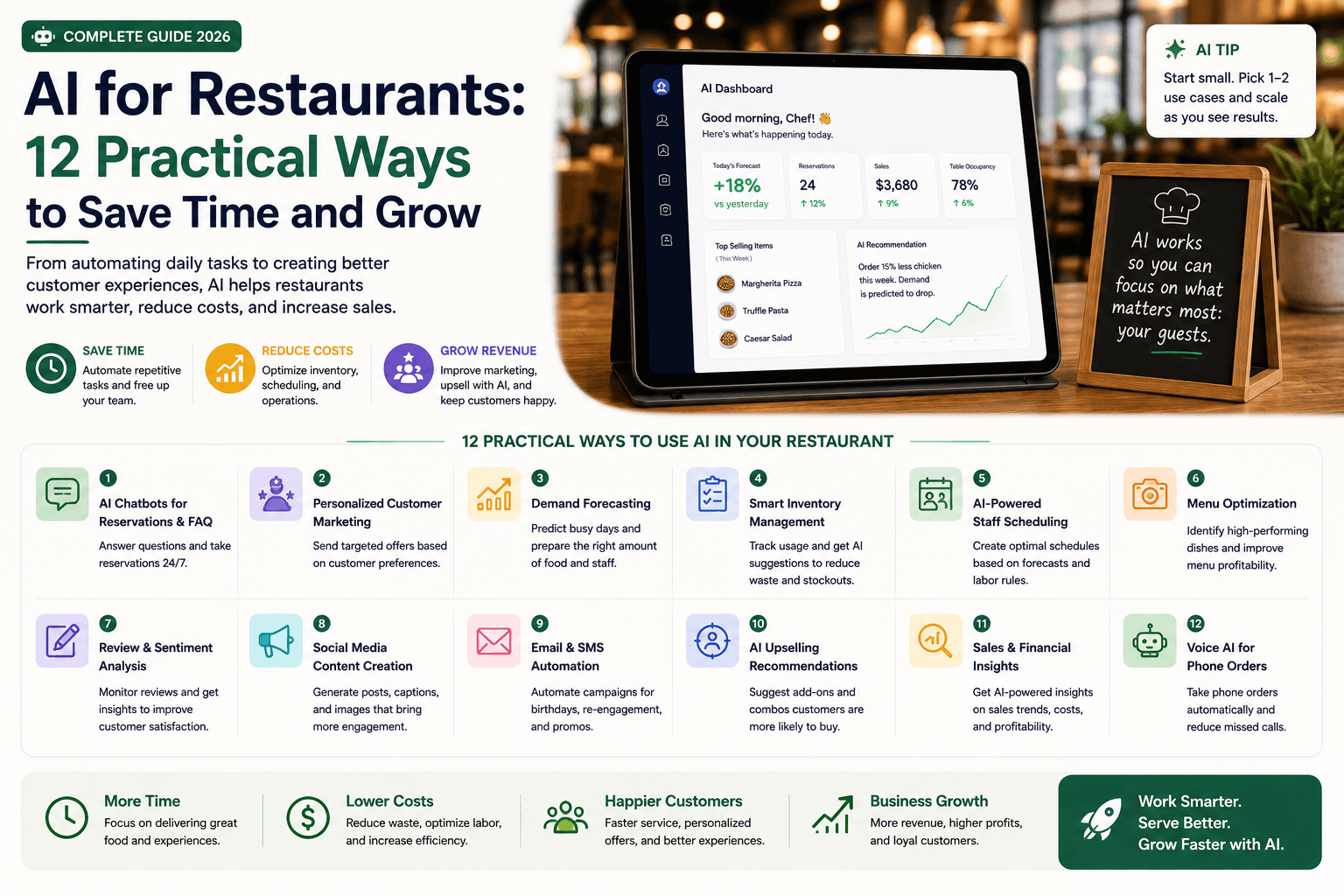
Restaurants do not need an AI transformation project. They need fewer missed calls, faster promotions, clearer staff handoffs, and better use of the information they already have.
The best AI workflows support those jobs without inventing ingredients, hiding customer complaints, or removing human hospitality.
This guide is for owners, GMs, marketing managers, multi-unit operators, consultants, and agencies who want 12 practical AI workflows for marketing, reviews, menus, reservations, staffing, inventory, guest communication, and local SEO — with a source sheet, approval gates, and ROI criteria.
For broader marketing systems, see AI marketing for small business. For a four-week pilot calendar, use the 30-day AI marketing plan. For missed-call coverage, see AI receptionist for small business.
Table of contents
- Quick summary
- What is AI for restaurants?
- Who should use it
- Who should not use it
- Key features of a safe restaurant AI system
- Pricing: lean restaurant stack
- Pros and cons
- Best use cases: 12 practical workflows
- Limitations
- A practical restaurant stack
- Protect trust
- Comparison tables
- Decision matrix
- Things to consider before choosing
- Common mistakes
- Restaurant AI checklist
- Alternatives and competing approaches
- Frequently asked questions
- Final recommendation
Quick summary
AI for restaurants means using generative and analytical tools to draft promotions, organize review themes, write menu descriptions from verified facts, prepare staff materials, qualify catering inquiries, and summarize performance — with humans owning hospitality, safety, and guest relationships.
Start with repeatable marketing and review workflows. Measure bookings, orders, average check, response time, and hours saved. Do not invent reviews, allergens, or fees.
What is AI for restaurants?
AI for restaurants applies machine learning or generative models to hospitality workflows. In 2026, that usually splits into three layers:
| Layer | Examples | Risk level |
|---|---|---|
| Marketing & local discovery | Promotions, GBP posts, social, email, local SEO briefs | Lower if facts are verified |
| Guest communication & reviews | FAQ drafts, missed-call follow-up, review replies | Medium — privacy and tone |
| Ops & kitchen data | Inventory variance, forecasting, scheduling analysis | Medium–high — data quality and decisions |
This guide focuses on practical owner-level workflows. Specialized POS AI (e.g. Toast IQ-class analytics), guest CRM platforms (OpenTable, SevenRooms), and inventory forecasting tools can extend the stack later — after you own a source sheet and approval process.
A usable system still needs: approved menu and policy facts, a named manager reviewer, trackable offers, and a keep/change/stop metric.
Who should use it
AI fits restaurants when:
- Owners and GMs run marketing themselves and need faster promo and review drafts.
- Multi-unit operators need consistent brand voice across locations without inventing local facts.
- Marketing coordinators or agencies need manager-approved source packs before publishing.
- Front-of-house leads want clearer handoffs, training quizzes, and FAQ scripts.
- Catering-heavy venues need structured inquiry qualification before a salesperson calls.
- Someone can approve guest-facing copy before it goes live.
Related playbooks: AI social media, AI SEO for small business, AI email marketing, AI chatbots, train a chatbot on FAQs, AI automation.
Who should not use it
Delay or heavily restrict AI when:
- staff would invent ingredients, allergens, or dietary claims from memory;
- complaints, allergies, or refunds would be handled by bots alone;
- reviews would be fabricated, suppressed, or argued publicly by AI;
- reservation details would be exposed in insecure SMS or email threads;
- inventory purchasing decisions would rely on AI without validating the export;
- no manager will review promotions before they publish;
- the “strategy” is hundreds of thin city pages with no genuine service difference.
Fix the source sheet and hospitality standards first. Then automate drafts.
Key features of a safe restaurant AI system
| Feature | Purpose |
|---|---|
| Source sheet | One approved menu, hours, policies, allergens procedures, promos |
| Fact lock | Prices, allergens, fees, availability never invented |
| Human approval | Manager reviews guest-facing and menu claims |
| Escalation rules | Allergy, safety, refund, complaint → person |
| Channel templates | Email, social, GBP, print from one offer brief |
| Trackable CTAs | Codes/links tied to reservations or orders |
| Review taxonomy | Food, service, wait, cleanliness, value, ordering |
| Systems of record | POS, booking platform, email — AI drafts only |
| Monthly review | What worked, what failed, what to retire |
Pricing: lean restaurant stack
Verify live pricing on vendor sites. Ranges reflect common SMB setups as of August 2026.
Starter (most independents)
$20–80/month
Drafts + existing tools
- One general AI assistant (~$20)
- Existing email/social/booking tools
- Google Business Profile (free)
- Canva Free or Pro for assets
- Review drafts + weekly promo workflow
- No new POS required
Growth (busy full-service)
$100–400/month
Comms + design capacity
- AI assistant + design Pro plan
- Email platform paid tier if list grows
- Optional review/reputation tool
- Missed-call SMS or receptionist pilot
- Catering inquiry forms + routing
- Still use POS/booking as source of truth
Platform AI add-ons
$200–1,000+/month
Vendor AI inside stack
- OpenTable / SevenRooms-class guest CRM AI
- Toast IQ-class POS analytics (if on Toast)
- Voice AI for reservations after-hours
- Inventory forecasting platforms
- Worth it after source sheet + volume justify cost
- Compare carefully — do not double-pay for same job
Start lean. Platform AI add-ons (voice reservations, CRM feedback summaries, POS forecasting) pay off when call volume, review volume, or multi-unit complexity already exists — not on day one for a quiet café.
Pros and cons
Pros
- Faster weekly promotions across email, social, and GBP
- Calmer, more consistent public review replies
- Menu and catering copy drafted from verified facts
- Clearer staff training and shift handoffs
- Structured catering intake before sales calls
- Measurable time savings when managers approve once
Cons
- Allergen and dietary errors create real guest harm
- AI can invent fees, hours, or availability
- Guest privacy can leak via insecure auto-messages
- Ops analysis is only as good as POS/inventory exports
- Software and approval time can erase labor savings
- Voice/chatbots without escalation damage hospitality
Best use cases: 12 practical workflows
Marketing and discovery
1. Weekly promotion workflow — Give AI the approved offer, dates, exclusions, location(s), and call to action. Create versions for email, social, Google Business Profile, and table signage. Require manager approval. Track with a unique code or UTM. Pair with AI social media and Canva Magic Studio for assets.
2. Menu description drafts — Start from a verified recipe and ingredient source. Human staff must confirm allergens, dietary claims, origin claims, prices, and availability before any public publish. Never let the model invent substitutions.
3. Local SEO briefs — Create useful pages for catering, private dining, reservations, events, or genuinely distinct locations. Avoid hundreds of thin city pages. Ground briefs in real services — see AI SEO for small business.
Guest communication and reputation
4. Review-response drafts — AI suggests a calm reply and classifies feedback into food, service, wait time, cleanliness, value, or ordering. Never disclose private reservation details, never argue publicly, and move sensitive issues offline. Managers edit before posting.
5. Reservation FAQ support — Use an approved knowledge base for hours, parking, group size, deposits, accessibility, and cancellation rules. Escalate allergy, safety, and unusual event questions. Related: train chatbot on FAQs.
6. Missed-call follow-up — Send a neutral acknowledgment and offer approved booking options. Do not expose reservation details in insecure channels. For after-hours coverage patterns, see AI receptionist and AI customer service automation.
People and operations
7. Staff training drafts — Turn manager-approved notes into opening checklists, service scenarios, menu quizzes, and role-play prompts. Keep employee performance details out of consumer AI tools.
8. Shift handoff summaries — Structure notes about equipment, stock, reservations, events, and maintenance. Keep employee and customer details inside approved systems (POS notes, booking platform) — not pasted into public chatbots.
9. Inventory analysis — Use clean exports to identify recurring variance or waste questions. Validate calculations against the source system. Operators make purchasing decisions — AI does not.
Revenue and reporting
10. Catering inquiry qualification — Collect date, guest count, location, budget range, service style, and dietary needs. Route a complete summary to a person. Do not auto-quote complex events without human review.
11. Customer segmentation — Use consented first-party data for useful groups: catering customers, loyalty members, lapsed guests. Avoid sensitive inferences (health conditions, protected attributes). Email workflows: AI email marketing.
12. Performance reporting — Combine campaign cost, reservations, orders, and average check into a weekly draft. Distinguish correlation from confirmed attribution. Owner edits before sharing.
Best for (by restaurant type)
| Restaurant type | Start with | Avoid first |
|---|---|---|
| Independent café / QSR | Weekly promo + GBP posts | Voice AI reservations |
| Full-service neighborhood | Reviews + missed-call follow-up | Auto allergy replies |
| Fine dining | Menu drafts + training quizzes | Inventory AI without clean data |
| Multi-unit casual | Shared source sheet + local SEO briefs | One chatbot for all locations' fees |
| Catering-heavy | Inquiry qualification form | Auto pricing emails |
| Ghost kitchen / delivery | Promo + campaign QA | Fabricated lifestyle photography as "real kitchen" |
Limitations
AI for restaurants will not:
- replace hospitality judgment at the table;
- guarantee allergen safety or food-code compliance;
- fill a weak concept or unclear positioning;
- fix inaccurate POS or inventory data;
- replace a booking platform or POS as system of record;
- create trustworthy reviews or photos out of thin air.
Treat every guest-facing draft as provisional until a manager verifies facts against the source sheet.
A practical restaurant stack
| Job | System of record | AI role |
|---|---|---|
| Menu | Approved menu / POS | Draft descriptions and formats |
| Reservations | Booking platform | FAQ draft and routing |
| Marketing | Email / social / local profiles | Create approved variations |
| Reviews | Review platforms + manager log | Draft replies and summarize themes |
| Operations | POS / inventory / scheduling | Analyze exports and structure SOPs |
Platform examples (evaluate for fit — not endorsements): OpenTable and SevenRooms-class tools for reservations and guest CRM; Toast-class POS for transaction data; Google Business Profile for local discovery. Use AI on top of these systems — do not replace them with a chatbot.
Protect trust
Do not use AI to:
- invent reviews or food photography presented as real;
- make unverified health or dietary claims;
- conceal mandatory fees;
- promise allergen safety without approved procedures;
- impersonate a staff member in a sensitive complaint;
- auto-send reservation confirmations that leak guest details to the wrong channel.
Questions before automating guest messages
- Is the answer present in the approved source sheet?
- Could the message reveal private reservation details?
- Does an allergy, safety, refund, or complaint issue require a person?
- Can the guest reach a human easily?
- Are language translations reviewed for important policies?
Comparison tables
Table 1 — Workflow value vs risk
| Workflow | Value | Risk | Start month 1? |
|---|---|---|---|
| Weekly promotion (4 channels) | High | Low–medium — verify prices | Yes — best first |
| Review-response drafts | High | Medium — privacy/tone | Yes |
| Menu description drafts | Medium | High — allergens | Yes with chef/manager lock |
| Reservation FAQ drafts | High | Medium | Yes — approved KB only |
| Missed-call follow-up | High | Medium — privacy | Yes — neutral templates |
| Local SEO briefs | Medium | Low if genuine pages | Yes |
| Staff training drafts | Medium | Low | Yes |
| Shift handoff summaries | Medium | Medium — PII | Internal systems only |
| Inventory analysis | Medium | Medium — bad data | After clean exports |
| Catering qualification | High | Medium — quotes | Yes — human closes |
| Guest messaging autopilot | Uncertain | High | No until FAQ proven |
| Fake reviews / AI photos as real | N/A | Critical | Never |
| Recommendation | Promo + reviews | Verify allergens | One pilot first |
Table 2 — Build vs buy for restaurant AI jobs
| Job | DIY with ChatGPT/Claude | Native in booking/POS | Specialized tool | When to upgrade |
|---|---|---|---|---|
| Weekly promo drafts | Excellent start | Limited | Marketing platforms | When volume/channels grow |
| Review replies | Good drafts | Some platforms include AI replies | Reputation suites | High review volume |
| Missed calls | SMS templates only | Some booking voice AI | AI receptionist / voice AI | After-hours call loss proven |
| Inventory forecasting | Weak without clean data | POS AI layers (e.g. Toast IQ-class) | Forecasting vendors | Multi-unit + clean exports |
| Guest CRM personalization | Limited | SevenRooms/OpenTable-class CRM | Full hospitality CRM | Repeat-guest program exists |
| Recommendation | Start DIY + source sheet | Use what you already pay for | Buy when volume justifies | Process before platform |
Decision matrix
Score each option 1–5 for your restaurant. Multiply by weight.
| Criterion (weight) | DIY assistant | Booking-platform AI | POS analytics AI | Voice AI / receptionist |
|---|---|---|---|---|
| Solves weekly time drain (×3) | ||||
| Manager can review outputs (×3) | ||||
| Fits current stack (×2) | ||||
| Guest-data risk manageable (×2) | ||||
| Predictable monthly cost (×2) | ||||
| Measurable bookings/orders (×2) | ||||
| Weighted total |
Things to consider before choosing
- Do you have a current, manager-owned source sheet?
- Who approves menu, allergen, and price claims?
- Which system is the source of truth for reservations and menu?
- Will guest messages draft-only or auto-send?
- How will you track promo redemptions or bookings?
- Are review replies checked for private-detail leaks?
- What happens when a guest mentions an allergy in chat?
- Can staff reach a human escalation path easily?
- Are photography and review practices compliant and honest?
- What keep/change/stop metric will you check in four weeks?
Common mistakes
- Publishing allergen claims without recipe verification.
- Letting AI invent hours, fees, or “always available” dishes.
- Auto-arguing with negative reviews.
- Exposing reservation details in SMS.
- Thin city pages that add no real service.
- Buying voice AI before a weekly promo works.
- Pasting guest names and notes into consumer chatbots.
- Measuring success by posts published, not covers or orders.
- Skipping manager approval to “save time.”
- Running three marketing tools that rewrite the same offer differently.
Restaurant AI checklist
Build a restaurant source sheet
Maintain one approved source for:
- current menu names and prices;
- ingredients and allergen procedures;
- hours and holiday exceptions;
- reservation and cancellation policies;
- service areas and delivery channels;
- catering minimums;
- loyalty terms;
- photography rights;
- current promotions.
AI tools should draft from this sheet — not scrape outdated web pages or rely on model memory.
Four-week restaurant rollout
| Week | Action |
|---|---|
| 1 | Choose one repeated promotion; record current production time |
| 2 | Build the source sheet, templates, and approval checklist |
| 3 | Publish across two proven channels with a trackable code or link |
| 4 | Compare orders, reservations, errors, and staff time; keep, change, or stop |
Pre-launch checklist
- Source sheet current and manager-owned
- Allergen/price verification owner named
- Guest-facing messages are draft-only until proven
- Escalation path for allergy/safety/complaints
- Trackable promo code or link ready
- Review reply rules (no private details, no arguing)
- Systems of record mapped (POS, booking, email)
- Photography and review integrity rules clear
- Success metric chosen (bookings, orders, hours, response time)
- Four-week keep/change/stop review scheduled
Measure restaurant AI ROI
For marketing, track redemptions, bookings, orders, average check, and campaign margin. For review workflows, track response time and operational themes. For staff material, track training time and correction rates.
Monthly net value ≈ labor saved + incremental contribution margin − software − manager approval time − error cost
A campaign that saves one hour but creates guest confusion is not a win.
Alternatives and competing approaches
vs hiring a part-time marketer
A marketer owns brand judgment and photography direction. AI accelerates drafts. Combine: AI drafts from the source sheet; human owns positioning and approvals.
vs posting randomly on Instagram
Random posts rarely connect to covers. A weekly offer workflow with tracking beats volume without a CTA. See AI social media.
vs full hospitality CRM suites
OpenTable/SevenRooms-class platforms add discovery, CRM, and sometimes Voice AI. Buy when you need the reservation/guest network — not only because “AI” is on the feature list.
vs ignoring reviews
Silence loses discovery. Drafted, manager-edited replies plus theme summaries beat both silence and defensive AI dumps.
Vertical peers: AI for dentists, AI for real estate agents.
Frequently asked questions
How can restaurants use AI?
Restaurants can use AI to draft promotions, organize review themes, create menu descriptions from verified facts, prepare staff materials, qualify catering inquiries, summarize performance exports, and support reservation FAQ drafts. Keep humans on allergens, complaints, and hospitality-critical messages.
Can AI create a restaurant menu?
AI can help draft descriptions and organize information, but staff must verify ingredients, allergens, prices, availability, dietary claims, and legal requirements before publication. The approved menu/POS remains the source of truth.
What is the best first AI project for a restaurant?
Start with a weekly promotion workflow or review-response drafts. Both use repeatable inputs, are easy to review, and can be measured through staff time, bookings, or orders.
Should restaurants use AI chatbots for reservations?
Only after an approved FAQ knowledge base exists, with clear escalation for allergies, large parties, and complaints. Many restaurants get more value from missed-call templates and booking-platform features first. See AI chatbots for small business.
Can AI respond to Google reviews for a restaurant?
Yes as drafts. A manager must edit so replies stay calm, never disclose private details, never invent apologies that admit liability carelessly, and invite serious issues offline.
How do you measure AI ROI in a restaurant?
Track redemptions, reservations, orders, average check, review response time, training hours saved, and how often managers correct AI output. Subtract software and approval time. Post count alone is not ROI.
Is AI safe for allergen information?
Only as a drafting aid against verified recipes and procedures. Never publish allergen or dietary claims without human verification. When guests ask about allergies, escalate to trained staff.
Do small restaurants need expensive hospitality AI platforms?
Usually not at first. A general AI assistant, Google Business Profile, existing email/booking tools, and a source sheet cover the highest-ROI pilots. Add platform AI when call volume, review volume, or multi-unit complexity justifies the cost.
Final recommendation
- Build the source sheet before buying new software.
- Run one weekly offer across two channels with a trackable code.
- Add review-response drafts with a manager edit gate.
- Keep allergens, complaints, and private reservation details with people.
- Use POS and booking platforms as systems of record — AI drafts only.
- Measure bookings, orders, and hours, then keep, change, or stop at week four.
- Upgrade to voice AI, CRM AI, or forecasting only when volume and data quality justify it.
Next reads: AI marketing for small business, best AI marketing tools, AI SEO, AI receptionist, AI automation.
The AI edge, delivered every Tuesday
One 5-minute email: the tools worth your money, the plays that are working right now, and zero hype. Unsubscribe anytime.
No spam. No selling your data. Read by owners of restaurants, gyms, clinics, and agencies across the US, UK, Canada, and Australia.
Key takeaway
12 practical AI workflows for restaurants — promotions, reviews, menus, reservations, staffing, inventory, and local SEO — with source sheets, checklists, and ROI. For more step-by-step guides, browse our blog or explore AI for Restaurants.
Frequently asked questions
How can restaurants use AI?
Restaurants can use AI to draft promotions, organize review themes, create menu descriptions from verified facts, prepare staff materials, qualify catering inquiries, summarize performance exports, and support reservation FAQ drafts. Keep humans on allergens, complaints, and hospitality-critical messages.
Can AI create a restaurant menu?
AI can help draft descriptions and organize information, but staff must verify ingredients, allergens, prices, availability, dietary claims, and legal requirements before publication. The approved menu or POS remains the source of truth.
What is the best first AI project for a restaurant?
Start with a weekly promotion workflow or review-response drafts. Both use repeatable inputs, are easy to review, and can be measured through staff time, bookings, or orders.
Should restaurants use AI chatbots for reservations?
Only after an approved FAQ knowledge base exists, with clear escalation for allergies, large parties, and complaints. Many restaurants get more value from missed-call templates and booking-platform features first.
Can AI respond to Google reviews for a restaurant?
Yes as drafts. A manager must edit so replies stay calm, never disclose private details, never invent careless liability admissions, and invite serious issues offline.
How do you measure AI ROI in a restaurant?
Track redemptions, reservations, orders, average check, review response time, training hours saved, and how often managers correct AI output. Subtract software and approval time. Post count alone is not ROI.
Is AI safe for allergen information?
Only as a drafting aid against verified recipes and procedures. Never publish allergen or dietary claims without human verification. When guests ask about allergies, escalate to trained staff.
Do small restaurants need expensive hospitality AI platforms?
Usually not at first. A general AI assistant, Google Business Profile, existing email and booking tools, and a source sheet cover the highest-ROI pilots. Add platform AI when call volume, review volume, or multi-unit complexity justifies the cost.
Written by
AI Growthub StaffEditorial Team
The AI Growthub editorial team covers practical AI news, tools, and workflows for small business owners. Every article is fact-checked against primary sources before publication.
Comments are coming soon
We’re building a discussion space for business owners. Until then, reply to any newsletter issue — we read everything.
The AI edge, delivered every Tuesday
One 5-minute email: the tools worth your money, the plays that are working right now, and zero hype. Unsubscribe anytime.
No spam. No selling your data. Read by owners of restaurants, gyms, clinics, and agencies across the US, UK, Canada, and Australia.