30-Day AI Marketing Plan for Small Businesses (2026 Week-by-Week Guide)
A practical 30-day AI marketing plan for small businesses: week-by-week calendar, source pack, budget, checklist, decision matrix, and keep/change/stop review — without automating everything.
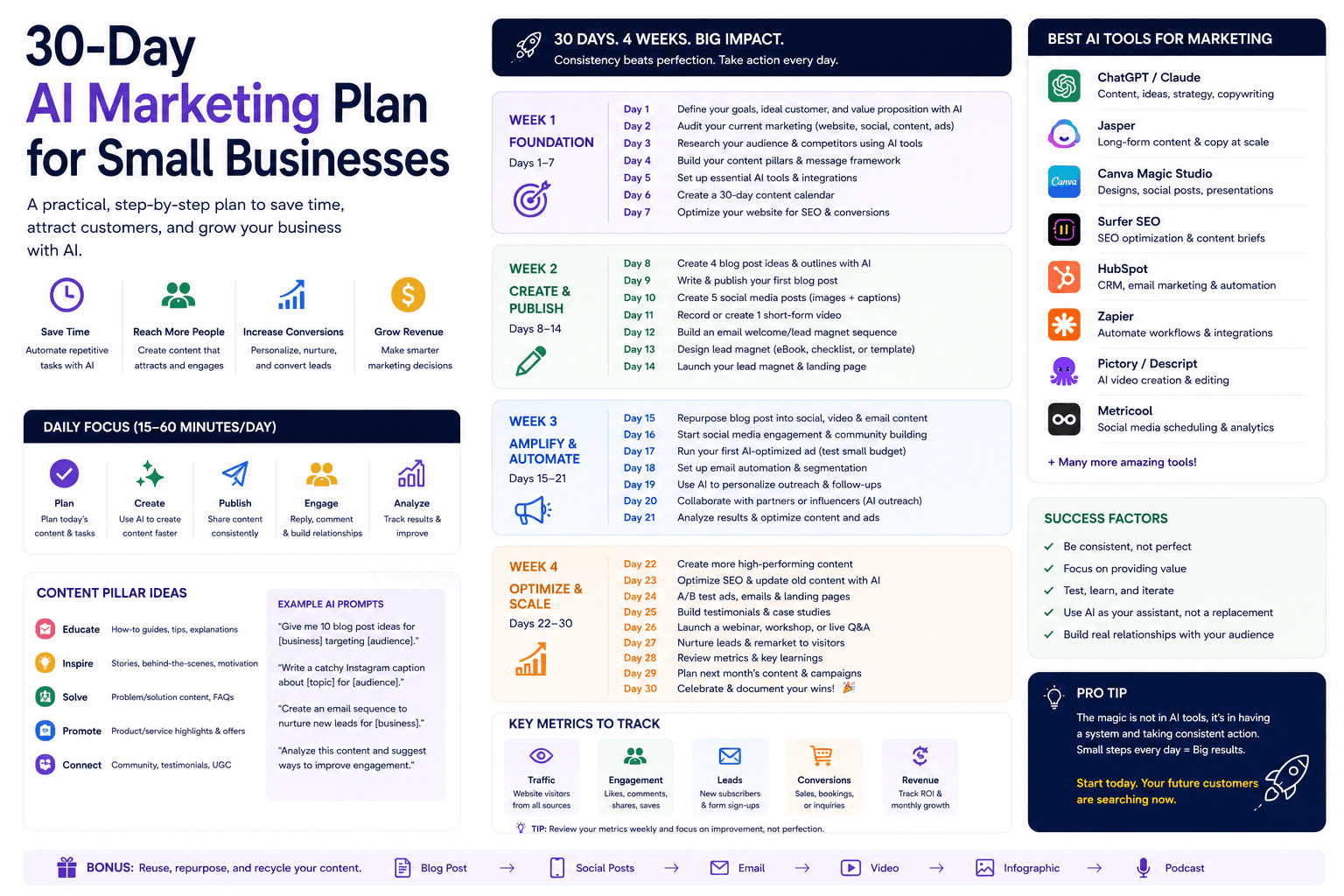
Thirty days is enough to build one useful AI-assisted marketing workflow. It is not enough to automate every channel — and that constraint is the point.
This plan takes one offer from customer evidence to a published campaign, consistent follow-up, and a keep / change / stop decision. It is written for small business owners, freelancers, agencies, and consultants who need a calendar, not another tool list.
For strategy context, read AI marketing for small business. For software choices, see best AI marketing tools.
Table of contents
- Quick summary
- What is a 30-day AI marketing plan?
- Who should use it
- Who should not use it
- Key features of the plan
- Pricing and time budget
- Pros and cons
- Best use cases
- Limitations
- Week-by-week plan
- Comparison tables
- Decision matrix
- Things to consider before starting
- Common mistakes
- 30-day checklist
- Alternatives
- Frequently asked questions
- Final recommendation
Quick summary
Complete this sentence before day one:
For the next 30 days, we will help [audience] solve [problem] with [offer], using [channel], and measure [conversion].
Then execute four weeks:
- Strategy and evidence — baseline, customer facts, source pack, brief
- Create — one core asset, human substance, channel adaptations, landing path
- Publish and follow up — tracking, warm launch, manual replies, one safe automation
- Improve — diagnose bottleneck, one test, SOP, ROI, keep/change/stop
Google’s public guidance remains quality-first: AI assistance is fine when pages are helpful and people-first; mass low-value publishing is not. See Google on AI-generated content and creating helpful content.
What is a 30-day AI marketing plan?
A 30-day AI marketing plan is a time-boxed experiment that uses AI for research support, outlining, drafting, adaptation, and analysis — while humans own strategy, facts, approvals, and customer promises.
It is not:
- a promise to replace your marketing team;
- a ranking guarantee;
- an AdSense approval shortcut;
- permission to publish unedited AI content at volume.
It is a documented loop: evidence → brief → asset → publish → follow-up → measure → decide.
According to the U.S. Chamber of Commerce, generative AI adoption among surveyed small businesses rose sharply by 2025. Adoption without a plan usually produces more drafts, not more qualified demand. This calendar forces one conversion and one review date.
Who should use it
This plan fits when:
- Owners and operators can spare ~2–5 focused hours in peak weeks.
- Freelancers and consultants need a repeatable client campaign process.
- Agencies want a first-month pilot for a new client or offer.
- Local businesses (clinics, trades, restaurants, real estate) have demand signals in reviews, calls, or Google Business Profile.
- You already have an offer and can name one conversion (call, form, booking, purchase, trial, reply).
- Someone will review every public asset before it goes live.
Pair with channel playbooks when needed: AI email marketing, AI social media, AI SEO, AI lead generation.
Who should not use it
Delay this plan when:
- you cannot finish the audience sentence without inventing hobbies and demographics;
- the offer does not convert in real sales conversations;
- no one owns fact-checking for prices, claims, or testimonials;
- you intend to publish dozens of thin AI pages to “win SEO”;
- you would paste customer lists or confidential files into unapproved tools;
- regulated claims (health, legal, financial) need specialist review you will not get;
- you refuse to set a keep / change / stop decision at day 29.
In those cases, fix positioning and process first — or hire specialists — before adding AI acceleration.
Key features of the plan
| Feature | Why it matters |
|---|---|
| Single experiment sentence | Prevents multi-channel chaos |
| Baseline metrics | Proves whether AI helped |
| Source pack | Stops generic, inventable content |
| One core asset | Depth over volume |
| Human substance rules | Aligns with people-first content standards |
| Manual follow-up before automation | Reveals real objections |
| One safe automation | Limits blast radius |
| Bottleneck diagnostic | Fixes the right problem |
| SOP document | Makes the win repeatable |
| Keep / change / stop | Ends sunk-cost theater |
Pricing and time budget
You do not need a new suite to run this plan.
Minimum viable
$0–20/month
Most solos can start here
- Existing email list or CRM
- Free AI tier or one paid assistant (~$20)
- Canva Free if visuals matter
- GA4 + Search Console ($0)
- No new ad spend required
Comfortable pilot
$40–100/month
When volume justifies tools
- Paid AI assistant
- Canva Pro or brand kit
- Email platform free/starter tier
- Optional Buffer Free/Essentials
- Small warm-audience boost only after day 17
Agency / multi-brand
$150+/month
Client pilots
- Team AI workspace if needed
- Client CRM + email already in place
- Automation only after manual path
- Reporting tied to one conversion
- Do not buy HubSpot Professional for a 30-day test
Time budget (realistic)
| Week | Focus | Typical hours |
|---|---|---|
| Week 1 | Baseline, customer, source pack, brief | 2–3 |
| Week 2 | Core asset + adaptations + QA | 3–5 |
| Week 3 | Publish, measure, manual replies, one automation | 2–4 |
| Week 4 | Diagnose, one test, SOP, ROI, decision | 2–3 |
| Total | Full plan | ~10–15 hours |
If you cannot protect those hours, shrink the experiment (shorter asset, smaller warm list) — do not skip Week 1.
Pros and cons
Pros
- Forces one audience and one conversion — reduces tool shopping
- Builds a reusable source pack for future prompts
- Creates a measurable before/after for AI spend
- Delays automation until objections are known
- Ends with a documented SOP and a clear decision
- Works with free or low-cost tools
Cons
- Will not transform every channel in a month
- Requires disciplined review — unedited drafts waste the month
- Weak offers produce weak campaigns faster
- Needs access to real customer language (reviews, calls, tickets)
- Temptation to change too many variables in Week 4
- SEO and paid results may need more than 30 days to mature
Best use cases
| Business type | Example experiment | Primary conversion |
|---|---|---|
| Dental / clinic | New-patient consult via local search + email | Booked consult |
| Restaurant | Weekday group bookings via GBP + list | Reservation / inquiry |
| Agency | Fixed-scope audit via LinkedIn + email | Reply / booked call |
| Realtor | Neighborhood price report via search + social | Lead form |
| Ecommerce | Win-back sequence for lapsed buyers | Repeat purchase |
| Consultant | Lead magnet + nurture for one niche | Qualified discovery call |
| Freelancer | Case-study page + warm outreach | Project inquiry |
Best for (by role)
| Role | Best fit | Adjust |
|---|---|---|
| Solo owner | Full plan at minimum viable budget | Protect calendar blocks |
| Freelancer | Use as client delivery framework | Bill discovery for Week 1 |
| Agency | Pilot one client offer | Cap scope in the contract |
| Marketing hire | First 30 days on the job | Align with sales on conversion definition |
| Consultant | Offer redesign + campaign | Keep claims conservative |
Limitations
This plan cannot:
- invent product-market fit;
- guarantee rankings or AdSense approval;
- replace sales skill on high-value deals;
- fix dirty email lists or missing consent;
- overcome platform ad policy violations;
- prove annual ROI from a single quiet week of traffic.
Treat surprising AI analysis as questions, not facts. Verify prices, testimonials, and claims against primary sources before publish.
Week-by-week plan
Before day one: choose the experiment
Finish the experiment sentence. Pick one primary conversion: call, form, booking, purchase, trial, or reply.
Examples that work:
- dental practice → new-patient consult → local search + email;
- restaurant → weekday group bookings → Google Business Profile + customer list;
- agency → fixed-scope audit → LinkedIn + email;
- realtor → neighborhood price report → search + social.
If the sentence is vague, AI will multiply the vagueness. Pause tool setup until it is specific.
Week 1: strategy and evidence
Day 1 — Record the baseline
Capture the last 30 days:
- channel traffic or reach;
- qualified inquiries;
- conversion rate;
- response time;
- marketing hours;
- software and ad costs;
- revenue or gross profit where attribution is reasonable.
Without a baseline, “AI helped” is a feeling.
Day 2 — Define the customer
Skip fictional personas. Use observable facts:
- search or purchase trigger;
- problem they want solved;
- outcome they value;
- objections;
- words from real reviews or calls;
- decision criteria;
- risks that delay action.
Day 3 — Collect the source pack
One document with:
- offer details and limits;
- pricing or quote process;
- five customer questions;
- five objections;
- approved proof;
- service area or eligibility;
- brand language;
- prohibited claims;
- final call to action.
Remove confidential and personal data before pasting into any AI tool. Prompt libraries help once the pack exists — see ChatGPT prompts for small business.
Day 4 — Analyze the evidence
Ask AI to group questions and objections into a table: source phrase → theme → possible response. Check every row against original notes. Do not ask it to invent what customers think. Call notes tools like Fireflies can feed this step when you have permission to record.
Day 5 — Write the campaign brief
One page only:
| Field | Decision |
|---|---|
| Audience | One specific customer group |
| Problem | One urgent or expensive problem |
| Offer | One clear next step |
| Promise | Outcome without unsupported guarantees |
| Proof | Real evidence available |
| Channel | One primary distribution path |
| Conversion | One measurable action |
| Guardrails | Claims, privacy, and tone rules |
Week 2: create the campaign
Day 6 — Choose the core asset
Build one substantial asset that answers the main customer question:
- service page;
- buyer guide;
- comparison;
- webinar outline;
- email sequence;
- case study;
- lead magnet with original utility.
For search content, make it complete enough that a reader can act without buying. That aligns with Google’s people-first guidance — not pages created only to capture rankings.
Day 7 — Create the outline
Ask AI to organize the approved source pack into:
- problem;
- decision criteria;
- practical steps;
- examples or proof;
- risks and limitations;
- FAQs;
- next action.
Delete sections that exist only to pad length.
Days 8–9 — Draft with human input
Draft one section at a time. Add firsthand process details, real examples, constraints, screenshots or diagrams, expert explanation, and links to primary sources. AI may help phrasing; substance must come from the business.
Day 10 — Fact and policy review
Check names, prices, claims, dates, links, testimonials, and disclosures. Regulated topics need a qualified professional.
Day 11 — Channel adaptations
From the core asset, create:
- three social posts;
- one short email;
- one longer nurture email;
- one Google Business Profile post if relevant;
- two ad concepts if paid is part of the experiment.
Fit the channel. Do not paste the same block everywhere. For social systems, see AI social media for small business.
Day 12 — Build the landing path
Make five things obvious:
- who it is for;
- what problem it solves;
- what is included;
- why you are credible;
- what to do next.
Days 13–14 — Quality assurance
Have someone outside the project complete the intended action on mobile. Fix confusing language, broken forms, slow assets, missing disclosures, and unclear confirmation messages.
Week 3: publish and follow up
Day 15 — Publish the core asset
Use an accurate title, unique description, clear H1, and links from a relevant category or navigation page. Connect related guides with descriptive anchors — for example from AI marketing for small business to this plan and the tools roundup.
Day 16 — Configure measurement
Verify analytics loads, the conversion event fires once, campaign parameters are consistent, calls or bookings can be counted, thank-you states work, and internal tests are excluded when possible.
Day 17 — Launch to the warm audience
Start with people who already know the business: subscribers, followers, customers where consent permits. Ask: “What is still unclear?” Feedback improves the asset before wider distribution. Email patterns: AI email marketing and email automation sequences.
Days 18–19 — Respond manually
Observe real replies. Record recurring questions and hesitation points before you automate.
Day 20 — Add one safe automation
Low-risk options:
- instant confirmation after a form;
- internal alert for a qualified lead;
- task creation when a call is booked;
- approved FAQ reply with human escalation;
- reminder when no owner follows up.
See AI automation workflows, lead follow-up AI agent, and HubSpot vs Pipedrive if CRM ownership is the bottleneck.
Day 21 — Weekly review
Review traffic/reach, conversion rate, qualified inquiries, response time, objections, quality problems, hours spent and saved. Do not rewrite the campaign based on one click.
Week 4: improve the constraint
Days 22–23 — Find the bottleneck
| Symptom | Likely problem |
|---|---|
| Impressions, no clicks | Title, creative, or audience |
| Clicks, no conversion | Page or offer |
| Leads, poor quality | Targeting or qualification |
| Qualified leads, no sale | Follow-up or sales |
| Sales, weak margin | Pricing or delivery |
AI can summarize evidence; the owner chooses the diagnosis.
Days 24–25 — Run one meaningful test
Change one variable: offer framing, proof placement, CTA language, subject line, qualification question, or follow-up timing. Do not change audience, offer, page, and channel at once.
Day 26 — Strengthen internal links
Link from relevant, already-discoverable pages with descriptive anchor text.
Day 27 — Document the workflow (SOP)
Write: trigger, owner, approved inputs, AI task, review checklist, publishing steps, measurement, escalation path.
Day 28 — Review costs
Net monthly value = labor value saved + incremental gross profit − software, setup, and review costs
Use conservative assumptions.
Day 29 — Make the decision
- Keep — clear quality and business value
- Change — promising with a named bottleneck
- Stop — no meaningful benefit or unacceptable risk
Day 30 — Plan the next month
If it worked, raise volume gradually or apply the process to the next bottleneck. Do not add three new channels at once. Tool upgrades only with proof — see best AI marketing tools.
Comparison tables
Table 1 — 30-day plan vs other approaches
| Approach | Time horizon | Primary risk | Best when |
|---|---|---|---|
| 30-day AI plan (this) | 1 month | Stopping early or skipping review | Offer works; need a measured pilot |
| Tool-first shopping | Ongoing | Unused subscriptions | You already have a documented workflow |
| Agency retainer only | 3–12 months | Paying for unedited AI volume | You will not review weekly |
| Content volume sprint | 2–4 weeks | Thin pages / spam risk | Almost never for new AI users |
| Full stack rebuild | 1–3 months | Integration debt | CRM + marketing must share data now |
| Recommendation | Start here | One conversion | Then expand |
Table 2 — Week focus vs output vs metric
| Week | Main output | Success signal | Failure signal |
|---|---|---|---|
| 1 | Baseline + brief + source pack | Clear experiment sentence | Vague audience; no baseline |
| 2 | Core asset + adaptations + landing path | External QA passes on mobile | Unedited AI paste; broken CTA |
| 3 | Live asset + tracking + one automation | Conversion event fires; warm replies | Launch without tracking |
| 4 | SOP + ROI + keep/change/stop | Named decision with evidence | Adding three tools instead of deciding |
| Overall | Repeatable workflow | Qualified demand or clear stop | More posts, same revenue |
Decision matrix
Score your readiness 1–5 before day one. Multiply by weight. If the weighted total is under 18, fix gaps before starting.
| Criterion (weight) | Your score (1–5) | Weighted |
|---|---|---|
| Offer already converts in conversations (×3) | ||
| Can name one conversion event (×3) | ||
| Access to real customer language (×2) | ||
| Named human reviewer available weekly (×2) | ||
| 10–15 hours available this month (×2) | ||
| Consent / data rules for AI tools clear (×1) | ||
| Total (max 65) |
Things to consider before starting
- Is the experiment sentence specific enough to reject off-topic work?
- Who owns facts, prices, and testimonials?
- Which channel already produces inquiries?
- Where do contacts and consent live today?
- What data is banned from consumer AI tools?
- What is the conversion event in analytics?
- What does “qualified” mean for a lead?
- What is the kill criteria on day 29?
- Will sales agree on follow-up SLAs?
- Are you prepared to stop if quality risk outweighs gains?
Common mistakes
- Running five channels in the same 30 days.
- Skipping the source pack and prompting “write my campaign.”
- Publishing unedited AI drafts to hit a content quota.
- Automating follow-up before reading real replies.
- Judging success by post volume instead of qualified demand.
- Changing four variables in the Week 4 test.
- Buying new software in Week 1 instead of using what you have.
- No baseline — then claiming ROI.
- Pasting private customer data into chat tools.
- Ignoring day 29 and restarting the same chaos next month.
30-day checklist
- Experiment sentence completed
- Baseline recorded (last 30 days)
- Audience defined from real evidence
- Source pack reviewed and redacted
- One-page campaign brief signed off
- Core asset published
- Channel adaptations completed
- Tracking verified (conversion fires once)
- Warm launch completed
- Manual responses observed (2+ days)
- One safe automation live
- Bottleneck diagnosed
- One controlled test completed
- SOP documented
- ROI calculated conservatively
- Keep / change / stop decision recorded
- Next-month plan written (one bottleneck only)
Alternatives
vs buying tools first
Tool lists are useful after a workflow exists. Start here, then open best AI marketing tools with a named upgrade trigger.
vs a full marketing overhaul
Overhauls stall. A 30-day single-conversion pilot ships learning. Expand only after keep.
vs hiring an agency for everything
Agencies help with strategy and production. Ask how they use AI, how they QA facts, and whether they will run a plan like this with you in the loop. Paying for unreviewed AI volume is not a strategy.
vs “post every day with ChatGPT”
Daily posting without a core asset and conversion path usually fails measurement and quality bars. One strong asset plus adaptations beats thirty generic posts.
vs SEO-only sprints
SEO can take longer than 30 days. Use this plan for a conversion-backed asset; treat rankings as a longer secondary signal. See AI SEO for small business.
A note about SEO and AdSense
No article or checklist guarantees a top ranking or AdSense approval. Google AdSense expects unique, relevant content and a good user experience. A credible site is supported by original substantial pages, clear navigation, About / Contact / Privacy and policy pages, mobile usability, no scraped material, honest affiliate disclosures, and enough useful content for a reviewer to understand the site’s purpose.
This plan improves marketing process quality. It does not bypass Google’s review.
Frequently asked questions
Can a small business build an AI marketing system in 30 days?
You can build and test one focused workflow in 30 days. You should not automate every channel. The goal is a measured first campaign and a documented process.
How much time does this plan require?
Plan for about two focused hours in week one, three to five hours for asset creation in week two, and one to two hours per week for launch, review, and improvement — roughly 10–15 hours total.
What budget is required?
You can begin with existing tools and free plans. A paid AI assistant (~$20/month on common public tiers), design tool, email platform, or ad budget is optional. Set spend only after choosing the channel and conversion.
What should I measure during the first month?
Qualified leads or sales, conversion rate, cost per qualified lead, response time, hours saved, and quality problems. Avoid judging success by output volume alone.
What if I get no leads in 30 days?
Use the bottleneck table. No impressions → distribution. Impressions without clicks → creative or targeting. Clicks without conversion → page or offer. Then choose change or stop — do not silently add three tools.
Should I use ChatGPT, Claude, or Jasper for this plan?
A general assistant is enough for most pilots. Specialized brand writers matter when multi-person volume requires voice lock — see Jasper vs Copy.ai vs ChatGPT.
Can I run this plan for a client?
Yes. Scope Week 1 discovery, require a named client reviewer, and write keep/change/stop into the SOW. Do not promise rankings or revenue.
Is AI content safe for SEO during this plan?
Google states appropriate AI use is not banned; using automation primarily to manipulate rankings is spam. Human review, original experience, and clear purpose matter more than the drafting method.
Final recommendation
Run one experiment: one audience, one offer, one channel, one conversion.
- Finish the experiment sentence.
- Protect 10–15 hours across four weeks.
- Build the source pack before drafting.
- Publish one strong asset with human substance.
- Follow up manually, then add one safe automation.
- End with keep, change, or stop — written down.
If the pilot earns a keep, raise volume carefully and add tools only for proven bottlenecks. If it earns a stop, you saved a year of unused subscriptions.
Next reads: AI marketing for small business for the operating system, and best AI marketing tools for stack decisions after day 30.
The AI edge, delivered every Tuesday
One 5-minute email: the tools worth your money, the plays that are working right now, and zero hype. Unsubscribe anytime.
No spam. No selling your data. Read by owners of restaurants, gyms, clinics, and agencies across the US, UK, Canada, and Australia.
Key takeaway
A practical 30-day AI marketing plan for small businesses: week-by-week calendar, source pack, budget, checklist, decision matrix, and keep/change/stop review — without automating everything. For more step-by-step guides, browse our blog or explore Marketing.
Frequently asked questions
Can a small business build an AI marketing system in 30 days?
A small business can build and test one focused workflow in 30 days. It should not attempt to automate every channel. The goal is a measured first campaign and a documented process with a keep, change, or stop decision.
How much time does this 30-day plan require?
Plan for about two focused hours in week one, three to five hours for asset creation in week two, and one to two hours per week for launch, review, and improvement — roughly 10 to 15 hours across the month.
What budget is required?
The plan can begin with existing tools and free plans. A paid AI assistant (commonly about $20 per month on public ChatGPT Plus or Claude Pro pricing), design tool, email platform, or ad budget is optional. Set a budget only after choosing the channel and conversion goal.
What should I measure during the first month?
Measure qualified leads or sales, conversion rate, cost per qualified lead, response time, hours saved, and quality problems. Avoid judging success by content volume alone.
What if I get no leads in 30 days?
Use a bottleneck diagnostic: impressions without clicks suggest title or audience issues; clicks without conversion suggest page or offer issues; leads without sales suggest follow-up or sales issues. Then choose change or stop — do not add three new tools by default.
Should I use ChatGPT, Claude, or Jasper for this plan?
A general AI assistant is enough for most 30-day pilots. Specialized brand-writing platforms become useful when multi-person volume requires locked brand voice. Start lean and upgrade only after a keep decision.
Can agencies or freelancers run this plan for clients?
Yes. Scope Week 1 discovery, require a named client reviewer for public assets, and write keep/change/stop into the statement of work. Do not promise rankings, AdSense approval, or revenue outcomes.
Is AI-assisted content safe for SEO during this plan?
Google evaluates whether content is helpful, reliable, and created for people. Appropriate AI assistance is not banned; using automation primarily to manipulate rankings violates spam policies. Human review, original experience, accurate claims, and a clear purpose matter more than the drafting method.
Written by
AI Growthub StaffEditorial Team
The AI Growthub editorial team covers practical AI news, tools, and workflows for small business owners. Every article is fact-checked against primary sources before publication.
Comments are coming soon
We’re building a discussion space for business owners. Until then, reply to any newsletter issue — we read everything.
Related posts
AI Video Marketing for Small Business: The Complete 2026 Guide
Compare the best AI video tools for small businesses in 2026. Covers HeyGen, Synthesia, Creatify, InVideo AI, and free alternatives with pricing, use cases, and a decision framework.

AI Lead Generation Workflow: The Complete 2026 Guide for Local Small Businesses
Definitive local SMB guide to AI lead generation: offers, landing pages, qualification, speed-to-lead, GBP, and HighLevel vs HubSpot vs Pipedrive pricing — without spammy automation.
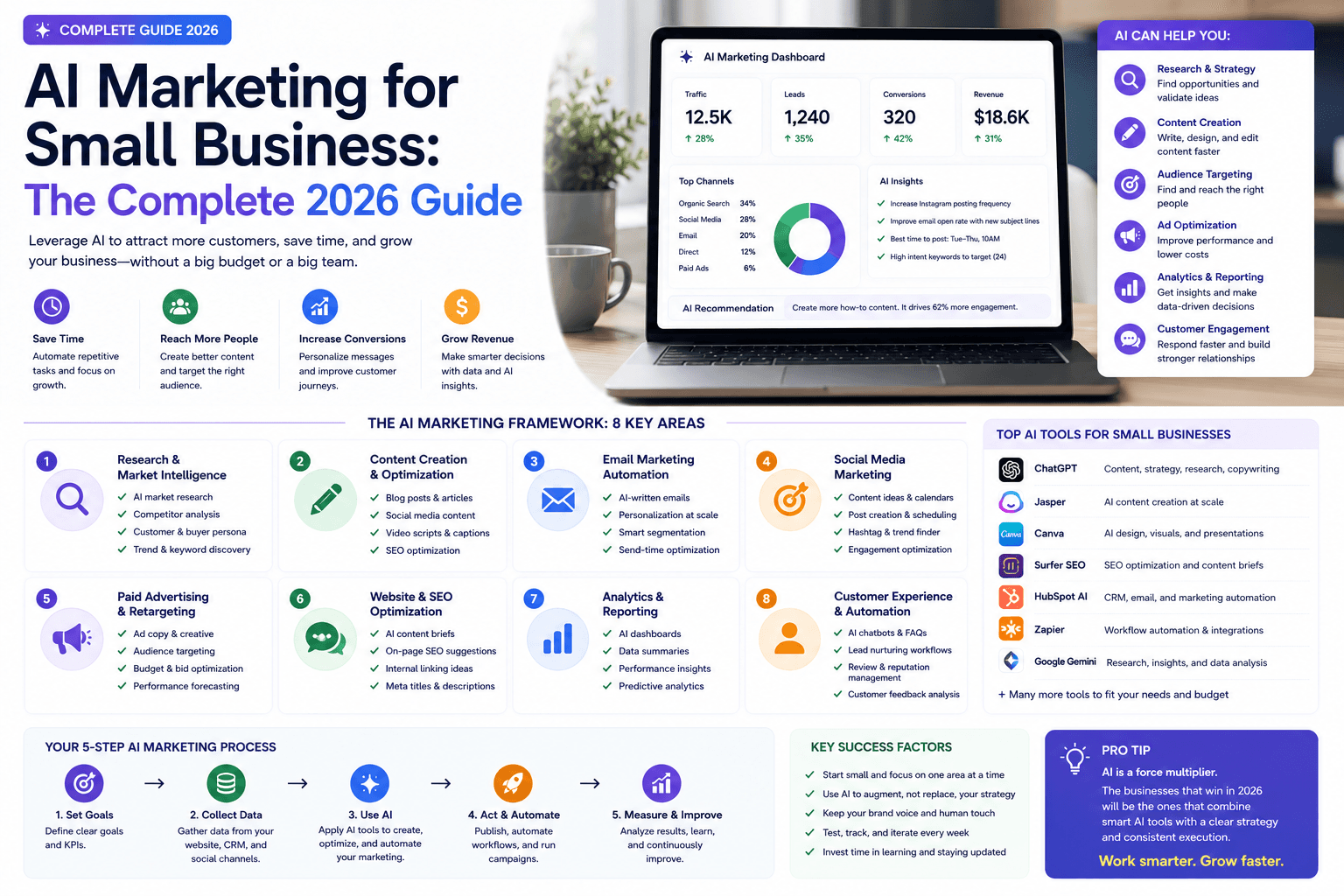
AI Marketing for Small Business: Complete 2026 Guide to Strategy, Tools & ROI
Practical AI marketing for small business in 2026: workflows, lean stack pricing, decision matrix, checklists, risks, Google SEO guidance, and how to measure ROI.
The AI edge, delivered every Tuesday
One 5-minute email: the tools worth your money, the plays that are working right now, and zero hype. Unsubscribe anytime.
No spam. No selling your data. Read by owners of restaurants, gyms, clinics, and agencies across the US, UK, Canada, and Australia.