AI Social Media for Small Business (2026): System, Workflow & Tool Stack
Build a repeatable AI social media system for small business: weekly workflow, four content pillars, FTC disclosures, pricing, checklists, and a 30-day test — without flooding feeds with generic AI posts.
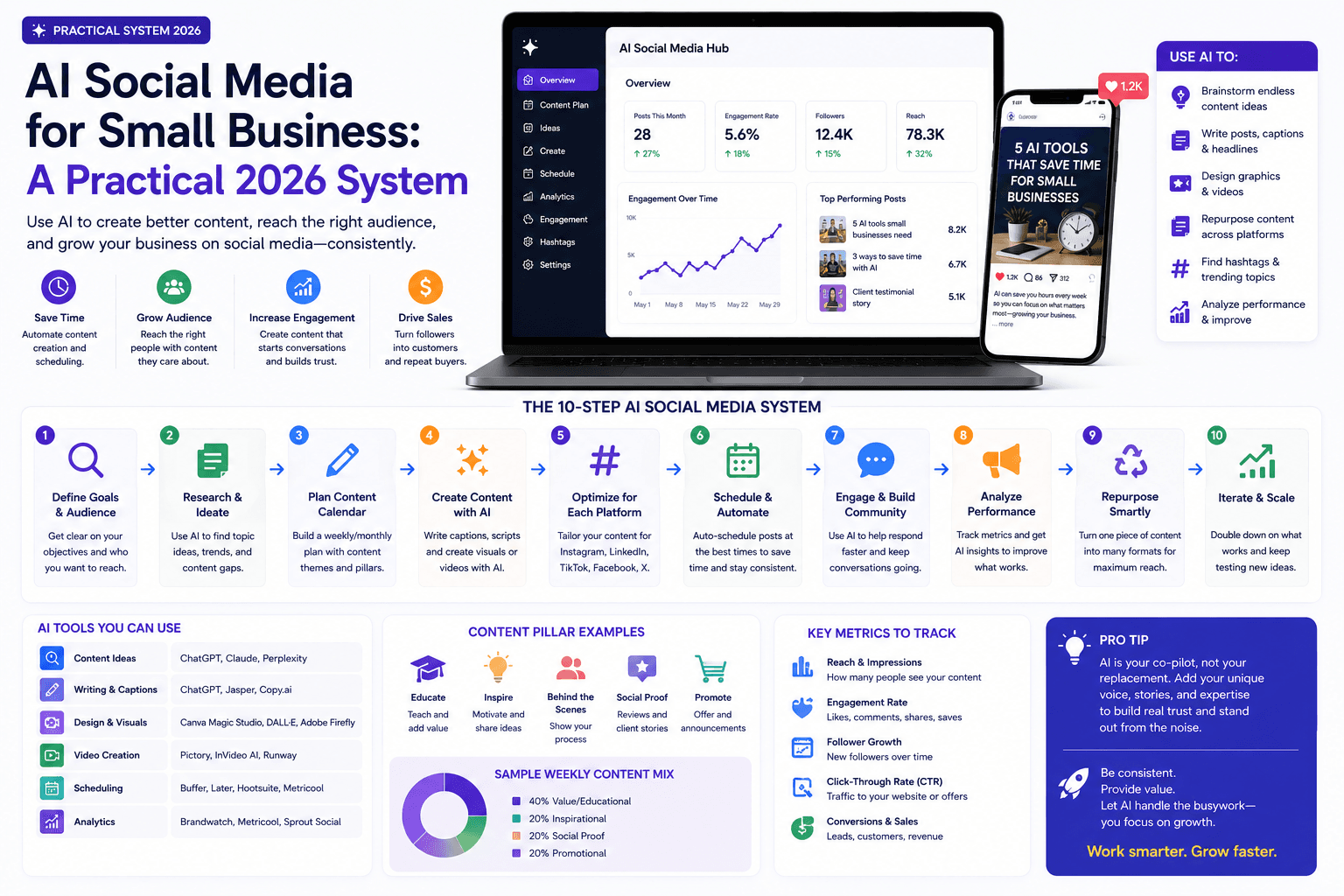
AI makes it easy to produce social posts. That is not the same as earning attention.
A useful social system starts with customer knowledge and a clear channel role. AI then helps you organize, adapt, and schedule — not invent expertise.
This guide is for small business owners, freelancers, agencies, and consultants who want a repeatable AI-assisted social workflow: ideas, scripts, repurposing, scheduling, community management, and measurement.
For the broader marketing system, read AI marketing for small business. For tools, see best AI marketing tools. For a four-week rollout, use the 30-day AI marketing plan.
Table of contents
- Quick summary
- What is AI social media for small business?
- Who should use it
- Who should not use it
- Key features of a working system
- Pricing: lean social stack
- Pros and cons
- Best use cases
- Limitations
- The weekly workflow
- Comparison tables
- Decision matrix
- Things to consider before choosing
- Common mistakes
- Social content checklist
- Alternatives and competing approaches
- Frequently asked questions
- Final recommendation
Quick summary
AI social media for small business means using AI inside a repeatable weekly system — not auto-posting random tips.
The practical pattern:
- Choose one primary goal and one primary platform.
- Build four content pillars: Teach, Show, Prove, Invite.
- Run a Monday–Friday workflow with human approval before publish.
- Repurpose one original asset per week across formats — without copy-pasting identical text.
- Disclose material connections per FTC endorsement guidance.
- Measure profile visits, clicks, qualified messages, and hours saved — not vanity reach alone.
What is AI social media for small business?
AI social media is the use of generative and automation tools within a social workflow. Typical jobs:
- organizing customer questions into content themes;
- drafting hooks, captions, and carousel outlines from approved notes;
- adapting one verified answer for Instagram, LinkedIn, TikTok, YouTube Shorts, or Google Business Profile;
- resizing visuals and generating subtitle drafts;
- drafting neutral comment replies for human review;
- summarizing exported analytics into questions to investigate.
It is not:
- a substitute for knowing your customers;
- permission to publish fake testimonials, synthetic customers, or undisclosed ads;
- fully automated comment and complaint handling;
- a reason to be on every platform at once.
If a post could be published by any company after swapping the logo, it needs more original detail.
Who should use it
This system fits when:
- Solo owners need a sustainable cadence without a full-time social manager.
- Local businesses (restaurants, gyms, clinics, trades) can connect social to GBP and booking paths.
- B2B consultants and agencies demonstrate expertise on LinkedIn with original proof.
- Ecommerce brands repurpose product education and customer FAQs.
- Marketing freelancers need a client-ready weekly SOP.
- You can assign a human approver and protect 30–90 minutes per week for the workflow.
Vertical examples: AI for restaurants, AI for dentists, AI for real estate agents.
Who should not use it
Skip or delay AI social when:
- you have no customer questions, proof, or process details to feed the system;
- the primary goal is undisclosed affiliate or sponsored content;
- complaints, refunds, or sensitive DMs would be handled by bots alone;
- you cannot verify claims about results, pricing, or compliance;
- your audience is not on social — search or email may be the real channel (AI SEO, AI email marketing);
- you plan to chase trends that do not fit your brand or offer.
In those cases, fix positioning and channel fit before scaling production.
Key features of a working system
Single primary goal. Reach, trust, leads, retention, hiring, or launch — pick one for 30 days.
Four content pillars. Teach, Show, Prove, Invite — each post maps to one.
Source card per asset. Question, verified answer, example, proof, banned claims, CTA, disclosures.
Weekly rhythm. Collect → draft → create → approve → engage.
Human review gate. Facts, tone, rights, accessibility, disclosures.
Repurposing rules. Same idea, different format — not identical captions everywhere.
Measurement tied to business. Clicks, messages, bookings — not views alone.
Lean stack. One planner, one creation tool, one scheduler, native analytics until volume forces an upgrade.
Pricing: lean social stack
Verify live pricing before purchase. Ranges reflect commonly listed SMB tiers as of August 2026.
Starter lean
$20–35/month
Solo, one platform
- General AI assistant for hooks/captions (~$20/mo)
- Canva Free or Pro for visuals (~$0–15/mo)
- Buffer Free (3 channels) or native scheduling
- Phone camera + basic editing
- Native platform analytics ($0)
Growth
$50–120/month
Active posting + light team
- Paid AI assistant kept
- Canva Pro brand kit
- Buffer Essentials (~$5/mo annual) or similar
- Optional CapCut or Descript-class editing
- UTM discipline + GA4 for site clicks
Multi-location / agency
$150+/month
Approvals + volume
- Team workspace or client folders
- Approval workflows
- Multi-profile scheduling
- Reporting tied to leads — not vanity dashboards
- Add specialized social AI only for proven bottlenecks
Official references: Buffer pricing, Canva pricing, OpenAI ChatGPT pricing.
Pros and cons
Pros
- Turns real customer questions into a steady content pipeline
- Cuts time on hooks, captions, and format adaptations
- Makes a sustainable weekly cadence realistic for small teams
- Connects social to measurement when UTMs and goals are set
- Repurposing one original asset beats daily generic posting
- Works with free or low-cost tools at starter scale
Cons
- Easy to produce forgettable ‘AI tips’ without original proof
- Over-automation of comments and DMs damages trust
- Platform tool sprawl without a weekly owner
- FTC disclosure mistakes on sponsored or affiliate posts
- Chasing trends that do not fit the business
- Impressions without qualified actions create false confidence
Best use cases
By content pillar
| Pillar | AI helps with | Human must own |
|---|---|---|
| Teach | Outline FAQ carousels from real questions | Accurate claims and examples |
| Show | Caption drafts for process videos | Original footage and delivery |
| Prove | Structure case-study posts | Permitted results and testimonials |
| Invite | CTA variations | Offer clarity and booking path |
By format
| Format | Good AI task | Human responsibility |
|---|---|---|
| Short video | Hook and outline options | Original delivery and proof |
| Carousel | Step-by-step organization | Verify details and design |
| Caption | Concise variations | Final tone and claims |
| Comment reply | Neutral draft | Context and escalation |
| Monthly report | Summarize exports | Diagnose and choose action |
| GBP post | Adapt local FAQ | Location facts and hours |
| Recommendation | Adapt — don't duplicate | Reviewer signs off |
Best for (by business type)
| Business type | Primary platform signal | First content type |
|---|---|---|
| Local service | Instagram + Google Business Profile | Teach + Invite |
| B2B consultant | Teach + Prove | |
| Restaurant / retail | Instagram or TikTok | Show + Invite |
| Ecommerce | Instagram + email tie-in | Show + Prove |
| Agency | LinkedIn + client proof | Prove + Teach |
| Recruiting-heavy | Show + Invite |
Limitations
AI social systems cannot:
- invent customer stories or results;
- replace community judgment on complaints;
- guarantee viral reach or follower growth;
- fix a weak offer or booking path;
- substitute for Google helpful content standards on linked blog posts;
- make undisclosed sponsorships compliant.
Trend participation only works when the format fits your audience and brand — not when it is borrowed for reach alone.
The weekly workflow
Monday — Collect evidence
Gather five inputs: a customer question, team lesson, product detail, objection, and recent result you are allowed to share. Save them in a source card.
Tuesday — Draft
Ask AI for multiple hooks and formats from those inputs. Keep the strongest idea, then rewrite in your business voice. Prompt patterns: ChatGPT prompts for small business.
Wednesday — Create
Record original video or photos when possible. Use AI for captions, cut suggestions, subtitle drafts, resizing, and alternative versions. Visuals: Canva Magic Studio review.
Thursday — Approve and schedule
Check facts, links, disclosures, accessibility (alt text, contrast, captions), and visual rights. Schedule only approved posts.
Friday — Engage and learn
Respond to meaningful comments as a person. Record recurring questions for next week's content. Draft-only AI for sensitive threads.
Choose the job of social media
Pick one primary goal for the next 30 days:
- reach new local customers;
- demonstrate expertise;
- build trust before a sales conversation;
- retain existing customers;
- recruit employees;
- support a product launch.
One account cannot optimize for every goal at once.
Build four content pillars
- Teach — answer a specific customer question.
- Show — demonstrate process, product, or people.
- Prove — share permitted evidence, results, or testimonials.
- Invite — offer a clear next step.
Feed AI approved source notes for each pillar. Do not ask it to invent stories, customers, or results.
Repurpose without duplicating
Start with one original asset — e.g., a 60-second FAQ video. Adapt into a short post, email paragraph, carousel, and website FAQ.
Each version should fit the channel. A LinkedIn explanation, Instagram Reel, and Google Business Profile post should not be identical text.
Handle endorsements correctly
The FTC’s Disclosures 101 for Social Media Influencers requires obvious disclosure when there is a material connection — payment, free product, affiliate commission, employment, or similar.
Rules of thumb from FTC endorsement guidance:
- place disclosure with the endorsement — not buried in hashtags or “see more”;
- use plain language: “Ad,” “Sponsored,” “Paid partnership with [Brand]”;
- do not rely on platform labels alone — add your own clear disclosure;
- for video, disclose on-screen and in audio when practical;
- never use AI-generated fake testimonials or undisclosed paid endorsements.
Measure business value
Track:
- profile visits from relevant people;
- website clicks with campaign parameters;
- qualified messages or leads;
- assisted conversions;
- response time to DMs and comments;
- saves and meaningful comments;
- production hours per asset.
Reach is useful only when it connects to audience and goal.
Create a reusable source card
For each post, save:
- the customer question;
- the verified answer;
- a real example or demonstration;
- approved proof;
- prohibited claims;
- desired next action;
- disclosure requirements.
This card lets AI create variations without becoming the source of truth.
A 30-day social test
Publish three useful posts per week from the four pillars. Keep audience, offer, and platform stable. At month end, compare meaningful conversations, qualified traffic, conversions, and production time vs. the prior month. Align with the 30-day AI marketing plan.
Comparison tables
Table 1 — Platform fit (choose one primary)
| Platform | Best for | Content format | Measure |
|---|---|---|---|
| Local visual brands, retail, services | Reels, carousels, Stories | Profile visits, DMs, link clicks | |
| B2B, consultants, agencies | Posts, carousels, short video | Qualified messages, site sessions | |
| TikTok | Demonstration-heavy, younger local audiences | Short video | Profile visits, comments quality |
| YouTube / Shorts | Search-driven how-to questions | Long + short video | Watch time, site clicks |
| Google Business Profile | Local services — non-optional | Posts, Q&A, photos | Calls, direction requests, bookings |
| Community groups, older local demographics | Posts, events, video | Messages, event responses | |
| Recommendation | Pick one primary + GBP if local | Sustain weekly | Qualified actions |
Table 2 — Stack approach comparison
| Approach | Monthly cost signal | Best when | Trade-off |
|---|---|---|---|
| Lean: AI + Canva + Buffer/native | $20–35 | Solo, one platform | Manual approvals |
| Growth: + paid scheduler + editing | $50–120 | 3 posts/week sustained | More tools to maintain |
| All-in-one social AI suite | $100–300+ | Multi-brand approvals | Overlap with general AI |
| Agency-managed only | Retainer | No internal owner | Lose voice if unreviewed |
| Manual only, no AI | $0 software | Very low volume | Slow drafting |
| Recommendation | Start lean | Upgrade on bottleneck | Process beats brand |
vs major competitors (scheduling + drafting)
| Need | Native platform tools | Buffer | Hootsuite-class |
|---|---|---|---|
| Solo, 1–2 channels | Often enough | Free/Essentials fits | Overkill |
| Simple queue | Built-in on some platforms | Strong fit | Strong fit |
| Team approvals | Limited | Team tier | Enterprise workflows |
| Analytics | Basic native | Lightweight | Heavier reporting |
| Cost at SMB scale | $0 | ~$5–10/mo annual entry | Higher entry |
| Default pick | Try native first | Buffer when queue + multi-channel helps | When team governance is the job |
For general drafting, a ChatGPT/Claude-class assistant plus a source card often beats a dedicated “AI social writer” subscription. Compare writers in Jasper vs Copy.ai vs ChatGPT.
Decision matrix
Score options 1–5 for your situation. Multiply by weight.
| Criterion (weight) | Lean AI + Canva + Buffer | Specialized social AI | Agency-only |
|---|---|---|---|
| Fits weekly time budget (×3) | |||
| Original proof available (×3) | |||
| One platform sustained (×2) | |||
| Human reviewer assigned (×2) | |||
| Measures qualified actions (×2) | |||
| Disclosure process clear (×1) | |||
| Weighted total |
Things to consider before choosing
- What is the one goal for social this quarter?
- Where do qualified customers already engage — with evidence?
- Can the team sustain three quality posts per week?
- Who approves claims, visuals, and disclosures?
- Do you have a source card template ready?
- Are affiliate or sponsored posts part of the mix — and disclosed?
- How will you track link clicks and qualified messages?
- What is the escalation path for complaints and sensitive DMs?
- Will social connect to GBP, email, or landing pages?
- What is the 30-day keep / change / stop metric?
Common mistakes
- Posting generic tips any competitor could publish.
- Automating comment replies on emotional or complaint threads.
- Identical captions across LinkedIn, Instagram, and GBP.
- Chasing trends that do not fit the offer.
- Measuring views alone while ignoring messages and bookings.
- Hiding #ad in hashtag clusters or below “see more.”
- AI fake testimonials or synthetic customer stories.
- Five platforms at once with no owner on any.
- No source card — AI becomes the “truth.”
- Skipping Friday engagement — social is a conversation, not a broadcast.
Social content checklist
Before every scheduled post:
- Maps to one pillar (Teach / Show / Prove / Invite)
- Built from source card — not a blank prompt
- Claims verified (price, results, availability)
- Original proof or example included
- Tone matches brand voice after human edit
- Visual rights confirmed
- Alt text / captions for accessibility
- CTA matches landing path
- UTM or trackable link where applicable
- Material connection disclosed if sponsored/affiliate
- Sensitive topics escalated to a person
- Scheduled only after named approver sign-off
Alternatives and competing approaches
vs “post every day with AI”
Daily volume without original proof usually underperforms three strong posts per week and risks low-quality patterns. Quality and consistency beat maximum frequency for most SMBs.
vs paid ads only
Ads can amplify a clear offer. Organic social builds trust and answers questions before the click. Many local businesses need both — social feeds the creative and proof ads require.
vs email-first
If your list is warm and converts, email may outrank social for ROI. Social still supports discovery and trust. See AI email marketing.
vs hiring a social manager immediately
A documented weekly system helps you hire well — or delay hiring until volume justifies it. Hand off the SOP, source card, and review checklist.
vs automation-heavy stacks (Zapier / n8n)
Automate after manual posting works: RSS-to-social, form alerts, lead routing. See AI automation and n8n vs Zapier vs Make.
Frequently asked questions
How can a small business use AI for social media?
AI can organize customer questions, draft content variations, create short-video outlines, adapt posts by platform, and summarize performance exports. Original expertise, approval, disclosure, and community interaction remain human responsibilities.
Should a business post AI-generated content automatically?
Not by default. Automated publishing should use approved source material, brand rules, fact checks, and a human escalation process. Sensitive replies, complaints, and endorsements need direct review.
How often should a small business post?
Choose a sustainable cadence based on audience response and content quality. Three useful posts each week often outperforms daily generic posts. Consistency and relevance matter more than maximum volume.
Which platform should a small business choose first?
Use audience evidence: local visual businesses often prioritize Instagram plus Google Business Profile; B2B experts often prioritize LinkedIn; search-driven video questions may favor YouTube. Pick one primary platform for 30 days.
Do I need a specialized AI social media tool?
Usually not at first. A general AI assistant, Canva, and a scheduler cover most solo workflows. Upgrade when approvals, multi-location publishing, or analytics become the repeated bottleneck.
How do I disclose sponsored or affiliate posts?
Follow FTC Disclosures 101: disclose material connections clearly and conspicuously with the post — plain language like “Ad” or “Sponsored,” not buried hashtags.
Can AI write comment replies?
It can draft neutral responses. A human should handle context, complaints, clinical or legal questions, and escalation. Do not fully automate sensitive threads.
What should I measure in the first 30 days?
Profile visits, link clicks with UTMs, qualified DMs or form fills, response time, production hours per asset, and meaningful comment themes — compared to the prior month.
Final recommendation
Build a small, repeatable system — not a content firehose.
- Choose one goal and one primary platform (+ GBP if local).
- Run the Monday–Friday workflow with source cards and human approval.
- Publish three useful posts per week from Teach / Show / Prove / Invite.
- Repurpose one original asset — adapt by channel, do not duplicate blindly.
- Disclose endorsements per FTC guidance.
- Run a 30-day test; decide keep, change, or stop on qualified actions and time saved.
Default stack: general AI assistant + Canva + Buffer or native scheduling + platform analytics.
Next reads: best AI marketing tools for stack upgrades, 30-day AI marketing plan for the full calendar, AI marketing guide for strategy context.
The AI edge, delivered every Tuesday
One 5-minute email: the tools worth your money, the plays that are working right now, and zero hype. Unsubscribe anytime.
No spam. No selling your data. Read by owners of restaurants, gyms, clinics, and agencies across the US, UK, Canada, and Australia.
Key takeaway
Build a repeatable AI social media system for small business: weekly workflow, four content pillars, FTC disclosures, pricing, checklists, and a 30-day test — without flooding feeds with generic AI posts. For more step-by-step guides, browse our blog or explore AI Social Media.
Frequently asked questions
How can a small business use AI for social media?
AI can organize customer questions, draft content variations, create short-video outlines, adapt posts by platform, and summarize performance exports. Original expertise, approval, disclosure, and community interaction remain human responsibilities.
Should a business post AI-generated content automatically?
Not by default. Automated publishing should use approved source material, brand rules, fact checks, and a human escalation process. Sensitive replies, complaints, and endorsements need direct review.
How often should a small business post on social media?
Choose a sustainable cadence based on audience response and content quality. Three useful posts each week often outperforms daily generic posts. Consistency and relevance matter more than maximum volume.
Which social platform should a small business choose first?
Use audience evidence rather than trying to be everywhere. Local visual businesses often prioritize Instagram plus Google Business Profile; B2B experts often prioritize LinkedIn; search-driven video questions may favor YouTube. Pick one primary platform for at least 30 days.
Do I need a specialized AI social media tool?
Usually not at first. A general AI assistant, Canva, and a scheduler cover most solo workflows. Add specialized social AI only when approvals, multi-location publishing, or analytics become a repeated bottleneck.
How do I disclose sponsored or affiliate social posts?
Follow FTC guidance: disclose material connections clearly and conspicuously with the post itself. Use plain language such as Ad or Sponsored, not buried hashtags or vague shorthand. Platform disclosure tools may help but are not sufficient alone.
Can AI write social media comment replies?
AI can draft neutral responses for human review. A person should handle complaints, sensitive topics, clinical or legal questions, and escalation. Do not fully automate emotional or high-stakes conversations.
What should a small business measure in a 30-day social test?
Track profile visits, link clicks with campaign parameters, qualified messages or leads, response time, production hours per asset, and meaningful comment themes — compared to the prior month. Avoid judging success by impressions alone.
Written by
AI Growthub StaffEditorial Team
The AI Growthub editorial team covers practical AI news, tools, and workflows for small business owners. Every article is fact-checked against primary sources before publication.
Comments are coming soon
We’re building a discussion space for business owners. Until then, reply to any newsletter issue — we read everything.
The AI edge, delivered every Tuesday
One 5-minute email: the tools worth your money, the plays that are working right now, and zero hype. Unsubscribe anytime.
No spam. No selling your data. Read by owners of restaurants, gyms, clinics, and agencies across the US, UK, Canada, and Australia.