AI for Real Estate Agents (2026): 12 Workflows, Compliance & Tool Stack
Practical AI for real estate agents in 2026: 12 workflows for listings, follow-up, and CRM — plus fair housing rules, HUD ad guidance, fact sheets, checklists, and a 30-day pilot.
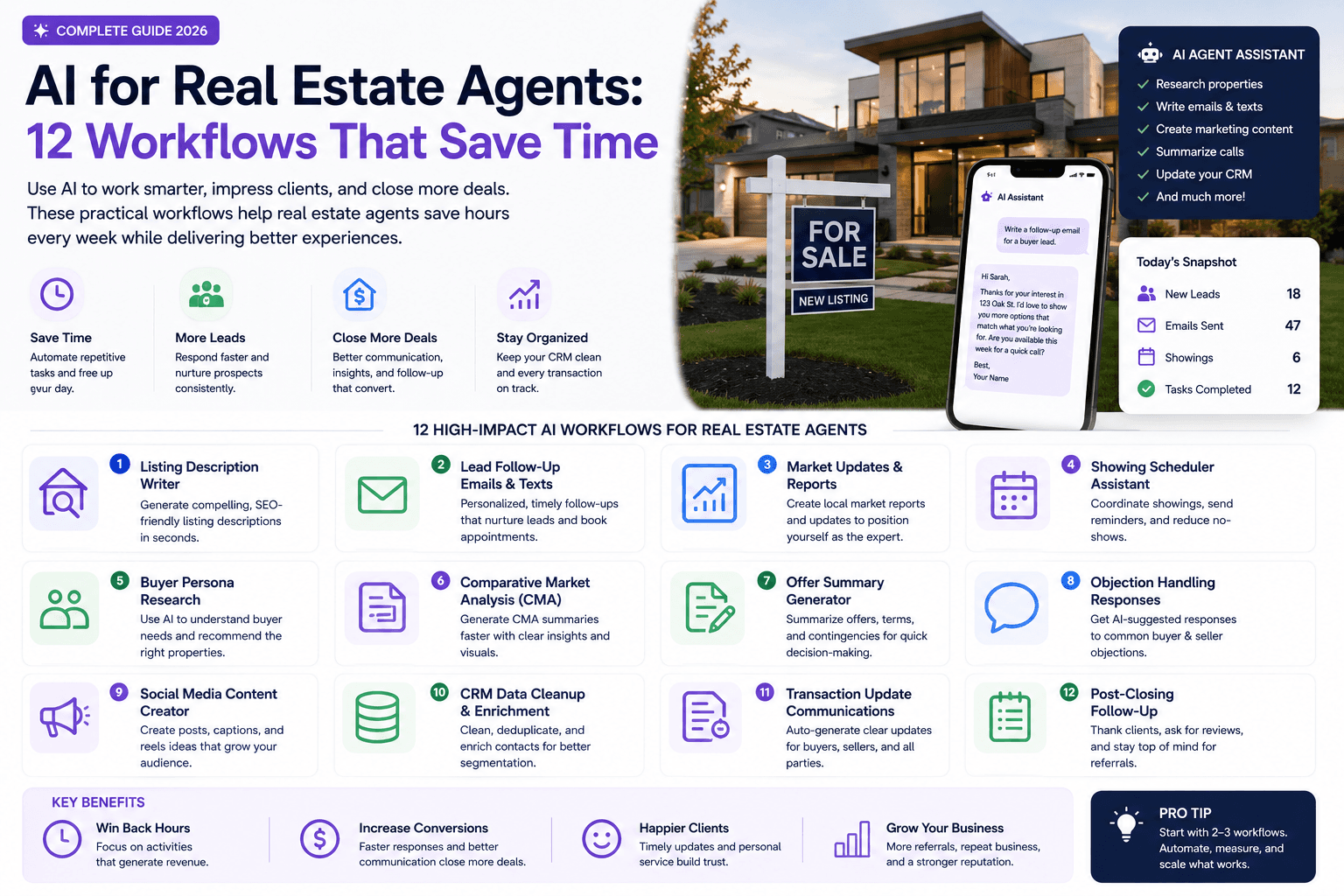
The strongest use of AI in real estate is not writing louder listing descriptions. It is reducing the administrative work between a lead, a showing, an offer, and a closing.
Use AI as a drafting and organization layer. Keep pricing judgment, representation, negotiation, disclosures, and client advice with qualified people.
This guide is for real estate agents, team leads, brokers, and marketing coordinators who want practical AI workflows for listings, lead follow-up, market updates, showings, CRM hygiene, and transaction communication — without inventing property facts or creating fair-housing risk.
For broader marketing systems, see AI marketing for small business. For CRM choices, see HubSpot vs Pipedrive AI.
Table of contents
- Quick summary
- What is AI for real estate agents?
- Who should use it
- Who should not use it
- Key features of a safe workflow
- Pricing: lean real estate AI stack
- Pros and cons
- Best use cases: 12 workflows
- Limitations
- Fair housing and digital advertising
- Comparison tables
- Decision matrix
- Things to consider before choosing
- Common mistakes
- Real estate AI review checklist
- Alternatives
- Frequently asked questions
- Final recommendation
Quick summary
AI helps agents when it handles repeatable drafting and organization from verified inputs: listing copy, channel adaptations, CRM summaries, showing templates, market-update drafts, nurture emails, open-house follow-up, transaction milestone messages, and SOPs.
It fails when it becomes the source of truth for property features, school quality, neighborhood character, client intent, or ad audiences.
Measure minutes saved on listing production, median lead response time, appointment rate, follow-up completion, and correction rate — not raw content volume.
What is AI for real estate agents?
AI for real estate agents means using generative and automation tools inside brokerage-approved workflows. Common jobs:
- drafting listing descriptions from MLS-verified facts;
- repurposing one listing into social, email, and video outlines;
- drafting speed-to-lead acknowledgments and CRM tasks;
- structuring notes into fields (timing, budget, next step);
- creating showing confirmation and feedback templates;
- summarizing dated, sourced market datasets;
- segmenting nurture tracks from permitted CRM fields;
- documenting vendor and transaction SOPs;
- planning local educational content from public sources.
It is not a substitute for agency, fiduciary judgment, MLS compliance, or fair-housing obligations.
Who should use it
This fits when:
- Solo agents and small teams lose hours on listing copy and follow-up admin.
- Listing coordinators need consistent repurposing from one fact sheet.
- ISA / lead-response roles need faster first-touch drafts with human send.
- Brokers want documented, reviewable workflows before team rollout.
- Marketing staff can enforce a fact sheet and compliance checklist.
- You have broker approval for tool use and data handling.
Related playbooks: AI lead generation workflow, lead follow-up AI agent, AI CRM automation, AI email marketing, AI social media.
Who should not use it
Delay or restrict AI when:
- you lack MLS-verified facts for a listing;
- copy would describe residents, “ideal buyers,” or neighborhood demographics;
- you plan automated ad targeting without fair-housing review;
- tenant screening or client qualification would run through unapproved AI;
- client PII would go into consumer chat tools without broker policy;
- transaction updates would send without human verification of dates and obligations;
- the broker has not approved AI use for client communications.
In those cases, limit AI to internal outlines with no client or public output.
Key features of a safe workflow
Verified property fact sheet. Single source for beds, baths, features, disclosures, media rights.
Human review gate. Agent or broker reviewer before MLS, email, or ad publish.
Fair-housing language check. No coded preferences, steering, or demographic assumptions.
Draft-only default. AI proposes; humans approve and send.
CRM discipline. Structured fields, owners, due dates — not orphan chat outputs.
Source-dated market stats. Figures tied to dataset and date.
Automation after manual proof. Acknowledgments and tasks only after routing works.
Correction log. Repeated fixes → improve fact sheet or stop workflow.
Pricing: lean real estate AI stack
Verify live pricing. Most agents do not need a real-estate-specific AI suite on day one.
Starter agent
$20–60/month
Solo agent, draft-only
- General AI assistant for drafts (~$20/mo)
- Existing CRM (HubSpot, Pipedrive, kvCORE-class)
- Canva for listing visuals
- MLS fact sheet template (internal)
- No PHI/client secrets in consumer AI
Active producer
$80–200/month
Volume listings + ISA support
- AI assistant kept
- Email/SMS platform with consent
- Optional meeting notes tool for call summaries (with permission)
- Zapier/Make for form → CRM tasks
- Broker-reviewed automation templates
Team / brokerage
$250+/month
Compliance + multi-agent
- Shared prompt library and fact sheet standards
- Approval workflows before publish
- CRM seats and automation volume
- Fair-housing review process documented
- Legal/compliance sign-off on ad targeting
Compare CRM options: HubSpot vs Pipedrive AI. For tools map: best AI marketing tools.
Pros and cons
Pros
- Cuts time from verified facts to multi-channel listing assets
- Speeds first-touch drafts while keeping human send control
- Structures messy CRM notes into follow-up fields
- Standardizes showing and transaction communication templates
- Supports market-update drafts when data is sourced and dated
- Makes SOP documentation realistic for small teams
Cons
- Hallucinated features (fireplaces, schools, commutes) if fact sheet is thin
- Fair-housing risk in listing copy and ad targeting
- Over-automation of client advice and negotiation messaging
- Privacy exposure if client data enters consumer AI
- False confidence from polished market summaries without source checks
- Brokerage/MLS violations if AI skips required language
Best use cases: 12 workflows
1. Listing description drafts
Provide verified beds, baths, size, upgrades, location facts, and permitted amenities. Ask for a factual first draft and a separate list of claims requiring verification.
Avoid demographic assumptions, subjective neighborhood characterizations, and language that signals preference for a type of resident.
2. Property-content repurposing
Turn the approved listing into a social caption, email teaser, short-video outline, brochure bullets, and open-house reminder. All versions trace to the same verified fact sheet. See AI social media system.
3. Speed-to-lead follow-up
Draft an immediate acknowledgment, assign ownership, create a CRM task, and prepare the next question. Do not pretend an automated message is personal analysis. Deep dive: lead follow-up AI agent.
4. CRM note cleanup
Convert permitted notes into structured fields: timing, property type, budget range, next step, follow-up date. Review the summary before saving.
5. Showing coordination
Create confirmation, reminder, feedback, and rescheduling templates. Keep access instructions and personal details inside approved systems.
6. Buyer and seller education
Draft plain-language outlines for process guides, document checklists, and common questions. State that requirements vary; direct clients to qualified professionals.
7. Market-update drafts
Give AI a dated, sourced dataset and require it to show which figures support each conclusion. Separate facts from commentary.
8. Email nurture
Create tracks for early research, active search, listed sellers, and past clients. Segment using permitted, relevant CRM information — not inferred protected traits. See AI email marketing.
9. Open-house workflow
Prepare promotional copy, sign-in follow-up, staff checklist, and post-event summary. Follow consent and brokerage rules for future marketing.
10. Transaction updates
Draft milestone updates from an approved checklist. A person verifies status, dates, obligations, and recipients before sending.
11. Vendor and process SOPs
Document repeatable tasks: photography, staging, listing entry, showing feedback, closing preparation. See AI automation workflows.
12. Content planning
Build useful local content from public sources: property-tax explanations, transaction steps, seasonal maintenance, market-data methodology. Do not mass-produce thin neighborhood pages. See AI SEO playbook.
Best for (by role)
| Role | Best first workflow | Avoid first |
|---|---|---|
| Solo listing agent | Fact sheet → listing + repurposing | Automated ad targeting |
| Buyer’s agent | Speed-to-lead + CRM note cleanup | AI “buyer matching” |
| Team lead | SOPs + review checklist | Team-wide auto-send |
| ISA | Acknowledgment drafts + tasks | Unreviewed bulk SMS |
| Broker / compliance | Fair-housing review + vendor register | Screening automation |
| Marketing coordinator | Repurposing + email nurture | Neighborhood spam pages |
Limitations
AI cannot safely:
- verify MLS accuracy without your fact sheet;
- replace CMA judgment or pricing strategy;
- determine fair offer terms or negotiation tactics;
- guarantee market appreciation or investment returns;
- comply with fair housing by default in copy or ads;
- access showing lockbox codes or sensitive client files in consumer tools;
- substitute for broker, legal, or escrow instructions on transactions.
Treat every public sentence as your sentence after review.
Fair housing and digital advertising
The Fair Housing Act prohibits discriminatory housing advertising. HUD’s May 2024 guidance on digital platform advertising explains that automated targeting and delivery — including AI-driven systems — can violate the Act even when discrimination was not intentional.
Risk areas include:
- steering ads toward or away from audiences based on protected characteristics or proxies;
- ad copy that discourages protected groups;
- neighborhood descriptions that code for demographics;
- audience datasets that embed unlawful targeting;
- tenant screening algorithms without fair-housing review.
Practical safeguards (with qualified review):
- mark housing ads correctly on platforms per vendor instructions;
- monitor campaign delivery for disparate outcomes when possible;
- avoid using AI to infer who “should” see a listing;
- run listing and ad copy through a fair-housing checklist;
- document broker approval for targeting choices.
Do not publish phrases merely because they sound familiar. Terms like “perfect for families,” descriptions of current residents, or coded neighborhood language can create risk.
Create a verified property fact sheet
Before drafting anything, collect:
- MLS-approved property facts;
- measurements and their source;
- included and excluded features;
- improvement dates and documentation;
- showing instructions (in secure systems);
- brokerage-required language;
- known limitations and disclosures;
- approved media rights.
Instruct AI to use only the fact sheet and list missing information separately. This reduces hallucinated fireplaces, school claims, commute times, and neighborhood characterizations.
Comparison tables
Table 1 — Workflow risk vs value
| Workflow | Time saved | Risk level | Start month 1? |
|---|---|---|---|
| Listing draft from fact sheet | High | Medium — FH + MLS | Yes |
| Multi-channel repurposing | High | Medium | Yes |
| Speed-to-lead draft | High | Medium — consent/tone | Yes |
| CRM note structuring | Medium | Medium — PII | Yes — no consumer AI with client data |
| Showing templates | Medium | Low–medium | Yes |
| Market update from sourced data | Medium | Medium — stats | Yes with date/source |
| Email nurture drafts | Medium | Medium — segmentation | After broker review |
| Open-house follow-up | Medium | Medium — consent | Yes |
| Transaction updates | Medium | High — accuracy | Draft-only |
| Ad audience targeting with AI | Uncertain | High — FHA | No without compliance |
| Tenant screening AI | N/A | High — FHA | No without legal review |
| Recommendation | Start draft-only | Review every send | One workflow first |
Table 2 — Tool approach comparison
| Approach | Cost signal | Best when | Trade-off |
|---|---|---|---|
| General AI + CRM | $20–60/mo | Most agents | You build checklists |
| Real-estate copy SaaS | $50–150/mo | High listing volume | May still hallucinate without fact sheet |
| CRM-native AI | Included in CRM tier | Already on platform | Feature limits vary |
| Full automation stack | $200+/mo | ISA-heavy teams | Compliance complexity |
| Manual only | $0 | Low volume | Slow |
| Recommendation | General AI + fact sheet | Upgrade on proof | Process beats brand |
The safest first workflow (summary)
| Input | AI task | Human check | Metric |
|---|---|---|---|
| Verified listing fact sheet | Draft channel variations | Accuracy + fair-housing language | Production minutes |
| New inquiry form | Draft acknowledgment + task | Consent, routing, tone | Response time |
| Public market dataset | Summarize dated trends | Calculations + source | Engagement + appointments |
| Showing notes | Create follow-up draft | Client context + next step | Follow-up completion |
Decision matrix
Score each workflow 1–5 before rollout. Multiply by weight.
| Criterion (weight) | Listing repurposing | Speed-to-lead | Market content | Ad targeting AI |
|---|---|---|---|---|
| Weekly time burden (×3) | ||||
| Verified inputs available (×3) | ||||
| Broker-approved (×2) | ||||
| Fair-housing risk manageable (×2) | ||||
| Measurable outcome (×2) | ||||
| Can stop without client harm (×1) | ||||
| Weighted total |
Things to consider before choosing
- Does the broker allow this tool and use case?
- Will client or MLS data enter the system — and is that permitted?
- Is there a verified fact sheet for every listing workflow?
- Who runs the fair-housing and MLS checklist?
- Are market stats tied to source and date?
- Is automation draft-only until proven?
- How is lead consent documented for follow-up?
- What CRM fields define nurture segments — lawfully?
- What happens when AI output is wrong mid-transaction?
- What metric proves ROI in 30 days?
Common mistakes
- Prompting without a fact sheet — invented fireplaces and school claims.
- “Perfect for families” and similar coded language.
- Pasting client notes into ChatGPT without broker policy.
- Auto-sending follow-up without human review.
- Thin neighborhood SEO pages at scale.
- Investment guarantees or demand hype in copy.
- Ad targeting by proxies for protected classes.
- Skipping MLS/brokerage required language.
- Measuring posts created instead of response time and appointments.
- Rolling out team-wide before one-agent pilot.
Real estate AI review checklist
Before MLS entry, email send, or ad publish:
- Every fact matches verified fact sheet / MLS
- Fair-housing language review complete
- Brokerage and MLS required text included
- No material omissions or exaggerated demand claims
- Media and content rights confirmed
- Market statistics sourced and dated
- No descriptions of ideal residents or neighborhood demographics
- Client-specific claims verified with client permission
- Ad marked as housing where platform requires
- Targeting choices documented and compliance-approved
- Named agent/broker reviewer signed off
- Correction log updated if edits were needed
Measure the business case
| Workflow | Track |
|---|---|
| Listing production | Minutes from approved facts → approved assets |
| Lead follow-up | Median response time, appointment rate |
| Nurture / market content | Qualified inquiries — not impressions alone |
| All AI workflows | Correction rate and review minutes |
Net value = time saved + incremental deals − software − review/correction time
If AI saves drafting but doubles compliance edits, account for both.
A 30-day implementation
| Week | Action |
|---|---|
| 1 | Document current process + baseline metrics |
| 2 | Build fact sheet template + draft-only workflow |
| 3 | Run parallel to manual process with review |
| 4 | Compare accuracy, time, adoption, qualified outcomes; keep / change / stop |
Expand only after broker or responsible reviewer approves the documented process. Calendar: 30-day AI marketing plan.
Alternatives
vs real-estate-specific AI copy tools
Vertical tools can speed templates. They still require your fact sheet and fair-housing review. A general assistant plus discipline often matches output at lower cost — see Jasper vs Copy.ai vs ChatGPT.
vs hiring a transaction coordinator only
Coordinators solve ops; AI reduces draft load. Combine both with clear ownership — AI does not replace file accuracy on dates and obligations.
vs ISA human-only follow-up
ISAs excel at conversation. AI drafts and task creation can shorten response time if humans send and escalate. See AI receptionist only with broker-approved scripts and escalation.
vs no AI
Manual workflows remain valid. AI earns its place when a measured pilot saves time without increasing corrections or compliance incidents.
Frequently asked questions
How can real estate agents use AI?
Agents can use AI to draft listing copy from verified facts, summarize sourced market data, prepare follow-up messages, organize CRM notes, create content outlines, and document workflows. Humans must verify facts and comply with fair housing, brokerage, MLS, privacy, and advertising rules.
Can AI write MLS listing descriptions?
AI can draft descriptions from accurate property facts. An agent must verify every feature, measurement, claim, and required disclosure — and run fair-housing and MLS checks — before publishing.
Can AI target housing ads?
Housing advertising is subject to the Fair Housing Act. HUD’s 2024 digital advertising guidance warns that automated targeting can produce discriminatory outcomes even without intent. Get qualified legal and compliance advice before using AI-driven audience tools.
What is the best first AI workflow for an agent?
Listing repurposing from a verified fact sheet or speed-to-lead acknowledgment drafts with CRM tasks. Both are frequent, measurable, and easier to review than automated decisions.
Can I put client notes into ChatGPT?
Follow broker policy. Client information in consumer AI tools can create privacy and compliance risk. Prefer approved systems and de-identified summaries when permitted.
Does AI help with CMAs and pricing?
AI can organize public data drafts, but pricing judgment stays with the agent. Do not publish AI-generated valuations as fact without your analysis and disclosures.
How do teams roll out AI safely?
One agent pilots draft-only for 30 days, documents checklists, logs corrections, then broker approves team templates. Shared fact sheet standards beat shared logins without rules.
What tools do most agents need?
Often: existing CRM, a general AI assistant, Canva-class visuals, email/SMS with consent, and optional automation for tasks — not a dozen overlapping writers. See best AI marketing tools.
Final recommendation
Use AI to shorten the admin gap between lead and closing — not to shout louder about listings.
- Build the verified property fact sheet first.
- Pilot listing repurposing or speed-to-lead drafts for 30 days.
- Keep draft-only + human send until correction rates are low.
- Run every public asset through fair-housing and MLS checklists.
- Treat ad targeting as a compliance project — not a prompt hack.
- Measure response time, appointments, and minutes saved.
Next reads: 30-day AI marketing plan, AI CRM automation, AI lead generation workflow.
The AI edge, delivered every Tuesday
One 5-minute email: the tools worth your money, the plays that are working right now, and zero hype. Unsubscribe anytime.
No spam. No selling your data. Read by owners of restaurants, gyms, clinics, and agencies across the US, UK, Canada, and Australia.
Key takeaway
Practical AI for real estate agents in 2026: 12 workflows for listings, follow-up, and CRM — plus fair housing rules, HUD ad guidance, fact sheets, checklists, and a 30-day pilot. For more step-by-step guides, browse our blog or explore AI for Real Estate.
Frequently asked questions
How can real estate agents use AI?
Agents can use AI to draft listing copy from verified facts, summarize sourced market data, prepare follow-up messages, organize CRM notes, create content outlines, and document workflows. Humans must verify facts and comply with fair housing, brokerage, MLS, privacy, and advertising rules.
Can AI write MLS listing descriptions?
AI can draft descriptions from accurate property facts, but an agent must verify every feature, measurement, claim, and required disclosure — and complete fair-housing and MLS checks — before publishing.
Can AI target housing ads for real estate?
Housing advertising is subject to the Fair Housing Act. HUD's 2024 guidance on digital platform advertising warns that automated targeting and delivery can produce discriminatory outcomes even without intent. Agents and brokers should follow HUD guidance, platform rules, and qualified legal or compliance advice before using AI-driven audience tools.
What is the best first AI workflow for a real estate agent?
Listing repurposing from a verified property fact sheet or speed-to-lead acknowledgment drafts with CRM tasks. Both are frequent, measurable, and easier to review than automated decision-making or ad targeting.
Can real estate agents put client notes into ChatGPT?
Follow broker policy. Client information in general consumer AI tools can create privacy and compliance risk. Prefer approved systems and de-identified summaries when permitted.
Does AI help with CMAs and pricing?
AI can help organize public data drafts, but pricing judgment remains with the agent. Do not publish AI-generated valuations as fact without your own analysis and required disclosures.
How should a brokerage roll out AI safely?
Run a draft-only pilot with one agent for about 30 days, document fact sheets and review checklists, log corrections, then obtain broker approval before team-wide templates. Shared standards beat shared tool logins without rules.
What AI tools do most real estate agents need?
Most agents start with their existing CRM, a general AI assistant for drafts, visual tools for marketing assets, and email or SMS with proper consent. Add automation for tasks and follow-up only after manual workflows are proven.
Written by
AI Growthub StaffEditorial Team
The AI Growthub editorial team covers practical AI news, tools, and workflows for small business owners. Every article is fact-checked against primary sources before publication.
Comments are coming soon
We’re building a discussion space for business owners. Until then, reply to any newsletter issue — we read everything.
The AI edge, delivered every Tuesday
One 5-minute email: the tools worth your money, the plays that are working right now, and zero hype. Unsubscribe anytime.
No spam. No selling your data. Read by owners of restaurants, gyms, clinics, and agencies across the US, UK, Canada, and Australia.