AI for Dentists (2026): 10 Safe Uses for Marketing, Ops & Patient Comms
Practical AI for dental practices in 2026: 10 workflows for marketing, recalls, reviews, and operations — plus HIPAA-aware privacy rules, pricing, checklists, and a 30-day pilot.
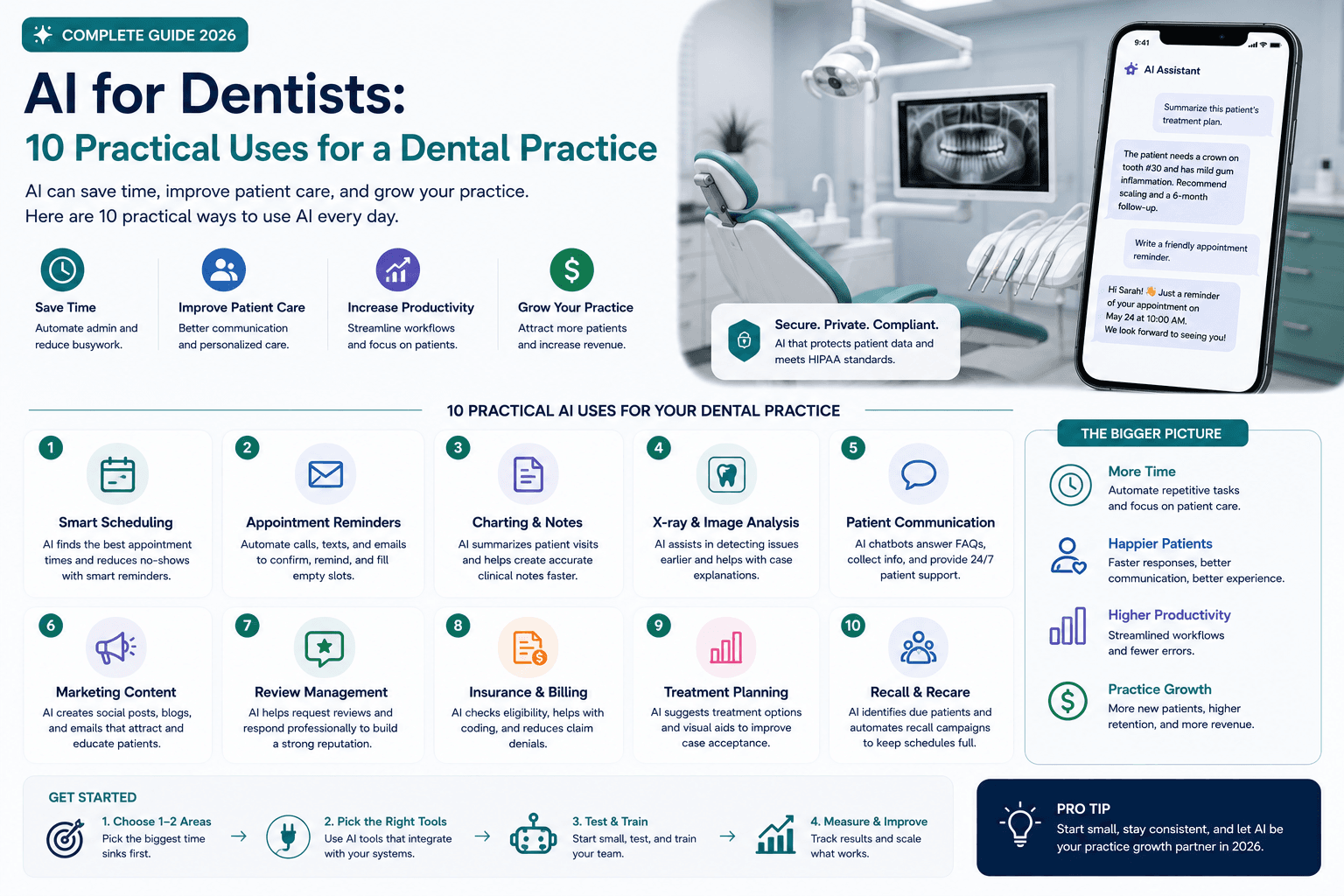
AI can help a dental practice respond faster, explain services more clearly, and cut repetitive admin work. It can also create serious privacy, accuracy, and trust problems when used without controls.
The best starting point is not clinical diagnosis. It is a narrow, measurable, non-clinical workflow with approved inputs and a human owner.
This guide is for dentists, practice managers, marketing staff, consultants, and agency partners who want practical AI uses for marketing, patient communication, scheduling support, reviews, and operations — without putting protected health information at risk.
For broader marketing systems, see AI marketing for small business. For a time-boxed pilot, use the 30-day AI marketing plan.
Table of contents
- Quick summary
- What is AI for dental practices?
- Who should use it
- Who should not use it
- Key features of a safe dental AI system
- Pricing: lean stack for dental marketing and ops
- Pros and cons
- Best use cases (10 practical workflows)
- Limitations
- Privacy and HIPAA fundamentals
- Comparison tables
- Decision matrix
- Things to consider before choosing
- Common mistakes
- Dental AI approval checklist
- Alternatives
- Frequently asked questions
- Final recommendation
Quick summary
Use AI to accelerate approved educational content, local SEO briefs, recall templates, front-desk scripts, de-identified feedback themes, public review replies, social/email adaptations, SOPs, scheduling pattern analysis, and hiring materials.
Do not use consumer chat tools for identifiable patient records, treatment advice, or fake reviews. Measure outcomes that matter to the practice: booked visits, response time, no-shows, and staff hours — not blog volume.
What is AI for dental practices?
AI for dental practices means applying machine learning or generative models to dental business workflows. In 2026, that usually splits into three layers:
| Layer | Examples | Risk level |
|---|---|---|
| Marketing & public education | Service pages, GBP posts, social, emails | Lower if no PHI |
| Front-office operations | Scripts, SOPs, scheduling analysis (de-identified) | Medium — depends on data |
| Clinical / imaging / chairside | Detection aids, charting assistants, clinical chatbots | High — specialized evaluation required |
This article focuses on the first two layers. Clinical AI needs separate validation, governance, and regulatory review — it is outside the scope of a general marketing guide.
A useful system still needs: approved source material, a named owner, a review checklist, vendor risk controls, and a success metric tied to appointments or staff time.
Who should use it
AI fits dental practices when:
- Owners and practice managers need faster marketing and admin drafts without hiring a full content team.
- Front-desk teams need consistent scripts for insurance questions, new-patient intake, and cancellations.
- Marketing coordinators or agencies need dentist-approved source packs before publishing.
- Multi-location groups need SOPs and brand-consistent public replies.
- The practice can assign a human reviewer for every patient-facing message.
- There is a willingness to run a 30-day pilot with keep/change/stop criteria.
Related playbooks: AI chatbots for small business, AI receptionist, train a chatbot on FAQs, AI email marketing, AI social media, AI SEO.
Who should not use it
Delay or heavily restrict AI when:
- staff would paste charts, radiographs, insurance IDs, or notes into consumer ChatGPT/Claude without approval;
- no one will verify clinical or financial claims;
- the goal is automated diagnosis or treatment recommendations from a general LLM;
- the practice cannot answer vendor questions about retention, training data, and BAAs;
- you plan to generate or suppress reviews deceptively;
- complaints, emergencies, or clinical escalations would be handled by bots alone;
- employment screening would rely on biased or unlawful criteria drafted by AI without HR/legal review.
In those cases, limit AI to public, non-PHI educational outlines — or pause until governance is in place.
Key features of a safe dental AI system
Approved source pack. Services offered, credentials, hours, insurance process, prohibited claims, brand tone.
Data classification. Public vs de-identified ops data vs PHI — different tools for each.
Human review gate. No patient-facing send without a named approver.
Escalation paths. Clinical questions, emergencies, complaints → licensed staff.
Vendor register. Tool, owner, allowed uses, banned data, review date, BAA status.
Measurable outcomes. Booked appointments, response time, no-shows, hours saved, correction rate.
Stop switch. Workflow can be paused without disrupting care.
Pricing: lean stack for dental marketing and ops
You do not need a clinical AI suite to start. Verify live vendor pricing before purchase.
Starter (non-PHI)
$20–50/month
Most solo practices
- One general AI assistant for public drafts (~$20/mo)
- Canva Free/Pro for visuals
- Existing PMS + email/SMS vendor
- Google Business Profile + GA4 ($0)
- No PHI in consumer AI chats
Growth ops
$80–200/month
Active recall + reviews + content
- Paid AI assistant + design tool
- Email/SMS platform with consent controls
- Review monitoring workflow
- Optional scheduling/automation layer
- Still keep PHI out of unapproved tools
Clinical / imaging AI
Custom
Only after risk review
- Vendor with appropriate agreements when PHI involved
- Validation and clinician oversight
- Training and audit logging
- Not a first-month experiment
- Qualified counsel + clinical evaluation required
For tool selection patterns outside dentistry, see best AI marketing tools. For phone coverage options, compare against AI receptionist for small business — only after privacy review.
Pros and cons
Pros
- Speeds educational drafts and local SEO briefs from approved outlines
- Improves consistency of front-desk and recall messaging
- Helps cluster de-identified review themes for operational fixes
- Reduces time to adapt one dentist-approved topic across channels
- Supports SOP drafting for non-clinical processes
- Makes 30-day pilots measurable with clear keep/change/stop criteria
Cons
- PHI exposure risk if staff use consumer AI casually
- Hallucinated clinical or insurance claims if unchecked
- Over-automation of emergencies or complaints damages trust
- Tool sprawl without a vendor register
- Clinical AI marketed as plug-and-play without validation
- False confidence — more posts do not equal more booked visits
Best use cases (10 practical workflows)
1. Patient-friendly educational content
Turn an approved clinical outline into a plain-language draft about preventive visits, treatment preparation, financing questions, or post-visit expectations.
A dentist or qualified team member must verify every statement. Avoid personalized diagnosis, guarantees, fear-based language, and claims that exceed the evidence.
2. Local SEO page briefs
Organize a service-page brief for queries such as emergency dentist, dental implants, or clear aligners in a specific city. Supply real information:
- services actually offered;
- dentist credentials;
- office location and hours;
- insurance and financing process;
- accessibility information;
- original patient questions;
- approved photos and proof.
Generic city pages with swapped place names are not useful. Each page should help a patient decide. See AI SEO for small business and ChatGPT for keyword research.
3. Recall and reactivation campaigns
Create variations for overdue hygiene recalls or inactive-patient outreach from an approved template.
Segment by a permitted operational status rather than asking AI to infer health conditions. Keep messages neutral, avoid exposing sensitive details on shared devices, and provide a clear booking path. Related: AI email automation sequences.
4. Phone and front-desk scripts
Draft scripts for:
- new-patient inquiries;
- insurance questions;
- emergency-call routing;
- appointment confirmations;
- cancellation recovery;
- financing explanations.
Scripts guide staff — they do not trap them. Include escalation for clinical questions, complaints, and urgent symptoms. Compare carefully with AI receptionist products before replacing humans on emergency lines.
5. Summarize de-identified feedback
Remove names and identifying details, then group public reviews or survey responses into themes: wait time, clarity, comfort, billing, scheduling, staff communication.
Use themes to choose an operational improvement. Do not generate fake reviews or suppress honest negative feedback.
6. Respond to public reviews
AI can draft a calm, brand-consistent reply. The final message must never confirm that the reviewer is a patient or discuss treatment.
Acknowledge feedback generally and move the conversation to a private channel.
7. Social and email campaigns
Turn one dentist-approved educational topic into:
- one email;
- three short social posts;
- one FAQ video outline;
- one Google Business Profile post;
- one front-desk talking point.
One verified source → many formats. See AI social media and AI email marketing.
8. Document standard operating procedures
Convert staff notes into structured SOPs for non-clinical processes: opening checks, supply ordering, referral intake, schedule handoffs.
Every SOP needs an owner, revision date, exception path, and final approval.
9. Analyze scheduling patterns
With appropriately de-identified or approved data, AI-assisted analysis can surface patterns in cancellations, lead response time, or appointment demand.
Require calculations to be reproducible. A polished explanation is not proof the analysis is correct.
10. Support hiring and training
Draft role descriptions, interview scorecards, onboarding checklists, and scenario-based training. Human leaders must check employment-law requirements and remove biased or irrelevant criteria.
Best for (by practice role)
| Role | Best first workflow | Avoid first |
|---|---|---|
| Solo dentist-owner | Educational content + GBP posts | Clinical chatbots |
| Practice manager | Front-desk scripts + SOPs | Unapproved PHI tools |
| Marketing coordinator | SEO briefs + email adaptations | Fake review generation |
| Multi-location group | Vendor register + shared templates | Uncontrolled staff ChatGPT use |
| Agency partner | Source-pack-driven campaigns | Promising clinical AI outcomes |
Limitations
AI for dental practices cannot safely:
- replace licensed diagnosis or treatment planning;
- invent insurance coverage for a specific patient;
- “HIPAA-certify” itself via a marketing badge alone;
- fix a broken recall process without clean lists and consent;
- guarantee ranking #1 for “dentist near me”;
- handle emergencies without human escalation.
Clinical imaging and charting AI may help under proper governance — they are not interchangeable with consumer writing assistants.
Privacy and HIPAA fundamentals
The HHS HIPAA Privacy Rule establishes safeguards for protected health information. HHS guidance on HIPAA and cloud computing explains that a cloud provider creating, receiving, maintaining, or transmitting electronic PHI on behalf of a covered entity generally requires an appropriate business associate agreement and ongoing risk management.
HHS business associate guidance also notes examples involving vendors that handle PHI — including certain AI chatbot scenarios on patient portals.
Practical rules for staff:
- Default to no PHI in general AI chat tools.
- If a vendor will handle PHI, confirm whether a BAA and risk analysis are required before use.
- Prefer minimum necessary data even for approved systems.
- Log who can use which tool for which purpose.
- Get qualified counsel — this article is educational, not a compliance program.
Questions to ask an AI vendor
- What data is retained, and for how long?
- Is customer data used to train models?
- Which subprocessors receive data?
- Are access controls, audit logs, and deletion available?
- Will the vendor sign an appropriate agreement when required?
- How are incidents reported?
- Can the practice export data and terminate cleanly?
Feature claims are not a risk assessment.
Comparison tables
Table 1 — Workflow risk vs value
| Workflow | Typical value | Privacy risk | Human owner | Start in month 1? |
|---|---|---|---|---|
| Educational content | High | Low (if no PHI) | Dentist / clinical lead | Yes |
| Local SEO briefs | High | Low | Marketing + dentist | Yes |
| Recall templates | High | Medium | Office manager | Yes — no PHI in consumer AI |
| Front-desk scripts | High | Low–medium | Office manager | Yes |
| Review replies | Medium | Medium | Office manager | Yes — never confirm patient status |
| Social/email adaptations | Medium | Low | Marketing | Yes |
| SOPs (non-clinical) | Medium | Low | Practice manager | Yes |
| Scheduling analysis | Medium | Medium–high | Ops lead | Only if de-identified/approved |
| Hiring drafts | Medium | Low | Owner / HR | Yes — with legal check |
| Clinical / imaging AI | Varies | High | Dentist + IT/compliance | No — separate project |
| Recommendation | Start low-risk | Protect PHI | Name owners | One workflow first |
Table 2 — Tool categories for dental practices
| Category | Examples of jobs | PHI allowed? | Notes |
|---|---|---|---|
| General AI assistant | Public drafts, outlines, scripts | No (default) | ChatGPT/Claude-class for non-PHI only |
| Design tool | GBP graphics, social | No | Canva-class brand kits |
| Email/SMS platform | Recall, confirmations | Only if vendor approved | Consent + templates matter |
| Review management | Draft public replies | Avoid PHI in drafts | Never discuss treatment publicly |
| Chatbot / receptionist AI | After-hours FAQs, booking | Only with proper agreements | Escalate emergencies to humans |
| PMS / imaging AI | Charts, detection aids | Yes — governed systems | Clinical validation required |
| Automation (Zapier-class) | Form → task alerts | Depends on payload | Do not pipe PHI to consumer AI |
| Analytics | Web calls, form fills | Usually marketing data | Separate from clinical records |
Decision matrix
Score each candidate workflow 1–5 before you buy or expand.
| Criterion (weight) | Educational content | Recall outreach | Clinical AI |
|---|---|---|---|
| Solves a weekly bottleneck (×3) | |||
| No PHI / approved vendor path (×3) | |||
| Named clinical/ops reviewer (×2) | |||
| Measurable booking or time outcome (×2) | |||
| Can stop without harming care (×1) | |||
| Staff will actually follow the SOP (×1) | |||
| Weighted total |
Things to consider before choosing
- What exact business problem are you solving (bookings, response time, staff hours)?
- Does any input contain patient or employee information?
- Is the vendor approved for that information and purpose?
- Who verifies clinical, financial, and operational claims?
- Where is the original source retained?
- What happens when the output is uncertain?
- Can the workflow stop without disrupting care?
- Will front-desk staff escalate emergencies correctly?
- Are review replies forbidden from confirming patient status?
- Is there a written register of tools, owners, and review dates?
Common mistakes
- Pasting charts into ChatGPT because it feels faster.
- Letting AI invent insurance or treatment claims.
- Publishing city pages that only swap town names.
- Confirming a reviewer is a patient in a public reply.
- Automating emergency calls without human escalation.
- Buying clinical AI to “fix marketing” without validation.
- No vendor register — every staffer brings a new extension.
- Measuring success by post count instead of booked visits.
- Skipping dentist approval on educational content.
- Assuming a “HIPAA compliant” badge replaces a BAA and risk analysis.
Dental AI approval checklist
Every approved workflow should answer:
- Exact business problem defined
- Data classification completed (public / de-identified / PHI)
- Vendor approved for that data and purpose
- BAA / agreements reviewed when required (with qualified counsel)
- Clinical/financial claim verifier named
- Original source pack retained
- Uncertainty / escalation path documented
- Patient-facing review gate enforced
- Stop procedure defined
- Success metrics chosen (bookings, response time, hours, corrections)
- Staff trained on prohibited uses
- Review date on the calendar (at least quarterly)
Keep a small register of tools, owners, approved uses, prohibited data, and review dates. Staff should not guess whether a new browser extension is permitted.
A safe 30-day pilot
| Week | Action | Success measure |
|---|---|---|
| 1 | Choose one non-clinical workflow; record baseline | Current time and outcome recorded |
| 2 | Build approved source material and review checklist | No sensitive data; owner assigned |
| 3 | Run workflow with human approval on every send | Quality issues and time saved logged |
| 4 | Compare results; keep, change, or stop | Booked visits, response time, or staff hours |
| Rule | Start with a weekly existing task | Document before expanding |
Align this with the general 30-day AI marketing plan — same discipline, dental-specific privacy constraints.
Measure outcomes that matter
| Workflow | Track |
|---|---|
| Recall outreach | Eligible contacted, appointments booked, opt-outs, staff time |
| Public education | Relevant page visits, calls, appointment requests — not article count |
| Review workflows | Response time, recurring operational themes |
| Front-desk scripts | Response consistency, escalation accuracy, handle time |
| All AI workflows | Correction rate — repeated fixes mean fix the source or stop |
Alternatives
vs hiring a dental marketing agency
Agencies help with SEO and campaigns. Require dentist-approved source packs, privacy rules for any AI they use, and booking metrics — not vanity traffic.
vs clinical AI vendors first
Imaging and charting tools can be valuable under governance. They are a poor first buy if marketing and front-desk bottlenecks are unsolved and PHI controls are immature.
vs AI receptionist / chatbot only
After-hours FAQs can help — see AI chatbots and AI receptionist — but only with approved answers, emergency escalation, and proper agreements when PHI is involved.
vs “post more on social”
Volume without verified education and booking paths wastes staff time and risks inaccurate claims. One approved topic adapted across channels beats daily unverified posts.
vs manual-only operations
Manual processes remain safer for PHI and clinical judgment. AI is an accelerator for approved, reviewed work — not a replacement for professional standards.
Frequently asked questions
How can dentists use AI safely?
Start with low-risk work that does not require protected health information: public educational content, campaign ideas, job descriptions, and de-identified process analysis. Review vendors, permissions, contracts, and HIPAA obligations before using patient data. Get qualified professional advice for your practice.
Can dentists put patient information into ChatGPT?
A dental practice should not put identifiable patient information into a general AI tool without an approved business purpose, appropriate safeguards, and any required business associate agreement. Consult qualified privacy and security professionals.
Can AI diagnose dental conditions?
General-purpose AI should not replace a licensed clinician’s diagnosis or treatment judgment. Clinical tools require separate evaluation, validation, governance, and regulatory review.
What is the best first AI project for a dental practice?
Usually an approved recall or FAQ workflow using no sensitive data — clear inputs, a human reviewer, and measurable outcomes such as booked appointments or reduced staff time.
Do we need a BAA for every AI tool?
Not for tools that never create, receive, maintain, or transmit PHI on your behalf. If a vendor handles PHI for the practice, HHS cloud and business associate guidance indicates a HIPAA-compliant BAA is generally required. Confirm with qualified counsel.
Can AI write our Google reviews responses?
It can draft tone-consistent replies. A human must edit so the reply never confirms patient status or discusses treatment, and moves details to a private channel.
How should we measure ROI?
Booked appointments, response time, no-show rate, staff hours saved, and correction rate — minus software and review time. Content volume alone is not ROI.
Should multi-location groups use one AI policy?
Yes. Shared vendor register, banned-data list, review gates, and training reduce freelancing with consumer AI across offices.
Final recommendation
Treat AI as a controlled assistant for non-clinical leverage, not as a digital dentist.
- Pick one weekly non-PHI workflow (education, scripts, or approved recall templates).
- Build a dentist-approved source pack and review checklist.
- Run a four-week pilot with human approval on every public message.
- Keep a vendor register; default to no PHI in consumer AI.
- Expand only after keep — and evaluate clinical AI as a separate, governed project.
Next steps: 30-day AI marketing plan for the calendar, AI marketing for small business for the system, and best AI marketing tools for stack choices after privacy rules are clear.
The AI edge, delivered every Tuesday
One 5-minute email: the tools worth your money, the plays that are working right now, and zero hype. Unsubscribe anytime.
No spam. No selling your data. Read by owners of restaurants, gyms, clinics, and agencies across the US, UK, Canada, and Australia.
Key takeaway
Practical AI for dental practices in 2026: 10 workflows for marketing, recalls, reviews, and operations — plus HIPAA-aware privacy rules, pricing, checklists, and a 30-day pilot. For more step-by-step guides, browse our blog or explore AI for Dentists.
Frequently asked questions
How can dentists use AI safely?
Start with low-risk work that does not require protected health information, such as public educational content, campaign ideas, job descriptions, and de-identified process analysis. Review vendors, permissions, contracts, and HIPAA obligations before using patient data. This is educational guidance — consult qualified professionals for your practice.
Can dentists put patient information into ChatGPT?
A dental practice should not put identifiable patient information into a general AI tool without an approved business purpose, appropriate safeguards, and any required business associate agreement. Consult qualified privacy and security professionals before processing patient data.
Can AI diagnose dental conditions?
General-purpose AI should not replace a licensed clinician's diagnosis or treatment judgment. Clinical tools require separate evaluation, validation, governance, and regulatory review.
What is the best first AI project for a dental practice?
A good first project is usually an approved recall or FAQ workflow using no sensitive data, because it has clear inputs, a human reviewer, and measurable outcomes such as booked appointments or reduced staff time.
Do dental practices need a BAA for every AI tool?
Not for tools that never create, receive, maintain, or transmit PHI on the practice's behalf. If a vendor handles PHI for the practice, HHS guidance on cloud computing and business associates indicates a HIPAA-compliant business associate agreement is generally required. Confirm obligations with qualified counsel.
Can AI write responses to Google reviews for a dental office?
AI can draft calm, brand-consistent replies. A human must edit so the reply never confirms that the reviewer is a patient, never discusses treatment, and moves detailed conversation to a private channel.
How should a dental practice measure AI ROI?
Track booked appointments, response time, no-show rate, staff hours saved, and how often staff must correct AI output. Subtract software and review time. Content volume alone is not a useful ROI metric.
Should multi-location dental groups share one AI policy?
Yes. A shared vendor register, banned-data list, review gates, and staff training reduce uncontrolled use of consumer AI across offices and lower privacy risk.
Written by
AI Growthub StaffEditorial Team
The AI Growthub editorial team covers practical AI news, tools, and workflows for small business owners. Every article is fact-checked against primary sources before publication.
Comments are coming soon
We’re building a discussion space for business owners. Until then, reply to any newsletter issue — we read everything.
The AI edge, delivered every Tuesday
One 5-minute email: the tools worth your money, the plays that are working right now, and zero hype. Unsubscribe anytime.
No spam. No selling your data. Read by owners of restaurants, gyms, clinics, and agencies across the US, UK, Canada, and Australia.