Best AI Marketing Tools for Small Business (2026): Stacks, Pricing & Picks
Compare the best AI marketing tools for small business in 2026 — ChatGPT, Canva, HubSpot, Brevo, Jasper, Buffer, Zapier, and more. Organized by job, budget, and upgrade trigger.
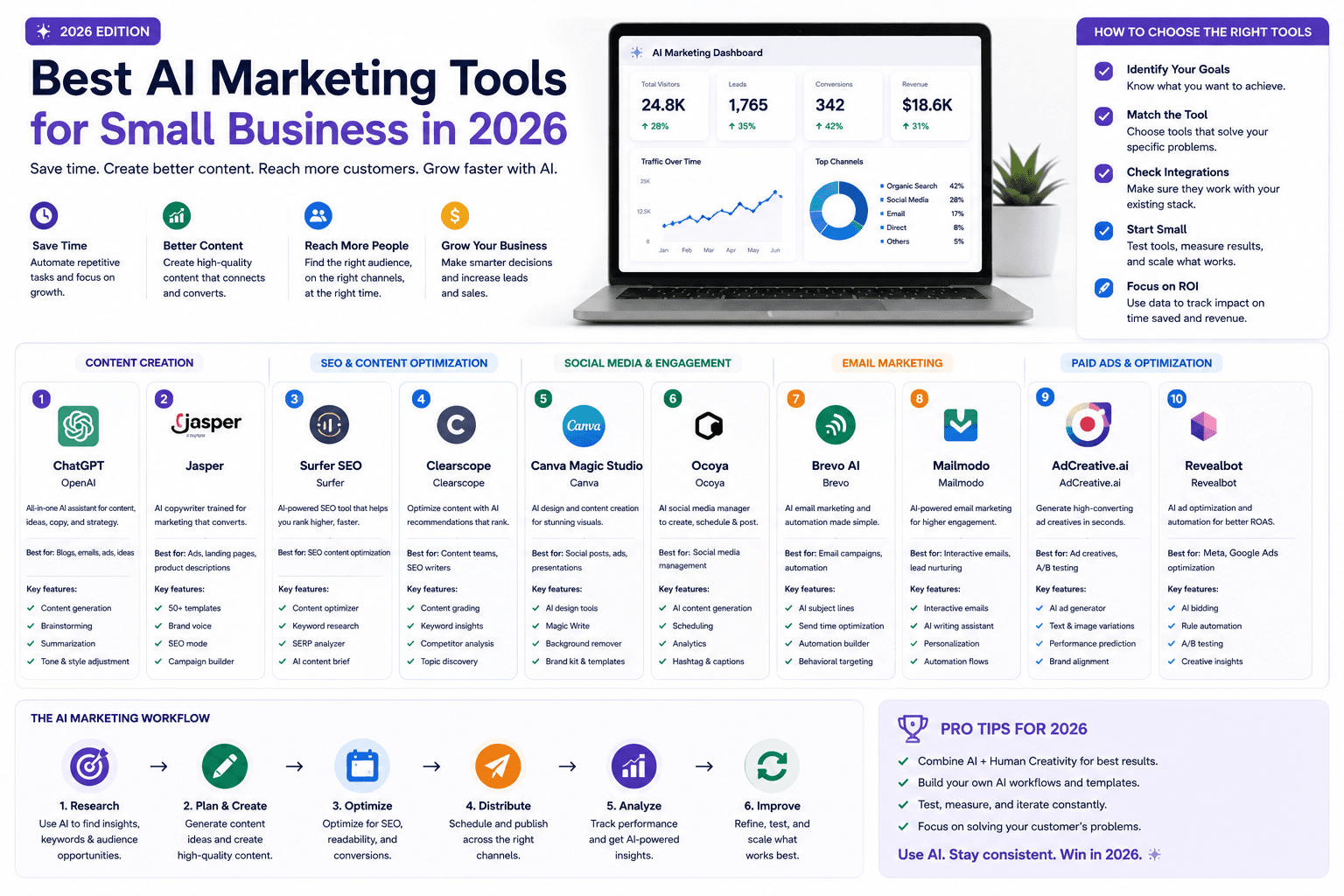
The best AI marketing tool is not the one with the longest feature list. It is the one that removes a real weekly bottleneck without creating five new subscriptions nobody uses.
This roundup compares AI marketing tools for small business owners, freelancers, agencies, and consultants — organized by job, budget, and upgrade trigger, not by hype. Pricing and feature notes reflect publicly listed information from vendor pages as of August 2026. Verify current rates before purchasing.
For the operating system behind the stack, read AI marketing for small business. For a four-week rollout, use the 30-day AI marketing plan.
Table of contents
- Quick summary
- What are AI marketing tools?
- Who should use them
- Who should not use them
- Key features to look for
- Pricing: stack tiers and tool costs
- Pros and cons of building a stack
- Best use cases by tool
- Limitations
- Comparison tables
- Decision matrix
- Things to consider before choosing
- Common mistakes
- Tool selection checklist
- Alternatives and competing approaches
- Frequently asked questions
- Final recommendation
Quick summary
AI marketing tools help small teams plan, create, design, capture leads, nurture contacts, publish, automate handoffs, and measure results. No single product does all of that well at SMB scale.
The practical pattern in 2026: start with a general AI assistant for drafting and analysis, keep or fix your contact system, add design and measurement, then buy specialized software only when volume and ownership justify the cost.
According to the U.S. Chamber of Commerce, 58% of surveyed U.S. small businesses self-identified as using generative AI in 2025 — mostly chat assistants and image tools, not full marketing suites. That matches what works: narrow wins before platform sprawl.
What are AI marketing tools?
AI marketing tools are software products that use machine learning or generative models inside marketing workflows. They fall into overlapping categories:
| Category | Typical jobs | Examples in this guide |
|---|---|---|
| General AI assistant | Briefs, drafts, analysis, variations | ChatGPT, Claude |
| Design & visual | Social graphics, decks, simple video | Canva |
| CRM & inbound | Forms, contacts, follow-up, reporting | HubSpot, Pipedrive |
| Email & SMS | Newsletters, nurture, transactional | Brevo, Mailchimp |
| Social publishing | Scheduling, channel adaptation | Buffer |
| Brand copy platform | Voice-locked campaign production | Jasper |
| Workflow automation | Handoffs between apps | Zapier, n8n |
| SEO optimization | Briefs, scoring, refresh | Surfer SEO |
| Measurement | Traffic, conversions, search visibility | GA4, Search Console |
A stack is how these categories connect. The stack is the product — not any one logo.
Who should use them
AI marketing tools make sense when:
- Solo owners need drafting and design speed without hiring a team.
- Freelancers and consultants repurpose one core message across client channels.
- Agencies need brand-governed production and repeatable handoffs.
- Local service businesses lose leads between form submit and follow-up.
- Ecommerce shops need email segmentation and product content at modest volume.
- Teams with a named weekly bottleneck (email slow, social inconsistent, CRM messy) that can be measured.
If you already know your audience and offer converts in sales conversations, tools amplify execution. If not, fix positioning before subscribing.
Who should not use them
Delay or restrict AI marketing tools when:
- you cannot assign a human reviewer for public output;
- you would paste customer PII or confidential data into consumer AI without approval;
- your goal is keyword volume without original proof — that fails Google's helpful content standards;
- you need regulated claims (health, legal, financial) without specialist review;
- you already own overlapping subscriptions with no owner;
- you expect AI to replace sales relationships or complaint handling.
In those cases, use AI internally for outlines only — or hire specialists.
Key features to look for
Evaluate tools on capabilities that matter at SMB scale:
Workflow fit. Does it solve one named job end to end?
Free entry or trial. Can you test without annual lock-in?
AI that respects limits. Are AI features gated, metered, or credit-based? Check official docs.
Integrations. Does it talk to your form, CRM, email, or calendar?
Human review path. Export, edit, approve — before publish.
Data controls. Team workspaces, retention settings, and export on exit.
Upgrade trigger you can explain. “We hit 20k emails/month” beats “we want more AI.”
Honest pricing model. Per seat, per contact, per send, or per task — know which scales against you.
Pricing: stack tiers and tool costs
Public pricing changes. Use vendor pages as the source of truth. Ranges below reflect commonly listed SMB tiers as of August 2026.
Starter lean
$20–50/month
Solo or new business
- ChatGPT Plus or Claude Pro (~$20/mo)
- Canva Free or Pro (~$0–15/mo)
- Brevo Free or Mailchimp Free for email entry
- GA4 + Search Console ($0)
- Manual CRM or spreadsheet until volume grows
Growth stack
$80–200/month
Active marketing + follow-up
- General AI assistant (keep one)
- Canva Pro + brand kit
- Brevo Standard or Mailchimp Essentials (~$18–35/mo)
- HubSpot free CRM or Pipedrive Lite (~$14/seat/mo annual)
- Buffer Essentials (~$5/mo annual) if social is proven
- Optional Surfer entry (~$49/mo annual) for SEO volume
Team / agency
$250–600+/month
Multi-brand or sales-led
- Jasper Pro (~$59/seat/mo annual) or team ChatGPT
- HubSpot Starter seats or Pipedrive Growth
- Zapier or n8n automation layer
- Fireflies or meeting notes if sales-heavy
- Reporting tied to qualified pipeline
Per-tool pricing signals (verify live)
| Tool | Free entry | Typical first paid tier | Pricing model note |
|---|---|---|---|
| ChatGPT | Free tier with limits | Plus ~$20/mo | Per user; Team/Business for workspaces |
| Claude | Free tier with limits | Pro ~$20/mo | Per user; Team for collaboration |
| Canva | Free | Pro ~$15/mo | Per user; brand kit on paid |
| HubSpot | Free CRM tools | Starter from ~$7/seat/mo (annual) | Credits for some AI agents; hubs scale fast |
| Brevo | 300 emails/day free | Starter from $9/mo; Standard from $18/mo | Scales by emails sent, not contacts |
| Mailchimp | Free up to 250 contacts | Essentials from ~$13/mo | Scales by contacts and sends |
| Buffer | Free (3 channels, 10 posts/channel) | Essentials ~$5/mo annual | Per channel add-ons on paid |
| Jasper | Trial varies | Pro ~$59/mo annual / $69 monthly | Per seat; Business custom |
| Zapier | 100 tasks/mo free | Paid from ~$20/mo | Scales by tasks and multi-step Zaps |
| Surfer SEO | No permanent free | Essential from ~$49/mo annual | Scales by articles/credits |
Official links: HubSpot Marketing pricing, Brevo plans, Buffer pricing, Jasper pricing, Zapier plans.
Pros and cons of building a stack
Pros
- Pay only for jobs you actually run weekly
- Swap one layer without rebuilding everything
- General AI assistants cover many tasks at ~$20/mo
- Free measurement (GA4, Search Console) is genuinely strong
- Best-of-breed SEO or email tools fit specific bottlenecks
- Easier to attribute ROI to one workflow change
Cons
- Integration glue (Zapier/n8n) adds cost and failure points
- Multiple logins and billing cycles to manage
- Data silos if CRM and email never connect
- Temptation to buy overlapping writers (ChatGPT + Jasper + Copy.ai)
- Setup time underestimated — tools are not strategy
- AI feature limits often hide behind higher tiers
Best use cases by tool
1. ChatGPT — best flexible starting point
Best for: campaign planning, outlines, variations, synthesis, and analysis.
According to OpenAI's pricing page, ChatGPT spans free through Plus, Pro, Business, and Enterprise tiers. Plus is the common SMB entry for higher limits and advanced models.
Choose when: you need one broad assistant before specialized software.
Skip when: team governance and data rules are undefined.
Compare: Jasper vs Copy.ai vs ChatGPT and ChatGPT prompts for small business.
2. Claude — best alternative general assistant
Best for: long-form drafting, document synthesis, and teams preferring Anthropic's interface.
Claude Pro is commonly listed around $20/month (annual discount available). Team plans add collaboration.
Choose when: ChatGPT limits or tone do not fit your workflow — not because you need two assistants.
Skip when: you already pay for one general AI and use it weekly.
Compare: ChatGPT vs Claude vs Gemini for productivity.
3. Canva — best for fast on-brand visuals
Best for: social graphics, presentations, lead magnets, and short video within templates.
Canva Magic Studio features sit inside familiar design workflows. Value comes from approved brand kits, not random image generation.
Choose when: non-designers produce assets weekly.
Upgrade when: brand controls, storage, or seat count require Pro.
Review: Canva Magic Studio review.
4. HubSpot — best CRM-centered marketing platform
Best for: connecting forms, email activity, sales follow-up, and reporting on one contact record.
HubSpot's free CRM tools and paid Marketing Hub tiers include Breeze AI features on higher plans. Marketing Hub Professional is commonly listed from about $800/month — far above what most early-stage SMBs need on day one.
Choose when: leads are lost between marketing and sales.
Skip when: you only need email — a lighter tool may suffice.
Compare: HubSpot vs Pipedrive AI CRM.
5. Brevo — best budget email and SMS
Best for: newsletters, nurture, and transactional mail when send volume matters more than contact count.
According to Brevo's help center, the Free plan includes 300 daily sends; Starter from $9/month; Standard from $18/month with automation.
Choose when: contact lists are large but sends stay moderate.
Check: automation starts on Standard — not Free or Starter.
Related: AI email marketing guide.
6. Mailchimp — best familiar email-first platform
Best for: businesses already on Mailchimp who want AI-assisted content inside a known UI.
Free tier covers up to 250 contacts (verify current limits). Essentials commonly starts around $13/month.
Choose when: your team will not migrate email platforms.
Skip when: Brevo's send-based pricing fits your list size better.
7. Buffer — best simple social scheduling
Best for: batching content to a limited set of channels.
Buffer's pricing page lists a Free plan (3 channels, 10 scheduled posts per channel) and Essentials from about $5/month annual.
Choose when: inconsistency — not ideation — is the problem.
Skip when: social is not a proven channel.
Related: AI social media system.
8. Jasper — best structured brand-copy production
Best for: teams and agencies producing high-volume campaign copy across brands.
Jasper Pro is commonly listed at $59/month annual or $69/month monthly.
Choose when: several people need consistent voice from approved inputs.
Skip when: ChatGPT Plus plus a source pack already meets volume.
Review: Jasper AI review 2026.
9. Zapier — best no-code stack connector
Best for: moving leads, notifications, and summaries between apps.
Free tier includes limited tasks; paid plans scale with volume and multi-step Zaps.
Choose when: the same manual handoff repeats weekly and errors cost money.
Skip when: the manual process is not documented yet.
Compare: n8n vs Zapier vs Make for cost-conscious automation.
10. Surfer SEO — best on-page optimization layer
Best for: teams publishing search content who need scoring against SERP intent.
Entry plans commonly start around $49/month annual. Pair with a general AI assistant for drafting — not as a replacement.
Review: Surfer SEO review. Compare: Surfer vs Frase vs Clearscope.
11. Google Analytics 4 + Search Console — best free measurement
Best for: tracking meaningful conversions and search visibility.
Configure events for forms, calls, bookings, purchases, or trials. AI without measurement is content theater.
Choose when: always — before adding another dashboard.
Related: AI SEO playbook and ChatGPT for keyword research.
Limitations
No tool list fixes:
- Weak offers. Software cannot invent product-market fit.
- Unreviewed AI output. Hallucinated prices and claims damage trust.
- Stack sprawl. Overlapping writers and schedulers drain budget.
- Platform lock-in. Export paths matter before you scale contacts.
- Attribution gaps. Tools do not define UTM discipline for you.
- Regulatory copy. Ads, testimonials, and industry rules still apply.
Treat AI features as accelerators inside a process you already understand.
Comparison tables
Table 1 — Tools by primary job
| Job | First pick | Budget alt | Upgrade signal |
|---|---|---|---|
| General drafting | ChatGPT Plus | Claude Pro | Need team workspace or admin controls |
| Visual production | Canva Pro | Canva Free | Brand kit + seat count |
| CRM + forms | HubSpot Free CRM | Pipedrive Lite | Automation + multi-pipeline sales |
| Email nurture | Brevo Standard | Mailchimp Essentials | Automation steps or send volume |
| Social scheduling | Buffer Essentials | Buffer Free | More channels + approvals |
| Brand copy at scale | Jasper Pro | ChatGPT + source pack | Multi-brand voice drift |
| App handoffs | Zapier | n8n self-host | Task volume exceeds free tier |
| SEO page scoring | Surfer Essential | Manual checklist | 8+ optimized pages/month |
| Measurement | GA4 + GSC | — | Add BI only when funnels complex |
| Lean default stack | ChatGPT + Canva + email + GA4 | — | One bottleneck-specific add |
Table 2 — Email platforms vs CRM platforms (where SMBs overbuy)
| Dimension | Brevo / Mailchimp | HubSpot / Pipedrive | When to pick |
|---|---|---|---|
| Core strength | Send mail and simple automation | Contact record + pipeline + forms | Email-first vs sales-first |
| Pricing scales on | Sends (Brevo) or contacts (Mailchimp) | Seats, contacts, hubs, credits | Model your growth curve |
| AI features | Subject lines, content assist (tier-gated) | Breeze / Sales Assistant (tier-gated) | Verify on your exact plan |
| Free entry | Yes — with send/contact caps | HubSpot free CRM; Pipedrive trial only | Start free where honest |
| Risk | Outgrowing automation tiers | Buying Professional too early | Map must-have features first |
| Best for | Newsletters + SMS-heavy SMBs | Inbound + sales handoff | One primary job each |
| Recommendation | Pick one email + one CRM max | Integrate via native sync or Zapier | Avoid duplicate contact databases |
Best for (by business type)
| Business type | Start with | Add next | Skip for now |
|---|---|---|---|
| Solo consultant | ChatGPT + Canva | Brevo Free + GA4 | Jasper, HubSpot Pro |
| Local services | CRM/forms + email | Buffer if social proves ROI | Full marketing suite |
| Ecommerce | Email (Klaviyo/Mailchimp class) + Canva | Surfer if content-led | Duplicate AI writers |
| Agency (multi-brand) | Jasper or team AI + Canva | Automation + CRM per client | Consumer chat for client data |
| B2B sales team | Pipedrive/HubSpot + meeting notes | Zapier handoffs | Social schedulers |
| Content publisher | ChatGPT + Surfer + GA4 | Buffer for distribution | HubSpot Enterprise |
Decision matrix
Score each candidate 1–5. Multiply by weight. Highest total wins — unless privacy or compliance disqualifies an option.
| Criterion (weight) | ChatGPT/Claude | Jasper | HubSpot | Brevo/Mailchimp |
|---|---|---|---|---|
| Solves named weekly bottleneck (×3) | ||||
| Owner will use it every week (×2) | ||||
| Output passes review standard (×2) | ||||
| Integrates with current stack (×2) | ||||
| Total cost incl. review time (×1) | ||||
| Data / export / permissions (×1) | ||||
| Weighted total |
Things to consider before choosing
- Which single workflow fails today? Name it in one sentence.
- Who reviews AI output before publish?
- Where do contacts live now — and will this tool duplicate or sync them?
- Does pricing scale on contacts, sends, seats, or tasks? Model 12-month growth.
- Are AI features included on your tier or behind credits?
- Can you export data and cancel without losing history?
- Does this replace or complement a tool you already pay for?
- What metric improves in 30 days if the tool works?
- What is the kill criteria if it does not?
- Have you read the official pricing page in the last 7 days?
Common mistakes
- Subscribing to three AI writers (ChatGPT + Jasper + Copy.ai) with no volume to justify it.
- Buying HubSpot Professional before outgrowing free CRM + email.
- Choosing tools by demo flash instead of weekly workflow fit.
- Ignoring send vs contact pricing on email platforms.
- Automating a broken process with Zapier before fixing the manual steps.
- Skipping measurement while adding AI content tools.
- Pasting customer data into consumer AI without policy review.
- Annual billing on day one without a 30-day pilot.
- Treating Buffer as a growth channel when social is not proven.
- Letting affiliates or ads pick the stack instead of the bottleneck.
Tool selection checklist
Before you add or upgrade a subscription:
- Named bottleneck documented
- Baseline time/cost measured for 2 weeks
- Official pricing page reviewed
- Free tier or trial tested with real work
- Human reviewer assigned
- Integration path confirmed (native or Zapier/n8n)
- Data handling rules checked
- Upgrade trigger written ("when X happens, we pay")
- Overlap with existing tools resolved
- 30-day success metric defined
- Kill criteria defined
- Export/cancel path verified
Alternatives and competing approaches
vs all-in-one suites (HubSpot-class)
Suites reduce integration pain when marketing, sales, and service must share one database. They cost more and reward teams that will adopt the full platform. Early SMBs often win with a lean stack first — see AI marketing guide.
vs hiring an agency
Agencies bring strategy and production capacity. Ask how they use AI, how they QA facts, and what you still own in-house. A $20 assistant plus a strong brief often replaces low-value agency hours — not strategic ones.
vs "ChatGPT only"
For many businesses under modest content volume, ChatGPT Plus with a source pack and custom GPT is enough. Jasper and similar tools earn their fee at multi-brand volume and team collaboration — detailed in Jasper vs Copy.ai vs ChatGPT.
vs self-hosted automation (n8n)
Zapier vs n8n vs Make: Zapier wins on simplicity; n8n wins on cost at scale if someone can maintain workflows.
vs vertical SaaS
Salons, field service, and clinics often benefit from industry CRMs with built-in marketing before generic AI stacks. Generic tools win when your workflow is content- and lead-heavy across standard channels.
Best stack by business stage
New or solo business
- one general AI assistant;
- Canva Free or Pro;
- Brevo or Mailchimp free tier;
- GA4 + Search Console.
Local service business
- CRM with forms (HubSpot free or Pipedrive);
- email or SMS follow-up;
- Canva for GBP and social assets;
- simple missed-lead automation.
Ecommerce
- ecommerce-native email with segmentation;
- Canva for creative;
- analytics hygiene on purchases;
- support automation with human escalation.
Agency or multi-brand team
- Jasper or governed team AI workspace;
- Canva brand kits per client;
- CRM + automation;
- reporting tied to client outcomes.
Frequently asked questions
What is the best AI marketing tool for a small business?
There is no universal winner. For most teams, the best first purchase is a general AI assistant (~$20/month) paired with the CRM, email, or design tool already in use. Match the tool to the bottleneck.
Which AI marketing tools have free plans?
Common free entry points include ChatGPT, Claude, Canva, HubSpot CRM, Brevo, Mailchimp (contact limits), Buffer, Zapier (task limits), and Google Analytics. AI features, automation, and higher limits often require paid tiers — verify each vendor.
How many marketing tools does a small business need?
Most need fewer than they expect: a contact record, one primary channel, one creation assistant, and measurement. Add specialized tools when a repeated workflow justifies the cost.
Are AI marketing tools worth paying for?
Worth it when measurable labor savings or qualified conversions exceed total cost (software + review time). Run a 30-day test before annual billing.
ChatGPT or Jasper for small business marketing?
ChatGPT Plus fits most solos and small teams. Jasper fits higher-volume, multi-brand marketing production. See Jasper AI review.
HubSpot or Brevo for a small business?
HubSpot when CRM, forms, and sales follow-up must share one system. Brevo when email and SMS are central and send-based pricing fits. Many teams use HubSpot free CRM plus Brevo for sends.
Should I use Zapier or n8n?
Zapier for speed and minimal maintenance. n8n when task volume is high and someone can own workflow upkeep. Compare in n8n vs Zapier vs Make.
What should I buy first?
General AI assistant → Canva (if visuals matter) → fix or keep email/CRM → configure GA4 events → add one bottleneck tool. Follow the 30-day AI marketing plan.
Final recommendation
Buy one bottleneck at a time. The default 2026 stack for most small businesses:
- ChatGPT Plus or Claude Pro for drafting and analysis
- Canva for on-brand visuals
- Existing or new email (Brevo or Mailchimp) matched to send/contact math
- CRM when leads leak (HubSpot free or Pipedrive)
- GA4 + Search Console before any other analytics
- Specialist add-ons only with proof: Jasper for brand volume, Surfer for SEO throughput, Buffer for proven social, Zapier for repetitive handoffs
Reject any tool that cannot explain its value in one workflow sentence.
For strategy and ROI framing, read AI marketing for small business. For execution timing, run the 30-day plan.
The AI edge, delivered every Tuesday
One 5-minute email: the tools worth your money, the plays that are working right now, and zero hype. Unsubscribe anytime.
No spam. No selling your data. Read by owners of restaurants, gyms, clinics, and agencies across the US, UK, Canada, and Australia.
Key takeaway
Compare the best AI marketing tools for small business in 2026 — ChatGPT, Canva, HubSpot, Brevo, Jasper, Buffer, Zapier, and more. Organized by job, budget, and upgrade trigger. For more step-by-step guides, browse our blog or explore Marketing.
Frequently asked questions
What is the best AI marketing tool for a small business?
There is no universal best tool. For most teams, the best first purchase is a general AI assistant (commonly about $20 per month on public ChatGPT Plus or Claude Pro pricing) paired with the CRM, email, or design platform already in use. Match the tool to the workflow bottleneck — not the longest feature list.
Which AI marketing tools have free plans?
Common free entry points include ChatGPT, Claude, Canva, HubSpot CRM, Brevo, Mailchimp (with contact limits), Buffer, Zapier (with task limits), and Google Analytics. AI features, automation, and higher usage limits often require paid tiers. Verify current terms on each vendor's official pricing page.
How many marketing tools does a small business need?
Most small businesses need fewer tools than they expect. A practical baseline is a contact record, one primary channel, one creation assistant, and measurement. Add specialized tools only when a repeated workflow has a named owner, enough volume, and a measurable return.
Are AI marketing tools worth paying for?
They are worth paying for when measurable labor savings or improved qualified conversions exceed total cost — including software fees, setup, and human review time. Run a 30-day controlled test before committing to annual billing.
Should a small business choose ChatGPT or Jasper?
ChatGPT Plus fits most solo owners and small teams that need flexible drafting and analysis. Jasper fits marketing teams producing high-volume, multi-brand campaign copy with strict voice requirements. Many businesses never need both.
HubSpot or Brevo for a small business?
Choose HubSpot when CRM, forms, and sales follow-up must share one contact database. Choose Brevo when email and SMS are central and send-based pricing fits your volume. Many teams start with HubSpot free CRM and a dedicated email platform.
Should I use Zapier or n8n for marketing automation?
Zapier is usually the faster choice for simple, low-maintenance handoffs between common apps. n8n can be more cost-effective at higher task volume if someone on the team can maintain workflows. Document the manual process before automating either way.
What AI marketing tools should I buy first?
Start with a general AI assistant, add Canva if visuals matter, keep or fix your email or CRM layer, configure Google Analytics and Search Console, then add one specialist tool only when a four-week pilot proves a bottleneck. Follow a structured plan such as a 30-day AI marketing rollout.
Written by
AI Growthub StaffEditorial Team
The AI Growthub editorial team covers practical AI news, tools, and workflows for small business owners. Every article is fact-checked against primary sources before publication.
Comments are coming soon
We’re building a discussion space for business owners. Until then, reply to any newsletter issue — we read everything.
Related posts
AI Video Marketing for Small Business: The Complete 2026 Guide
Compare the best AI video tools for small businesses in 2026. Covers HeyGen, Synthesia, Creatify, InVideo AI, and free alternatives with pricing, use cases, and a decision framework.

AI Lead Generation Workflow: The Complete 2026 Guide for Local Small Businesses
Definitive local SMB guide to AI lead generation: offers, landing pages, qualification, speed-to-lead, GBP, and HighLevel vs HubSpot vs Pipedrive pricing — without spammy automation.
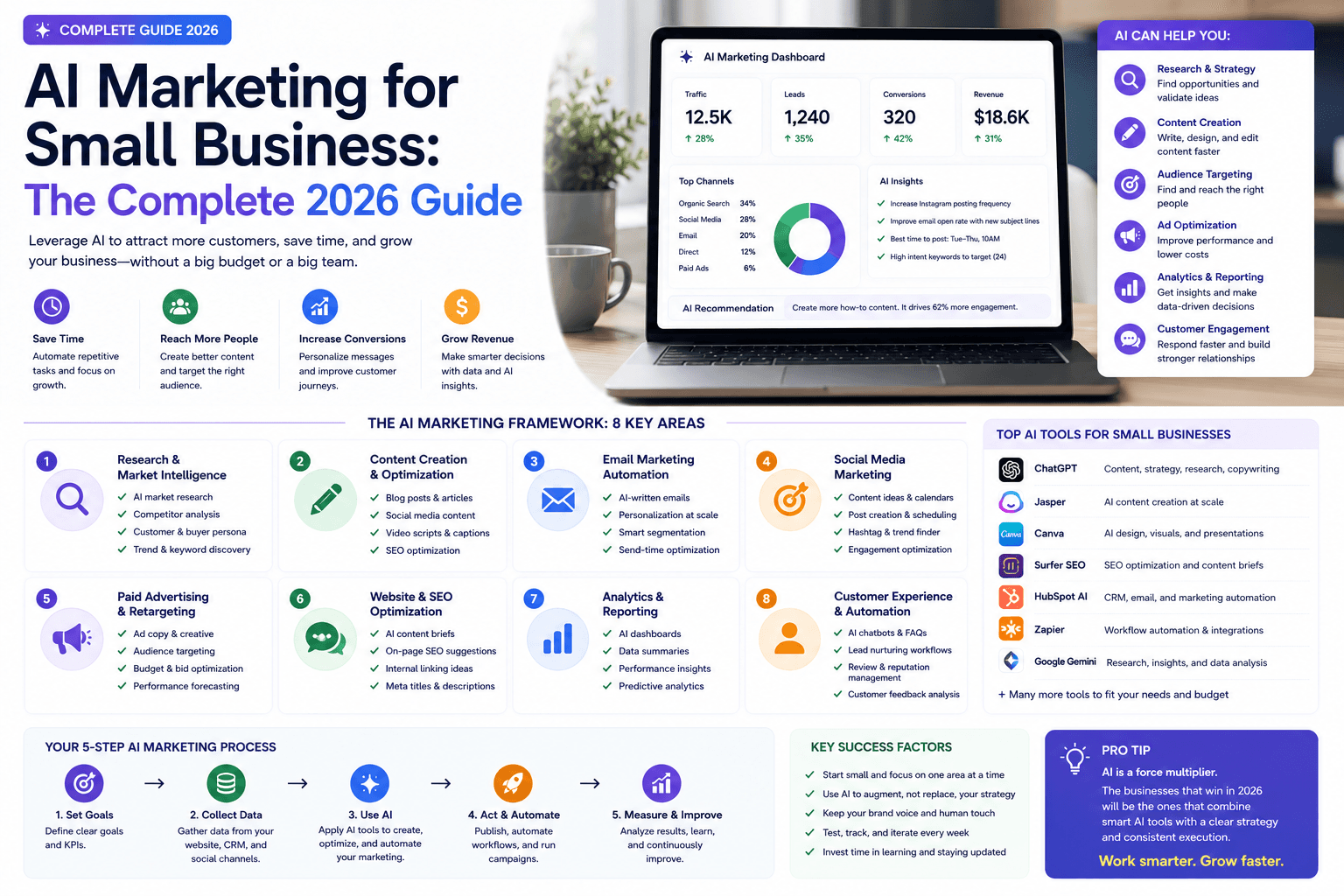
AI Marketing for Small Business: Complete 2026 Guide to Strategy, Tools & ROI
Practical AI marketing for small business in 2026: workflows, lean stack pricing, decision matrix, checklists, risks, Google SEO guidance, and how to measure ROI.
The AI edge, delivered every Tuesday
One 5-minute email: the tools worth your money, the plays that are working right now, and zero hype. Unsubscribe anytime.
No spam. No selling your data. Read by owners of restaurants, gyms, clinics, and agencies across the US, UK, Canada, and Australia.