AI Workflow for Agencies: The Complete 2026 Guide (Reporting, Content Ops & Lead Follow-Up)
Build supervised AI workflows for marketing and creative agencies: weekly report drafts, content calendars, proposals, meeting notes, and lead follow-up — with per-client voice cards and account manager approval gates.

Agency owners do not need another "AI will 10x your output" webinar. They need client reports that leave Monday mornings intact, content calendars that do not start from zero, and lead follow-up that sounds like a human who read the brief — not a mail merge from 2014.
An AI workflow for agencies is a repeatable system: a trigger, approved inputs, a narrow AI task, a human approval gate, and a named owner. Done well, it protects margins. Done poorly, it ships a report with wrong metrics, publishes off-brand copy, or sends a proposal with another client's name in it.
This guide is the definitive 2026 reference for boutique marketing, creative, and fractional CMO agencies in the US, Canada, UK, and Australia — typically 2–25 people — who want practical automation without risking client trust.
It sits under AI automation for small business and links to CRM, proposal, content, and onboarding playbooks where those fit.
Table of contents
- Quick summary
- What is an AI workflow for agencies?
- Who should use it
- Who should NOT use it
- Quick recommendation
- Things to consider before choosing
- Key features
- Best-for table
- Pricing in 2026
- Pros and cons
- Best use cases
- Limitations
- Comparison tables
- Decision matrix
- Setup checklist
- Six core workflows
- Four-week rollout plan
- Common mistakes
- Alternatives and competitor comparison
- FAQ
- Final recommendation
Quick summary
| If your main pain is… | Start here | Upgrade when… |
|---|---|---|
| Monday reporting eats the week | Weekly report narrative drafts from structured exports | AM error rate on numbers stays near zero for 4 cycles |
| Content planning from blank page | Monthly calendar idea drafts per client | Strategist acceptance rate on ideas ≥50% |
| Proposals take too long to start | Scope drafts from master templates | Principal review time ≤20 min per draft |
| Stale CRM opportunities | Follow-up email drafts (draft-only) | Edit rate ≤30% on 30 sends |
| Call notes never become tasks | Meeting recap → tasks + client recap draft | 10 calls reviewed for leakage |
| Off-brand client copy | Per-client voice cards in every prompt | Spot-check error rate declining |
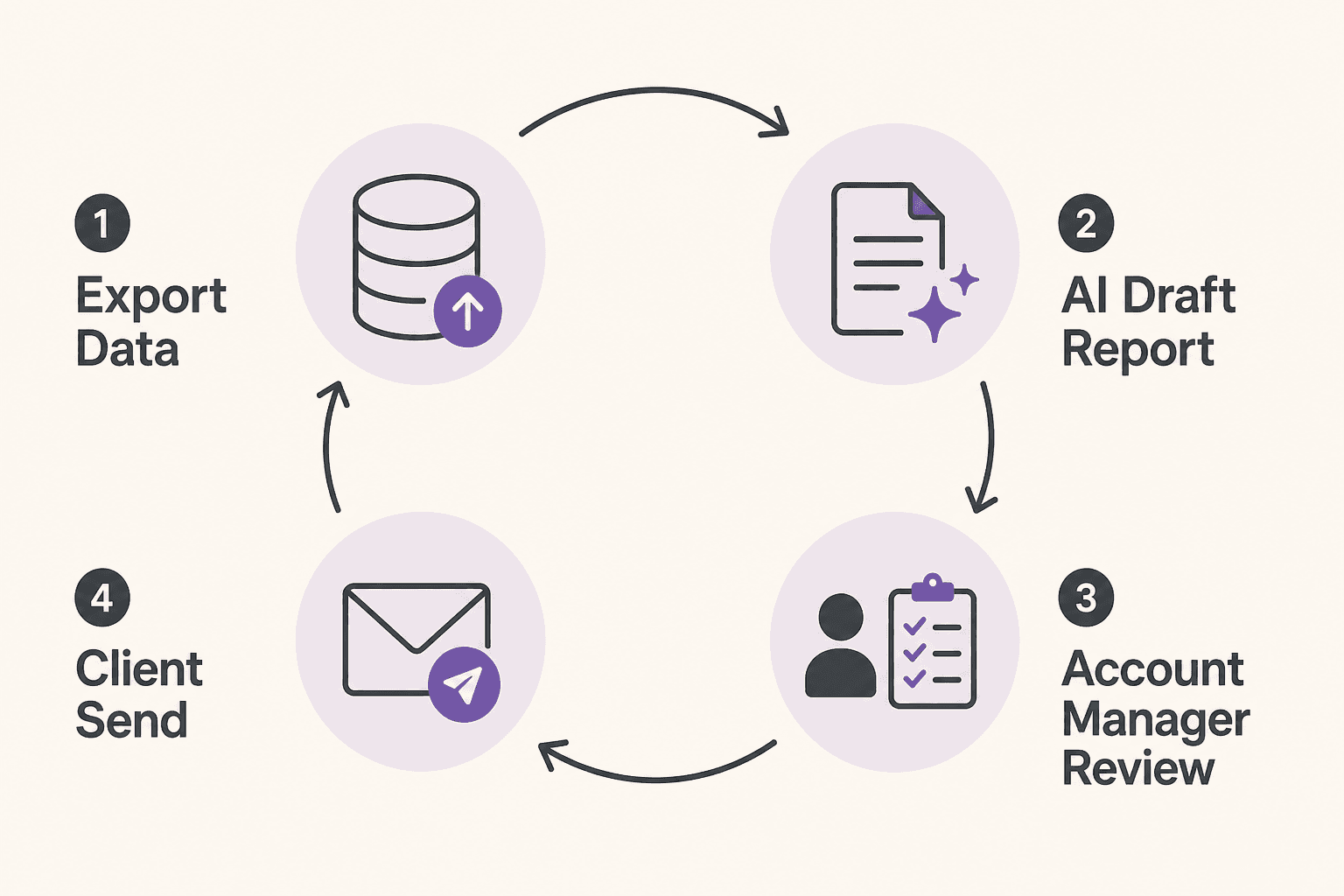
Default bias for agencies: export → draft → account manager verify → send. Client trust is the asset.
What is an AI workflow for agencies?
An AI workflow for agencies is not "we bought ChatGPT Team." It is a documented path such as:
- Analytics exports land in a folder every Monday 7 a.m.
- Automation pulls KPIs into a structured template.
- AI drafts narrative summary, anomalies, and recommended next actions.
- Account manager edits numbers, context, and tone.
- PDF or slide deck sends to the client by agreed deadline.
AI is strongest at summarization, first drafts, classification, and formatting. It is weakest at strategy you would stake a retainer on, unpublished client confidentialities, and anything requiring verified live data without a human check.
For broader automation framing, see AI marketing for small business. For lead-specific flows, pair with lead follow-up AI agent patterns — always with human gates.
The supervised agency loop
| Step | Reporting | Content | Proposals |
|---|---|---|---|
| Trigger | Monday export ready | Month/campaign kickoff | CRM "Proposal needed" |
| Context | KPI JSON + voice doc | Brief + past winners | Master scope template |
| AI output | Narrative sections | Post ideas + hooks | Outline + deliverables |
| Human gate | AM verifies every number | Strategist selects + legal | Principal edits price/terms |
| Action | Client send | Assign production | BD sends proposal |

Who should use an AI workflow for agencies
Build or upgrade when:
- Reporting, content planning, or follow-up happens weekly or per lead
- Source data lives in consistent exports (GA4, Meta, HubSpot, sheets)
- Each client has a voice/brand doc accessible to the workflow
- A named person reviews every external output
- Mistakes are catchable (wrong client name, date range, currency)
- You can measure baseline hours for the manual version
Strong fits:
- Performance marketing agencies (8–20 retainer clients)
- Creative and content shops with recurring calendars
- Fractional CMO / consulting pods with weekly client touchpoints
- Boutique BD teams using AI CRM automation for pipeline drafts
Who should NOT use it
| Situation | Why wait |
|---|---|
| Reporting is ad-hoc screenshots | Fix measurement template first |
| No per-client voice docs | AI produces generic or wrong-brand copy |
| Nobody reviews external outputs | Client trust risk |
| You want auto-publish social on day one | Brand and compliance risk |
| Client contracts prohibit certain AI tools | Legal/compliance sign-off first |
| <3 retainer clients and low lead volume | Manual may suffice |
If reporting is "whoever has time pulls screenshots," AI cannot fix a broken measurement plan.
Quick recommendation
Things to consider before choosing
- Client isolation — Separate LLM projects or folders per client?
- Data accuracy — Structured exports vs screenshot paste?
- Approval ownership — AM vs strategist vs principal by output type?
- Confidentiality — Client contracts and GDPR/CCPA retention rules?
- Tool sprawl — PM + CRM + LLM + automation — who maintains glue?
- Error types — Wrong metric vs wrong name vs off-strategy recommendation?
- Margin math — Net hours saved × blended rate vs subscription stack?
- Publish scope — What never auto-sends (ads, crisis comms, pricing)?
If #1 and #2 are weak, fix exports and client cards before scaling workflows.
Key features of strong agency AI workflows
| Feature | Why it matters | Reporting | Content |
|---|---|---|---|
| Per-client context card | Prevents cross-client bleed | Voice + KPIs | Do-not-say list |
| Structured data inputs | Stops invented metrics | KPI JSON/CSV | Past top posts |
| Separate internal/client outputs | Avoids margin leakage | — | Recap vs Slack |
| AM approval gate | Accuracy and tone | Required | Required |
| CRM client ID in prompts | Wrong-name prevention | — | Proposals |
| Master scope templates | Legal/pricing control | — | Proposals |
| Audit trail | Who approved external send | Compliance | Compliance |
| Error logging | Tune prompts and exports | Weekly | Monthly |
Proposal depth: AI proposal writing for small business. Onboarding handoff: AI onboarding workflow.
Best-for table
| Agency profile | Best starting workflow | Avoid first |
|---|---|---|
| 12-client performance shop | Monday report drafts | Auto-send client emails |
| 5-person creative studio | Content calendar drafts | Cross-client single prompt |
| BD-heavy consultancy | CRM follow-up drafts | Autonomous SDR agent |
| Fractional CMO pod | Meeting notes → tasks | Publishing without strategist sign-off |
| Paid social specialist | Report + ad recap drafts | AI budget change recommendations |
| SEO retainer agency | KPI narrative + content ideas | Auto-publish blog drafts |
| New agency (<2 clients) | Voice cards + manual AI assist | Full automation stack |
| Multi-office firm | Standardized export SOP first | One shared LLM project for all clients |
Pricing in 2026
Directional anchors from official vendor pricing (verify before purchase). Agency stacks combine PM, CRM, LLM, and glue.
Project management
| Product | Published entry (USD) | Agency notes |
|---|---|---|
| ClickUp Unlimited | from ~$7–10/user/mo annual | Automations, integrations — clickup.com/pricing |
| ClickUp Business | from ~$12–19/user/mo annual | Deeper automation limits |
| Asana Starter | from ~$10.99/user/mo annual | AI included on paid tiers per vendor — asana.com/pricing |
| Asana Advanced | from ~$24.99/user/mo annual | Workload, approvals |
CRM and sales
| Product | Published entry | Agency fit |
|---|---|---|
| HubSpot Sales Hub Starter | from ~$15–20/seat/mo | Pipeline — HubSpot vs Pipedrive |
| Pipedrive Essential | from ~$14/seat/mo annual | Lighter sales teams |
AI drafting
| Product | Published entry | Agency fit |
|---|---|---|
| ChatGPT Business / Team | varies | Per-client projects |
| Claude Pro / Team | ~$20/mo+ | Long reports, meeting notes |
| ClickUp Brain | ~$9–28/user/mo add-on | In-workspace AI per ClickUp pricing |
Automation glue
| Product | Published entry | Use when |
|---|---|---|
| Zapier Professional | from ~$19.99–29.99/mo annual | Export → draft → task — zapier.com/pricing |
| Make Core | from ~$9–12/mo annual | Branching client routing |
Realistic agency stacks (directional, 5-person team)
| Stack shape | Typical monthly | Includes |
|---|---|---|
| Lean | ~$150–300 | ClickUp + 5 LLM seats + Zapier |
| CRM-forward | ~$300–500 | HubSpot/Pipedrive + PM + LLM |
| Reporting-heavy | +$100–400 | AgencyAnalytics-class reporting add-on |
Hidden cost: AM and principal review time — billable hours "saved" must survive verification.
Pros and cons
Pros
- Monday report drafts reclaim senior time without skipping number verification
- Per-client voice cards improve consistency across AMs and freelancers
- Meeting note → task workflows reduce dropped client commitments
- Proposal outlines accelerate BD without inventing legal terms
- Follow-up drafts improve response time when BD edits quickly
- Structured exports make AI outputs auditable against dashboards
Cons
- Cross-client context bleed destroys trust in one wrong send
- Unstructured prompts invent metrics and recommendations
- Tool stack costs stack per seat across PM, CRM, LLM, automation
- Auto-send client comms creates wrong-name and off-brand disasters
- Creatives may skip review if AI is treated as final QA
- ROI vanishes if rework rises — pause expansion when errors spike
Best use cases
Client delivery
- Weekly performance report narratives from KPI exports
- Campaign recap drafts and next-week priorities
- Meeting notes → Asana/ClickUp tasks + client recap email draft
Business development
- Proposal scope outlines from master templates — AI proposal writing
- Stale opportunity follow-up drafts — AI email automation sequences
- Discovery call summaries for CRM notes
Content operations
- Monthly social/content calendar idea drafts
- Hook and angle variations from past winners
- Internal brief drafts for designers and copywriters — not auto-publish
Pair content ops with AI social media for small business systems when clients approve channel strategy separately.
Limitations
- AI does not verify live dashboard numbers — AM must reconcile exports
- Strategy recommendations off signed scope need human rejection/editing
- Confidential unreleased campaigns must not leak across prompts or freelancers
- Auto-publishing ads, posts, or emails without review risks brand and contract breach
- LLM context windows and retention policies vary — align with client contracts
- Heavy multi-tool stacks need an ops owner or workflows silently break
What not to automate (principal-controlled)
- Pricing, discounts, and contract terms
- Publishing paid ads without specialist review
- Crisis communications
- References to unreleased client financials
- Client termination or legal dispute messages
AI can draft. Principals decide.
What "done" looks like after 30 days
| Metric | Target |
|---|---|
| Report numeric error rate | Near zero after AM review |
| Net hours saved on reporting (firm-wide) | Positive after rework counted |
| Wrong client name incidents | Zero |
| Follow-up edit rate | ≤30% |
| Content ideas accepted vs proposed | Tracked and improving |
Comparison tables
Table 1 — Workflow by agency function
| Function | Trigger | AI role | Human gate | Tool class |
|---|---|---|---|---|
| Reporting | Scheduled export | Narrative from JSON | AM verifies metrics | Sheets + LLM |
| Content calendar | Month kickoff | Ideas + hooks | Strategist selects | LLM + PM |
| Proposals | CRM stage change | Scope outline | Principal pricing/legal | CRM + LLM |
| Lead follow-up | 48h stale | Email draft | BD send | CRM + LLM |
| Meeting admin | Call ends | Tasks + recap | AM redacts internal | Fireflies + LLM |
| New client onboarding | Signed | Packet draft | AM scope check | Onboarding workflow |
Meeting tools: Fireflies.ai review, best AI meeting note tools.
Table 2 — Stack options for boutique agencies
| Stack | Entry posture (5 users) | Best when | Trade-off |
|---|---|---|---|
| ClickUp + LLM + Zapier | ~$150–350/mo | All-in-one PM + automation | Setup complexity |
| Asana + HubSpot + LLM | ~$300–550/mo | CRM-native BD + clean client views | Multiple logins |
| Notion + LLM only | ~$100–150/mo | Docs-heavy, light PM | Weak native reporting |
| HubSpot + Make | ~$250–400/mo | Pipeline automation focus | PM tool still needed |
| Google Workspace Studio | Workspace sub | Gmail/Sheets-native shops | Workspace Studio guide |
Architecture fork: AI agent vs chatbot vs Zapier when choosing automation depth.
Decision matrix
10-minute diagnostic
- Is Monday reporting the biggest time sink? → Start report workflow.
- Do you have structured exports per client? → If no, week 1 is data SOP.
- Does every client have a context card? → If no, build cards first.
- Who approves external sends? → Name AM/principal before automation.
- Is BD follow-up stale? → Add CRM drafts after reporting is stable.
Weighted scoring matrix
Score each workflow 1–5. Multiply by weight.
| Criterion | Weight | Reporting drafts | Content calendar | Follow-up drafts | Meeting → tasks |
|---|---|---|---|---|---|
| Weekly time pain | 5 | ||||
| Export/data readiness | 5 | ||||
| Client count (8+) | 4 | ||||
| BD pipeline volume | 3 | ||||
| Post-call admin pain | 4 | ||||
| Brand risk if wrong | 5 | ||||
| AM review bandwidth | 4 | ||||
| Weighted total |
Rule of thumb: Reporting first if Mondays hurt. Meeting → tasks if commitments get dropped. Follow-up only after CRM hygiene exists.
Setup checklist
- One report template standardized with KPI fields
- Monday export automation or calendar ritual documented
- Per-client context card (voice, ICP, KPIs, taboo phrases, approvals)
- Separate LLM project or folder per client
- Named approver by output type (AM, strategist, principal)
- Draft-only on all client external sends — 30+ outputs before any auto-send debate
- CRM client ID required in proposal/follow-up prompts
- Internal vs client-facing labels in meeting note prompts
- Error log template (wrong metric, wrong name, off-strategy)
- Baseline hours captured for manual reporting (3 clients minimum)
- Freelancer access scoped to assigned clients only
- 30-day ROI review scheduled
Six core workflows

1. Weekly client reporting drafts
Trigger: Monday analytics export per retainer client.
AI task: Executive summary, wins, issues, recommendations, next-week focus from KPI JSON.
Human step: AM verifies every number against source dashboards; sends.
Never summarize performance without structured data in the prompt.
2. Content calendar drafts
Trigger: Month start or campaign kickoff.
AI task: 4–8 post ideas, hooks, channel fit from brief + past winners.
Human step: Strategist selects, assigns, adds legal/offer constraints.
3. Proposal and scope drafts
Trigger: CRM opportunity "Proposal needed."
AI task: Outline from master template: situation, channels, deliverables, timeline, assumptions.
Human step: Principal edits pricing, scope boundaries, legal terms.
4. Lead follow-up drafts
Trigger: New lead or stale opportunity 48h+.
AI task: Personalized follow-up from CRM notes and discovery summary.
Human step: BD edits and sends. Connect to AI lead generation workflow for top-of-funnel consistency.
5. Meeting notes to tasks
Trigger: Client call ends; transcript in shared drive.
AI task: Decisions, action items, internal Slack summary, separate client recap draft.
Human step: AM redacts internal strategy; sends recap after review.
6. Brand voice guardrails per client
Trigger: Any content or report workflow.
AI task: Apply client voice doc, terminology, competitor rules, CTA patterns.
Human step: Creative lead spot-checks until error rate is low.
Example: 12-client performance marketing agency
Monday 7 a.m.: Exports hit folder; AI drafts per template; AMs edit and send by noon.
Tuesday: Strategists review calendar drafts; assign production.
Daily: Stale CRM opportunities get follow-up drafts; BD sends after edit.
Post-call: Transcripts → Asana tasks + recap draft; AM verifies before external send.
Agencies running this pattern often reclaim 8–15 hours per week firm-wide, after review is counted.
Prompt patterns
Weekly report:
Draft client reporting narrative using ONLY the KPI JSON below.
Sections: Executive summary (3 sentences), Wins, Issues, Recommendations (3 bullets), Next week focus.
Do not invent metrics. If null, say "not available in export."
Client voice: {{voice_guide}}
KPI JSON: {{kpi_json}}
Meeting notes:
Return JSON: decisions, client_action_items, internal_action_items,
client_recap_email_draft (120 words max, no internal pricing).
Do not include confidential internal discussion in client recap.
Four-week rollout plan
| Week | Focus | Exit criteria |
|---|---|---|
| 1 | Report template + exports | Baseline hours for 3 clients |
| 2 | AI narratives on those clients | AM correction log for 4 cycles |
| 3 | Meeting notes → tasks (one pod) | Client recap checklist live |
| 4 | Lead follow-up drafts | Named owner + ROI note |
Common mistakes
- Wrong client name in proposal — CRM ID in prompt; AM confirms before export.
- AI recommends off-strategy tactics — Feed signed scope and KPI doc.
- Creatives skip review — Publish checklist stays human-signed.
- No workflow owner — One name in ops wiki per automation.
- Single LLM project for all clients — Context bleed risk.
- Screenshot-based reporting — Use structured exports only.
- Auto-send client recaps — AM approval always in month one.
- Ignoring margin math — Track rework, not draft volume.
- Freelancers with full client access — Scope folders and cards.
- Buying agent platform before reporting works — Prove Monday loop first.
Alternatives and competitor comparison
Manual vs AI-assisted agency ops
| Approach | Best when | Weak when |
|---|---|---|
| Senior builds every deck manually | <5 clients | Scale breaks Mondays |
| Junior + AI draft + AM review | 8–20 retainers | No export discipline |
| Reporting SaaS only (AgencyAnalytics-class) | Dashboard-first clients | Still need narrative layer |
| Full autonomous content agent | Not recommended SMB default | Brand and client risk |
ClickUp vs Asana vs HubSpot + glue
| Need | Lean toward |
|---|---|
| All-in-one PM + docs + automations | ClickUp |
| Clean client timelines + HubSpot CRM | Asana + HubSpot |
| Pipeline and sequences | HubSpot + AI CRM automation |
| Form → CRM → task without code | Zapier/Make |
| Gmail/Sheets-native agency | Google Workspace Studio |
Suggested future articles: Agency reporting stack comparison (Looker vs AgencyAnalytics vs sheets) and Per-client LLM workspace setup for agencies.
Frequently asked questions
What is the best first AI workflow for a marketing agency?
Start with weekly client reporting drafts from structured analytics exports. Recurring, format-stable, and easy to verify before anything reaches a client.
Can AI replace account managers?
No. AI drafts reports, calendars, and follow-ups. Account managers verify data, tone, and strategy — and own the relationship.
How do agencies prevent AI from mixing up clients?
Separate context docs or LLM projects per client, include CRM identifiers in prompts, and require human review before any external send or publish.
Is it safe to use AI for agency proposals?
AI can draft sections from master templates. A principal must review pricing, scope, legal terms, and client-specific details before sending.
How should agencies measure AI ROI?
Track net hours saved after review and rework, report error rates, and client revision requests — not raw drafts produced. Translate hours to margin using blended hourly cost.
When should we add AI agents vs drafts?
When multi-step routing varies widely — but keep approval gates. See AI agents for small business after Monday reporting is stable.
Does this work for creative agencies vs performance shops?
Yes — start with the highest-volume repeatable output (reports for performance, calendars for creative, follow-ups for BD-heavy shops).
What about client contracts banning AI?
Honor contract terms. Use approved tools, disclose where required, and keep human review documented.
Final recommendation
Build a client-specific, supervised, measurable AI workflow — not a generic "agency AI stack."
- Standardize Monday exports and one report template.
- Build per-client context cards before scaling prompts.
- Run reporting drafts for 4 weeks; log errors and hours.
- Add meeting → tasks and follow-up drafts with named owners.
- Never auto-send client-facing outputs until error rates prove stable.
- Translate hours to margin — fake ROI erodes trust faster than it helps payroll.
If you build one system this quarter, build Monday reporting: export → AI narrative → AM verify → send.
Adjacent playbooks: AI workflow for Shopify stores (ecommerce clients), AI onboarding workflow (new client kickoff), daily AI workflow for founders, and 30-day AI marketing plan.
Key takeaway
Build supervised AI workflows for marketing and creative agencies: weekly report drafts, content calendars, proposals, meeting notes, and lead follow-up — with per-client voice cards and account manager approval gates. For more step-by-step guides, browse our blog or explore Automation.
Frequently asked questions
What is the best first AI workflow for a marketing agency?
Start with weekly client reporting drafts built from structured analytics exports. Reporting is recurring, format-stable, and easy to verify before anything reaches a client.
Can AI replace account managers at an agency?
No. AI can draft reports, content calendars, and follow-ups, but account managers must verify data, tone, and strategy — and own the client relationship.
How do agencies prevent AI from mixing up clients?
Use separate context docs or LLM projects per client, include CRM identifiers in prompts, and require human review before any external send or publish.
Is it safe to use AI for agency proposals?
AI can draft proposal sections from master templates, but a principal should always review pricing, scope, legal terms, and client-specific details before sending.
How should agencies measure AI ROI?
Track net hours saved after review and rework, report error rates, and client revision requests — not just raw drafts produced. Translate hours to margin using your blended hourly cost.
When should we add AI agents vs drafts?
When multi-step routing varies widely, but keep approval gates. Prove Monday reporting ROI before buying specialized agent platforms.
Does this work for creative agencies vs performance shops?
Yes. Start with the highest-volume repeatable output: reports for performance agencies, content calendars for creative shops, follow-up drafts for BD-heavy consultancies.
What about client contracts banning AI?
Honor contract terms. Use approved tools, disclose where required by client agreement or applicable rules, and keep human review documented.
Written by
AI Growthub StaffEditorial Team
The AI Growthub editorial team covers practical AI news, tools, and workflows for small business owners. Every article is fact-checked against primary sources before publication.
Comments are coming soon
We’re building a discussion space for business owners. Until then, reply to any newsletter issue — we read everything.
Related posts

Google Workspace Studio for Small Business (2026): The Complete Guide
Build Google Workspace Studio flows for SMBs: Gmail invoice logging, Meet follow-ups, Sheets triggers, limits, approval rules, and when Zapier still wins.
n8n vs Zapier vs Make (2026): Best Automation Platform for SMBs?
Compare n8n vs Zapier vs Make for small business: task vs credit vs execution pricing, AI agents, setup paths, and which iPaaS to start on in 2026.
Claude for Small Business: Complete 2026 Setup Guide
Set up Claude for Small Business: Cowork plugin, QuickBooks and HubSpot connectors, 15 workflows, Pro vs Team pricing, and when ChatGPT Work or Gemini fits better.
The AI edge, delivered every Tuesday
One 5-minute email: the tools worth your money, the plays that are working right now, and zero hype. Unsubscribe anytime.
No spam. No selling your data. Read by owners of restaurants, gyms, clinics, and agencies across the US, UK, Canada, and Australia.