AI Agent vs Chatbot vs Zapier: Which Does Your Business Need?
Clear 2026 comparison of AI agents, chatbots, and Zapier-style automation for small business — decision tables, pricing anchors, checklists, and when to combine all three.
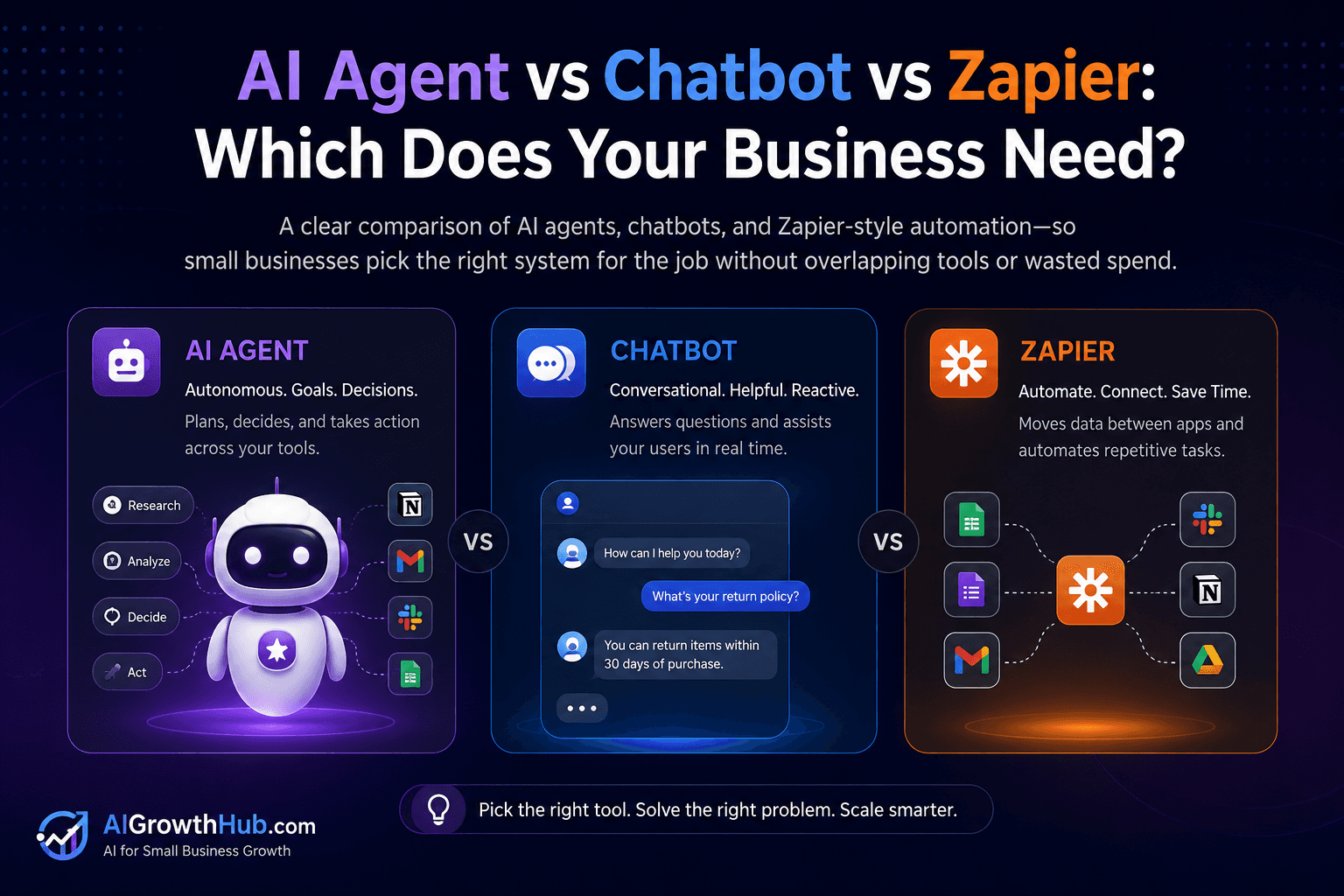
Most small businesses do not need all three. They need the smallest system that reliably finishes the job — without overlapping subscriptions, confused permissions, or a chatbot trying to do CRM surgery.
AI agent vs chatbot vs Zapier is the buying question behind half the wasted AI spend in 2026. Vendors blur the labels on purpose. This guide separates the lanes in plain English, shows when each wins, and gives you tables, a decision matrix, and a checklist so you pick once and measure for 30 days.
It sits under the pillar AI Agents for Small Business and points to chatbots or automation when those are the better fit.
Table of contents
- Quick summary
- What chatbots, automation, and AI agents are
- Who should use each lane
- Who should NOT use each lane
- Quick recommendation
- Things to consider before choosing
- Key features that matter
- Best-for table
- Pricing in 2026
- Pros and cons by lane
- Best use cases
- Limitations
- Comparison tables
- Decision matrix
- Setup checklist
- How to combine all three
- Common mistakes
- Alternatives and competitor comparison
- FAQ
- Final recommendation
Quick summary
| If your main need is… | Start here | Upgrade when… |
|---|---|---|
| Answering visitor questions in a chat UI | Chatbot (e.g. Tidio, helpdesk AI) | You need multi-app handoffs behind the widget |
| Identical steps after every form or payment | Zapier / Make / n8n | Branching explodes and judgment varies |
| Messy inbound work that changes path by context | Constrained AI agent (ChatGPT/Claude brief) | Volume and connectors justify a platform |
| High-stakes sends (money, legal, HR, medical) | Human-owned process; tools draft only | Never auto-send until edit rate is proven |
Default bias for SMBs: Zapier-style automation with human approval beats an “autonomous agent” pitch on day one.
What chatbots, automation, and AI agents are
These three categories solve different jobs. Mixing them up is how teams buy the wrong product twice.
Chatbot
Software built to converse with customers or staff — usually on a website, SMS, WhatsApp, or helpdesk. Strong at FAQs, routing, lead capture, and after-hours coverage. Weak at multi-system operations unless you connect automation behind it.
Deep dive: AI chatbots for small business and how to train a chatbot on your FAQs.
Zapier-style automation
Software that runs a mostly fixed recipe: when a trigger happens, execute actions across apps. AI may classify or draft inside one step, but the map is predetermined. Includes Zapier, Make, n8n, and Google Workspace Studio-style flows.
Start here: AI automation for small business. Platform comparison: n8n vs Zapier vs Make.
AI agent
Software given a goal, tools, and guardrails. It chooses steps within limits and stops or escalates when rules require a human. In SMB practice this often means a ChatGPT or Claude Project with a narrow brief — not a sci-fi autonomous worker.
Architecture and ROI: AI agents pillar. First build: lead follow-up AI agent. Concept layer: What is agentic AI?.
How they differ at a glance
| Category | Optimizes for | Typical input | Autonomy level |
|---|---|---|---|
| Chatbot | Conversation + routing | Visitor messages | Low–medium (scripted / retrieval) |
| Automation | Reliable handoffs | App events, form fields | Low (fixed path) |
| AI agent | Variable multi-step jobs | Messy digital work items | Medium within guardrails |
Who should use each lane
Choose a chatbot when
- Most questions are repeatable FAQs from approved copy
- You need 24/7 website or messaging coverage
- Success means deflection + lead capture, not deep CRM surgery
- Escalation to a human inbox is acceptable
Example evaluation path: Tidio review 2026.
Choose Zapier / Make / n8n when
- Triggers are clean (form submitted, tag added, payment succeeded)
- Actions are predictable (create record, notify Slack, add row)
- Exceptions are rare and can route to a person
- You want lower autonomy risk than a full agent
Also consider Google Workspace Studio if your work already lives in Gmail, Sheets, and Meet.
Choose an AI agent when
- Inbound messages vary widely in content and intent
- The system must decide next steps from incomplete context
- Multiple tools are involved and fixed branching would explode
- You can define forbidden actions, escalation, and draft-only mode
Tool shortlist after the concept is clear: best AI agent tools.
Agencies juggling client ops should also read AI workflow for agencies.
Who should NOT use each lane
| Lane | Skip (or stay manual) if… |
|---|---|
| Chatbot | You expect it to update CRM fields, send contracts, or approve refunds without human review |
| Automation | The path changes on every lead and needs nuanced judgment at each step |
| AI agent | You cannot write the job in one sentence or nobody will review drafts for 30 days |
| Any of the three | A wrong send creates legal, financial, or reputation damage and you lack approval gates |
Fix data and process first. Software amplifies whatever you already have — including chaos.
Quick recommendation
Things to consider before choosing
Work through these before comparing vendor logos.
- Job sentence — Can you describe success in one line with a metric?
- Conversation vs handoff vs judgment — Is the bottleneck talk, data movement, or drafting?
- Path variability — Does the same trigger always produce the same 3–7 actions?
- Stakes — Would a wrong send hurt legally, financially, or reputationally?
- Review capacity — Can a human approve outputs in under five minutes per item?
- System of record — Where do customer facts live (CRM, inbox, helpdesk)?
- Meters — Tasks, credits, activities, and chat conversations stack differently
- Owners — Each live bot, Zap, or agent brief needs a named human
Key features that matter
Score lanes on capabilities that change risk and ROI — not marketing adjectives.
| Feature | Chatbot | Automation | AI agent |
|---|---|---|---|
| Approved FAQ / knowledge retrieval | Core strength | Via docs/Sheets step | Via source pack in brief |
| Multi-app writes | Needs backend automation | Core strength | Possible with connectors |
| Branching on messy context | Limited | Medium (filters, paths) | Higher within rules |
| Human escalation | To inbox / live agent | Exception alerts | Draft + approve sends |
| Audit trail | Chat logs | Run history | Prompt + output logs |
| Kill switch | Pause widget / bot | Pause Zap/scenario | Stop scheduled runs |
| Public-facing risk | High (wrong answers visible) | Medium (wrong CRM row) | High if auto-send enabled |
For computer-use or browser agents, add the evaluation checklist in how to evaluate computer-use AI agents.
Best-for table
| Profile | Best lane | Avoid first |
|---|---|---|
| Local clinic / salon website FAQs | Chatbot | Agent with write access to scheduling |
| E-commerce “where is my order?” | Chatbot + helpdesk macros | 40-step Zap for refund judgment |
| B2B consultancy with varied inbound briefs | Draft-only agent + CRM automation | Chatbot pretending to qualify enterprise deals |
| Agency form → CRM → Slack notify | Zapier / Make | Specialized agent OS |
| Sales team with messy follow-up | Agent brief + CRM | Chatbot for pipeline management |
| Google Workspace–native shop | Workspace Studio flows | Parallel Zapier for everything |
| Technical team, high volume, data rules | n8n | Consumer chat account for client PII |
| Regulated / high-stakes vertical | Human process; tools draft only | Any auto-send in week one |
Pricing in 2026
Directional anchors from vendor pages (verify before purchase — plans, bundles, and promos change):
Chatbot lane
| Tier shape | Published entry (USD) | What you are buying |
|---|---|---|
| Free chat tiers | $0 | Low-volume live chat pilots |
| Starter (e.g. Tidio) | ~$24–$29/mo | ~100 billable conversations |
| Growth (e.g. Tidio) | ~$49–$59/mo | Higher conversation caps + team features |
| AI add-ons (Lyro-style) | Often separate quota | AI conversations billed apart from human chat |
Real-world SMB stacks often land ~$100–$250/mo once AI and automation add-ons enter — see Tidio review for quota math.
Automation lane
| Platform | Entry paid (published) | Meter |
|---|---|---|
| Zapier Professional | from ~$19.99/mo annual (750 tasks) | Per task / action step |
| Zapier Agents Pro | ~$33.33/mo annual (1,500 activities) | Separate from Zap tasks |
| Make Core | from ~$12/mo (10k credits) | Credits per operation |
| n8n Cloud Starter | €20/mo annual (2.5k executions) | Per workflow execution |
| n8n self-hosted Community | Free (you pay infra) | Execution + ops ownership |
Deep comparison: n8n vs Zapier vs Make.
AI agent lane
| Layer | Entry (published) | Notes |
|---|---|---|
| ChatGPT Plus / Business | ~$20/user/mo common list | Projects, custom GPTs, connectors vary by plan |
| Claude Pro / Team | ~$20/mo Pro; Team per seat | Projects + admin on team plans |
| CRM-native agents (HubSpot Breeze, etc.) | Seat + plan gating + credits | Agent inside system of record |
| Specialized agent platforms | Wide range | Buy only after 30 days of measured draft-only value |
Hidden cost on every lane: human review minutes. Budget them in total cost of ownership.
Pros and cons by lane
Pros
- Clear lane choice prevents overlapping tools that all draft customer email
- Chatbots deliver fast after-hours FAQ wins with lower setup than full agents
- Automation is often the safest path for identical multi-app handoffs
- Constrained agents handle variable inbound when fixed Zaps break
- All three can stack — chatbot front door, automation plumbing, agent drafting
Cons
- Label confusion — vendors call everything an agent in 2026 marketing
- Chatbots cannot safely own refunds, legal, or medical advice
- Automation brittleness grows with every branch you add for judgment calls
- Agents with write access create confident wrong actions if CRM data is dirty
- Meters stack — Zap tasks + Agent activities + chat AI quotas + model seats
Best use cases
Chatbot wins
- Top 20 FAQs from approved copy on a local business site
- Lead capture with name, email, and intent routing
- After-hours “we’ll reply tomorrow” with escalation to inbox
- Order-status questions tied to helpdesk macros
Support automation context: AI customer service automation.
Automation wins
- Web form → CRM contact → Slack notification
- Payment succeeded → receipt email → spreadsheet row
- Tag added → task created → owner assigned
- Invoice PDF → accounting folder → client status update
CRM-heavy variant: AI CRM automation.
AI agent wins
- Personalized first reply drafts after varied inbound briefs
- Qualification summaries when lead messages differ wildly
- Research packs that pull from approved docs before a human call
- Internal SOP assistants for onboarding checklists
Best first build: lead follow-up AI agent.
Limitations
- Chatbots answer from what you trained — they do not invent policy, pricing exceptions, or legal positions
- Automation fails loudly when field mapping is wrong; it does not “figure out” messy context
- Agents need guardrails; “autonomous” defaults are a liability for SMB brand trust
- None replace a system of record — chat logs are not a CRM
- Combining lanes without separate owners creates mysterious failures nobody can debug
- Free tiers are for pilots; production volume, connectors, and audit needs usually require paid plans
What “done” looks like (30-day bar)
| Lane | Done means… |
|---|---|
| Chatbot | Top FAQs answered from approved copy; unclear Qs escalate; lead fields reach CRM |
| Automation | Trigger → actions under five minutes; exceptions alert a human; weekly error check clean |
| Agent | Draft quality accepted ≥80% of the time; escalations fire correctly; no unsupervised sends |
If you cannot define done, you are shopping too early.
Comparison tables
Table 1 — Capability comparison (SMB lens)
| Dimension | Chatbot | Zapier / Make / n8n | AI agent |
|---|---|---|---|
| Primary job | Conversation + routing | Reliable fixed workflows | Complete variable tasks |
| Best input | Visitor messages | App events + structured fields | Messy but digital work items |
| Path flexibility | Scripted / retrieval | Low–medium (branches) | Higher within constraints |
| Typical risk | Wrong tone or public answer | Broken mapping / loops | Confident wrong actions |
| Human review | Escalation to inbox | Exception filters | Approvals for sends/writes |
| First win for SMBs | After-hours FAQs | Form → CRM → notify | Lead follow-up drafts |
| Setup effort | Low–medium | Low–medium | Medium |
| Kill switch | Pause widget | Pause scenario | Stop runs / draft-only |
Table 2 — Cost posture vs control
| Option | Entry cost posture | Autonomy risk | When it wins |
|---|---|---|---|
| Chatbot (Tidio-class) | Low–medium + AI add-ons | Medium (public) | Site FAQ + capture |
| Zapier | Low–mid + task growth | Low–medium | Largest app catalog, simple Zaps |
| Make | Low–mid + credits | Low–medium | Visual branching at volume |
| n8n | Low–mid cloud; infra if self-host | Medium (you own ops) | Control, execution billing |
| ChatGPT / Claude brief | ~$20/mo seat | Medium–high if auto-send | Variable drafting |
| CRM-native AI | Seat + plan gates | Medium–high on agents | CRM already the OS |
Decision matrix
Answer yes/no, then score the lane that matches.
10-minute diagnostic
- Do customers primarily need answers in a conversation UI?
- Does the same trigger always produce the same 3–7 actions?
- Do incomplete inputs change which tools you must use?
- Would a wrong send create legal, financial, or reputation damage?
- Can a human review outputs in under five minutes per item?
Interpretation:
- Mostly #1 yes → chatbot
- Mostly #2 yes → Zapier / Make / n8n
- #3 yes + #5 yes → constrained agent
- #4 yes → draft-only everywhere until proven
Weighted scoring matrix
Score each lane 1–5. Multiply by weight. Highest total wins for this job only.
| Criterion | Weight | Chatbot | Automation | AI agent |
|---|---|---|---|---|
| Conversation is the main UI | 5 | |||
| Trigger → fixed actions | 5 | |||
| Context changes the path | 5 | |||
| Need lowest autonomy risk | 4 | |||
| Public FAQ / deflection value | 4 | |||
| Multi-app handoffs | 3 | |||
| Personalized drafting | 4 | |||
| Weighted total |
Rule of thumb: When fixed-path score is high and judgment variance is low, automation beats an agent platform. When judgment variance is high, keep a model workspace and add automation only for the handoff.
Setup checklist
Use this as a one-afternoon buying filter.
- Job written in one sentence with a success metric
- Lane chosen: chatbot, automation, or agent (only one primary for 30 days)
- Stakes assessed — draft-only if a wrong send hurts
- System of record named (CRM, helpdesk, inbox)
- Source pack or FAQ copy assembled for chatbots/agents
- Trigger and actions mapped if choosing automation
- Owner named for the bot, Zap, or agent brief
- Kill switch documented (who pauses it)
- KPI picked: deflection, time-to-CRM, edit rate, or time-to-reply
- 10 historical examples prepared for scoring
- Annual plan deferred until the metric moves
How to combine all three
Yes — carefully. Same company, different jobs.
Example stack
- Chatbot answers site FAQs and captures the lead
- Zapier / Make creates the CRM record and notifies the channel
- Agent drafts a personalized first reply for human approval
Owners stay separate
| Lane | Owner owns… |
|---|---|
| Chatbot | Content, tone, escalation rules |
| Automation | Mappings, meters, uptime |
| Agent | Brief quality, review SLA, forbidden actions |
If one person “owns AI” with no checklists, failures become mysterious.
Mini scenarios
Local clinic intake — Website FAQs → chatbot. Form submit → CRM record → Zapier. Treatment questions → human only (no agent send).
B2B consultancy — Variable inbound briefs → draft-only agent. CRM + Slack → automation. Site FAQ → chatbot later if needed.
E-commerce support — “Where is my order?” → chatbot. Refund disputes → human. Wholesale partnership emails → agent drafts, owner approves.
Common mistakes
- Buying an “agent platform” for a FAQ problem a chatbot solves in a week
- Building a 40-step Zap for work that needs judgment at every branch
- Granting send/write access on day one — draft-only until edit rate is stable
- Overlapping three tools that all draft customer emails with no owner
- Treating chat memory as CRM — pipeline facts belong in HubSpot/Pipedrive/your OS
- Ignoring meters — Zap tasks, Agent activities, and chat AI quotas are separate bills
- No kill switch — every live automation needs a human who can pause it
- Forcing one product category to do all three jobs badly
KPI starters by lane (measure after two weeks)
| Lane | Track |
|---|---|
| Chatbot | Deflection rate, CSAT on escalations, qualified leads captured |
| Automation | Success rate per run, time-to-CRM, exception volume |
| Agent | Time-to-approved-reply, edit rate, booked next steps, escalation precision |
Do not compare tools on vibes. Compare them on these numbers.
Alternatives and competitor comparison
The three-lane fork (editorial)
| If you were about to buy… | Often better first move |
|---|---|
| Agent platform for website FAQs | Chatbot + FAQ training guide |
| Chatbot for CRM pipeline management | CRM + light automation + draft agent |
| Zapier for every judgment call | Claude/ChatGPT brief + one narrow Zap for handoff |
| Make/n8n when you only need two apps | Native integrations or Workspace Studio |
| Another drafting tool with no system of record | Fix CRM fields first |
Automation platforms vs each other
When the lane is automation but not yet which platform, use n8n vs Zapier vs Make:
| Need | Lean toward |
|---|---|
| Fastest non-technical setup, huge app catalog | Zapier |
| Visual branching, credit economics at volume | Make |
| Execution billing, self-host, deeper AI nodes | n8n |
| Already on Google Workspace | Google Workspace Studio |
Agent tooling vs chatbot vendors
| Need | Lean toward |
|---|---|
| Visitor conversation on your site | Tidio-class chatbot — review |
| Variable email / lead drafting | ChatGPT / Claude Projects — Claude SMB guide |
| Full agent shortlist after lane is clear | Best AI agent tools |
Suggested future articles: “Zapier Agents vs Make AI Agents for SMBs” and “When to add a chatbot vs helpdesk AI only.”
Frequently asked questions
What is the difference between an AI agent and a chatbot?
A chatbot is optimized for conversation and FAQs in a chat UI. An AI agent is optimized for completing multi-step jobs across tools, with goals, permissions, and human handoff rules. A website widget is usually a chatbot even if the vendor says “AI agent.”
What is the difference between an AI agent and Zapier?
Zapier runs mostly fixed trigger-action workflows. An AI agent chooses steps within constraints when the path depends on context. Zapier also sells a separate Agents product metered in activities — confirm which product a demo is showing. Many teams should start with Zaps and add agents only when fixed recipes become too rigid.
Is Zapier an AI agent?
Not by itself. Zapier can include AI steps inside a predetermined map. That lower autonomy is often safer for small businesses. Zapier Agents add more variable behavior but still need guardrails and a separate activity meter per Zapier Agents usage help.
Can a small business use all three?
Yes. A common pattern is chatbot for site FAQs, automation for CRM handoffs, and a draft-only agent for personalized follow-up — with separate owners and permissions.
Which should I buy first?
Buy for the bottleneck. FAQs → chatbot. Identical handoffs → Zapier/Make/n8n. Variable multi-step work with clear guardrails → constrained AI agent in draft-only mode.
When is a chatbot enough?
When most questions are repeatable, you need 24/7 coverage, success is deflection plus lead capture, and escalation to a human is acceptable. Do not expect a widget to run multi-app operations without automation behind it.
When is automation enough?
When triggers are clean, actions are predictable, exceptions are rare, and you want lower autonomy risk. This is still “AI-powered” if one step drafts an email — it is not a full agent, and that is often a feature.
When do I actually need an AI agent?
When inbound varies widely, next steps depend on context, multiple tools are involved, and you can define forbidden actions and escalation. Best first project: lead follow-up AI agent.
Final recommendation
Write your job in one sentence. Run the diagnostic and decision matrix. Pick one lane for 30 days.
- FAQ / site coverage → chatbot — start with AI chatbots playbook
- Identical handoffs → automation — start with AI automation guide
- Variable drafting → constrained agent — start with agents pillar and lead follow-up build
- Stack later — chatbot front door, automation plumbing, agent drafts with separate owners
- Tool picks — best AI agent tools, n8n vs Zapier vs Make, Tidio review
The winning pattern is boring on purpose: smallest lane that finishes the job, approved facts, human approval on anything external, clear meter, named owner. That is how small businesses stop buying three tools that all do the same half-job.
Image prompts for production
Hero (16:9), editorial photography, no logos, no readable UI:
“Wide editorial photograph of a small business owner at a café table with three blank index cards laid out left to right suggesting different workflow paths, soft morning light, shallow depth of field, documentary magazine style, no text, no logos, 16:9.”
Supporting image 1 (16:9):
“Over-the-shoulder editorial photo of a support lead reviewing a simple hand-drawn flowchart on paper with three labeled zones (conversation, automation, drafting) shown as abstract shapes only, warm office lamp, no readable UI, photorealistic, 16:9.”
Supporting image 2 (16:9):
“Documentary-style photo of a local agency whiteboard with three colored columns of sticky notes (no readable words), team standing back discussing, natural light, authentic small-business energy, no logos, 16:9.”
Infographic prompt (16:9):
“Clean editorial infographic on neutral paper background: decision tree with three branches — Conversation → Chatbot, Fixed handoff → Automation, Variable judgment → Agent — simple geometric icons, charcoal/cream/muted teal palette, no logos, no tiny UI text, 16:9.”
Metadata (CMS)
| Field | Value |
|---|---|
| Title | AI Agent vs Chatbot vs Zapier: Which Does Your Business Need? |
| Slug | ai-agent-vs-chatbot-vs-zapier |
| Primary keyword | AI agent vs chatbot vs Zapier |
| Secondary keywords | chatbot vs automation, Zapier vs AI agent, AI automation for SMB, when to use AI agent, Make vs chatbot |
| Semantic keywords | draft-only mode, trigger-action workflow, FAQ deflection, activity meter, kill switch, multi-step agent, no-code automation |
| Meta title | AI Agent vs Chatbot vs Zapier: SMB Guide (2026) |
| Meta description | Clear 2026 comparison of AI agents, chatbots, and Zapier-style automation for small business — decision tables, pricing anchors, checklists, and when to combine all three. |
| Excerpt | Stop buying the wrong AI category. Compare chatbots, Zapier/Make/n8n automation, and constrained AI agents — with decision matrices, pricing, and a 30-day buying path. |
| Category | Automation (ai-automation) |
| Type | comparison |
| JSON-LD | Article + FAQPage + HowTo (decision checklist). |
Suggested JSON-LD (FAQ + HowTo sketch)
{
  "@context": "https://schema.org",
  "@graph": [
    {
      "@type": "Article",
      "headline": "AI Agent vs Chatbot vs Zapier: Which Does Your Business Need?",
      "description": "Clear 2026 comparison of AI agents, chatbots, and Zapier-style automation for small business.",
      "dateModified": "2026-08-10",
      "author": { "@type": "Organization", "name": "AI Growthub" }
    },
    {
      "@type": "FAQPage",
      "mainEntity": [
        {
          "@type": "Question",
          "name": "What is the difference between an AI agent and a chatbot?",
          "acceptedAnswer": {
            "@type": "Answer",
            "text": "A chatbot is optimized for conversation and FAQs. An AI agent completes multi-step jobs across tools with goals, permissions, and human handoff rules."
          }
        },
        {
          "@type": "Question",
          "name": "Is Zapier an AI agent?",
          "acceptedAnswer": {
            "@type": "Answer",
            "text": "Not by itself. Zapier runs mostly fixed trigger-action workflows. AI steps can draft or classify inside that map. Zapier Agents add more variable behavior on a separate activity meter."
          }
        }
      ]
    },
    {
      "@type": "HowTo",
      "name": "Choose between chatbot, automation, or AI agent",
      "step": [
        { "@type": "HowToStep", "text": "Write the job in one sentence with a success metric." },
        { "@type": "HowToStep", "text": "If the main need is conversation, choose a chatbot." },
        { "@type": "HowToStep", "text": "If the path is identical every time, choose Zapier, Make, or n8n." },
        { "@type": "HowToStep", "text": "If context changes the steps, choose a constrained AI agent in draft-only mode." }
      ]
    }
  ]
}
Suggested external references
Key takeaway
Clear 2026 comparison of AI agents, chatbots, and Zapier-style automation for small business — decision tables, pricing anchors, checklists, and when to combine all three. For more step-by-step guides, browse our blog or explore Automation.
Frequently asked questions
What is the difference between an AI agent and a chatbot?
A chatbot is optimized for conversation and FAQs in a chat UI. An AI agent is optimized for completing multi-step jobs across tools, with goals, permissions, and human handoff rules.
What is the difference between an AI agent and Zapier?
Zapier runs mostly fixed trigger-action workflows. An AI agent chooses steps within constraints when the path depends on context. Zapier also sells a separate Agents product metered in activities. Many teams should start with Zaps and add agents only when fixed recipes become too rigid.
Is Zapier an AI agent?
Not by itself. Zapier can include AI steps inside a predetermined map. Zapier Agents add more variable behavior but still need guardrails and a separate activity meter from regular Zap tasks.
Can a small business use all three?
Yes. A common pattern is chatbot for site FAQs, automation for CRM handoffs, and a draft-only agent for personalized follow-up — with separate owners and permissions.
Which should I buy first?
Buy for the bottleneck. FAQs → chatbot. Identical handoffs → Zapier/Make/n8n. Variable multi-step work with clear guardrails → constrained AI agent in draft-only mode.
When is a chatbot enough?
When most questions are repeatable, you need 24/7 coverage, success is deflection plus lead capture, and escalation to a human is acceptable.
When is automation enough?
When triggers are clean, actions are predictable, exceptions are rare, and you want lower autonomy risk than a full agent.
When do I actually need an AI agent?
When inbound varies widely, next steps depend on context, multiple tools are involved, and you can define forbidden actions and escalation. Start with a draft-only lead follow-up brief.
Written by
AI Growthub StaffEditorial Team
The AI Growthub editorial team covers practical AI news, tools, and workflows for small business owners. Every article is fact-checked against primary sources before publication.
Comments are coming soon
We’re building a discussion space for business owners. Until then, reply to any newsletter issue — we read everything.
Related posts

Google Workspace Studio for Small Business (2026): The Complete Guide
Build Google Workspace Studio flows for SMBs: Gmail invoice logging, Meet follow-ups, Sheets triggers, limits, approval rules, and when Zapier still wins.
n8n vs Zapier vs Make (2026): Best Automation Platform for SMBs?
Compare n8n vs Zapier vs Make for small business: task vs credit vs execution pricing, AI agents, setup paths, and which iPaaS to start on in 2026.

Claude for Small Business: Complete 2026 Setup Guide
Set up Claude for Small Business: Cowork plugin, QuickBooks and HubSpot connectors, 15 workflows, Pro vs Team pricing, and when ChatGPT Work or Gemini fits better.
The AI edge, delivered every Tuesday
One 5-minute email: the tools worth your money, the plays that are working right now, and zero hype. Unsubscribe anytime.
No spam. No selling your data. Read by owners of restaurants, gyms, clinics, and agencies across the US, UK, Canada, and Australia.