HubSpot vs Pipedrive AI (2026): Complete CRM Comparison for Small Teams
HubSpot and Pipedrive both ship AI in 2026 — but for different jobs. Compare pricing, Breeze vs Sales Assistant, automation limits, and which CRM small sales teams actually adopt.
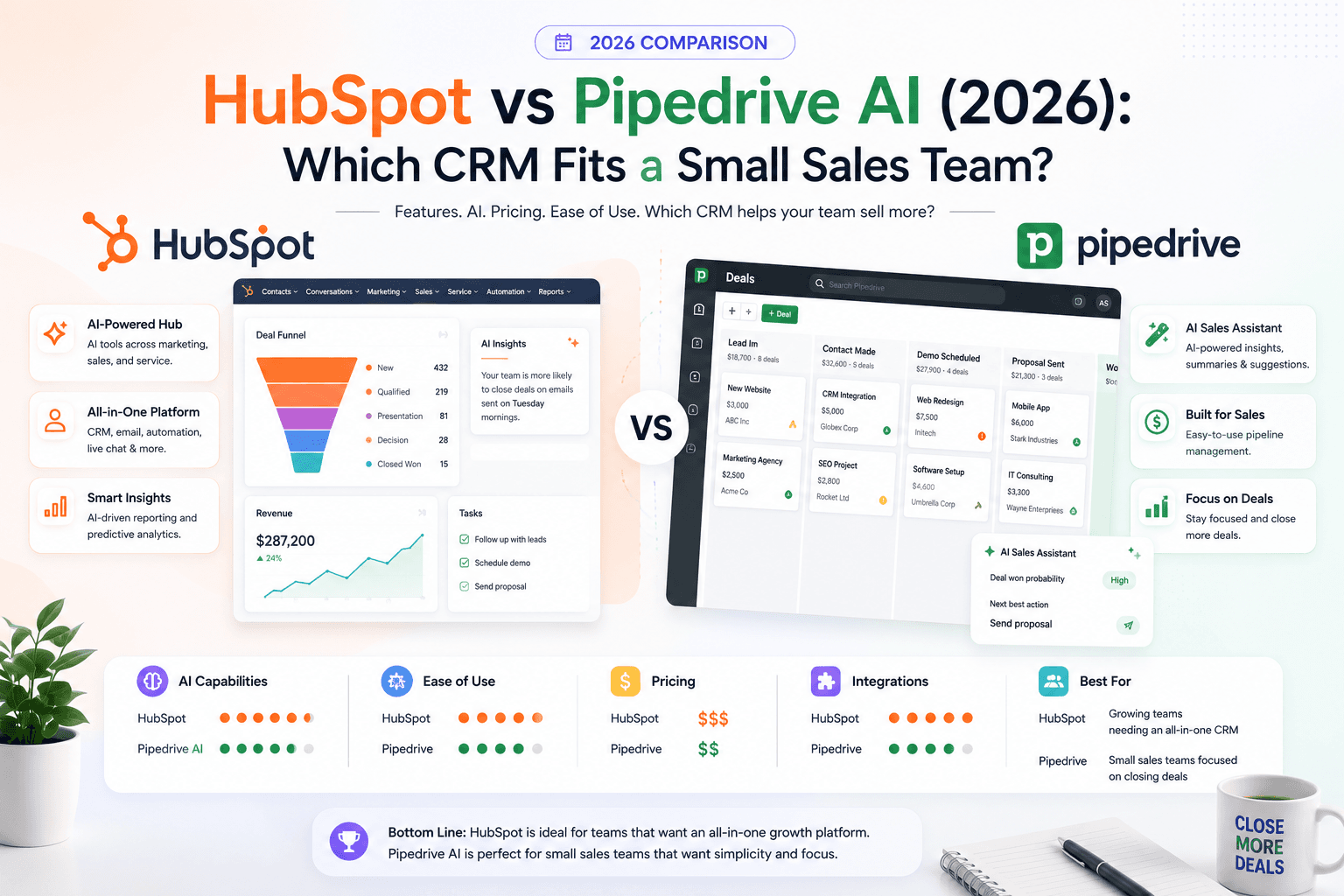
Choosing a CRM is less about AI demos and more about daily habits. Both HubSpot and Pipedrive added AI assistants in 2026, but they solve different problems. HubSpot built Breeze into a full customer platform — CRM, marketing, content, and service under one roof. Pipedrive stayed focused on visual pipelines, activity tracking, and rep productivity.
This guide compares both platforms for small business owners, agency sales teams, freelancers, and consultants who need a practical answer — not a feature checklist copied from a landing page. Pricing and AI availability reflect publicly listed information from HubSpot and Pipedrive as of August 2026. Verify current rates before purchasing.
Quick summary
Both platforms can support a small sales team. The split is organizational: Pipedrive optimizes closing; HubSpot optimizes the full journey from first visit to renewal.
What is HubSpot?
HubSpot is an all-in-one customer platform built around a free Smart CRM. According to HubSpot's product catalog, the platform spans Marketing Hub, Sales Hub, Service Hub, Content Hub, and Data Hub — each adding tools on top of the same contact database.
For small businesses, HubSpot's appeal is consolidation. A lead who downloads a guide, books a call, and opens a support ticket can appear as one record with shared history. HubSpot's AI layer — branded Breeze — includes productivity assistance (summaries, drafting, enrichment) and optional autonomous Breeze Agents (Customer Agent, Prospecting Agent, Data Agent) that consume HubSpot Credits when they complete work.
HubSpot works best when marketing and sales actually collaborate inside one system rather than exporting CSV files every Friday.
What is Pipedrive?
Pipedrive is a sales-first CRM built around a visual deal pipeline. Reps drag deals between stages, log activities, sync email, and automate follow-ups — without navigating marketing dashboards they never use.
Pipedrive's AI tools — documented in Pipedrive's AI knowledge base — focus on rep workflow: import mapping, report generation, a conversational Sales Assistant, and (on Premium plans and above) AI email creation, thread summarization, and suggested replies.
Pipedrive does not try to be your blog CMS or marketing automation suite. That narrow focus is the product's strength for teams that only need to sell.
Who should use HubSpot?
HubSpot fits teams where several functions touch the same contacts:
- Inbound-heavy businesses — SEO content, forms, and email nurture feed directly into CRM segments
- Agencies managing client funnels — one portal for landing pages, lead capture, and deal tracking
- B2B teams with long cycles — marketing attribution and sales activity on one timeline
- Businesses already on HubSpot Free — upgrading within the ecosystem avoids migration pain
- Teams planning to add service or ticketing later — Service Hub shares the same database
If your AI marketing stack already centers on owned channels and CRM-connected follow-up, HubSpot aligns with that architecture.
Who should NOT use HubSpot
Skip HubSpot — or delay it — when:
- Your team only needs a deal pipeline and will ignore marketing hubs
- You cannot budget for seat growth, credits, or Professional onboarding down the road
- Reps refuse admin-heavy tools; a simpler CRM drives higher adoption
- You already pay for best-in-class email, CMS, and support tools you do not want to replace
- You need a CRM live in days, not weeks of configuration
HubSpot rewards preparation. Without staged pipelines, property definitions, and ownership rules, the platform feels heavy fast.
Who should use Pipedrive?
Pipedrive fits sales-led organizations that prioritize velocity and visibility:
- Small sales teams (2–15 reps) closing outbound or referral-driven deals
- Freelancers and consultants tracking proposals without enterprise overhead
- Real estate agents and brokers who need stage-based follow-up — see our AI workflows for real estate for parallel patterns
- Agencies with dedicated BDRs who live in calls, emails, and pipeline reviews
- Teams migrating from spreadsheets that want structure without a full re-platform
Pipedrive's 14-day trial and deal-centric UI usually produce faster rep buy-in than all-in-one suites.
Who should NOT use Pipedrive
Pipedrive is the wrong default when:
- Marketing owns lead gen and needs native email campaigns, landing pages, and SEO tools inside the CRM
- You require deep service ticketing, knowledge bases, or SLA workflows
- You want autonomous AI agents resolving customer conversations at scale
- Your business model depends on product-led growth analytics tied to web behavior
- You need a permanent free tier — Pipedrive is paid after trial
For marketing-led growth, pair Pipedrive with external tools or choose HubSpot instead.
Key features compared
HubSpot key features
According to HubSpot's publicly listed capabilities:
- Smart CRM — contacts, companies, deals, tickets, and custom objects on higher tiers
- Forms and landing pages — lead capture connected to CRM (Content Hub / Marketing Hub)
- Email marketing and automation — sequences, workflows, and segmentation
- Sales pipeline tools — deal stages, meeting links, quotes (tier-dependent)
- Breeze Assistant — drafting, summarization, and enrichment included with Starter Core Seats
- Breeze Agents — Customer, Prospecting, and Data Agents billed via HubSpot Credits
- Reporting dashboards — marketing, sales, and service analytics in one account
- Integrations — native Gmail/Outlook sync; app marketplace for extensions
Pipedrive key features
Per Pipedrive documentation and pricing pages:
- Visual pipelines — customizable stages, deal rotting, and weighted forecasts
- Activity-based selling — calls, tasks, and reminders tied to deals
- Email sync — Gmail/Outlook integration with open and click tracking (Growth+)
- Workflow automation — trigger actions on stage changes (plan limits apply)
- Sales Assistant (beta) — natural-language queries against CRM data on all plans
- AI email tools — creation, summarization, suggested replies (Premium+)
- Insights reporting — AI-assisted report generation from prompts
- Marketplace — 500+ integrations including Zapier, Zoom, and Lemlist
Pricing
Always confirm live pricing on official pages before buying. List prices below reflect annual billing where noted.
HubSpot pricing overview
Free Smart CRM
$0/mo
Up to 2 users; 1,000 contacts (per HubSpot)
- Contact and deal records
- Basic email tracking with branding
- 1 deal pipeline
- Forms and email send limits
- Limited dashboards
Starter (Core Seat)
$7/seat/mo (annual)
$20/seat/mo if billed monthly; 500 HubSpot Credits included
- Breeze Assistant productivity AI
- Additional pipelines and automation
- Remove HubSpot branding on select tools
- HubSpot Credits for agent features
- Scales per seat
Professional+
Variesby Hub
Marketing Hub Pro from ~$800/mo; onboarding fees apply
- Advanced automation and reporting
- Higher credit allowances
- Breeze Agents at scale
- Multi-hub bundles available
- Annual commitment typical
HubSpot uses a hybrid model: seats for access, HubSpot Credits for autonomous AI work, and hub bundles for feature depth. Starter Core Seats include Breeze Assistant; Prospecting Agent, Customer Agent, and Data Agent draw credits per action. HubSpot lists credit overage at roughly $9 per 1,000 credits on annual plans.
Typical small-team math: three Starter sales seats at $7 each ≈ $21/month plus any credit overage — affordable entry. Moving to Professional Marketing or Customer Platform bundles jumps to hundreds or thousands per month plus onboarding fees.
Pipedrive pricing overview
Lite
$14/seat/mo (annual)
$24/seat/mo monthly billing
- Visual pipeline
- AI import assistant and Sales Assistant
- 2,500 open leads/deals per user
- 500 custom fields
- Basic reporting
Growth
$39/seat/mo (annual)
Most popular for growing teams
- Full email sync and tracking
- Workflow automation
- Bulk email sending
- Scheduling links
- More integrations
Premium
$59/seat/mo (annual)
Required for full AI email suite
- AI email creation and summarization
- Suggested replies (beta)
- Lead scoring and enrichment
- Quotes and e-signatures
- Team inboxes
Ultimate
$79/seat/mo (annual)
Highest plan limits
- Advanced security and permissions
- Higher automation caps
- Full feature access
- Add-ons still extra for LeadBooster, Campaigns
Pipedrive prices per seat with optional add-ons: LeadBooster (chatbots, web forms), Campaigns (email marketing), Smart Docs (proposals), and Web Visitors. No free plan — only a 14-day trial.
Typical small-team math: five Growth seats ≈ $195/month annual. Premium for AI email on five seats ≈ $295/month. Add LeadBooster or Campaigns only if sales truly uses them.
| Cost factor | HubSpot | Pipedrive |
|---|---|---|
| Free entry | Yes — 2 users, 1,000 contacts | No — 14-day trial only |
| Entry paid seat | ~$7/seat/mo (Starter, annual) | $14/seat/mo (Lite, annual) |
| AI email drafting | Breeze Assistant on Starter; agents use credits | Premium+ ($59/seat/mo annual) |
| Autonomous AI agents | Yes — credit-based (Customer, Prospecting, Data) | No equivalent autonomous agents |
| Marketing automation | Native in Marketing Hub | Campaigns add-on or external tool |
| Onboarding fees | Professional+ hubs often require paid onboarding | Not typically required for SMB plans |
| Pricing predictability | Can expand via hubs, credits, and seats | Per-seat + add-ons; generally linear |
HubSpot pros and cons
Pros
- Free CRM lowers risk for inbound experiments
- One database for marketing, sales, and service
- Breeze Assistant included on Starter Core Seats
- Strong content, forms, and email for nurture-heavy businesses
- Large app ecosystem and HubSpot Academy resources
- Scales toward enterprise without switching platforms
Cons
- Feature depth creates setup and training overhead
- True AI agent value requires credits and higher tiers
- Professional bundles and onboarding fees add up fast
- Easy to pay for hubs your team never opens
- Sales reps may prefer a simpler interface
- Reporting power exceeds what a five-person team often needs
Pipedrive pros and cons
Pros
- Fastest path to a working sales pipeline for most teams
- Visual deal board drives daily rep engagement
- Transparent per-seat pricing without hub sprawl
- Sales Assistant on every plan for CRM questions
- Deep email sync and automation on Growth+
- 500+ integrations for specialized stacks
Cons
- No permanent free tier
- Full AI email tools locked to Premium and above
- Marketing, content, and service require add-ons or other software
- Less native inbound tooling than HubSpot
- Beta AI features may roll out unevenly by account
- Add-on costs (LeadBooster, Campaigns) accumulate
Best use cases
| Scenario | Better fit | Why |
|---|---|---|
| Outbound B2B sales team (5 reps) | Pipedrive Growth/Premium | Pipeline-first UI; reps log calls and emails quickly |
| Inbound SaaS with content marketing | HubSpot Starter+ | Forms, email, and CRM segments share one record |
| Freelance consultant (solo) | HubSpot Free or Pipedrive Lite | Free HubSpot if inbound; Lite if deal-focused |
| Real estate brokerage | Pipedrive Premium | Stage-based deals + AI email on Premium; pair with niche workflows |
| Local service business with ads + calls | HubSpot Starter | Capture form leads; automate follow-up tasks |
| Agency new business pipeline | Pipedrive Growth | Simple visibility for partners reviewing deal flow |
| E-commerce with support tickets | HubSpot Service Hub | Ticketing tied to CRM history |
| Team already using Mailchimp + Calendly | Pipedrive + integrations | Avoid paying for duplicate marketing hubs |
Limitations
HubSpot limitations
- Free and Starter tiers cap contacts, sends, pipelines, and automation steps
- Breeze Agents require credit budgeting; heavy agent use can exceed seat cost
- Professional upgrades carry mandatory onboarding fees on several hubs
- All-in-one design means paying for complexity even if you use 20% of features
- AI output still depends on clean properties and consistent deal updates
Pipedrive limitations
- No native blog, SEO, or full marketing suite without add-ons
- AI email summarization and suggested replies need Premium ($59/seat/month annual minimum)
- Sales Assistant remains beta for some accounts per Pipedrive docs
- Automation, API, and report caps vary by plan — check limits before scaling
- Does not replace meeting note tools for call transcription; integrate separately
Head-to-head comparison table
| Category | HubSpot | Pipedrive |
|---|---|---|
| Primary job | Grow and manage the full customer lifecycle | Move deals through a sales pipeline |
| AI branding | Breeze (Assistant + Agents + Credits) | Pipedrive AI / Sales Assistant |
| Included AI on entry paid tier | Breeze Assistant on Starter Core Seat | Sales Assistant, AI import, AI reports (all plans) |
| Advanced sales email AI | Assistant drafting; agents cost credits | Premium+ for create, summarize, suggest replies |
| Autonomous agents | Customer, Prospecting, Data Agents | None listed |
| Marketing email + landing pages | Native (Marketing/Content Hub) | Campaigns add-on or external ESP |
| Free option | Yes (2 users) | Trial only |
| Typical setup time | 1–4 weeks if marketing included | 3–7 days for sales pipeline |
| Best team size | 5–50 with marketing + sales overlap | 2–30 sales-focused reps |
| Integration strategy | HubSpot marketplace + ops hub | Pipedrive marketplace + Zapier |
| Winner for pure sales adoption | — | Pipedrive |
| Winner for inbound + CRM unity | HubSpot | — |
Things to consider before choosing
Before you sign a contract or import 10,000 legacy contacts, answer these questions honestly:
1. Where do leads enter today? Website forms, referrals, cold outreach, marketplaces, and walk-ins each need a capture path. HubSpot native forms reduce integration work. Pipedrive often relies on LeadBooster, web forms, or Zapier from your site.
2. Who owns data entry? If reps will not log calls, no CRM wins. Pick the interface reps will open without being nagged. Pipedrive's deal board usually wins on daily sales habits; HubSpot wins when marketers maintain records too.
3. What is your 12-month seat count? Multiply per-seat price by expected headcount. A team of eight on Pipedrive Premium ($59 × 8 = $472/mo annual) may still beat a partial HubSpot Professional bundle — run your own spreadsheet.
4. Do you need AI to act or AI to assist? HubSpot's credit-based agents can execute workflows (within limits). Pipedrive's AI helps reps draft, summarize, and query data — human send remains the default. For guardrails on automated outreach, read our guide to AI automation for small business.
5. What tools must stay? Replacing working email, CMS, or support software for CRM consolidation has a switching cost. Sometimes Pipedrive plus existing tools is cheaper than HubSpot migration.
6. Compliance and data residency — review each vendor's DPA, retention settings, and AI data policies. Pipedrive states customer data is not used to train third-party models per its Sales Assistant documentation. Confirm current terms for your industry.
Decision matrix
Score each factor 1 (low) to 5 (high) for your business. Add the weighted totals.
| Factor | Weight | HubSpot score (1–5) | Pipedrive score (1–5) |
|---|---|---|---|
| Sales pipeline simplicity | ×3 | 2 | 5 |
| Inbound marketing + forms | ×3 | 5 | 2 |
| Time to first live pipeline | ×2 | 3 | 5 |
| AI email assistance (no extra tier) | ×2 | 4 | 2 |
| Autonomous AI agents | ×1 | 5 | 1 |
| Total cost at 5 users (entry useful tier) | ×2 | 4 | 4 |
| Reporting across marketing + sales | ×2 | 5 | 3 |
| Integration with existing stack | ×1 | 3 | 4 |
How to use this: Multiply each HubSpot and Pipedrive score by the weight, sum the columns, and compare totals. Adjust weights to match your reality — a referral-only agency should weight pipeline simplicity higher than inbound marketing.
Common mistakes when choosing a CRM
Buying for AI headlines. Drafting a follow-up email saves minutes. An empty pipeline loses deals. Configure stages, required fields, and activity rules before enabling AI features.
Ignoring adoption. The best CRM is the one reps update daily. A lighter tool with 90% usage beats an enterprise suite with 40% usage.
Undercounting add-ons. Pipedrive LeadBooster, Campaigns, and Smart Docs add cost. HubSpot credits and Professional onboarding fees surprise teams that budgeted only Starter seats.
Migrating messy data. Duplicate contacts, undefined stages, and six years of spreadsheet columns import into any CRM as chaos. Deduplicate and standardize first.
Automating too early. Auto-send sequences before human review create compliance and quality risk. Start with draft-only AI workflows as outlined in AI email marketing for small business.
Switching for minor friction. CRM migration costs weeks of productivity. Change platforms when limits block revenue — not because one template looks nicer.
CRM selection checklist
Use this before go-live:
- Pipeline stages defined with exit criteria for each stage
- Required fields set (minimum: owner, next activity, source, value)
- Lead source captured for every new contact
- Email sync tested for all rep accounts
- One automation built and monitored (e.g., stale deal alert)
- Manager dashboard confirmed for weekly pipeline review
- AI features enabled only after two weeks of clean manual usage
- Data retention and AI privacy settings reviewed with admin access
- Integration map documented (forms, calendar, billing, support)
- Training doc or Loom walkthrough recorded for new hires
Our 30-day AI marketing plan uses a similar phased rollout — stabilize process, then layer AI.
HubSpot vs Pipedrive vs other CRMs
Small teams also evaluate Zoho CRM, Salesforce, and Monday CRM. Brief comparison based on publicly listed positioning:
| Platform | Best for | AI approach | Pricing entry | Trade-off |
|---|---|---|---|---|
| HubSpot | Inbound + CRM unity | Breeze Assistant + credit-based agents | Free; Starter ~$7/seat/mo | Complexity grows with hubs |
| Pipedrive | Sales pipeline focus | Sales Assistant + Premium email AI | $14/seat/mo (Lite, annual) | Marketing requires add-ons |
| Zoho CRM | Budget multi-department CRM | Zia AI on paid plans | Free tier up to 3 users (verify limits) | UI less polished for some teams |
| Salesforce | Enterprise scale | Einstein AI on higher editions | Higher entry; SMB editions vary | Overkill for most sub-20 teams |
| Monday CRM | Visual work management | AI blocks on platform plans | Per-seat platform pricing | Weaker native sales email depth |
Versus Zoho: Zoho wins on price for teams needing CRM plus invoicing and projects in one vendor suite. HubSpot wins on inbound marketing integration. Pipedrive wins on sales UX.
Versus Salesforce: Salesforce suits complex B2B with custom objects and enterprise governance. Small teams rarely need it unless investors or enterprise buyers mandate it.
Versus building custom: Some firms prototype lightweight trackers with vibe coding. Custom tools fit narrow workflows but shift maintenance burden to you — weigh security and support before skipping established CRMs.
Alternatives worth evaluating
If neither platform fits:
- Zoho CRM — lower-cost suite with Zia AI for teams needing CRM plus finance adjacent tools
- Freshsales (Freshworks) — sales CRM with built-in phone and chat for inside sales teams
- Copper — Google Workspace-native CRM for teams living in Gmail and Calendar
- Close — call-heavy outbound teams with built-in dialing emphasis
- HubSpot Free + Pipedrive trial — run parallel pilots with 20 real deals before committing
For prompt-based follow-up drafts outside your CRM, keep a ChatGPT prompt library as a supplement — not a replacement for pipeline discipline.
Implementation timeline
| Week | HubSpot focus | Pipedrive focus |
|---|---|---|
| 1 | Import contacts; define properties; connect email | Import deals; configure one pipeline; connect email |
| 2 | Build core form; set deal stages; train reps on logging | Required fields; activity types; stale deal automation |
| 3 | Email templates; first workflow; dashboard for manager | Email templates; Sales Assistant trial; manager dashboard |
| 4 | Enable Breeze Assistant; review credit settings if using agents | Enable Premium AI email if budgeted; review add-on needs |
| Ongoing | Monthly data hygiene; segment cleanup | Weekly pipeline review; automation audit |
Agencies onboarding multiple clients should document one golden pipeline template and clone it — regardless of vendor.
Final recommendation
There is no universal winner — only a better fit for how your business earns revenue today.
Choose Pipedrive when sales reps drive growth, deals need visible stages, and you want predictable per-seat pricing. Growth ($39/seat/month annual) is the sensible default for email sync and automation; upgrade to Premium when AI email drafting justifies $20 more per seat.
Choose HubSpot when marketing and sales must share one contact record, you capture inbound leads through forms and content, and you may expand into service or ticketing without a platform switch. Starter Core Seats ($7/seat/month annual) are the practical entry point; treat credit-based agents as a later optimization, not day-one requirements.
Do first, regardless of vendor: define stages, assign owners, set follow-up SLAs, and run the CRM manually for two weeks. AI assistants — whether Breeze or Sales Assistant — save time only when the underlying data reflects reality.
For broader context on wiring CRM into your stack, see AI marketing for small business and AI automation workflows.
Suggested follow-up article: AI CRM Automation: Lead Capture, Tagging, and Follow-Up Sequences — a step-by-step guide for small teams implementing draft-only automation without unsupervised sends. (Not yet published on AI Growthub.)
Key takeaway
HubSpot and Pipedrive both ship AI in 2026 — but for different jobs. Compare pricing, Breeze vs Sales Assistant, automation limits, and which CRM small sales teams actually adopt. For more step-by-step guides, browse our blog or explore Sales.
Frequently asked questions
Is HubSpot free CRM enough for a small sales team?
For early pipelines with up to two users and roughly 1,000 contacts, HubSpot's free Smart CRM can work. According to HubSpot's pricing page, advanced AI agents, marketing automation, and multi-pipeline sales features require paid Starter seats or higher. Most growing teams outgrow free limits within a few months.
Does Pipedrive have a free plan?
No permanent free tier. Pipedrive offers a 14-day trial, then paid seats starting at $14 per user per month on annual billing (Lite plan, per Pipedrive's pricing page). Budget for at least Growth ($39/seat/month annual) if you need email sync and workflow automation.
Which CRM is easier to set up in under two weeks?
Pipedrive is usually faster for a sales-only pipeline because the interface is deal-centric from day one. HubSpot takes longer when you also configure forms, email, content, or service tools — but that setup pays off if marketing and sales must share one contact database.
Which AI features are included without extra fees?
HubSpot includes Breeze Assistant productivity tools with Starter Core Seats; autonomous Breeze Agents consume HubSpot Credits. Pipedrive includes Sales Assistant, import help, and AI report creation on all plans; AI email drafting, summarization, and suggested replies require Premium ($59/seat/month annual) or higher, per Pipedrive's AI documentation.
Can HubSpot and Pipedrive replace a separate marketing stack?
HubSpot can replace several tools because Marketing Hub, Content Hub, and CRM share one database. Pipedrive is sales-first; email campaigns and landing pages typically require add-ons like Campaigns or external tools such as Brevo or Mailchimp connected via Zapier.
What is the biggest hidden cost in each platform?
HubSpot: seat tiers, HubSpot Credits for AI agents, and Professional onboarding fees if you upgrade beyond Starter. Pipedrive: per-seat pricing plus add-ons (LeadBooster, Campaigns, Smart Docs) and the jump to Premium for full AI email tools.
HubSpot vs Pipedrive vs Zoho CRM — which is cheapest?
Pipedrive Lite is the lowest entry for pure sales ($14/seat/month annual). HubSpot Free costs $0 for two users but caps contacts and features. Zoho CRM offers a free tier for up to three users with AI on paid plans — compare current limits on each vendor's pricing page before deciding.
Should freelancers and consultants choose HubSpot or Pipedrive?
Solo consultants closing a handful of deals per month often adopt Pipedrive Growth for pipeline clarity. Consultants who publish content, run webinars, and nurture inbound leads usually benefit from HubSpot's free or Starter CRM plus forms and email tracking in one place.
Written by
Maya ChenSenior Editor, AI for Small Business
Maya has tested 120+ AI tools inside real restaurants, clinics, agencies, and brokerages. She writes the reviews and comparisons owners actually use to decide what to buy.
Comments are coming soon
We’re building a discussion space for business owners. Until then, reply to any newsletter issue — we read everything.
Related posts

AI Proposal Writing for Small Business: The Complete 2026 Guide
How agencies, consultants, and service businesses use AI proposal writing tools to cut drafting time, personalize scopes, and close deals faster — with pricing, comparisons, and a decision framework.

AI CRM Automation: The Complete 2026 Guide (Lead Capture, Tagging & Follow-Up)
Build supervised AI CRM automation for small sales teams: capture leads, draft tags and follow-ups, stale deal alerts, and meeting recaps — with human approval before every external send.
The AI edge, delivered every Tuesday
One 5-minute email: the tools worth your money, the plays that are working right now, and zero hype. Unsubscribe anytime.
No spam. No selling your data. Read by owners of restaurants, gyms, clinics, and agencies across the US, UK, Canada, and Australia.