How to Build a Lead Follow-Up AI Agent for Small Business
Build a lead follow-up AI agent that qualifies inbound leads, drafts replies, and updates your CRM — with briefs, guardrails, pricing, and a 60-minute checklist.
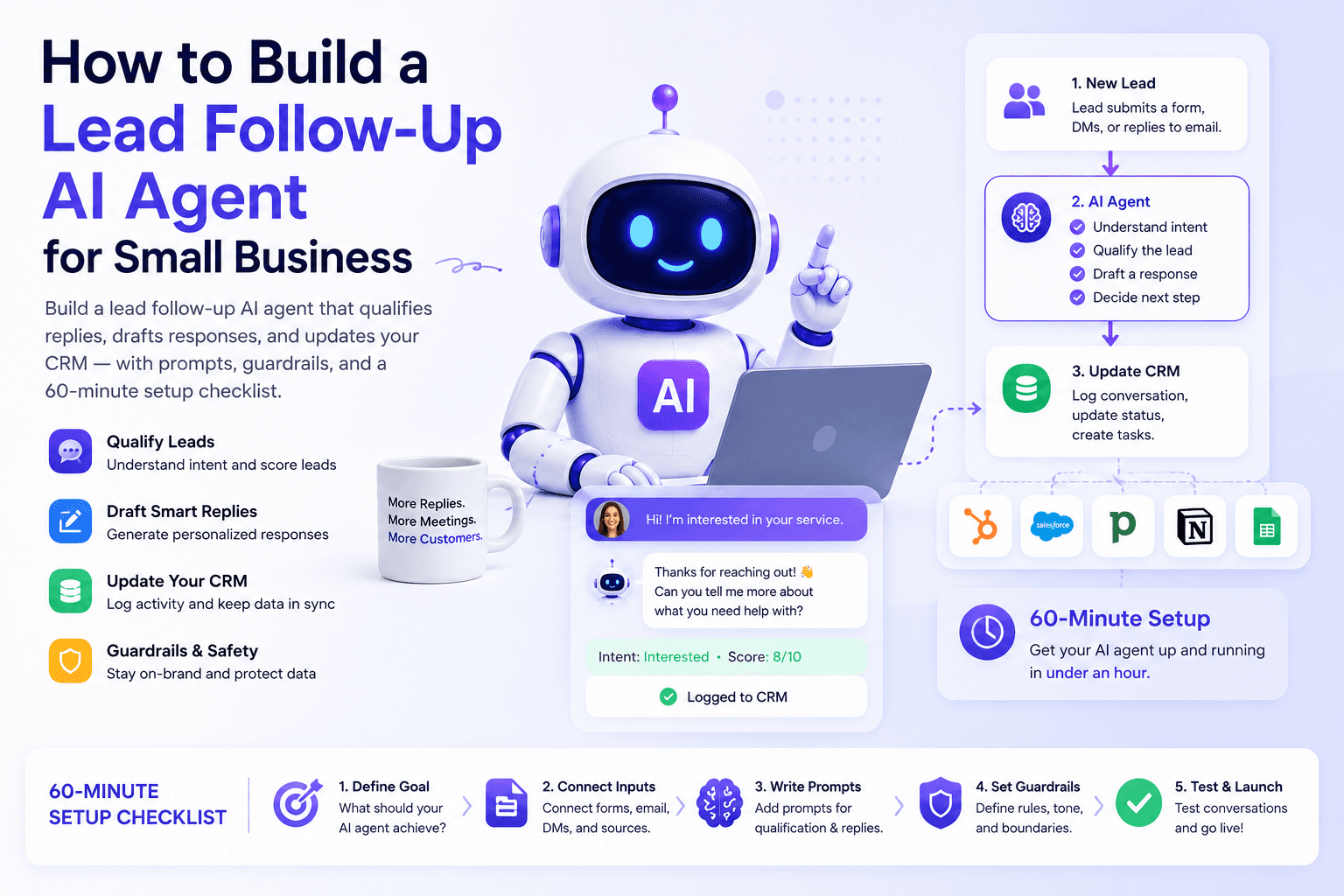
If you only build one AI agent this quarter, make it lead follow-up.
New inquiries go cold in hours, not days. Most small businesses do not lose leads because the offer is weak. They lose them because nobody replied while the prospect was still paying attention.
This guide shows how to build a lead follow-up AI agent: a constrained system that qualifies an inbound lead, drafts the first response, logs CRM notes, and escalates exceptions to a human — with briefs, guardrails, architecture options, pricing anchors, and a 60-minute checklist. It supports the pillar AI Agents for Small Business and pairs with the tool shortlist in Best AI Agent Tools.
Table of contents
- Quick summary
- What a lead follow-up AI agent is
- Who should use it
- Who should NOT use it
- Quick recommendation
- Things to consider before choosing
- Key features
- Best-for table
- Pricing in 2026
- Pros and cons
- Best use cases
- Limitations
- Architecture options
- Step-by-step build
- Comparison tables
- Decision matrix
- Setup checklist
- Common mistakes
- Alternatives and competitor comparison
- FAQ
- Final recommendation
Quick summary
| Stage | What to do | Success signal |
|---|---|---|
| Day 1 | Write ICP + forbidden actions; paste the agent brief | One-page brief exists |
| Days 1–7 | Draft-only on 10 historical + live leads | ≥8/10 drafts need only light edits |
| Days 8–14 | Human approval before every send; CRM notes required | Median time-to-approved-reply drops |
| Days 15–30 | Tighten brief; add write access only where edit rate is low | Booked next steps rise or stay stable |
| After 30 days | Consider automation/agent connectors or CRM-native AI | Kill switch + owner still named |
What a lead follow-up AI agent is
A lead follow-up AI agent is a constrained AI system that:
- Reads an inbound lead (form, email, chat handoff)
- Qualifies fit against your ICP (fit / maybe / not a fit)
- Drafts a first reply with one clear next step
- Proposes CRM notes or tasks
- Escalates anger, legal, pricing exceptions, or enterprise procurement to a human
It is not a full sales OS, a chatbot that books without review, or a blast sequence that ignores what the prospect wrote.
| Nearby system | Job | Guide |
|---|---|---|
| Fixed follow-up sequence | Same emails every time | AI email automation sequences |
| CRM automation | Capture, tag, task routing | AI CRM automation |
| Lead generation | Getting inquiries in the door | AI lead generation workflow |
| Chatbot / receptionist | Website or phone conversation | AI chatbots, AI receptionist |
| Agent vs automation fork | Which pattern to buy | AI agent vs chatbot vs Zapier |
Who should use it
This build fits:
- Service businesses with form fills or inbound email
- Agencies and consultants who lose deals to slow first replies
- Local businesses using a shared inbox and a simple CRM
- Founders who already use ChatGPT or Claude and want a production workflow
- Teams that can name one draft owner for the first two weeks
Agency operators: also see AI workflow for agencies.
Who should NOT use it
Do not start here if:
- You have fewer than ~5 inbound leads per month — fix acquisition first (lead generation workflow)
- You want the agent to invent discounts, SLAs, or legal guarantees
- Nobody will review drafts for at least 14 days
- Your CRM fields and ownership are chaos — agents amplify bad data
- You need identical nurture for every lead — buy a sequence, not an agent
Quick recommendation
Things to consider before choosing
- Inbound source — form, shared inbox, chat handoff, scheduler
- CRM of record — HubSpot, Pipedrive, or equivalent (comparison)
- SLA — e.g. human-approved first reply within 15 minutes in business hours
- Owner + coverage hours — who approves when the founder is on a call
- Kill switch — how to cut send/update permissions in one step
- Fixed vs variable path — sequences vs adaptive drafts
- Data rules — what never goes into consumer AI tools
- Success metrics — time-to-first-response, edit rate, booked next steps
Key features
A production-ready lead follow-up agent needs:
| Feature | Why it matters |
|---|---|
| Written agent brief | ICP, tone, forbidden actions, escalation |
| Draft / approval mode | Prevents unsupervised promises |
| CRM note or task output | Chat logs are not a pipeline |
| Escalation triggers | Anger, legal, pricing exceptions, RFPs |
| Example good/bad replies | Beats abstract tone adjectives |
| Scoring sheet | Turns “feels okay” into go/no-go |
| Kill switch | Stops a bad loop fast |
| Weekly brief updates | Offers and policies change |
Best-for table
| Profile | Best first architecture | Avoid first |
|---|---|---|
| Solo founder, under 20 leads/mo | Custom GPT / Claude Project + manual paste | Multi-agent sales suite |
| Agency / shared inbox | Zap/Make: form → draft → Slack approve → CRM | Auto-send without owner rotation |
| HubSpot-heavy sales team | HubSpot AI / Breeze where plan allows + draft review | Parallel CRM in a chat tool |
| Pipedrive sales-led SMB | Pipedrive AI drafts + approval | Forcing HubSpot “for AI” |
| Technical / data residency | n8n staging + draft | Consumer ChatGPT with raw PII |
| High-volume identical nurture | Email sequence automation | Overbuilt agent |
Pricing in 2026
Directional costs (verify on vendor sites):
| Layer | Typical published posture | Role in this agent |
|---|---|---|
| ChatGPT / Claude seat | ~$20/mo consumer; Business ~$20/user/mo annual | Brief + drafting |
| Zapier Professional | from ~$19.99/mo annual (tasks) | Trigger, notify, CRM write after approve |
| Zapier Agents (optional) | Separate activity meter (Free ~400/mo; Pro often ~$33/mo annual) | Adaptive steps across apps — Zapier pricing |
| Make Core | from ~$12/mo (credits) | Branching scenarios |
| HubSpot Breeze agents | Credits; Prospecting Agent cited at $1/recommended lead | CRM-native outreach assist (Pro+) |
| Pipedrive AI | Plan-gated features | Sales assist inside CRM |
Pilot budget for most SMBs: existing AI seat + free CRM tier + free automation tier, then one paid automation seat when multi-step Zaps are required.
Pros and cons
Pros
- Highest-ROI first agent for many SMBs — frequent, digital, measurable
- Failure mode is reversible (edit the draft) if you stay draft-only
- Works with tools you likely already have (form, inbox, CRM)
- Clear KPIs: speed, edit rate, booked next steps
- Natural upgrade path to sequences, CRM AI, and later agents
Cons
- Bad briefs invent confident wrong facts
- Auto-send too early damages trust fast
- Messy CRM ownership creates wrong assignees
- Usage meters (tasks/credits/activities) can surprise budgets
- Does not fix a weak offer or empty pipeline
Best use cases
- Website contact / demo form → first reply + CRM task
- Shared inbox inquiries for agencies and consultants
- Chatbot handoff when a human should own the close (chatbots)
- “Not a fit” polite decline with optional referral
- Escalation-only acknowledgment for angry or legal messages
Limitations
- Cannot invent accurate pricing or availability you did not supply
- Will not fix acquisition if inbound volume is near zero
- Chat memory is not a CRM
- Consumer tools may be wrong for regulated or highly sensitive data
- Identical nurture paths are usually cheaper as automation, not agents
What the agent should and should not do
Should: extract name, company, need, timeline, budget signals; score fit; draft a polite first reply with one next step; create/update CRM contact and task; flag anger, legal, pricing exceptions, enterprise procurement.
Should not: invent discounts or guarantees; auto-send before you trust accuracy; argue with unhappy customers; delete or merge CRM records; promise delivery dates the team has not approved.
Architecture options
Option A — Custom GPT / Claude Project (fastest)
Paste brief and examples. Manually paste each lead. Best for learning. Weak for automatic CRM writes until you add tools.
Option B — No-code agent + CRM connector
Lead payload in → draft out → wait for approval. Best balance for most SMBs once volume rises. Tool map: best AI agent tools.
Option C — Automation with one AI draft step
Form → AI draft → Slack/email approval → CRM task. Often enough for the first 30 days and cheaper to maintain. Deep dive: AI automation, n8n vs Zapier vs Make.
Pick the lightest option that meets your SLA.
Step-by-step build
1. Define ICP and qualification criteria
Five bullets max:
- Who is ideal
- Who is a maybe
- Who is not a fit
- What must be answered before a call
- What next step you always offer (call, form, quote, booking link)
2. Write the agent brief and escalation rules
Role: You are a sales ops assistant for [Business].
Goal: Qualify inbound leads and draft a first reply. Do not send without approval.
Tone: Clear, warm, concise. No hype. No emojis unless the lead used them first.
ICP: [bullets]
Allowed actions: Draft email; propose CRM status; create follow-up task.
Forbidden: Pricing changes, legal claims, guarantees, refunds, complaining about competitors.
Escalation: If budget conflict, anger, security/legal questions, or enterprise RFP language appears, draft nothing beyond an acknowledgment and notify [Owner].
Definition of done: Draft reply + CRM note + recommended next step + confidence (high/med/low).
Add 2 good example replies and 2 bad ones. Borrow patterns from ChatGPT prompts for small business.
3. Connect email/CRM tools
Minimum wiring:
- inbound lead → agent input
- agent output → draft in shared inbox or approval channel
- on approve → send + CRM update
- on reject → log reason for weekly review
Grant read access first. Add write access only after edit rate drops.
4. Test with 10 real leads
Replay last month’s inquiries. Score factual accuracy, qualification, tone, escalation, and minutes to approve. Do not go live until you would accept at least 8 of 10 with light edits.
If facts fail, fix the brief. If tone fails, add examples. If escalation fails, add trigger phrases.
Copy-paste brief add-on
Business: [name, one-sentence offer, service area]
Owner: [name, email]
CRM fields to update: [status, source, notes, next_step_date]
First-reply goals:
1) Confirm you received the request
2) Reflect their problem in one sentence
3) Ask at most two clarifying questions if needed
4) Offer one next step with two time options or a booking link
Never mention: [discount codes, internal costs, unfinished features]
If not a fit: Thank them, say who you serve, optionally refer, do not hard-sell.
First-reply skeleton (adapt — do not send blindly)
Hi [Name] — thanks for reaching out about [problem in their words].

We help [ICP] with [outcome]. Based on what you shared, [one clarifying question] / [one next step].

If useful, I can hold [two time options] or you can book here: [link].

— [Owner name]
Keep it short. Momentum beats a brochure.
Quality checks (weekly, first month)
- Sample 10 sends
- Check CRM notes for invented facts
- Confirm unsubscribe/privacy language untouched
- Verify sensitive data stays out of unapproved tools
- Update the brief when offers or policies change
KPIs
- Median time from submit to approved first reply
- Human edit rate (% drafts changed before send)
- Positive reply rate
- Booked calls / qualified next steps
- Escalation precision (false calm vs false alarm)
If speed improves but booked calls do not, fix qualification and offer clarity — not model settings alone.
Comparison tables
Table 1 — Architecture comparison
| Option | Speed to first draft | CRM write ease | Cost posture | Best for |
|---|---|---|---|---|
| ChatGPT / Claude Project | Fastest | Manual at first | Low (seat you may own) | Learning + low volume |
| Zapier/Make + AI step | Fast | Strong | Low–mid (tasks/credits) | Most SMBs |
| Zapier Agents / Make AI Agents | Medium | Strong | Mid (separate meters) | Variable multi-app jobs |
| HubSpot / Pipedrive AI | Medium | Native | Seat + plan/credits | CRM-centric teams |
| n8n | Slower setup | Strong | Mid (executions) / self-host | Control & custom logic |
Table 2 — Agent vs sequence vs chatbot
| Pattern | When it wins | When it loses |
|---|---|---|
| Lead follow-up agent | Messy inbound; reply must adapt | Identical nurture for everyone |
| Email/CRM sequence | Predictable funnel stages | Prospect asked a unique question |
| Website chatbot | FAQ + capture after hours | Complex quoting / legal commitments |
Decision matrix
Score 1–5 × weight. Highest total wins for your inbound volume.
| Criterion | Weight | GPT/Claude Project | Zap/Make + AI | CRM-native AI | n8n |
|---|---|---|---|---|---|
| Time to first useful draft | 5 | ||||
| Approval UX for your team | 5 | ||||
| CRM field mapping fit | 5 | ||||
| Predictable monthly cost | 4 | ||||
| Escalation / logging clarity | 4 | ||||
| Admin / multi-owner coverage | 3 | ||||
| Weighted total |
Setup checklist
60-minute setup
| Minute | Action |
|---|---|
| 0–10 | Write ICP + forbidden actions on one page |
| 10–20 | Paste and customize the agent brief |
| 20–35 | Connect or manually stage 10 historical leads |
| 35–50 | Score drafts; revise brief for recurring errors |
| 50–60 | Decide draft destination + owner coverage hours |
Go-live checklist
- CRM of record chosen and fields listed
- Inbound source mapped
- Owner + SLA + kill switch documented
- Brief includes escalation triggers
- 2 good + 2 bad example replies attached
- Scoring sheet ready (accuracy, fit, tone, escalation, edit minutes)
- Draft-only for at least 14 days
- Weekly sample of 10 sends scheduled
- 30-day upgrade criteria written (edit rate / booked steps)
Sample scoring sheet
| Lead # | Accurate? | Right fit label? | Tone OK? | Escalated correctly? | Minutes to edit | Notes |
|---|---|---|---|---|---|---|
| 1 | Y/N | Y/N | Y/N | Y/N | ||
| 2 | Y/N | Y/N | Y/N | Y/N |
Common mistakes
- Auto-sending week one — stay draft-only until edit rate is stable
- No ICP brief — models fill gaps with fiction
- Treating chat as CRM — pipeline facts belong in HubSpot/Pipedrive
- Automating a messy process — wrong owner, wrong fields, faster spam
- Measuring only speed — booked next steps matter more than reply latency alone
- No kill switch — a bad loop keeps running overnight
- Skipping historical tests — demo leads ≠ your messy inbox
- Building a “full sales agent” first — win follow-up, then expand
Alternatives and competitor comparison
| If you were about to buy… | Often better first move |
|---|---|
| A specialized multi-agent sales suite | GPT/Claude brief + approval Zap for 30 days |
| More CRM seats “for AI” | Clean fields + turn on features you already own |
| Another chatbot for ops follow-up | Keep chat for capture; agent/automation for CRM completion |
| Long nurture sequence only | Add adaptive first reply for high-intent forms; sequence the rest |
When to hand off to a wider agent stack (after 30 stable days): meeting prep, proposal drafts, renewal reminders — each with narrow permissions. Parent map: AI agents pillar. Tool choices: best AI agent tools.
Suggested future article: “HubSpot Breeze Prospecting Agent vs Zapier Agents for SMB inbound follow-up.”
Frequently Asked Questions
What is a lead follow-up AI agent?
A constrained AI system that reads an inbound lead, qualifies fit against your ICP, drafts a first reply, updates CRM notes or tasks, and escalates exceptions to a human.
Should the agent send emails automatically?
Not at first. Run draft-only mode with human approval until edit rate and escalation accuracy are consistently strong.
Do I need a developer to build this?
No. Many teams start with a Custom GPT or Claude Project and a simple approval workflow. Add connectors or no-code agents when volume justifies it.
What if Zapier is enough?
If every lead follows the same path, use automation. Use an agent when messages vary and the reply must adapt to incomplete or messy context. Compare platforms in n8n vs Zapier vs Make.
How many historical leads should I test?
Use at least 10 real inquiries. Require roughly 8/10 drafts acceptable with light edits before loosening permissions.
Which CRM works best?
The one your team already updates. HubSpot and Pipedrive both support AI-assisted workflows on eligible plans — see HubSpot vs Pipedrive AI. Clean fields beat a new logo.
How do I measure success?
Track median time-to-approved-first-reply, edit rate, positive replies, and booked next steps. If speed rises but bookings do not, fix qualification and offer clarity.
When should I add HubSpot Breeze or Zapier Agents?
After draft-only follow-up works for ~30 days and either CRM-native context or multi-app adaptive steps becomes the bottleneck — not before the brief and approval habit exist.
Final recommendation
Build the draft-only version this week. Approve every send for 14 days. Loosen permissions only where edit rate stays low.
- Write ICP + forbidden actions (10 minutes)
- Customize the agent brief + examples
- Score 10 historical leads
- Wire form → draft → approval → CRM
- Review KPIs at day 30, then expand carefully
For the broader map of use cases, stacks, and risks, continue with AI Agents for Small Business and the best AI agent tools shortlist. For capture and nurture around this agent, use AI CRM automation and AI email automation sequences.
Image prompts for production
Hero (16:9), editorial photography, no logos, no readable UI:
“Wide editorial photograph of a small sales desk at late morning, owner reviewing a short handwritten lead checklist beside a closed laptop, soft window light, calm focused atmosphere, documentary magazine style, no text, no logos, 16:9.”
Supporting image 1 (16:9):
“Over-the-shoulder editorial photo of a consultant marking approve/revise on printed draft reply pages with a pen, warm office light, no readable screen UI, no brand marks, photorealistic, 16:9.”
Supporting image 2 (16:9):
“Documentary-style photo of a local service business front desk with a simple intake notepad and phone, afternoon light, authentic small-business setting, no logos, no readable device screens, 16:9.”
Infographic prompt (16:9):
“Clean editorial infographic on paper-textured background showing lead follow-up flow: Lead in → Qualify → Draft → Human approve → CRM update / Escalate, geometric icons, charcoal/cream/muted teal, no logos, no tiny UI text, 16:9.”
Metadata (CMS)
| Field | Value |
|---|---|
| Title | How to Build a Lead Follow-Up AI Agent for Small Business |
| Slug | lead-follow-up-ai-agent |
| Primary keyword | lead follow-up AI agent |
| Secondary keywords | AI lead follow-up, sales AI agent, CRM follow-up automation, ChatGPT lead reply, Zapier lead draft, HubSpot AI follow-up |
| Semantic keywords | draft-only mode, ICP brief, time-to-first-response, edit rate, escalation rules, kill switch |
| Meta title | Lead Follow-Up AI Agent for Small Business (2026) |
| Meta description | Build a lead follow-up AI agent that qualifies inbound leads, drafts replies, and updates your CRM — with briefs, guardrails, pricing, and a 60-minute checklist. |
| Excerpt | A practical 2026 build guide for SMB lead follow-up agents: architecture options, copy-paste briefs, scoring sheets, KPIs, and when Zapier or CRM AI is enough. |
| Category | Automation (ai-automation) |
| Type | guide |
| JSON-LD | Article + FAQPage + HowTo |
Suggested external references
Key takeaway
Build a lead follow-up AI agent that qualifies inbound leads, drafts replies, and updates your CRM — with briefs, guardrails, pricing, and a 60-minute checklist. For more step-by-step guides, browse our blog or explore Automation.
Frequently asked questions
What is a lead follow-up AI agent?
A constrained AI system that reads an inbound lead, qualifies fit against your ICP, drafts a first reply, updates CRM notes or tasks, and escalates exceptions to a human.
Should the agent send emails automatically?
Not at first. Run draft-only mode with human approval until edit rate and escalation accuracy are consistently strong.
Do I need a developer to build this?
No. Many teams start with a Custom GPT or Claude Project and a simple approval workflow. Add connectors or no-code agents when volume justifies it.
What if Zapier is enough?
If every lead follows the same path, use automation. Use an agent when messages vary and the reply must adapt to incomplete or messy context.
How many historical leads should I test?
Use at least 10 real inquiries. Require roughly 8 of 10 drafts acceptable with light edits before loosening permissions.
Which CRM works best?
The one your team already updates. HubSpot and Pipedrive both support AI-assisted workflows on eligible plans. Clean fields beat a new logo.
How do I measure success?
Track median time-to-approved-first-reply, edit rate, positive replies, and booked next steps. If speed rises but bookings do not, fix qualification and offer clarity.
When should I add HubSpot Breeze or Zapier Agents?
After draft-only follow-up works for about 30 days and either CRM-native context or multi-app adaptive steps becomes the bottleneck — not before the brief and approval habit exist.
Written by
Maya ChenSenior Editor, AI for Small Business
Maya has tested 120+ AI tools inside real restaurants, clinics, agencies, and brokerages. She writes the reviews and comparisons owners actually use to decide what to buy.
Comments are coming soon
We’re building a discussion space for business owners. Until then, reply to any newsletter issue — we read everything.
Related posts

Google Workspace Studio for Small Business (2026): The Complete Guide
Build Google Workspace Studio flows for SMBs: Gmail invoice logging, Meet follow-ups, Sheets triggers, limits, approval rules, and when Zapier still wins.
n8n vs Zapier vs Make (2026): Best Automation Platform for SMBs?
Compare n8n vs Zapier vs Make for small business: task vs credit vs execution pricing, AI agents, setup paths, and which iPaaS to start on in 2026.

Claude for Small Business: Complete 2026 Setup Guide
Set up Claude for Small Business: Cowork plugin, QuickBooks and HubSpot connectors, 15 workflows, Pro vs Team pricing, and when ChatGPT Work or Gemini fits better.
The AI edge, delivered every Tuesday
One 5-minute email: the tools worth your money, the plays that are working right now, and zero hype. Unsubscribe anytime.
No spam. No selling your data. Read by owners of restaurants, gyms, clinics, and agencies across the US, UK, Canada, and Australia.