How to Train an AI Chatbot on Your Business FAQs (Step-by-Step)
Step-by-step workflow to train an AI chatbot on real business FAQs — templates, refusal rules, test scripts, pricing notes, and a weekly maintenance loop.
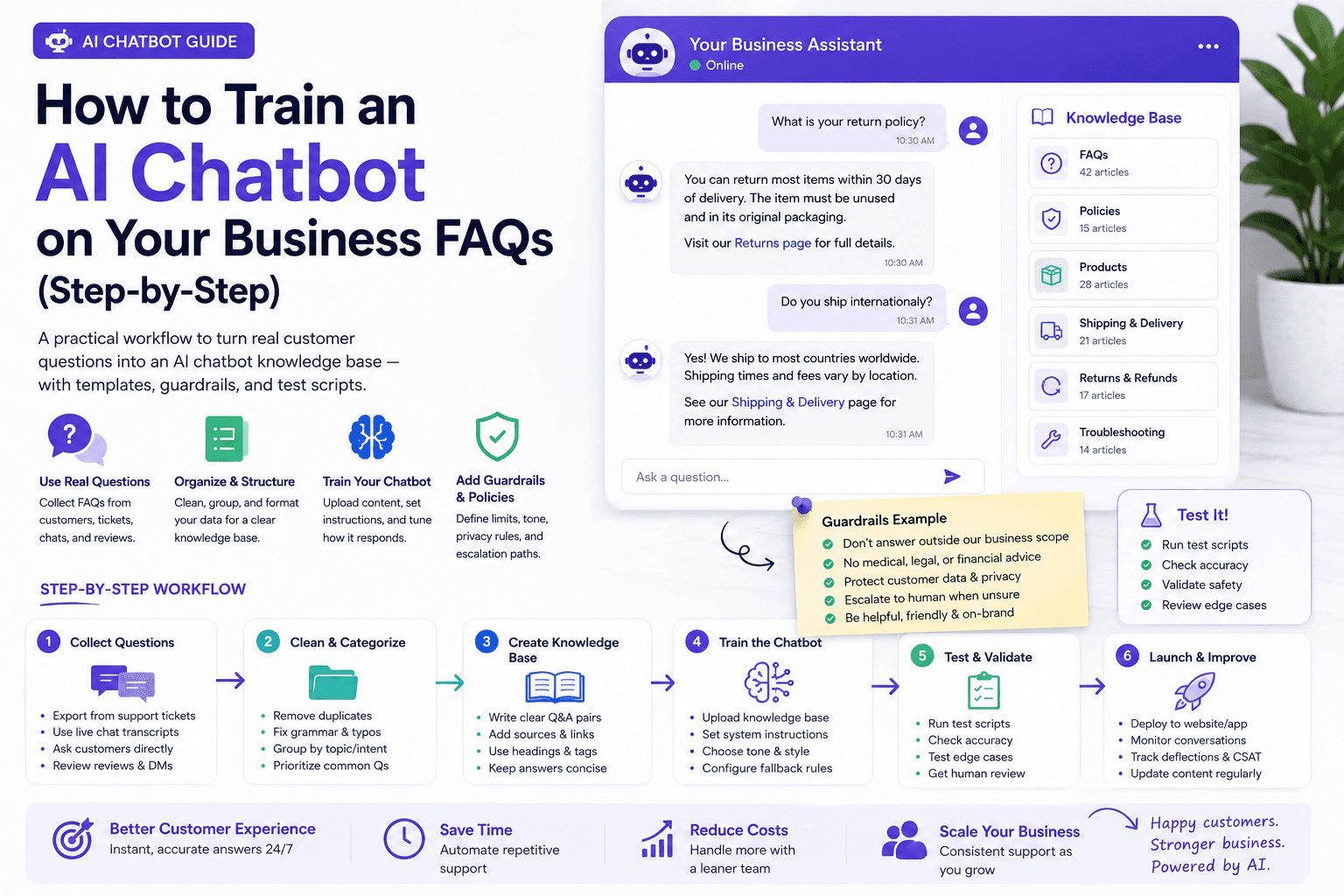
Most AI chatbots sound smart in the demo and wrong on day two. The gap is rarely the model. The gap is an unowned, untested FAQ knowledge base.
This guide shows how to train an AI chatbot on your business FAQs: collect real questions, rewrite answers bots can use, add refusal and escalation rules, load them into your tool, and run break-it test scripts before customers see the widget. It is the tactical companion to AI Chatbots for Small Business. For a common website stack, see the Tidio review.
Table of contents
- Quick summary
- What FAQ chatbot training is
- Who should use it
- Who should NOT use it
- Quick recommendation
- Things to consider before choosing
- Key features
- Best-for table
- Pricing in 2026
- Pros and cons
- Best use cases
- Limitations
- Step-by-step training workflow
- Comparison tables
- Decision matrix
- Setup checklist
- Common mistakes
- Alternatives and competitor comparison
- FAQ
- Final recommendation
Quick summary
| Step | Action | Done when… |
|---|---|---|
| 1 | Mine 30–90 days of real questions | Spreadsheet of top themes by frequency |
| 2 | Approve 15–40 short answers | Owner signed off; no invented prices |
| 3 | Write refusal + handoff lines | Unknown, human, pricing edge, regulated, angry paths exist |
| 4 | Upload to chatbot KB | One answer per intent; links work |
| 5 | Run break-it test scripts | All scripts pass |
| 6 | Weekly maintenance | Named owner + 30-minute block |
Your goal is a small, accurate, high-frequency set — usually 15–40 answers to start — not a complete company wiki.
What FAQ chatbot training is
FAQ chatbot training is the process of turning approved business facts into short, scoped answers a chatbot can retrieve and speak — with rules for what it must refuse and when a human must take over.
It is not:
| Nearby job | What it solves | Guide |
|---|---|---|
| Chatbot strategy / ROI / stack | Whether to buy a bot and which jobs it owns | AI chatbots playbook |
| Phone / after-hours voice | Calls, not website FAQ | AI receptionist |
| Ticket triage across channels | Helpdesk automation beyond the widget | AI customer service automation |
| Multi-system agents | CRM writes, adaptive sales follow-up | AI agents, lead follow-up agent |
Conversation tools answer and capture. Agents and automation finish multi-system jobs. Keep FAQ training as Layer 1.
Why most knowledge bases fail
- Answers copied from a vague About page
- Policies that contradict the website
- No “I do not know” path
- Hundreds of documents with zero prioritization
- Nobody assigned to weekly updates
Who should use it
This workflow fits when you:
- Get the same questions every week (hours, pricing shape, shipping, booking, eligibility)
- Have a website chat widget or plan to add one
- Can name an owner who approves answers
- Want after-hours capture without inventing policy
- Already drown in repeat tickets or DMs
Typical readers: local service businesses, e-commerce shops, clinics and studios (non-advice FAQs), agencies answering scope questions, freelancers with booking FAQs.
Who should NOT use it
Do not treat FAQ training as enough if:
- Visitors need complex quoting, negotiation, or licensed advice in-chat
- You cannot approve any answers this week — wait
- You plan to dump the whole website PDF and “let AI figure it out”
- Refunds, medical, legal, or financial advice will be auto-answered without a human
- Your real bottleneck is phone volume — start with AI receptionist instead of (or before) a website FAQ bot
Quick recommendation
Things to consider before choosing
- Source of truth — website, policy doc, or owner spreadsheet (pick one for conflicts)
- Top themes — hours, pricing shape, shipping, booking, eligibility, service area
- Commercial risk — which wrong answer costs money or trust
- Handoff path — email, phone, live chat hours
- After-hours behavior — capture contact + set expectations
- Controlled documents — pricing, guarantees, medical/legal, service-area boundaries
- Tool grounding — can the bot stay on approved FAQs only?
- Owner — who edits the KB weekly?
- Languages — train only languages you can review
- Success metric — deflection with CSAT held, not “messages sent”
Key features
A trainable FAQ chatbot stack needs:
| Feature | Why it matters |
|---|---|
| Knowledge base / FAQ upload | Curated answers beat random site scrape |
| Intent or question titles | Match how customers actually ask |
| Refusal / unknown handling | Stops invented policy |
| Human handoff | “I want a person” must work |
| Business hours rules | After-hours expectations |
| Transcript review | Maintenance fuel |
| Source grounding (if offered) | Prefer cite-approved content |
| Link actions | Book, form, track order |
Best-for table
| Profile | FAQ training focus | Avoid in v1 |
|---|---|---|
| Local service (HVAC, dental front desk) | Service area, hours, deposits, what to prepare | Medical/legal advice, invented same-day guarantees |
| E-commerce | Shipping windows, returns process, order lookup handoff | Holiday delivery guarantees without inventory check |
| Agency / consultancy | Scope, timeline shape, fit criteria, booking link | Custom project pricing invented in chat |
| Restaurant / catering | Hours, catering headcount questions, reservation rules | Allergen medical claims |
| Multi-location | Location-specific hours and services tagged clearly | One mega-answer that mixes cities |
Pricing in 2026
Training itself is mostly time, not software. Tool costs sit on top.
| Layer | Typical posture | Notes |
|---|---|---|
| Drafting (ChatGPT / Claude) | ~$20/mo if you do not already pay | Draft only — humans approve |
| Chatbot free tier | Often limited live chat + limited AI | Fine for FAQ pilots |
| Tidio Lyro (example) | 50 free Lyro conversations often one-time; paid packages refresh monthly (from 50/mo upward per Tidio help) | Verify on tidio.com/pricing |
| Helpdesk AI add-ons | Plan-gated | Prefer when tickets already live there |
| Owner time | 60–90 min setup + 30 min/week | Usually the real cost |
Budget for review time. A cheap bot with wrong prices is expensive.
Pros and cons
Pros
- Cuts repeat questions so humans handle exceptions
- Works after hours with clear capture and expectations
- Forces the business to write down accurate policy
- Small curated FAQ sets outperform huge unreviewed dumps
- Creates a clean Layer 1 before CRM automation or agents
Cons
- Stale FAQs contradict the website and destroy trust
- Unbounded browsing invents policy
- No owner means the bot rots in weeks
- AI conversation quotas can surprise budgets
- FAQ bots cannot safely replace licensed advice or complex quoting
Best use cases
- Hours, location, and service-area questions
- Shipping / arrival windows with checkout caveats
- Booking and “what to prepare” checklists
- Deposit and payment-process explanations (approved wording only)
- Return/refund process (not invented exceptions)
- “I want a human” and after-hours contact capture
Limitations
- Will not invent accurate custom quotes
- Cannot safely give medical, legal, or financial advice
- Website marketing copy makes poor bot answers
- Chat transcripts are not a CRM unless you connect one
- Phone-heavy businesses need voice coverage too (AI receptionist)
Step-by-step training workflow
1. Collect FAQs from real sources (60–90 minutes)
Mine the last 30–90 days:
- Support email and helpdesk tags
- Sales call notes and CRM lost reasons
- Social DMs and SMS
- Website contact forms
- Questions your team is tired of typing
Spreadsheet columns: raw question, theme, frequency (high/medium/low), owner, status (draft/approved/live).
Sort by frequency × commercial risk. Train high-frequency, low-ambiguity answers first.
Team interview (15 minutes)
Ask each frontline person:
- What question do you answer every day?
- What do people get wrong about us?
- What should the bot never say?
- When must a human take over immediately?
2. Rewrite answers for bots
Bot answers should be:
- Short — 2–6 sentences or a tight list
- Scoped — what you do and do not
- Actionable — link, book, or one follow-up
- Consistent with the website
Template:
Answer: [plain-language resolution]
Scope: [who/where this applies]
Next step: [book / form / human / link]
Do not say: [common inaccurate claim]
Local service example:
Question: Do you serve [City]?
Answer: Yes — we serve [City] and these nearby areas: [list]. Same-day visits depend on schedule.
Next step: Share your ZIP and job type, or book an estimate: [link]
Do not say: We cover the entire state / guaranteed same-day everywhere.
E-commerce example:
Question: How long does shipping take?
Answer: Standard shipping usually arrives in [range] after fulfillment. Expedited options appear at checkout when available.
Next step: If you need a deadline for a gift or event, tell us the date and we will check options.
Do not say: Always arrives in 2 days / we guarantee holiday delivery without checking inventory.
Use ChatGPT or Claude to draft from notes, then edit. More patterns: ChatGPT prompts.
Drafting prompt:
Rewrite these approved business facts into chatbot FAQ answers.
Rules: short, no invented prices, include a next step, add a refusal line if the question is out of scope.
Facts:
[paste]
Questions:
[paste]
Conflict-check prompt:
Compare these FAQ answers to this website copy. List contradictions, vague pricing, and claims that need a human owner before go-live.
Website copy:
[paste]
FAQ answers:
[paste]
3. Add refusal rules and escalation phrases
Write these before upload:
- Unknown: “I do not have that detail. I can connect you with the team.”
- Human request: “Absolutely — I will get a teammate. What is the best email or phone?”
- Pricing edge cases: “Pricing depends on [factors]. I can collect details for a quote instead of guessing.”
- Regulated topics: “I cannot provide [legal/medical/financial] advice. Please speak with our team / a licensed professional.”
- Angry visitor: skip cleverness — offer a human immediately
Pin these as always-on rules in your platform.
4. Upload and structure content
In tools like Tidio (and similar KBs):
- Create a dedicated FAQ / knowledge source
- Use question titles that match real customer wording
- Keep one primary answer per intent — no conflicting duplicates
- Attach booking or contact links
- Set business hours and human handoff
- Limit topics to what you trained — avoid unbounded web browsing for policy
If the platform offers grounding or “must use sources,” enable it. Product notes: Tidio Lyro help.
5. Test scripts before go-live
| Script | Pass criteria |
|---|---|
| Top 10 FAQs in normal wording | Correct answer + next step |
| Same FAQ with typos / slang | Still correct |
| Out-of-scope question | Refusal + handoff offer |
| “Price for a custom edge case” | No invented number |
| “I want a human” | Immediate handoff path |
| After-hours message | Capture contact + set expectations |
| Competitor / rant message | Calm redirect, no argument |
Fail any script → fix content before public launch. Soft-launch on one low-traffic page if needed.
6. Weekly maintenance loop
Block 30 minutes weekly:
- Read 10–20 transcripts
- Tag wrong or weak answers
- Add 1–3 new FAQs from real chats
- Remove outdated promos or hours
- Spot-check mobile widget and handoff
Change-control for risky answers
Treat pricing, guarantees, medical/legal claims, and service-area boundaries as controlled documents. Any edit needs the same owner who approved the original. Marketers should not freestyle those live without review.
Example: five live FAQs from a messy inbox
Home-services inbox repeats on service area, deposits, and emergency fees. Approved set:
- Service area — cities list; ask ZIP; estimate booking
- Deposit — when required; never invent unapproved percentages
- Emergency vs standard — define hours and meaning
- What to prepare — photos, access, pet notes
- Talk to human — labeled intent always available
That small set already covers a large share of chats for many local businesses.
Comparison tables
Table 1 — Training source quality
| Source | Use for training? | Watch-outs |
|---|---|---|
| Real tickets / calls / DMs | Primary | Anonymize personal data |
| Team interview notes | Primary | Capture “never say” list |
| Curated FAQ page | Strong if accurate | Must match live policy |
| Full website scrape | Secondary only | Marketing fluff, contradictions |
| Random PDFs / old proposals | Rarely | Stale prices, conflicting terms |
| Open web browse | Avoid for policy | Invented answers |
Table 2 — FAQ bot vs receptionist vs agent
| Need | Prefer | Why |
|---|---|---|
| Repeat website questions | FAQ-trained chatbot | Fast deflection + links |
| Phone / missed calls | AI receptionist | Voice channel — guide |
| Adaptive CRM follow-up | Agent / automation | Multi-system completion — agents |
| Ticket queues | Helpdesk automation | Customer service automation |
Decision matrix
Score 1–5 × weight before you expand beyond FAQs.
| Criterion | Weight | Curated FAQ bot | Full-site scrape bot | Helpdesk AI | Human-only |
|---|---|---|---|---|---|
| Answer accuracy on top 20 questions | 5 | ||||
| Refusal / handoff quality | 5 | ||||
| Setup time this week | 4 | ||||
| Predictable monthly cost | 4 | ||||
| Transcript review UX | 3 | ||||
| Fit for after-hours capture | 4 | ||||
| Weighted total |
Rule: If curated FAQ scores highest, do not “upgrade” to a giant scrape until maintenance is stable.
Setup checklist
- Top 25 questions listed from real sources
- Answers approved by an owner
- Refusal + handoff lines written
- Uploaded to the chatbot KB
- Ten break-it test scripts passed
- Weekly review owner assigned
- Pricing / policy answers marked controlled
- Lead notification path tested after hours
- Website vs FAQ conflict check completed
- Unbounded browsing disabled for policy (unless deliberately approved)
Common mistakes
- Uploading PDFs of marketing fluff and calling it “training”
- Two conflicting answers for the same question
- No owner on the spreadsheet
- Testing only the happy path
- Updating website prices but forgetting the bot
- Letting the model browse the public web for policy
- Starting with 200 FAQs instead of 15–40 that matter
- Granting refund or legal authority to a widget
Alternatives and competitor comparison
| If you were about to… | Often better first move |
|---|---|
| Buy a bigger AI chat plan | Fix FAQ quality and handoff on the plan you have |
| Scrape the whole site into the bot | Curate 15–40 answers; use site as secondary |
| Replace phone coverage with a widget | Add AI receptionist for calls |
| Jump to sales agents | Stabilize FAQ deflection, then lead follow-up agent |
| Automate CRM from day one of the bot | Pass test scripts first, then AI automation |
When to expand beyond FAQs
Only after FAQ deflection is stable:
- Qualifying questions for booking
- CRM / email follow-up (AI email marketing)
- WhatsApp or SMS (if you can staff handoff)
- Post-chat task automation
Channel strategy and stack choices: AI Chatbots for Small Business. Product deep dive: Tidio review.
Suggested future article: “FAQ knowledge base template for local service businesses (30 starter questions).”
Frequently Asked Questions
How many FAQs should I start with?
Start with 15–40 high-frequency answers. Expand only after those are accurate and tested. A huge unreviewed knowledge dump usually performs worse.
Can I paste my whole website into the chatbot?
As a secondary source, yes. Prioritize curated FAQ answers for questions customers actually ask. Websites often contain marketing language that makes poor bot replies.
How often should I update chatbot FAQs?
Review transcripts weekly and update whenever hours, pricing rules, service areas, or policies change. Treat the knowledge base like a living webpage.
What if the bot invents an answer?
Tighten grounding to approved FAQs, add refusal rules, disable unbounded browsing, and retest. Never leave invented pricing or policy claims live.
Do I need a developer to train the bot?
No. Most SMB tools let you upload FAQ content and set handoff rules in a UI. The hard part is approving accurate answers.
Should the chatbot give exact prices?
Only when the price is fixed, published, and controlled. For quotes that depend on variables, collect details and hand off — do not invent numbers.
Chatbot or AI receptionist first?
If most demand is website chat, train FAQs first. If most demand is phone, prioritize AI receptionist. Many businesses eventually need both with shared facts.
How is this different from an AI agent?
FAQ chatbots optimize conversation and deflection. Agents pursue multi-step goals across tools (CRM, email) with write permissions — see AI agents for small business.
Final recommendation
Train the bot like you would train a new front-desk hire: real questions, short approved answers, clear “I don’t know,” and a human on call.
- Mine 30–90 days of real questions this week.
- Approve 15–40 answers with refusal lines.
- Upload, disable risky browsing, run break-it scripts.
- Assign a weekly owner.
- Expand to booking qualifiers and CRM follow-up only after deflection is stable.
Continue with the AI chatbots playbook, the Tidio review, and AI customer service automation when tickets span more than the widget.
Image prompts for production
Hero (16:9), editorial photography, no logos, no readable UI:
“Wide editorial photograph of a small shop counter with a printed FAQ checklist and sticky notes sorted by theme, owner reviewing one card under warm afternoon light, documentary magazine style, no text, no logos, 16:9.”
Supporting image 1 (16:9):
“Over-the-shoulder editorial photo of a support lead highlighting questions on printed ticket summaries with a pen, calm office, no readable screen UI, no brand marks, photorealistic, 16:9.”
Supporting image 2 (16:9):
“Documentary-style photo of a local service business team in a short standup discussing a simple wall board of abstract categories (no readable words), natural light, authentic small-business energy, no logos, 16:9.”
Infographic prompt (16:9):
“Clean editorial infographic on paper-textured background showing FAQ training flow: Collect → Rewrite → Refuse/Escalate → Upload → Test → Maintain, geometric icons, charcoal/cream/muted teal, no logos, no tiny UI text, 16:9.”
Metadata (CMS)
| Field | Value |
|---|---|
| Title | How to Train an AI Chatbot on Your Business FAQs (Step-by-Step) |
| Slug | train-ai-chatbot-on-business-faqs |
| Primary keyword | train AI chatbot on business FAQs |
| Secondary keywords | chatbot knowledge base, FAQ chatbot training, AI chatbot FAQs, Tidio Lyro training, chatbot refusal rules, chatbot test scripts |
| Semantic keywords | grounding, escalation, handoff, controlled documents, deflection, after-hours capture |
| Meta title | Train an AI Chatbot on Business FAQs (2026 Guide) |
| Meta description | Step-by-step workflow to train an AI chatbot on real business FAQs — templates, refusal rules, test scripts, pricing notes, and a weekly maintenance loop. |
| Excerpt | Turn real tickets and calls into a reliable chatbot knowledge base: 15–40 curated answers, guardrails, break-it tests, and ownership that keeps the bot accurate. |
| Category | Customer Support (ai-chatbots) |
| Type | guide |
| JSON-LD | Article + FAQPage + HowTo |
Suggested external references
Key takeaway
Step-by-step workflow to train an AI chatbot on real business FAQs — templates, refusal rules, test scripts, pricing notes, and a weekly maintenance loop. For more step-by-step guides, browse our blog or explore Customer Support.
Frequently asked questions
How many FAQs should I start with?
Start with 15–40 high-frequency answers. Expand only after those are accurate and tested. A huge unreviewed knowledge dump usually performs worse.
Can I paste my whole website into the chatbot?
As a secondary source, yes. Prioritize curated FAQ answers for questions customers actually ask. Websites often contain marketing language that makes poor bot replies.
How often should I update chatbot FAQs?
Review transcripts weekly and update whenever hours, pricing rules, service areas, or policies change. Treat the knowledge base like a living webpage.
What if the bot invents an answer?
Tighten grounding to approved FAQs, add refusal rules, disable unbounded browsing, and retest. Never leave invented pricing or policy claims live.
Do I need a developer to train the bot?
No. Most SMB tools let you upload FAQ content and set handoff rules in a UI. The hard part is approving accurate answers.
Should the chatbot give exact prices?
Only when the price is fixed, published, and controlled. For quotes that depend on variables, collect details and hand off — do not invent numbers.
Chatbot or AI receptionist first?
If most demand is website chat, train FAQs first. If most demand is phone, prioritize an AI receptionist. Many businesses eventually need both with shared facts.
How is this different from an AI agent?
FAQ chatbots optimize conversation and deflection. Agents pursue multi-step goals across tools like CRM and email with write permissions.
Written by
Maya ChenSenior Editor, AI for Small Business
Maya has tested 120+ AI tools inside real restaurants, clinics, agencies, and brokerages. She writes the reviews and comparisons owners actually use to decide what to buy.
Comments are coming soon
We’re building a discussion space for business owners. Until then, reply to any newsletter issue — we read everything.
Related posts

AI Receptionist for Small Business (2026): The Complete Guide
Compare AI receptionists for small business: Rosie vs Goodcall vs Smith.ai pricing, setup checklist, decision matrix, ROI math, and when a chatbot is enough.
Tidio Review 2026: AI Chat for Small Business Websites That Need Leads
Tidio review for SMBs: Lyro AI, Flows, live chat pricing, billable vs AI conversation limits, setup checklist, and when Intercom or an AI receptionist fits better.

AI Customer Service Automation: The Complete 2026 Guide (Tickets, FAQs & After-Hours Coverage)
Build supervised AI customer service automation for SMBs: FAQ bots, ticket triage, after-hours coverage, macro drafts, escalation rules, and CSAT loops — without auto-sending refunds or inventing policy.
The AI edge, delivered every Tuesday
One 5-minute email: the tools worth your money, the plays that are working right now, and zero hype. Unsubscribe anytime.
No spam. No selling your data. Read by owners of restaurants, gyms, clinics, and agencies across the US, UK, Canada, and Australia.