AI Workflow for Shopify Stores: The Complete 2026 Guide (Orders, Support & Product Content)
Build a supervised AI workflow for Shopify stores: product description drafts, support triage, order delay messages, review replies, and cart recovery — with brand voice guardrails and human review before every send.

Most Shopify merchants do not need another generic "AI for e-commerce" pitch. They need product descriptions that do not take an hour each, order delay messages that sound human, and support replies that match their brand — not a template factory that promises refunds they do not offer.
An AI workflow for Shopify stores is a repeatable system: a trigger from Shopify or your help desk, approved inputs, a narrow AI task, a human review step, and a named owner. Done well, it saves hours every week. Done poorly, it sends the wrong refund policy, invents shipping dates, or auto-replies to an angry customer with copy you would never approve.
This guide is the definitive 2026 reference for independent Shopify merchants and small teams in the US, Canada, UK, and Australia. It covers product copy, support triage, order messages, review replies, and cart recovery — with pricing from official vendor pages, comparison tables, a decision matrix, and a four-week rollout you can run without replatforming.
It sits under AI automation for small business and links to email, chatbot, and support playbooks where those fit better.
Table of contents
- Quick summary
- What is an AI workflow for Shopify stores?
- Who should use it
- Who should NOT use it
- Quick recommendation
- Things to consider before choosing
- Key features
- Best-for table
- Pricing in 2026
- Pros and cons
- Best use cases
- Limitations
- Comparison tables
- Decision matrix
- Setup checklist
- Six core workflows
- Four-week rollout plan
- Common mistakes
- Alternatives and competitor comparison
- FAQ
- Final recommendation
Quick summary
| If your main bottleneck is… | Start here | Upgrade when… |
|---|---|---|
| Blank-page product copy | Product description drafts (draft-only) | Edit time per SKU drops below ~15 minutes |
| Repetitive support tickets | Triage + reply drafts in help desk | Correction rate stays under ~30% for 2 weeks |
| Fulfillment delays and backorders | Order delay message drafts from real fulfillment data | 3PL or supplier dates are reliable in one export |
| Public review replies | Review response drafts with owner approval | You have a voice guide and escalation rules |
| Cart abandonment revenue | AI-drafted recovery sequence in ESP | Merge tags and offers verified against live Shopify data |
| Cross-app ops (ERP, accounting) | Zapier/Make from Shopify webhook | Flow native connectors cannot reach the tool |
Default bias for SMB merchants: draft → review → send or publish. Your brand voice is the product — AI prepares; humans approve anything customer-facing.
What is an AI workflow for Shopify stores?
An AI workflow for Shopify is not a chat widget that guesses shipping times. It is a documented path such as:
- Trigger — New product draft, new ticket, order tagged delayed, new review, or checkout abandoned.
- Context pull — Specs, order facts, policy doc, and brand voice guide — never invented summaries.
- AI task — Draft copy, classify intent, or outline a sequence within narrow guardrails.
- Human review — Owner or agent checks facts, compliance, and tone.
- Action — Publish product, send email, tag ticket, or escalate.
AI is strongest at drafting, classification, summarization, and personalization at scale. It is weakest at final refund decisions, inventory promises, and real-time warehouse truth. Those stay with a human who can see the order in admin.
For the broader pattern, see AI customer service automation. For chat-heavy stores comparing widgets vs draft workflows, see AI chatbots for small business.
The spine every store should copy
| Step | Product copy | Support | Order delay |
|---|---|---|---|
| Trigger | New SKU in draft | New ticket | Fulfillment exception tag |
| Context | Specs + voice guide | Order JSON + policy doc | Fulfillment events only |
| AI output | Title, description, SEO fields | Intent label + reply draft | Email/SMS draft |
| Human gate | Founder batch-edit | Agent review + send | Verify dates vs 3PL |
| Action | Publish in Shopify | Send in Gorgias/inbox | Send via Klaviyo/Shopify Email |

Who should use an AI workflow for Shopify stores
Build or upgrade when:
- You launch new SKUs regularly or refresh seasonal catalogs
- Support volume is weekly or daily — not one ticket per month
- Order delay or return questions repeat with the same policy answers
- You have (or can write in one afternoon) a one-page brand voice guide and canonical policy doc
- A named owner can review drafts in batches
Strong fits:
- Apparel and lifestyle brands with variant-heavy catalogs
- Beauty and supplement stores needing compliance-aware human review — see category guardrails below
- 500–5,000 order/month shops where founder time on copy and inbox is the bottleneck
- Teams of 2–10 using Shopify admin plus Klaviyo, Gorgias, or Shopify Inbox
Pair product workflows with AI review management for small business when public replies are a recurring task.
Who should NOT use an AI workflow for Shopify stores
| Situation | Why wait |
|---|---|
| Fewer than ~50 orders/month and rare launches | Manual copy and inbox may suffice |
| Refund policy lives in three Notion pages | AI amplifies inconsistency — consolidate docs first |
| No human can review drafts within 24 hours | Auto-queue creates worse delays than writing from scratch |
| You want "fully autonomous" support on day one | Policy and tone risk is too high — see AI agent vs chatbot vs Zapier |
| Regulated claims (health, kids, financial products) without compliance review | Draft-only until legal signs off template library |
| You have not connected fulfillment truth to Shopify | AI will invent ETAs — fix data before delay workflows |
If every product description is bespoke with no spec sheet, write one standard spec template first, then automate.
Quick recommendation
Things to consider before choosing
- Volume — Enough tickets or SKUs per week to justify setup?
- Policy clarity — One canonical returns/shipping doc linked in every support prompt?
- Fulfillment truth — Do delay workflows pull dates from Shopify fulfillment events or 3PL export?
- Compliance categories — Health, beauty, performance claims need human sign-off?
- Review capacity — Can owner or agent batch-edit 10–20 drafts without burnout?
- Tool boundaries — Sidekick cannot read Klaviyo flows or Gorgias macros — plan handoffs
- Meter stacking — Shopify plan + ESP profiles + help desk tickets + LLM seats add up
- Kill switch — Who pauses Flow, ESP workflow, or AI step when errors spike?
If #2 and #3 are weak, fix documentation and data before adding AI steps.
Key features of a strong Shopify AI workflow
| Feature | Why it matters | Product path | Support path |
|---|---|---|---|
| Brand voice guide in context | Stops generic "Dear Customer" copy | Every product prompt | Every reply prompt |
| Policy doc as source of truth | Prevents invented free returns | — | Returns/refund tickets |
| Order facts from Shopify API | No hallucinated tracking | — | WISMO, delays |
| Compliance flags in output | Surfaces risky claims before publish | Supplements, cosmetics | — |
| Draft-only external sends | Limits brand and legal risk | Pre-publish review | Agent send gate |
| Intent classification | Routes chargebacks to humans | — | Triage step |
| Content library for variants | Reuse approved patterns | Size/color variants | — |
| Audit trail | Debug wrong macro or tag | Version history | Ticket notes |
For email sequence patterns, see AI email automation sequences and AI email marketing for small business.
Best-for table
| Store profile | Best starting workflow | Avoid first |
|---|---|---|
| Solo merchant, <100 SKUs | Sidekick + batch product drafts | Gorgias AI auto-resolve |
| 500 orders/mo apparel | Product drafts + support triage | 40-step Zap for every ticket type |
| Beauty / supplements | Product drafts with compliance flags | Auto-publish without claim review |
| High ticket support volume | Gorgias triage + reply drafts | Chatbot pretending to approve refunds |
| Klaviyo-centric retention shop | Cart recovery draft → human QA in ESP | AI inventing discount rules |
| Shopify Plus, multi-warehouse | Flow + delay drafts from fulfillment events | Sidekick-only for cross-app ERP sync |
| Wholesale + DTC same store | Separate workflows per channel | One prompt for B2B and consumer tone |
| Low support, high launch cadence | Product description pipeline only | Full help desk AI stack |
Pricing in 2026
Directional anchors from official vendor pricing pages (verify before purchase — promos and bundles change). Budget review time in total cost.
Shopify-native layer
| Product | Published entry (USD) | Notes |
|---|---|---|
| Shopify Basic | from | Store + admin; plan pricing |
| Shopify (mid tier) | from | Higher staff accounts |
| Sidekick | Included on Shopify plans | No separate fee per Shopify Sidekick |
| Shopify Flow | Included on all plans | ~1,000 runs/day on standard plans; Plus higher limits |
Email and retention
| Product | Published entry | Meter |
|---|---|---|
| Klaviyo free | $0 | Up to ~250 profiles (verify current limit) |
| Klaviyo paid | from ~$45/mo | Profiles + sends — klaviyo.com/pricing |
| Shopify Email | Included / usage-based sends | Native to admin |
Help desk and support AI
| Product | Published entry | Meter |
|---|---|---|
| Gorgias Helpdesk Starter | from ~$10/mo | Ticket allowance |
| Gorgias with AI add-ons | from ~$40/mo total (helpdesk + AI resolutions) | Per automated interaction — gorgias.com/pricing |
| Shopify Inbox | Free with Shopify | Basic chat |
Glue and LLM drafting
| Product | Published entry | Shopify fit |
|---|---|---|
| Zapier Professional | from ~$19.99/mo annual | Non-native connectors — n8n vs Zapier vs Make |
| Make Core | from ~$9–12/mo annual | Branching scenarios |
| ChatGPT / Claude seat | ~$20/mo common list | Batch copy outside Sidekick context |
Realistic SMB stacks (directional)
| Volume | Typical monthly stack | What you get |
|---|---|---|
| <200 orders/mo | ~$39–80 | Shopify Basic + Sidekick + manual review |
| 200–1,000 orders/mo | ~$100–250 | Shopify + Klaviyo starter + help desk + 1 LLM seat |
| 1,000+ orders/mo | ~$250–600+ | Higher ESP/help desk tiers + Flow-heavy ops |
Hidden cost: agent and founder review minutes — often larger than software fees at low volume.
Pros and cons
Pros
- Product description drafts remove blank-page friction while keeping publish control
- Support triage routes chargebacks and exceptions to humans faster
- Shopify Flow and Sidekick add automation without a second subscription
- Draft-only mode limits refund and shipping promise errors
- Batch review fits founder schedules better than one-off prompting
- Reuse approved copy patterns across SKU variants
Cons
- Sidekick cannot read Klaviyo, Gorgias, or external analytics — handoffs required
- AI invents policy exceptions if your doc is vague or missing
- Compliance categories need human review every time
- ESP and help desk meters stack with Shopify plan costs
- Auto-send on day one damages brand trust on angry tickets
- Flow execution limits on standard plans cap complex high-volume scenarios
Best use cases
Product and catalog
- New SKU → AI draft title, bullets, long description, SEO fields → founder batch-edit → publish
- Variant expansion from approved parent copy template
- Seasonal refresh outlines from last year's top performers (human selects facts)
Support and operations
- Ticket triage: WISMO, refund, damaged, sizing, wholesale, spam
- Reply drafts using policy doc only — agent confirms order facts
- Order delay emails from fulfillment events — never invented ETAs
Marketing and retention
- Abandoned cart sequence draft imported into Klaviyo with verified merge tags
- Review reply drafts for Judge.me, Google, or Shopify Product Reviews
- Post-purchase FAQ snippets for macros — not auto-sent without review
For wholesale invoicing separate from consumer support, AI invoice automation follows the same draft-and-approve pattern.
Limitations
- Sidekick context ends at Shopify admin — it does not see Gorgias macros or Klaviyo flow logic
- Language models hallucinate materials, certifications, and delivery dates without spec and fulfillment inputs
- Auto-resolve support on policy tickets creates chargeback and ad-platform risk
- Flow on standard plans has daily run limits — high-volume stores need architecture review
- Public review replies need owner tone control — never argue with reviewers in AI copy
- AI cannot replace inventory systems — backorder messaging must reflect real stock rules
What "done" looks like after 30 days
| Metric | Target |
|---|---|
| Average edit time per product description | Trending down vs baseline |
| First response time on triaged tickets | Improved vs pre-workflow |
| % triage labels corrected by agents | ≤30% |
| Policy reply drafts sent without edits | Track — aim for stability before auto-send |
| Cart recovery revenue (post human QA) | Positive vs control if A/B tested |
Comparison tables
Table 1 — Workflow type by store job
| Job | Best primary tool | AI role | Human gate |
|---|---|---|---|
| Product copy | Sidekick / LLM Project | Draft from specs | Publish in admin |
| Store automation | Shopify Flow | Trigger + optional Sidekick Action step | Test in sandbox |
| Support tickets | Gorgias / Shopify Inbox | Triage + reply draft | Agent send |
| Retention email | Klaviyo / Shopify Email | Sequence draft | QA merge tags + offers |
| Cross-app sync | Zapier / Make | Move data; optional AI step | Exception alerts |
| Public reviews | LLM + review app | Reply draft | Owner approve |
Table 2 — Shopify-native vs third-party AI stack
| Approach | Entry cost | Best when | Trade-off |
|---|---|---|---|
| Sidekick + Flow only | Shopify plan | Single-store, admin-heavy ops | No deep help desk AI |
| + Klaviyo | +$45/mo typical start | Email/SMS revenue focus | Profile and send meters |
| + Gorgias help desk | +$10–40/mo+ | Daily ticket volume | AI resolution fees per interaction |
| + Zapier/Make | +$9–20/mo+ | ERP, accounting, custom sheets | Task/credit math |
| LLM Project (no Sidekick) | +~$20/seat | Batch copy outside admin | Manual copy into Shopify |
| Tidio-class chatbot | Separate plan | FAQ deflection on site | Not a substitute for policy support — Tidio review |
Decision matrix
10-minute diagnostic
- Is the bottleneck product copy, support, or email revenue? → Start one lane only.
- Does data stay inside Shopify for this job? → Prefer Flow over Zapier.
- Do replies touch refunds, shipping promises, or legal threats? → Draft-only + human send.
- Are policy and voice docs written? → If no, week 1 is documentation.
- Is ticket or SKU volume weekly+? → If no, stay manual with templates.
Weighted scoring matrix
Score each stack 1–5. Multiply by weight. Highest total wins for this job only.
| Criterion | Weight | Sidekick + Flow | + Klaviyo | + Gorgias AI | + Zapier glue |
|---|---|---|---|---|---|
| Store-native triggers | 5 | ||||
| Daily support volume | 4 | ||||
| Email/SMS retention focus | 4 | ||||
| Cross-app data movement | 3 | ||||
| Lowest extra subscription cost | 4 | ||||
| Deep ticket resolution | 4 | ||||
| Draft-only compliance comfort | 5 | ||||
| Weighted total |
Rule of thumb: If the job is product copy or admin reporting, start Sidekick + batch review. If tickets dominate, add help desk triage before chatbot widgets. If retention is the KPI, Klaviyo drafts after Shopify data sync is verified.
Setup checklist
- One-page brand voice guide (tone, banned words, emoji policy)
- Canonical returns + shipping policy doc — single URL or pasted text
- Spec template for new SKUs (materials, dimensions, care, compliance limits)
- Named owner for product publish and support send gates
- Draft-only enforced — no auto-send on policy or delay messages
- Fulfillment exception process documented (tag name, 3PL export field)
- Help desk macros aligned with policy doc — AI uses same source
- Compliance categories flagged for mandatory human review
- KPI baseline: edit time per SKU, first response time, triage correction rate
- Kill switch: who pauses Flow scenario or ESP workflow
- Prompt library stored with guardrails — no invented claims or dates
- 30-day review scheduled
Six core workflows
Each pattern follows trigger → context → AI task → human review → action.

1. Product description drafts
Trigger: New product created (draft) or CSV import staged.
AI task: Title variants, short/long description, bullets, SEO title, meta description, compliance flags.
Human step: Edit claims, tone, and accuracy; publish manually.
2. Order status and delay messages
Trigger: Order tagged delayed, backorder SKU, or fulfillment exception.
AI task: Draft email/SMS from order + fulfillment events only.
Human step: Verify dates against 3PL; send via Klaviyo or Shopify Email.
Never let AI invent tracking numbers or delivery dates.
3. Support ticket triage
Trigger: New ticket in Gorgias, Zendesk, or Shopify Inbox.
AI task: Classify intent, suggest priority, draft internal note + reply draft.
Human step: Agent edits and sends — or escalates chargebacks and threats.
4. Refund and return policy answers
Trigger: Ticket classified returns or exchange question.
AI task: Draft from published policy doc only; flag edge cases.
Human step: Agent confirms policy applies to this order.
5. Review response drafts
Trigger: New review on Google, Judge.me, or Shopify Product Reviews.
AI task: Short public reply — thank specifics; negative → empathy + offline path.
Human step: Owner approves every public response.
6. Abandoned cart email drafts
Trigger: Checkout abandoned (Klaviyo, Flow, or ESP).
AI task: Draft recovery email or three-email outline with cart items and one objection handler.
Human step: Import to ESP, verify merge tags and offers, activate after QA.
Prompt patterns that work
Product description:
Draft Shopify product copy using ONLY the specs below and the brand voice guide.
Return JSON: title, short_description, long_description_html, bullet_benefits,
seo_title, meta_description, compliance_flags (array).
Do not invent materials, certifications, or shipping times.
Brand voice guide: {{voice_guide}}
Specs: {{specs}}
Support reply:
Draft a support reply using ONLY the policy doc and order facts below.
80–120 words. Match brand voice. If exception needed, say a human will follow up.
Do not approve refunds.
Order: {{order_json}}
Policy: {{policy}}
Store prompts in your help desk or Notion so every agent uses the same guardrails.
Four-week rollout plan
| Week | Focus | Exit criteria |
|---|---|---|
| 1 | Voice guide + policy doc | Single canonical doc linked in all prompts |
| 2 | Product drafts on 10 SKUs | Edit time logged; compliance flags reviewed |
| 3 | Support triage + reply drafts | Correction rate on 100 tickets |
| 4 | Delay messages + review replies | Named owner, weekly ROI note |
Track: edit minutes per description, first response time, triage corrections, recovery revenue after ESP QA.
Common mistakes
- Auto-send refund or delay messages — Draft-only 30–60 days minimum.
- Policy doc missing or contradictory — AI invents free returns you do not offer.
- Health/beauty claims without review — Ad platform rejects and regulatory risk.
- Sidekick for cross-app support — Use Gorgias/inbox for tickets; Sidekick for admin.
- Generic "Dear Customer" — Feed name, product, order context; ban boilerplate in voice guide.
- Cart emails with wrong merge tags — QA in ESP before activate.
- Arguing in review replies — Keep public responses short; resolve offline.
- 40-step Zap for judgment calls — Draft agent + narrow Flow for handoffs.
- Ignoring Flow run limits — Architect high-volume triggers on standard plans.
- Chatbot as policy engine — Widget for FAQs; humans for refunds — train AI chatbot on FAQs separately from policy tickets.
Alternatives and competitor comparison
Manual vs AI-assisted Shopify ops
| Approach | Best when | Weak when |
|---|---|---|
| Founder writes every description | <20 SKUs, rare launches | Catalog scale; inconsistent tone |
| Macros only, no AI | Stable policy; low volume | Personalization at scale |
| Sidekick + batch review | Store-native ops; moderate catalog | Deep cross-app automation |
| Full help desk AI auto-resolve | High volume + mature QA | Month one; regulated categories |
Shopify Flow vs Zapier/Make
| Need | Lean toward | Reference |
|---|---|---|
| Trigger on order, customer, product in Shopify | Shopify Flow | Included on plans |
| Native Klaviyo/Gorgias connector in Flow | Flow 3.x partners | Verify connector list |
| ERP, QuickBooks, custom sheet | Zapier or Make | n8n vs Zapier vs Make |
| AI step writing to metafield | Flow Sidekick Action | Shopify admin |
Sidekick vs Gorgias AI vs Klaviyo AI
| Tool | Strength | Weakness |
|---|---|---|
| Sidekick | Free; store data access; admin tasks | No external ticket context |
| Gorgias | Ticket depth; multi-channel | Per-resolution AI fees |
| Klaviyo | Retention segments; send logic | Not a help desk |
| ChatGPT/Claude Project | Batch copy; custom prompts | Manual paste into Shopify |
Suggested future AI Growth Hub articles: Shopify Flow vs Zapier for merchants and Klaviyo AI vs manual ESP workflows for cart recovery.
Frequently asked questions
What is the best first AI workflow for a Shopify store?
Start with product description drafts on new SKUs in draft-only mode. Repetitive, batch-reviewable, and avoids customer-facing policy risk on day one.
Can AI handle Shopify customer support automatically?
Not safely at launch. Use triage and reply drafts; agents review and send. Auto-send only after correction rates are logged for several weeks.
How do I keep AI product copy on brand?
One-page voice guide in every prompt. Ban generic phrases. Batch-edit before publish.
Should AI write abandoned cart emails?
AI can draft sequences, but verify product facts, merge tags, and offers against live Shopify data before activating in Klaviyo or similar.
What workflows save the most time?
Product description drafting, support triage with reply drafts, and order delay messages — when review time is counted honestly.
Is Shopify Sidekick enough without Gorgias or Klaviyo?
Sidekick and Flow cover admin and store-native automation. Growing stores often add Klaviyo for retention and Gorgias for ticket volume — with humans on policy sends.
When should I use Zapier instead of Flow?
When data must leave Shopify to ERP, accounting, or tools without native Flow connectors.
How long should draft-only mode last?
At least 30–60 days on external sends. Track edit rate. Auto-send only when corrections stay consistently low.
Final recommendation
Build a narrow, on-brand, supervised Shopify AI workflow — not a "set and forget" bot.
- Document voice guide and policy before buying more apps.
- Week 1–2: Product description drafts → batch review → publish.
- Week 3: Support triage + reply drafts — no auto-send.
- Week 4: Delay messages and review replies with owner approval.
- Stack: Flow + Sidekick first; add Klaviyo/Gorgias when volume justifies cost; Zapier only for off-platform data.
- Measure edit time and correction rate before expanding.
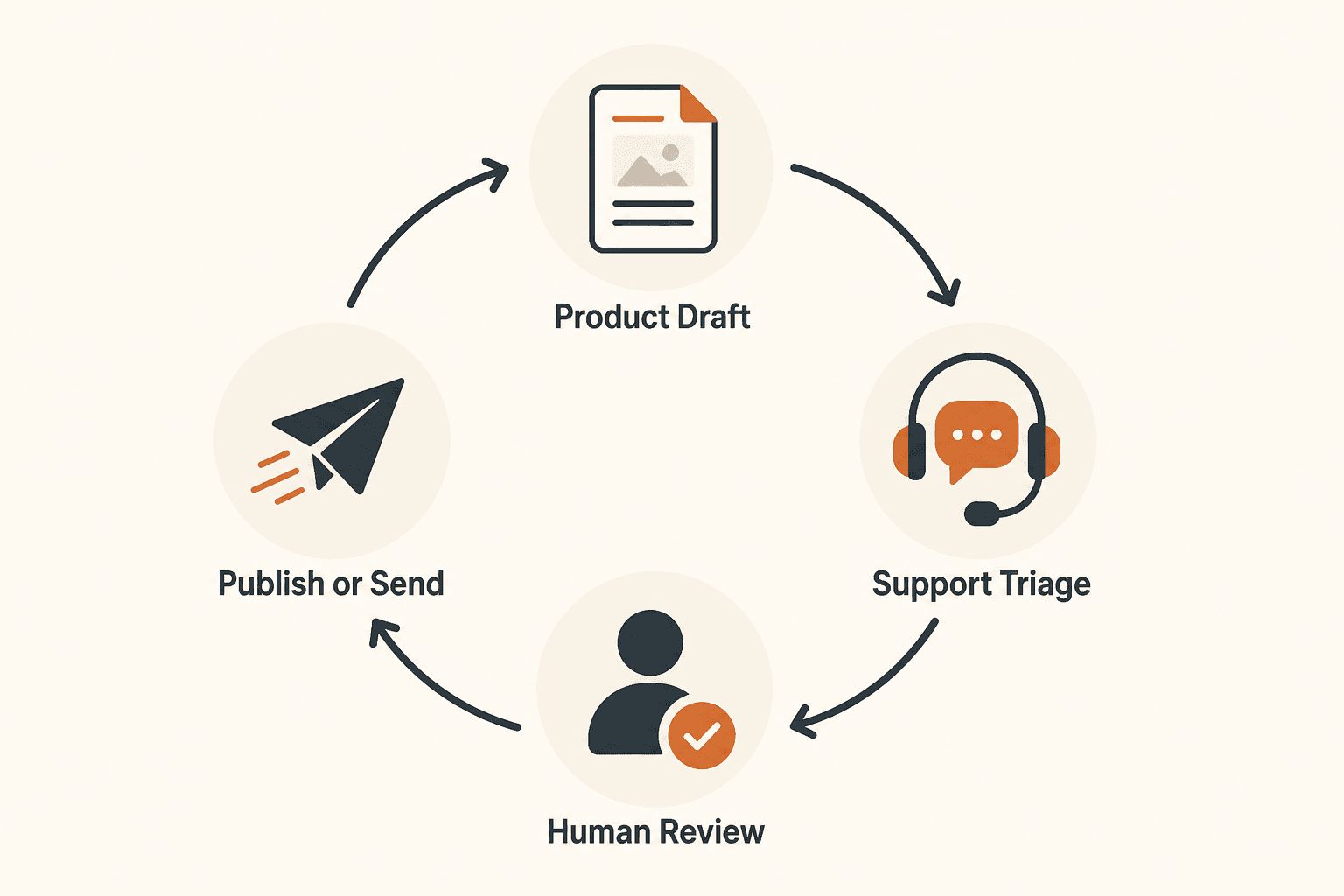
The winning loop: trigger → draft → human review → publish or send. Everything else plugs into that spine.
Adjacent playbooks: AI automation for small business, AI customer service automation, AI email automation sequences, and AI agents for small business when judgment variance justifies more than fixed Flow paths.
Key takeaway
Build a supervised AI workflow for Shopify stores: product description drafts, support triage, order delay messages, review replies, and cart recovery — with brand voice guardrails and human review before every send. For more step-by-step guides, browse our blog or explore Automation.
Frequently asked questions
What is the best first AI workflow for a Shopify store?
Start with product description drafts on new SKUs in draft-only mode. It is repetitive, easy to review in batches, and saves blank-page time without touching refund or shipping policy decisions.
Can AI handle Shopify customer support automatically?
Not safely on day one. Use AI for ticket triage and reply drafts, then have a human agent review and send. Auto-send only after you have logged correction rates and edge cases for several weeks.
How do I keep AI product copy on brand?
Maintain a one-page brand voice guide and feed it into every product and support prompt. Ban generic phrases, specify tone and emoji rules, and batch-edit drafts before publish.
Should AI write abandoned cart emails for Shopify?
AI can draft sequences and subject lines, but verify product facts, merge tags, and offers against live Shopify data before activating any automation in Klaviyo or similar tools.
What Shopify AI workflows save the most time?
Most small stores reclaim the most hours from product description drafting, support triage with reply drafts, and order delay messages — provided review time is included in the ROI calculation.
Is Shopify Sidekick enough without Gorgias or Klaviyo?
Sidekick and Flow cover admin tasks and store-native automation at no extra cost. For deep help desk resolution across email and social, or predictive retention email, most growing stores still add Klaviyo or Gorgias — with human review on policy replies.
When should I use Zapier instead of Shopify Flow?
When data must leave Shopify — ERP, accounting, custom sheets, or tools without native Flow connectors. If the trigger and action both live in Shopify or a Flow-native partner, Flow is usually cheaper and simpler.
How long should draft-only mode last?
Keep external sends in draft-only for at least 30–60 days. Track edit rate per workflow. Auto-send only when agents or owners correct fewer than roughly 20–30% of drafts consistently.
Written by
AI Growthub StaffEditorial Team
The AI Growthub editorial team covers practical AI news, tools, and workflows for small business owners. Every article is fact-checked against primary sources before publication.
Comments are coming soon
We’re building a discussion space for business owners. Until then, reply to any newsletter issue — we read everything.
Related posts

Google Workspace Studio for Small Business (2026): The Complete Guide
Build Google Workspace Studio flows for SMBs: Gmail invoice logging, Meet follow-ups, Sheets triggers, limits, approval rules, and when Zapier still wins.
n8n vs Zapier vs Make (2026): Best Automation Platform for SMBs?
Compare n8n vs Zapier vs Make for small business: task vs credit vs execution pricing, AI agents, setup paths, and which iPaaS to start on in 2026.

Claude for Small Business: Complete 2026 Setup Guide
Set up Claude for Small Business: Cowork plugin, QuickBooks and HubSpot connectors, 15 workflows, Pro vs Team pricing, and when ChatGPT Work or Gemini fits better.
The AI edge, delivered every Tuesday
One 5-minute email: the tools worth your money, the plays that are working right now, and zero hype. Unsubscribe anytime.
No spam. No selling your data. Read by owners of restaurants, gyms, clinics, and agencies across the US, UK, Canada, and Australia.