Best AI Agent Tools for Small Business in 2026
Practical 2026 shortlist of AI agent tools for small business — by job, budget, and governance — with pricing anchors, comparison tables, and a safer buying path.
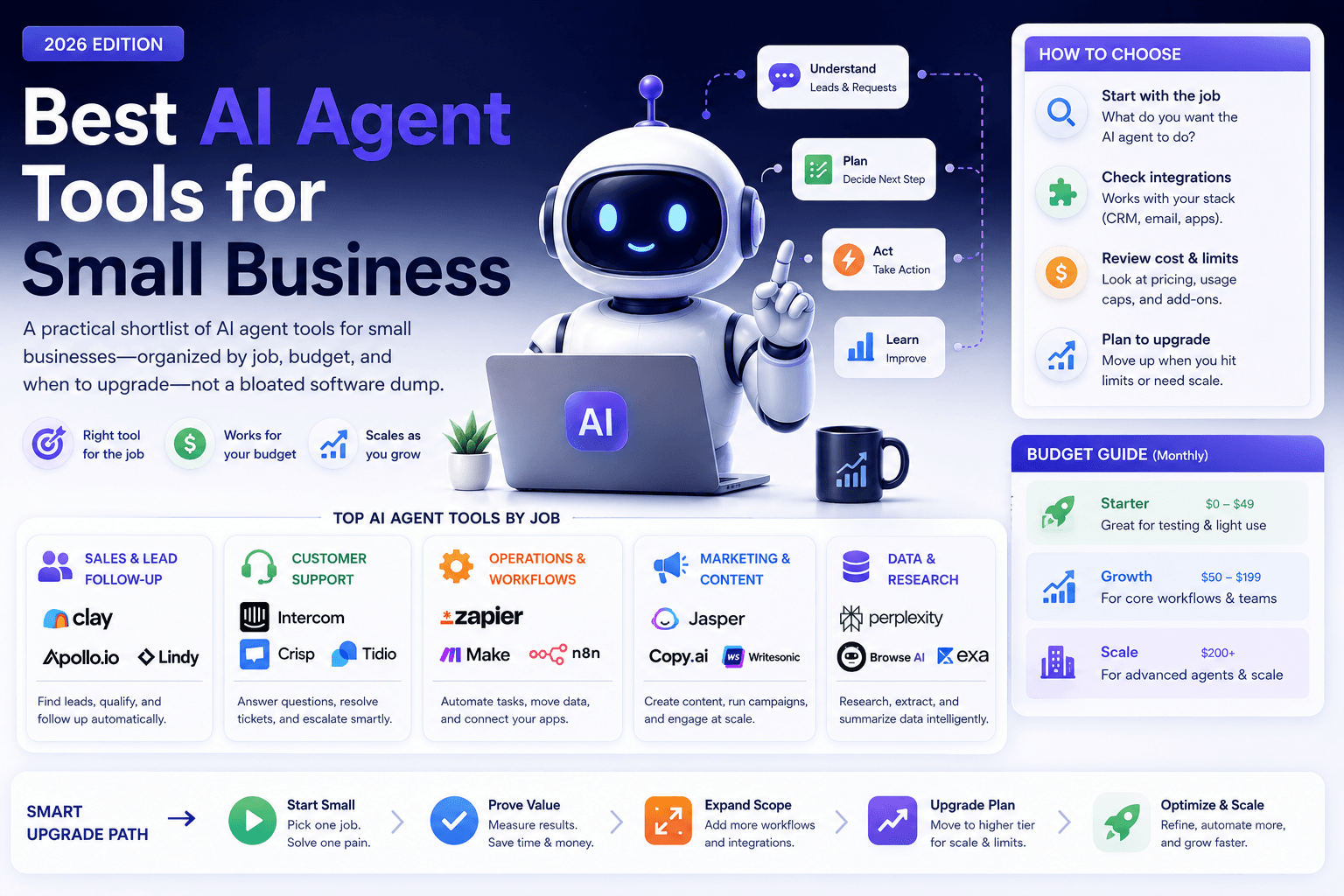
Most small businesses do not need a “fully autonomous” agent. They need a tool that finishes a narrow job — follow-up drafts, triage, research packs, CRM notes — inside systems they already pay for, with a human still able to stop a bad send.
This is the definitive 2026 shortlist of best AI agent tools for small business, organized by job, budget, and governance — not by vendor hype. It supports the pillar guide AI Agents for Small Business and updates the earlier roundup with clearer definitions, pricing anchors from vendor sites, decision tables, and a safer buying path.
If you are still unsure whether you need an agent at all, start with AI agent vs chatbot vs Zapier.
Table of contents
- Quick summary
- What AI agent tools are
- Who should use them
- Who should NOT use them
- Quick recommendation
- Things to consider before choosing
- Key features that matter
- Best-for table
- The shortlist (10 options)
- Pricing in 2026
- Pros and cons
- Best use cases
- Limitations
- Comparison tables
- Decision matrix
- Setup checklist
- Common mistakes
- Alternatives and competitor comparison
- FAQ
- Final recommendation
Quick summary
| If your bottleneck is… | Start here | Upgrade when… |
|---|---|---|
| Drafting + judgment on messy leads | ChatGPT or Claude Projects | You need scheduled runs and deeper connectors |
| Fixed multi-app handoffs | Zapier or Make | Paths stay mostly identical every time |
| Website FAQ + lead capture chat | Tidio / helpdesk AI | You need conversation, not multi-system jobs |
| CRM notes, tasks, pipeline hygiene | HubSpot or Pipedrive AI | Follow-up and field quality are the choke point |
| Call notes feeding follow-up | Fireflies.ai | Transcripts must reach CRM/tasks reliably |
| Custom logic or data residency | n8n or a thin custom tool | Off-the-shelf tools cannot meet your rules |
The “best” tool is the one that completes a named job with review time you can afford. Feature lists do not close deals. Workflows do.
What AI agent tools are
An AI agent tool helps software take a sequence of steps toward a goal — often with tools, memory, and branching — rather than answering one chat message and stopping.
In small-business practice, that usually means one of four layers:
- Agent briefs / copilots — ChatGPT Custom GPTs, Projects, scheduled tasks; Claude Projects and tool-assisted workflows
- Automation with AI steps — Zapier, Make, n8n classifying, drafting, or routing inside fixed scenarios
- Domain agents inside SaaS — HubSpot Breeze agents, CRM email assist, website chat AI
- Input layers for agents — meeting note tools that structure transcripts so follow-up agents have facts
For the concept layer, see What Is Agentic AI? and What Is Computer Use in AI?. For evaluation criteria on computer-use products, see How to Evaluate Computer-Use AI Agents.
Agents are not the same as:
| Nearby category | Job it solves | Typical tools |
|---|---|---|
| Chatbots | Conversation on a site or inbox | Covered in AI chatbots and Tidio review |
| Fixed automation | When X happens, do Y | AI automation workflows |
| Generic writers | Blog posts, ads, captions | Content tools — useful inputs, not agent platforms |
| Meeting notetakers alone | Transcripts and summaries | Fireflies.ai review — feed agents, do not replace them |
Who should use them
AI agent tools fit when you have:
- A repeatable job with clear success criteria (e.g., draft first reply within one hour of form fill)
- Access to the systems of record the job needs (CRM, inbox, calendar, docs)
- Someone who can own review for at least the first 30 days
- Enough volume that manual handling creates missed revenue or burnout
Typical buyers: owners, agency operators, freelancers with client ops, consultants packaging SOPs, and small sales or support teams.
Agency-specific patterns live in AI Workflow for Agencies. CRM-heavy teams should also read AI CRM Automation.
Who should NOT use them
Skip (or stay in research-only mode) if:
- You cannot write the job in one sentence
- You want the tool to invent refunds, legal positions, medical claims, or pricing exceptions
- Your CRM fields and permissions are a mess — agents amplify bad data
- Nobody will check drafts for the first weeks
- A vendor demo promises “fully autonomous” customer messaging with no approval path, audit log, or kill switch
In those cases, fix process and data first. Buy software later.
Quick recommendation
Things to consider before choosing
Work through these before you compare logos.
- Job sentence — “When a new lead arrives from X, draft a reply using Y facts, then create a CRM task for Z.”
- Fixed vs variable path — Identical steps favor Zapier/Make/n8n. Variable judgment favors ChatGPT/Claude (or Zapier Agents / Make AI Agents later).
- Two systems that must connect — If you cannot name them, you are shopping for vibes.
- Write permissions — Draft-only for week one. Expand only after edit rate drops.
- Data rules — Where does customer PII live? Who can see prompts? Are vendor training defaults acceptable?
- Review UX — If approving a draft is harder than writing it yourself, the stack failed.
- Total cost — Seats + usage credits + human minutes. Usage-based AI can outrun the sticker price.
- Owner — Every live agent or scenario needs a named human.
Key features that matter
Ignore marketing checklists. Score tools on features that change risk and ROI for SMBs:
| Feature | Why it matters |
|---|---|
| Draft / approval mode | Prevents unsupervised customer promises |
| Connectors to email, CRM, calendar, docs | Agents without systems of record become chat logs |
| Logging and replay | You need to debug bad runs |
| Permissions and SSO (as you grow) | Agencies and multi-seat teams need control |
| Clear usage metering | Tasks, credits, activities, and seats stack differently |
| SOP / knowledge packaging | Projects, GPTs, or knowledge bases beat one-off prompts |
| Escalation rules | “When unsure, ask a human” must be explicit |
Computer-use or browser agents add power and risk. Treat them as a later upgrade — evaluate with the checklist in computer-use agent evaluation.
Best-for table
| Profile | Best starting stack | Avoid first |
|---|---|---|
| Solo founder, messy inbound | ChatGPT or Claude + Gmail/CRM manual paste | Multi-agent platforms |
| Agency with client reporting + follow-up | Claude Projects or ChatGPT + Zapier/Make | One agent that “runs the agency” |
| Sales-led SMB on HubSpot | HubSpot AI inside CRM + light drafting tool | Parallel CRM in a chat tool |
| Sales-led SMB wanting simpler CRM | Pipedrive AI on eligible plans | Forcing HubSpot complexity “for AI” |
| Local service business website | Tidio/chat for FAQ; separate agent for ops | Granting refund authority to a widget |
| Ops-heavy, branching workflows | Make or n8n | Fragile 40-step Zaps with no owner |
| Strict data boundaries | n8n self-host or thin custom app | Consumer chat accounts for client PII |
The shortlist
1. ChatGPT (Custom GPTs, Projects, agent-style workflows)
Best for: Solo operators and small teams testing a first agent brief.
According to OpenAI’s published product pages, ChatGPT Business (formerly Team) is positioned for shared workspaces with company knowledge and agent-style features, commonly listed around $20/user/month billed annually / $25 monthly (minimum seats apply). Individual Plus/Pro plans add Projects, custom GPTs, and higher usage for operators who are not ready for a team workspace. Confirm current figures on ChatGPT pricing and OpenAI business pricing.
Strengths: Fast setup, strong drafting, easy for non-technical owners.
Watch-outs: Integration depth and governance vary by plan. Do not treat chat memory as a CRM.
Practical start: the lead follow-up AI agent pattern. Deeper product setup: ChatGPT Work for Small Business.
How to evaluate: Run 10 historical leads through the same brief. Score factual accuracy, tone, escalation, and minutes-to-edit. If edit rate stays above ~40% after two brief revisions, fix the brief or source facts before blaming the model.
2. Claude (Projects + tool-assisted workflows)
Best for: Longer briefs, careful writing, and SOP-heavy teams.
According to Anthropic’s pricing page, Claude Pro is commonly $20/month (lower effective rate on annual), with Team Standard often $20–$25/seat/month depending on billing interval. Team plans include shared Projects and admin controls useful for agencies.
Strengths: Strong instruction-following and structured briefs.
Watch-outs: Facts still must come from your approved source pack.
Setup guide: Claude for Small Business.
ChatGPT vs Claude for first agents: There is no universal winner. Pick the model that scores better on your examples with your tone rules. Many teams keep both — one for speed, one for careful SOP work — after a review checklist exists.
3. Zapier (AI steps + Zapier Agents)
Best for: “When X happens, do Y” processes with one smart draft or classify step.
Per Zapier’s pricing reference: Free includes 100 tasks/mo and two-step Zaps; Professional starts near $19.99/mo annual for 750 tasks. Zapier Agents is a separate product metered in activities (Free ~400/mo; Pro commonly cited around ~$33.33/mo annual for 1,500 activities). Activities do not consume Zap task allowance — see Zapier’s Agents usage help.
Strengths: Huge app ecosystem, clear trigger/action model.
Watch-outs: Overbuilt branching becomes fragile. Keep exception paths simple.
Broader automation context: AI Automation for Small Business.
4. Make (visual scenarios + Make AI Agents)
Best for: Operators who want visual control over multi-step scenarios.
According to Make pricing, Free includes up to 1,000 credits/mo; Core starts around $12/mo for 10k credits (published card pricing); Pro around $21/mo at the same credit tier. Make lists AI Agents / AI Toolkit across plans (beta features evolve — verify in-product).
Strengths: Flexible scenario design and branching.
Watch-outs: Complexity tax — name an owner for every live scenario.
5. HubSpot AI / Breeze
Best for: Teams whose bottleneck is CRM hygiene, follow-up tasks, and pipeline notes.
HubSpot’s AI layer (Breeze) combines seat access with HubSpot Credits for autonomous agent outcomes. Public third-party and partner summaries in 2026 commonly cite included monthly credit allowances by hub tier and outcome-based charges for agents such as Customer Agent and Prospecting Agent. Confirm live credit rates in HubSpot’s product catalog before budgeting.
Strengths: Customer data already lives nearby.
Watch-outs: Do not enable broad automation until field mapping and permissions are clean.
Compare options: HubSpot vs Pipedrive AI.
6. Pipedrive AI
Best for: Sales-led SMBs that want lighter CRM complexity with AI assist on activities and emails.
Based on publicly documented plan packaging, core Sales Assistant features appear on broader plans, while advanced email drafting / summarization often sits on higher tiers (e.g., Premium+). Confirm which AI features ship on your plan before promising them to the team.
Strengths: Sales-focused workflows.
Watch-outs: Plan gating — the demo may show features you do not own.
7. Tidio (and website chat AI)
Best for: On-site FAQ deflection and lead capture conversations.
Chatbots are not full agents, but they often feed agent workflows. Details: Tidio review 2026. Use chat for conversation; use agents/automation for multi-system completion. Training FAQs: Train an AI chatbot on business FAQs.
Strengths: Fast visitor response.
Watch-outs: Do not grant refund or legal authority to a widget.
8. Fireflies.ai (meeting layer for agents)
Best for: Turning calls into structured notes your follow-up agent can use.
Agents get smarter when inputs are structured. Fireflies-style tools supply transcripts and action items — covered in Fireflies.ai Review 2026. Also see Best AI Meeting Note Tools.
Strengths: Reduces manual note loss.
Watch-outs: Meeting consent and retention policies still matter.
9. n8n (technical control, optional self-host)
Best for: Teams with light technical skill who need more control than pure SaaS.
According to n8n pricing, Cloud Starter is €20/mo billed annually (2.5k executions); Pro €50/mo annual (10k executions). Community Edition is free self-hosted. n8n bills per workflow execution (full run), not per step — useful when scenarios are deep.
Strengths: Flexibility and control.
Watch-outs: You own uptime, updates, and security hygiene on self-hosted setups.
10. A thin custom agent tool (when to build)
Best for: Unique internal workflows or strict data boundaries.
If no SaaS tool fits, a small custom tool can wrap model calls + your APIs. Use the vibe coding guide and keep auth, logging, and kill switches first-class. Coding-platform buyers: How to Choose an AI Coding Platform.
Pricing in 2026
Directional anchors from vendor pages (verify before purchase — currency, taxes, and bundles change):
| Layer | Typical entry (published) | What you are really buying |
|---|---|---|
| ChatGPT Business | ~$20/user/mo annual | Shared workspace + higher governance |
| Claude Pro / Team Standard | ~$20/mo or ~$20–$25/seat | Projects + higher usage |
| Zapier Professional | from ~$19.99/mo (750 tasks) | Task-metered automation |
| Zapier Agents Pro | ~$33.33/mo annual (1,500 activities) | Separate activity meter |
| Make Core | from ~$12/mo (10k credits) | Credit-metered scenarios |
| n8n Cloud Starter | €20/mo annual (2.5k executions) | Execution-metered workflows |
| HubSpot / Pipedrive AI | Seat + plan gating (+ credits on HubSpot) | CRM-native assist |
Budget ranges (directional)
| Stage | Typical monthly posture |
|---|---|
| Pilot | Existing ChatGPT/Claude plan + free automation tier |
| Working system | One AI seat + one automation/agent seat + CRM you already pay for |
| Scaled ops | Multiple seats, usage credits, possible custom connector costs |
Always subtract review time. Human minutes are part of total cost of ownership.
Pros and cons
Pros
- Compresses drafting and triage so owners can keep same-day follow-up habits
- Works inside tools many SMBs already pay for (CRM, email, chat, meetings)
- Fixed-path automation is often cheaper and safer than full autonomy
- Clear upgrade path: brief → automation → CRM AI → specialized agents
- Measurable with edit rate, time-to-first-reply, and tasks completed
Cons
- Usage meters (tasks, credits, activities) can surprise budgets
- Poor CRM data produces confident, wrong agent output
- Vendor AI features move between plan tiers without warning
- Tool sprawl creates unused subscriptions without owners
- Computer-use / write-access agents raise security and brand risk
Best use cases
- Lead follow-up drafts after form fill or inbound email (playbook)
- CRM note cleanup and next-step tasks after sales calls
- FAQ deflection on the website, with handoff to a human or CRM
- Meeting → summary → CRM fields for sales and agencies
- Internal SOP assistants for onboarding or reporting (agency workflows)
- Classification + routing (urgent vs normal, sales vs support) inside Zapier/Make/n8n
Limitations
- Models do not know your unpublished pricing, inventory, or legal commitments unless you supply them
- Chat memory is not a system of record
- “Agent” branding on a product may mean a chatbot with a prompt, not multi-system completion
- Free tiers are for pilots — production connectors and audit needs usually require paid plans
- Self-hosted flexibility transfers operational risk to you
Tools intentionally not crowned “best”
Long lists of near-identical wrappers that only rebrand a chat box do not belong here. If a product cannot explain permissions, logging, and failure behavior in plain language, it is not ready for customer-facing workflows — regardless of marketing claims.
Meeting notetakers, design tools, and generic writers can feed agents, but they are not agent platforms by themselves.
Comparison tables
Table 1 — Capability comparison (SMB lens)
| Tool | Primary job | Technical skill | Write-risk if misconfigured | Best first week mode |
|---|---|---|---|---|
| ChatGPT | Briefs + drafting | Low | Medium (if connected apps send) | Draft-only |
| Claude | SOP briefs + careful writing | Low | Medium | Draft-only |
| Zapier | Fixed automations + optional Agents | Low–medium | High if auto-send enabled | Notify + draft |
| Make | Branching scenarios + AI modules | Medium | High | Test scenario + draft |
| HubSpot AI | CRM-native assist / agents | Low (admin setup) | High on autonomous agents | Assistant first, agents later |
| Pipedrive AI | Sales assist | Low | Medium | Draft + suggest |
| Tidio | Website chat | Low | Medium (promises) | FAQ-only |
| Fireflies | Meeting structure | Low | Low (privacy still matters) | Notes → human CRM update |
| n8n | Controlled orchestration | Medium–high | High | Staging + draft |
| Custom thin app | Unique rules | High | High | Auth + logs first |
Table 2 — Cost posture vs control
| Option | Entry cost posture | Control over data/logic | When it wins |
|---|---|---|---|
| ChatGPT / Claude | Low monthly seat | Medium (vendor cloud) | Fast learning and drafting |
| Zapier | Low–mid + task growth | Medium | App coverage matters most |
| Make | Low–mid + credits | Medium | Visual branching, cost at volume |
| n8n Cloud | Low–mid (EUR) | Higher | Technical teams, execution billing |
| n8n self-host | Infra time + optional license | Highest | Residency / custom nodes |
| HubSpot / Pipedrive AI | Seat + AI plan gates | Medium (inside CRM) | CRM is already the OS |
| Custom build | Dev time | Highest | Unique workflow, strict rules |
Decision matrix
Score each candidate 1–5. Multiply by weight. Highest total wins for this job only.
| Criterion | Weight | ChatGPT/Claude | Zapier/Make | CRM AI | n8n / custom |
|---|---|---|---|---|---|
| Time to first useful draft | 5 | ||||
| Connector fit for your two systems | 5 | ||||
| Approval / kill-switch quality | 5 | ||||
| Predictable monthly cost | 4 | ||||
| Admin / team sharing | 3 | ||||
| Data residency / policy fit | 4 | ||||
| Weighted total |
Rule of thumb: If fixed-path score is high and judgment variance is low, automation beats an “agent platform.” If judgment variance is high, keep a model workspace and add automation only for the handoff.
Setup checklist
Use this as a one-afternoon buying filter.
- Job written in one sentence with a success metric
- Fixed path vs variable path decided
- Two systems to connect named
- Source pack assembled (pricing, FAQs, escalation rules, tone examples)
- Draft-only mode for week one
- 10 historical examples prepared for scoring
- Owner named; weekly review block on the calendar
- Kill switch documented (who pauses the Zap/agent)
- Data policy checked (training defaults, retention, PII)
- 30-day success metric chosen (edit rate, response time, or tasks closed)
- Annual plan deferred until the metric moves
Common mistakes
- Buying autonomy before a brief — Start with instructions and examples, not a platform.
- Treating chat as CRM — Pipeline facts belong in HubSpot/Pipedrive/your system of record.
- Auto-sending week one — Draft-only until edit rate is stable.
- Ignoring meters — Tasks, credits, and activities stack; Agents may be a separate bill on Zapier.
- No owner — If nobody owns the scenario, it will fail silently or spam customers.
- Tool sprawl — A second agent tool with no weekly workflow is an unused subscription.
- Granting chatbots refund authority — Conversation tools deflect FAQs; they should not authorize money movement.
- Skipping historical tests — Demo happy-path ≠ your messy inbox.
Alternatives and competitor comparison
Agent vs chatbot vs Zapier (the real fork)
| Need | Prefer | Why |
|---|---|---|
| Visitor Q&A and lead capture | Chatbot (e.g. Tidio) | Conversation UX, not multi-system jobs |
| Identical multi-app path | Zapier / Make / n8n | Cheaper, clearer failure modes |
| Variable judgment + drafting | ChatGPT / Claude agent brief | Better at nuance; keep humans on send |
| CRM-native assist | HubSpot / Pipedrive AI | Data already in place |
Full comparison: AI Agent vs Chatbot vs Zapier.
Major competitor paths (editorial)
| If you were about to buy… | Often better first move |
|---|---|
| A specialized multi-agent “OS” | ChatGPT/Claude brief + one Zap/Make scenario |
| More CRM seats “for AI” | Clean fields + Breeze/Pipedrive features you already own |
| Another chatbot for ops work | Separate chat (front door) from agents/automation (back office) |
| Custom build on day one | Prove the job with SaaS for 30 days, then vibe-code only the gap |
Suggested future articles if you need deeper coverage: “Zapier Agents vs Make AI Agents for SMBs” and “ChatGPT Agent features vs Claude Projects for client follow-up.”
Frequently Asked Questions
What is the best AI agent tool for a small business?
There is no single best tool. Many teams should start with ChatGPT or Claude Projects for a narrow job, then add Zapier/Make or CRM AI once the workflow and review process are proven.
Do I need a specialized AI agent platform on day one?
Usually no. Prove value with a draft-only agent brief and light automation first. Buy specialized software when volume, connectors, or governance needs exceed that setup.
What is the difference between Zapier and an AI agent tool?
Zapier excels at fixed trigger-action workflows. AI agent tools are better when steps vary by context and the system must choose actions within guardrails. Zapier also sells a separate Agents product metered in activities — confirm which product a demo is showing.
Are free AI agent tools enough?
Free tiers are excellent for pilots. Paid plans become worth it when you need higher limits, reliable connectors, audit logs, or team seats tied to a measured ROI.
How many AI agent tools should a small business buy?
Start with one drafting environment and one system of record. Add a connector or automation layer only when a repeated handoff justifies it.
ChatGPT or Claude — which should I pick?
Score both on the same 10 historical examples with your tone rules. Prefer the lower edit rate. Many teams keep both for different jobs after the review checklist is real — see ChatGPT vs Claude vs Gemini productivity.
When should I choose n8n over Zapier or Make?
When you need execution-based billing, self-hosting, or deeper custom logic. Trade-off: more technical ownership. Details in n8n vs Zapier vs Make.
Can AI agents update my CRM automatically?
Yes, many stacks can — but enable write access only after draft quality and field mapping are trustworthy. Start by creating tasks or draft notes, not silent overwrites.
Final recommendation
Treat “best AI agent tools” as a stack decision, not a trophy purchase.
- Read the AI agents pillar.
- Build one job — ideally lead follow-up — in draft-only mode with ChatGPT or Claude.
- Add Zapier, Make, or n8n only if handoffs are repetitive.
- Deepen CRM AI after notes and fields are trustworthy (HubSpot vs Pipedrive).
- Add specialized agent platforms only after 30 days of measured value.
- Keep chatbots for conversation (Tidio); keep meeting tools as inputs (Fireflies).
The winning pattern is boring on purpose: narrow job, approved facts, human approval, clear meter, named owner. That is how small businesses get agent leverage without brand damage.
Image prompts for production
Hero (16:9), editorial photography style, no logos, no readable UI:
“Wide editorial photograph of a small open-plan studio office at late afternoon, two colleagues reviewing printed workflow notes on a large wooden table, soft window light, shallow depth of field, documentary magazine style, no screens with readable text, no logos, 16:9.”
Supporting image 1 (16:9):
“Over-the-shoulder editorial photo of a freelancer at a home desk with a closed laptop and a notebook of circled process steps, warm lamp light, calm focused atmosphere, no readable UI, no brand marks, photorealistic, 16:9.”
Supporting image 2 (16:9):
“Documentary-style photo of a local agency standup around a whiteboard with abstract shapes only (no readable words), sticky notes in muted colors, natural office light, authentic small-business energy, no logos, 16:9.”
Infographic prompt (16:9):
“Clean editorial infographic on a neutral paper-textured background showing a five-step horizontal buying path: Job → Draft brief → Automate handoffs → CRM AI → Specialized agents, with simple geometric icons, minimal palette (charcoal, cream, muted teal), no logos, no tiny unreadable UI text, 16:9.”
Metadata (CMS)
| Field | Value |
|---|---|
| Title | Best AI Agent Tools for Small Business in 2026 |
| Slug | best-ai-agent-tools-small-business |
| Primary keyword | best AI agent tools for small business |
| Secondary keywords | AI agent tools, Zapier Agents, Make AI Agents, ChatGPT agents, Claude Projects, n8n AI, HubSpot Breeze, AI automation for SMBs |
| Semantic keywords | agentic AI, draft-only mode, AI workflow, CRM copilots, website chat AI, meeting notes for agents, kill switch, audit log |
| Meta title | Best AI Agent Tools for Small Business (2026) |
| Meta description | Practical 2026 shortlist of AI agent tools for small business — by job, budget, and governance — with pricing anchors, comparison tables, and a safer buying path. |
| Excerpt | A definitive SMB guide to AI agent tools: what counts as an agent, who should buy, ChatGPT vs Claude vs Zapier/Make/n8n vs CRM AI, pricing, checklists, and common mistakes. |
| Category | AI Tool Reviews (ai-tool-reviews) |
| Type | listicle |
| JSON-LD | Article + FAQPage + ItemList (tools shortlist). Site already emits Article/FAQ from article + FAQ fields; add ItemList in CMS if supported. |
Suggested JSON-LD (FAQ + ItemList sketch)
{
  "@context": "https://schema.org",
  "@graph": [
    {
      "@type": "Article",
      "headline": "Best AI Agent Tools for Small Business in 2026",
      "description": "Practical 2026 shortlist of AI agent tools for small business — by job, budget, and governance.",
      "dateModified": "2026-08-09",
      "author": { "@type": "Organization", "name": "AI Growthub" }
    },
    {
      "@type": "FAQPage",
      "mainEntity": [
        {
          "@type": "Question",
          "name": "What is the best AI agent tool for a small business?",
          "acceptedAnswer": {
            "@type": "Answer",
            "text": "There is no single best tool. Many teams should start with ChatGPT or Claude Projects for a narrow job, then add Zapier/Make or CRM AI once the workflow and review process are proven."
          }
        }
      ]
    },
    {
      "@type": "ItemList",
      "name": "Best AI agent tools for small business",
      "itemListElement": [
        { "@type": "ListItem", "position": 1, "name": "ChatGPT" },
        { "@type": "ListItem", "position": 2, "name": "Claude" },
        { "@type": "ListItem", "position": 3, "name": "Zapier" },
        { "@type": "ListItem", "position": 4, "name": "Make" },
        { "@type": "ListItem", "position": 5, "name": "HubSpot AI" },
        { "@type": "ListItem", "position": 6, "name": "Pipedrive AI" },
        { "@type": "ListItem", "position": 7, "name": "Tidio" },
        { "@type": "ListItem", "position": 8, "name": "Fireflies.ai" },
        { "@type": "ListItem", "position": 9, "name": "n8n" },
        { "@type": "ListItem", "position": 10, "name": "Custom thin agent tool" }
      ]
    }
  ]
}
Suggested external references
Key takeaway
Practical 2026 shortlist of AI agent tools for small business — by job, budget, and governance — with pricing anchors, comparison tables, and a safer buying path. For more step-by-step guides, browse our blog or explore AI Tool Reviews.
Frequently asked questions
What is the best AI agent tool for a small business?
There is no single best tool. Many teams should start with ChatGPT or Claude Projects for a narrow job, then add Zapier/Make or CRM AI once the workflow and review process are proven.
Do I need a specialized AI agent platform on day one?
Usually no. Prove value with a draft-only agent brief and light automation first. Buy specialized software when volume, connectors, or governance needs exceed that setup.
What is the difference between Zapier and an AI agent tool?
Zapier excels at fixed trigger-action workflows. AI agent tools are better when steps vary by context and the system must choose actions within guardrails. Zapier also sells a separate Agents product metered in activities — confirm which product a demo is showing.
Are free AI agent tools enough?
Free tiers are excellent for pilots. Paid plans become worth it when you need higher limits, reliable connectors, audit logs, or team seats tied to a measured ROI.
How many AI agent tools should a small business buy?
Start with one drafting environment and one system of record. Add a connector or automation layer only when a repeated handoff justifies it.
ChatGPT or Claude — which should I pick?
Score both on the same 10 historical examples with your tone rules. Prefer the lower edit rate. Many teams keep both for different jobs after the review checklist is real.
When should I choose n8n over Zapier or Make?
When you need execution-based billing, self-hosting, or deeper custom logic. The trade-off is more technical ownership of uptime and security.
Can AI agents update my CRM automatically?
Yes, many stacks can — but enable write access only after draft quality and field mapping are trustworthy. Start by creating tasks or draft notes, not silent overwrites.
Written by
Maya ChenSenior Editor, AI for Small Business
Maya has tested 120+ AI tools inside real restaurants, clinics, agencies, and brokerages. She writes the reviews and comparisons owners actually use to decide what to buy.
Comments are coming soon
We’re building a discussion space for business owners. Until then, reply to any newsletter issue — we read everything.
Related posts

How to Choose an AI Coding Platform as a Non-Technical Founder: The Complete 2026 Guide
Non-technical founders: choose an AI coding platform with a one-page brief, security checks, exportability, weighted scorecard, and a two-week fake-data pilot—plus when to hire a developer.
Muse Spark 1.1 vs Claude Opus 5: The Complete 2026 Comparison
Muse Spark 1.1 vs Claude Opus 5 for small business: pricing (~$1.25/$4.25 vs $5/$25), multi-agent vs judgment, decision matrix, and when to use both.
Emergent vs Replit: The Complete 2026 Comparison for Non-Technical Founders
Emergent vs Replit for SMB founders: Series C context, credit pricing, design caveats, decision matrix, and when each AI coding platform wins.
The AI edge, delivered every Tuesday
One 5-minute email: the tools worth your money, the plays that are working right now, and zero hype. Unsubscribe anytime.
No spam. No selling your data. Read by owners of restaurants, gyms, clinics, and agencies across the US, UK, Canada, and Australia.